Solved Windows Defender Scheduled Scan does not run

pwcrickman

New member
Local time
11:42 AM
Messages
7
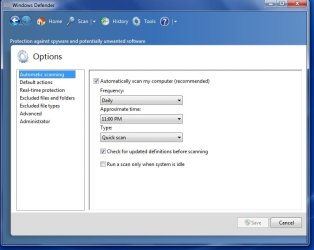
On my Win 7 laptop, I have Windows Defender set to run a scheduled quick scan at 11 pm in the evening on a daily schedule. This scan never runs (even when the laptop is in use - the system idle option is not checked). When this scheduled scan is set up in Defender, is a Windows Task Scheduler task supposed to be created?

The Window Defender entry in Task Scheduler (under Microsoft not Microsoft / Windows in the Task Scheduler Library tree) does not have any tasks listed in the middle pane.

Defender is operating as expected otherwise - it performs both Quick and Full Scans manually.
 

My Computer

Computer type
Laptop
Computer Manufacturer/Model Number
Dell
OS
Windows 7 Home Premium 64bit
CPU
Intel(R) Core(TM) i3-2310M CPU @ 2.10GHz, 2100 Mhz
Memory
6 GB
Screen Resolution
1366 x 768
Hard Drives
600 GB
Browser
Firefox 44
Your system spec info lists Window Defender as your antivirus.
Window Defender is not an antivirus app in Windows 7.

As for your scheduled task issue, do you have history turned on? Maybe some info in there will help you figure out why it the task is not running. What happens if you manually ask the task to run?
 

My Computer

Computer type
Laptop
Computer Manufacturer/Model Number
Employer provided Dell Latitude
OS
W7 Pro SP1 64bit
CPU
i7
Memory
8GB
Graphics Card(s)
Intel HD Graphics
Hard Drives
crappy SSD
Antivirus
Employer mandated Symantec Endpoint Protection
Browser
Pale Moon 64bit, IE11 64bit & Chrome 64bit
Could you also upload some screenshots of the History page and the Scan page, as well as any other relevant sections of Defender please?
 

My Computer

Computer type
PC/Desktop
Computer Manufacturer/Model Number
Custom Build
OS
Windows 7 Home Premium x64
CPU
AMD FX - 6200 3.8GHz
Motherboard
ASUS M5A99X EVO R2.0
Memory
Patriot Viper 3 Series DDR3 1600MHz
Graphics Card(s)
Sapphire AMD Radeon HD 7850
Hard Drives
2 x Seagate Barracuda 3.5" 2TB 6GB/s
Antivirus
Kaspersky Total Security 2016
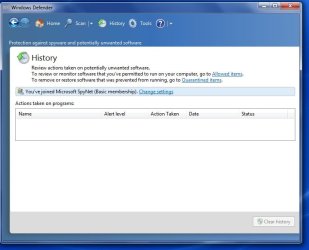
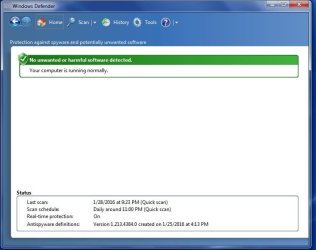
All manually initiated scans (Quick and Full) complete successfully. I have attached a screenshot of the History, Scan and Options tabs.
 

Attachments

  • win defender history.jpg
    win defender history.jpg
    92 KB · Views: 2
  • win defender scan options.jpg
    win defender scan options.jpg
    87.7 KB · Views: 2
  • win defender scan.jpg
    win defender scan.jpg
    81.5 KB · Views: 2

My Computer

Computer type
Laptop
Computer Manufacturer/Model Number
Dell
OS
Windows 7 Home Premium 64bit
CPU
Intel(R) Core(TM) i3-2310M CPU @ 2.10GHz, 2100 Mhz
Memory
6 GB
Screen Resolution
1366 x 768
Hard Drives
600 GB
Browser
Firefox 44
Try disabling then re-enabling Defender in features in the control panel and see if that rectifies the issue.
 

My Computer

Computer type
PC/Desktop
Computer Manufacturer/Model Number
Custom Build
OS
Windows 7 Home Premium x64
CPU
AMD FX - 6200 3.8GHz
Motherboard
ASUS M5A99X EVO R2.0
Memory
Patriot Viper 3 Series DDR3 1600MHz
Graphics Card(s)
Sapphire AMD Radeon HD 7850
Hard Drives
2 x Seagate Barracuda 3.5" 2TB 6GB/s
Antivirus
Kaspersky Total Security 2016

My Computer

Computer type
PC/Desktop
Computer Manufacturer/Model Number
Home made Desktop
OS
Windows 10 Pro. 64/ version 1709 Windows 7 Pro/64
CPU
Intel i7-6800K @ 4.3
Motherboard
ASUS X-99 Deluxe II
Memory
Corsair Platinum 16 gig @2400
Graphics Card(s)
EVGA GTX 1070 OC
Monitor(s) Displays
Asus 27" LED LCD/VE278Q
Screen Resolution
1920-1080 or 1280-720 HDMI
Hard Drives
INTEL SSD 730-240 Gb Sata 3.0/
PSU
EVGA Platium 1200W
Case
Phanteks Luxe Tempered Glass 8 fans/ one radiator
Cooling
XSPC/ Water Cooled CPU
Keyboard
Das 4 Professional
Mouse
Logitech M705/MX Anywhere 2-S
Internet Speed
100 mbits
Antivirus
Microsoft Security Essentials/ Malwarebytes Premium 3.0/ SAS
Browser
I.E. 11 default/Firefox/ ISP Time Warner Cable/Spectrum
Other Info
LG BluRay Burner/
Sound system-KLipsch-THX/
Icy Dock ssd Hot Swap bays.
Yes, and I could've just as easily suggested that and I probably would have done... but only after a solution is found or if it is impossible to solve. You're just clogging up the thread by posting
 

My Computer

Computer type
PC/Desktop
Computer Manufacturer/Model Number
Custom Build
OS
Windows 7 Home Premium x64
CPU
AMD FX - 6200 3.8GHz
Motherboard
ASUS M5A99X EVO R2.0
Memory
Patriot Viper 3 Series DDR3 1600MHz
Graphics Card(s)
Sapphire AMD Radeon HD 7850
Hard Drives
2 x Seagate Barracuda 3.5" 2TB 6GB/s
Antivirus
Kaspersky Total Security 2016
What you call clogging up the thread is what I call giving advice.
One can follow my advice or not. It's their computer.
 

My Computer

Computer type
PC/Desktop
Computer Manufacturer/Model Number
Home made Desktop
OS
Windows 10 Pro. 64/ version 1709 Windows 7 Pro/64
CPU
Intel i7-6800K @ 4.3
Motherboard
ASUS X-99 Deluxe II
Memory
Corsair Platinum 16 gig @2400
Graphics Card(s)
EVGA GTX 1070 OC
Monitor(s) Displays
Asus 27" LED LCD/VE278Q
Screen Resolution
1920-1080 or 1280-720 HDMI
Hard Drives
INTEL SSD 730-240 Gb Sata 3.0/
PSU
EVGA Platium 1200W
Case
Phanteks Luxe Tempered Glass 8 fans/ one radiator
Cooling
XSPC/ Water Cooled CPU
Keyboard
Das 4 Professional
Mouse
Logitech M705/MX Anywhere 2-S
Internet Speed
100 mbits
Antivirus
Microsoft Security Essentials/ Malwarebytes Premium 3.0/ SAS
Browser
I.E. 11 default/Firefox/ ISP Time Warner Cable/Spectrum
Other Info
LG BluRay Burner/
Sound system-KLipsch-THX/
Icy Dock ssd Hot Swap bays.
My point is it is not needed at this point. You've caused problems on other threads and never really relate to the actual problem. Please stop doing that.
 

My Computer

Computer type
PC/Desktop
Computer Manufacturer/Model Number
Custom Build
OS
Windows 7 Home Premium x64
CPU
AMD FX - 6200 3.8GHz
Motherboard
ASUS M5A99X EVO R2.0
Memory
Patriot Viper 3 Series DDR3 1600MHz
Graphics Card(s)
Sapphire AMD Radeon HD 7850
Hard Drives
2 x Seagate Barracuda 3.5" 2TB 6GB/s
Antivirus
Kaspersky Total Security 2016
I did not find a method to disable and re-enable Defender in Windows features under "Program and Features" in the Control Panel. I have tried turning if off and then back on within Defender, but the scheduled scans still do not run.
 
Last edited:

My Computer

Computer type
Laptop
Computer Manufacturer/Model Number
Dell
OS
Windows 7 Home Premium 64bit
CPU
Intel(R) Core(TM) i3-2310M CPU @ 2.10GHz, 2100 Mhz
Memory
6 GB
Screen Resolution
1366 x 768
Hard Drives
600 GB
Browser
Firefox 44
When you turned it off from inside Defender itself and tried opening it again, did it say that it's off and to "click here to turn in on"?
 

My Computer

Computer type
PC/Desktop
Computer Manufacturer/Model Number
Custom Build
OS
Windows 7 Home Premium x64
CPU
AMD FX - 6200 3.8GHz
Motherboard
ASUS M5A99X EVO R2.0
Memory
Patriot Viper 3 Series DDR3 1600MHz
Graphics Card(s)
Sapphire AMD Radeon HD 7850
Hard Drives
2 x Seagate Barracuda 3.5" 2TB 6GB/s
Antivirus
Kaspersky Total Security 2016
Event Viewer

Hi PCW,
lets have a look in event viewer.

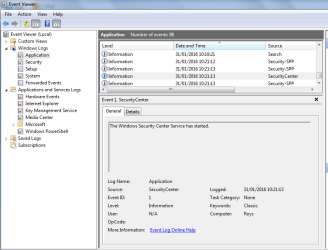
ControlPanel>>Admintools>>Event Viewer>>Windowslogs>Applications>Click on date&time, this will just sort it, then scroll down to Yesterday 11 oclock look for security essentials entries,
What do you see in the lower box??, post the results of both, general and details

Roy

Note What i do find interesting is the fact that MSE must have been offered to you via windows update, and you have decided not to upgrade, Is your comp up to date Update wise. Its possible that this may have dissabled auto scanning.
 

Attachments

  • secdet.PNG
    secdet.PNG
    63 KB · Views: 5

My Computer

Computer type
PC/Desktop
Computer Manufacturer/Model Number
medionl/Aspire 6930G/acer x55a
OS
W7 home premium 32bit/W7HP 64bit/w10 tp insider ring
CPU
E5300 dual core
Motherboard
medion MS7366
Memory
3gb
Graphics Card(s)
Nvidia Geforce 7100 Nforce 630i
Monitor(s) Displays
avixc
Internet Speed
n (isp resticted to 72)
Antivirus
mse/pands
Browser
palemoon
Other Info
Belkin Fd7050 n USB using Railink RT2870 drivers, more upto date
In answer to your questions concerning Windows Updates - yes the computer is up-to-date. I do not regularly install optional updates on this computer which MSE was marked as. I had previously hidden it from the Update list. I have collected and attached two sets of events; "Security-SPP" and "SecureConnector" which occurred shortly after 11 pm last night from the Event Application log. As far as I can tell this represents the Defender auto scan.

If after reviewing the Event log entries it makes more sense to upgrade to MSE than troubleshoot Defender, I am willing to go that route. I am assuming that MSE has auto-scanning features also.

In response to MarkP15's question - yes I saw and responded yes to the question to "turn it back on".
 

Attachments

My Computer

Computer type
Laptop
Computer Manufacturer/Model Number
Dell
OS
Windows 7 Home Premium 64bit
CPU
Intel(R) Core(TM) i3-2310M CPU @ 2.10GHz, 2100 Mhz
Memory
6 GB
Screen Resolution
1366 x 768
Hard Drives
600 GB
Browser
Firefox 44
Please update to MSE, lookin at logs now.

Roy
 

My Computer

Computer type
PC/Desktop
Computer Manufacturer/Model Number
medionl/Aspire 6930G/acer x55a
OS
W7 home premium 32bit/W7HP 64bit/w10 tp insider ring
CPU
E5300 dual core
Motherboard
medion MS7366
Memory
3gb
Graphics Card(s)
Nvidia Geforce 7100 Nforce 630i
Monitor(s) Displays
avixc
Internet Speed
n (isp resticted to 72)
Antivirus
mse/pands
Browser
palemoon
Other Info
Belkin Fd7050 n USB using Railink RT2870 drivers, more upto date
logs

Nothing much in the logs apart from the fact its failing to contact the KMS server at certain times.
There may be Group policies that do not allow this out of date program to perform.

Roy
 

My Computer

Computer type
PC/Desktop
Computer Manufacturer/Model Number
medionl/Aspire 6930G/acer x55a
OS
W7 home premium 32bit/W7HP 64bit/w10 tp insider ring
CPU
E5300 dual core
Motherboard
medion MS7366
Memory
3gb
Graphics Card(s)
Nvidia Geforce 7100 Nforce 630i
Monitor(s) Displays
avixc
Internet Speed
n (isp resticted to 72)
Antivirus
mse/pands
Browser
palemoon
Other Info
Belkin Fd7050 n USB using Railink RT2870 drivers, more upto date
I'll report back after the MSE install is complete. Thanks for your help.
 

My Computer

Computer type
Laptop
Computer Manufacturer/Model Number
Dell
OS
Windows 7 Home Premium 64bit
CPU
Intel(R) Core(TM) i3-2310M CPU @ 2.10GHz, 2100 Mhz
Memory
6 GB
Screen Resolution
1366 x 768
Hard Drives
600 GB
Browser
Firefox 44
The question is, why are we dealing with a KMS Server?
We could be dealing with a authentication problem with Windows 7 on this computer.
From the log.

C:\windows\system32\sppobjs.dll, msft:spp/TaskScheduler/1.0, 0x00000000, 0x00000000
C:\windows\system32\sppobjs.dll, msft:spp/volume/services/kms/1.0, 0x00000000, 0x00000000
C:\windows\system32\sppobjs.dll, msft:spp/volume/services/kms/licenserenewal/1.0, 0x00000000, 0x00000000

What do you think torchwood?

I think it's time to see a log. Their might be a problems there.

pwcrickman please complete this tutorial by Brink and post the log here.


http://www.sevenforums.com/windows-...ne-activation-issue-posting-instructions.html
 

My Computer

Computer type
PC/Desktop
Computer Manufacturer/Model Number
Home made Desktop
OS
Windows 10 Pro. 64/ version 1709 Windows 7 Pro/64
CPU
Intel i7-6800K @ 4.3
Motherboard
ASUS X-99 Deluxe II
Memory
Corsair Platinum 16 gig @2400
Graphics Card(s)
EVGA GTX 1070 OC
Monitor(s) Displays
Asus 27" LED LCD/VE278Q
Screen Resolution
1920-1080 or 1280-720 HDMI
Hard Drives
INTEL SSD 730-240 Gb Sata 3.0/
PSU
EVGA Platium 1200W
Case
Phanteks Luxe Tempered Glass 8 fans/ one radiator
Cooling
XSPC/ Water Cooled CPU
Keyboard
Das 4 Professional
Mouse
Logitech M705/MX Anywhere 2-S
Internet Speed
100 mbits
Antivirus
Microsoft Security Essentials/ Malwarebytes Premium 3.0/ SAS
Browser
I.E. 11 default/Firefox/ ISP Time Warner Cable/Spectrum
Other Info
LG BluRay Burner/
Sound system-KLipsch-THX/
Icy Dock ssd Hot Swap bays.
Just an FYI - I have not installed MSE yet. Awaiting your analysis. Do you need a complete Event Log to help diagnose?

This computer is used to connected to a school network using ForeScout SecureConnector. Is this the KMS server that you have noted in the Event Log. It was installed on Thursday 1/28.

Code:
Diagnostic Report (1.9.0027.0):
-----------------------------------------
Windows Validation Data-->

Validation Code: 0
Cached Online Validation Code: 0x0
Windows Product Key: *****-*****-QCPVQ-KHRB8-RMV82
Windows Product Key Hash: +Rj3N34NLM2JqoBO/OzgzTZXgbY=
Windows Product ID: 00359-OEM-8992687-00095
Windows Product ID Type: 2
Windows License Type: OEM SLP
Windows OS version: 6.1.7601.2.00010300.1.0.003
ID: {B73A38BA-7AC7-4FEA-A50B-992AAE70BE6B}(1)
Is Admin: Yes
TestCab: 0x0
LegitcheckControl ActiveX: N/A, hr = 0x80070002
Signed By: N/A, hr = 0x80070002
Product Name: Windows 7 Home Premium
Architecture: 0x00000009
Build lab: 7601.win7sp1_gdr.151230-0600
TTS Error: 
Validation Diagnostic: 
Resolution Status: N/A

Vista WgaER Data-->
ThreatID(s): N/A, hr = 0x80070002
Version: N/A, hr = 0x80070002

Windows XP Notifications Data-->
Cached Result: N/A, hr = 0x80070002
File Exists: No
Version: N/A, hr = 0x80070002
WgaTray.exe Signed By: N/A, hr = 0x80070002
WgaLogon.dll Signed By: N/A, hr = 0x80070002

OGA Notifications Data-->
Cached Result: N/A, hr = 0x80070002
Version: N/A, hr = 0x80070002
OGAExec.exe Signed By: N/A, hr = 0x80070002
OGAAddin.dll Signed By: N/A, hr = 0x80070002

OGA Data-->
Office Status: 109 N/A
OGA Version: N/A, 0x80070002
Signed By: N/A, hr = 0x80070002
Office Diagnostics: 025D1FF3-364-80041010_025D1FF3-229-80041010_025D1FF3-230-1_025D1FF3-517-80040154_025D1FF3-237-80040154_025D1FF3-238-2_025D1FF3-244-80070002_025D1FF3-258-3

Browser Data-->
Proxy settings: N/A
User Agent: Mozilla/4.0 (compatible; MSIE 8.0; Win32)
Default Browser: C:\Program Files (x86)\Mozilla Firefox\firefox.exe
Download signed ActiveX controls: Prompt
Download unsigned ActiveX controls: Disabled
Run ActiveX controls and plug-ins: Allowed
Initialize and script ActiveX controls not marked as safe: Disabled
Allow scripting of Internet Explorer Webbrowser control: Disabled
Active scripting: Allowed
Script ActiveX controls marked as safe for scripting: Allowed

File Scan Data-->

Other data-->
Office Details: <GenuineResults><MachineData><UGUID>{B73A38BA-7AC7-4FEA-A50B-992AAE70BE6B}</UGUID><Version>1.9.0027.0</Version><OS>6.1.7601.2.00010300.1.0.003</OS><Architecture>x64</Architecture><PKey>*****-*****-*****-*****-RMV82</PKey><PID>00359-OEM-8992687-00095</PID><PIDType>2</PIDType><SID>S-1-5-21-954798729-2099407843-2967358683</SID><SYSTEM><Manufacturer>Dell Inc.</Manufacturer><Model>Inspiron N5110</Model></SYSTEM><BIOS><Manufacturer>Dell Inc.</Manufacturer><Version>A09</Version><SMBIOSVersion major="2" minor="6"/><Date>20110930000000.000000+000</Date></BIOS><HWID>4F343607018400FE</HWID><UserLCID>0409</UserLCID><SystemLCID>0409</SystemLCID><TimeZone>Eastern Standard Time(GMT-05:00)</TimeZone><iJoin>0</iJoin><SBID><stat>3</stat><msppid></msppid><name></name><model></model></SBID><OEM><OEMID>DELL  </OEMID><OEMTableID>WN09   </OEMTableID></OEM><GANotification/></MachineData><Software><Office><Result>109</Result><Products/><Applications/></Office></Software></GenuineResults>  

Spsys.log Content: 0x80070002

Licensing Data-->
Software licensing service version: 6.1.7601.17514

Name: Windows(R) 7, HomePremium edition
Description: Windows Operating System - Windows(R) 7, OEM_SLP channel
Activation ID: d2c04e90-c3dd-4260-b0f3-f845f5d27d64
Application ID: 55c92734-d682-4d71-983e-d6ec3f16059f
Extended PID: 00359-00178-926-800095-02-1033-7600.0000-1622011
Installation ID: 002185550851012971085824097176260183092860391585039931
Processor Certificate URL: http://go.microsoft.com/fwlink/?LinkID=88338
Machine Certificate URL: http://go.microsoft.com/fwlink/?LinkID=88339
Use License URL: http://go.microsoft.com/fwlink/?LinkID=88341
Product Key Certificate URL: http://go.microsoft.com/fwlink/?LinkID=88340
Partial Product Key: RMV82
License Status: Licensed
Remaining Windows rearm count: 2
Trusted time: 1/31/2016 5:18:21 PM

Windows Activation Technologies-->
HrOffline: 0x00000000
HrOnline: 0x00000000
HealthStatus: 0x0000000000000000
Event Time Stamp: 12:15:2015 14:57
ActiveX: Registered, Version: 7.1.7600.16395
Admin Service: Registered, Version: 7.1.7600.16395
HealthStatus Bitmask Output:


HWID Data-->
HWID Hash Current: MAAAAAEAAQABAAEAAAABAAAABAABAAEAonZYTyRRBoZ+gXR0vMSu/0YOdItMFy5z

OEM Activation 1.0 Data-->
N/A

OEM Activation 2.0 Data-->
BIOS valid for OA 2.0: yes
Windows marker version: 0x20001
OEMID and OEMTableID Consistent: yes
BIOS Information: 
  ACPI Table Name    OEMID Value    OEMTableID Value
  APIC            DELL        WN09
  FACP            DELL        WN09
  HPET            DELL        WN09
  MCFG            DELL        WN09
  SSDT            TrmRef        PtidDevc
  SLIC            DELL          WN09   
  SSDT            TrmRef        PtidDevc
  SSDT            TrmRef        PtidDevc
  OSFR            DELL          M08

 
Last edited:

My Computer

Computer type
Laptop
Computer Manufacturer/Model Number
Dell
OS
Windows 7 Home Premium 64bit
CPU
Intel(R) Core(TM) i3-2310M CPU @ 2.10GHz, 2100 Mhz
Memory
6 GB
Screen Resolution
1366 x 768
Hard Drives
600 GB
Browser
Firefox 44
MSE

Hi PWC,

Nothing wrong with the log i still believe it to be a group policy restriction within the server.
Please update to MSE.
Although you do not need to go via the server,
your comp has ALL the correct Dell activation/Admin settings for WU

Roy
 

My Computer

Computer type
PC/Desktop
Computer Manufacturer/Model Number
medionl/Aspire 6930G/acer x55a
OS
W7 home premium 32bit/W7HP 64bit/w10 tp insider ring
CPU
E5300 dual core
Motherboard
medion MS7366
Memory
3gb
Graphics Card(s)
Nvidia Geforce 7100 Nforce 630i
Monitor(s) Displays
avixc
Internet Speed
n (isp resticted to 72)
Antivirus
mse/pands
Browser
palemoon
Other Info
Belkin Fd7050 n USB using Railink RT2870 drivers, more upto date
The log looks okay to me also.
Because of this, have you contacted your school I.T. Department?

This computer is used to connected to a school network using ForeScout SecureConnector. Is this the KMS server that you have noted in the Event Log. It was installed on Thursday 1/28.

They for what ever reason might have changed things on your system.

I would think that you should be able to go online without ForeScout SecureConnector and download MSE from Microsoft. When this computer joined the schools KMS ForeScout SecureConnector the rules might of been changed.

Please check with your schools I.T. Department.
 

My Computer

Computer type
PC/Desktop
Computer Manufacturer/Model Number
Home made Desktop
OS
Windows 10 Pro. 64/ version 1709 Windows 7 Pro/64
CPU
Intel i7-6800K @ 4.3
Motherboard
ASUS X-99 Deluxe II
Memory
Corsair Platinum 16 gig @2400
Graphics Card(s)
EVGA GTX 1070 OC
Monitor(s) Displays
Asus 27" LED LCD/VE278Q
Screen Resolution
1920-1080 or 1280-720 HDMI
Hard Drives
INTEL SSD 730-240 Gb Sata 3.0/
PSU
EVGA Platium 1200W
Case
Phanteks Luxe Tempered Glass 8 fans/ one radiator
Cooling
XSPC/ Water Cooled CPU
Keyboard
Das 4 Professional
Mouse
Logitech M705/MX Anywhere 2-S
Internet Speed
100 mbits
Antivirus
Microsoft Security Essentials/ Malwarebytes Premium 3.0/ SAS
Browser
I.E. 11 default/Firefox/ ISP Time Warner Cable/Spectrum
Other Info
LG BluRay Burner/
Sound system-KLipsch-THX/
Icy Dock ssd Hot Swap bays.
Back
Top