Windows defender updating definition file without my permission

KayronLim

New member
Member
Local time
12:36 AM
Messages
25
So I uninstalled mcafee recently and it turns out the antivirus program had blocked windows defender (a software I never knew I had until now!) and its updates all this time. Suddenly I started to see in system restore that a critical update had been installed without my knowing, shortly after the uninstall of mcafee. This turns out to be a definition file for Windows Defender.

The thing is though: I have windows update set on allowing me to choose when or whether or not I install new updates. So why has this windows defender update managed to get around it and install it without me allowing it?

And how can I stop this in the future?
 

My Computer My Computer

At a glance

windows 7
OS
windows 7
Hi,

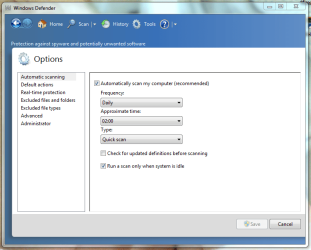
By default Windows disables Windows Defender if the presence of another AV program is detected. You can change the Automatic Update settings by clicking Tools > Options

Defender.PNG

Hope it helps :)


OS
 

My Computer My Computer

At a glance

Windows 7 Ultimate x64AMD Sempron Dual Core3GBNVIDIA GeForce 6150SE nForce 430
Computer Manufacturer/Model Number
Compaq Desktop
OS
Windows 7 Ultimate x64
CPU
AMD Sempron Dual Core
Memory
3GB
Graphics Card(s)
NVIDIA GeForce 6150SE nForce 430
Screen Resolution
1024x768
Hard Drives
150GB Sata
Hi,

By default Windows disables Windows Defender if the presence of another AV program is detected. You can change the Automatic Update settings by clicking Tools > Options

View attachment 151295

Hope it helps :)


OS

Hi and thank you for your reply. Does this mean it is normal that it got around my windows update settings which I set on allowing me to decide whether or not to install an update?
And if I uncheck "check for update definitions before scanning", will it only stop it from download definitions before scanning or will it stop it updating itself altogether? Because I did not use it to scan and my computer was not on at 2 am for it to automatically start a scan, so it shouldn't have checked on updated to begin with.
 

My Computer My Computer

At a glance

windows 7
OS
windows 7
If you have software that has an independent Automatic Update settings then they will overwrite any Windows Updates that would be for that particular software (only Microsoft software).
 

My Computer My Computer

At a glance

Windows 7 Ultimate x64AMD Sempron Dual Core3GBNVIDIA GeForce 6150SE nForce 430
Computer Manufacturer/Model Number
Compaq Desktop
OS
Windows 7 Ultimate x64
CPU
AMD Sempron Dual Core
Memory
3GB
Graphics Card(s)
NVIDIA GeForce 6150SE nForce 430
Screen Resolution
1024x768
Hard Drives
150GB Sata
If you have software that has an independent Automatic Update settings then they will overwrite any Windows Updates that would be for that particular software (only Microsoft software).

And this mean windows defender does that... well I have a problem now that might be connected to it: http://www.sevenforums.com/performance-maintenance/159469-strange-problem-i-recently-have.html

Might be getting slightly off topic, but since windows update says the windows defender definition file update can not be deleted once installed, would a system restore to the moment before this update get rid of the definition file?
What I'm trying to do is I want to try and see if it helps if I restore the system back to before the update, then de-activate windows defender, then see if my aforementioned problem is solved.
 

My Computer My Computer

At a glance

windows 7
OS
windows 7
This Microsoft article may shed some light on your situation concerning automatic updates. (See the paragraph pertaining to Required Updates about half-way down.)

Microsoft Windows Update

To summarize, Microsoft has been using what some have called "stealth updates" for a couple of years now. Even if a user selects "download but don't install" or "notify me that updates are available", some updates will be installed without any further notification to the user. And this could result in a machine rebooting in the middle of a task. Per Microsoft, the only sure way to avoid a stealth update is to turn the update service off and manually check for updates.
 

My Computer My Computer

At a glance

Win 7 Pro 64-bitIntel i5 2.4 Ghz8GB DDR3Intel HD 3000
Computer type
Laptop
Computer Manufacturer/Model Number
Sony Vaio VPCEB47GM Laptop
OS
Win 7 Pro 64-bit
CPU
Intel i5 2.4 Ghz
Memory
8GB DDR3
Graphics Card(s)
Intel HD 3000
Sound Card
IDT High Definition
Monitor(s) Displays
15.6 WGXA Anti-Glare LED
Screen Resolution
1280x800
Hard Drives
640Gb 7200rpm
Antivirus
MSE
Browser
Opera (primary) with IE9 backup
This Microsoft article may shed some light on your situation concerning automatic updates. (See the paragraph pertaining to Required Updates about half-way down.)

Microsoft Windows Update

To summarize, Microsoft has been using what some have called "stealth updates" for a couple of years now. Even if a user selects "download but don't install" or "notify me that updates are available", some updates will be installed without any further notification to the user. And this could result in a machine rebooting in the middle of a task. Per Microsoft, the only sure way to avoid a stealth update is to turn the update service off and manually check for updates.

I have it on "check for updates but let me choose whether to download and install them"... also, the computer has not rebooted itself during the update, because looking at the update history, I was using the computer whilst it updated windows defender.

EDIT:
Update Services are "turned on" if you choose one of the following settings: (i) install updates automatically, (ii) download updates automatically and choose whether to install them, or (iii) receive notifications about updates and choose whether to download and install them. Windows Update service is "turned on" and set to "install updates automatically" when you choose the recommended option during Windows Out Of Box Experience (OOBE) setup.
If you turn on the Update Services, regardless of which "turned on" setting you have chosen, required updates to some components of the service will be downloaded and installed automatically without further notice to you. If you would prefer not to receive required updates, turn off the Update Services.


And thus, it updated the list for windefender. Oh well, thanks for the link, clears alot up... annoying though. I have shut this program off to see if it links with my problems mentioned in the previous post/link.

EDIT 2:

Would a system restore be able to 'get rid of the update' if I go to a point before this happened? Or will it leave traces of it anyway?
 

My Computer My Computer

At a glance

windows 7
OS
windows 7

My Computer My Computer

At a glance

Windows 7 Ultimate 32bit SP1Intel(R) Core(TM)2 Quad CPU @ 2.40GHz, 2400 MHz4 GBATI Radeon HD 2600 Pro
Computer type
PC/Desktop
Computer Manufacturer/Model Number
Bruce ... somewhere in his 40's
OS
Windows 7 Ultimate 32bit SP1
CPU
Intel(R) Core(TM)2 Quad CPU @ 2.40GHz, 2400 MHz
Motherboard
INTEL/D975XBX2
Memory
4 GB
Graphics Card(s)
ATI Radeon HD 2600 Pro
Monitor(s) Displays
Samsung SyncMaster 914v
Screen Resolution
1280 x 1024
Hard Drives
2/500GB each ... ST3500630AS ATA Device.
One is not connected
PSU
Rocketfish 700 W
Case
G.Skill Gigabyte Chassis
Keyboard
Standard PS/2 Keyboard
Mouse
Microsoft PS/2 Mouse
Internet Speed
DSL
Antivirus
Avira Internet Security
Browser
IE 11
Other Info
ATI HDMI Audio
Back
Top