Windows Desktop Gaget Gallery Missing

ChudaPati09

New member
Member
Local time
8:29 AM
Messages
29
In the start menu I can't find any windows programs.
EX. Gaget Gallery, Mail, DVD Maker, Media player

But if I go to Program files its all there.
But then when i try to open Sidebar.exe it shows up in Task Manager
but doesn't show up on the desktop.

Also the icon for Windows Media Player is also gone from AutoRun.

I did change the default Program File directory.

I'm running Build 7022
 

My Computer

OS
Windows 7

My Computer

Computer Manufacturer/Model Number
Self Build 64bit
OS
Vista Ult64, Win7600
CPU
Intel Core 2 Quad Q6600 @ 2400 MHz 64bit OS
Motherboard
Asus P5E3 Deluxe WiFi @p 64 bit OS
Memory
4096 MB DDR3-SDRAM
Graphics Card(s)
ATI Radeon HD 3870 Series x2 Crossfired
Sound Card
Realtek on board
Monitor(s) Displays
Samsung SyncMaster - 23 inches
Screen Resolution
1680x1050 pixels at 60 Hz in True Colors
Hard Drives
Hitachi (250 GB)/Samsung 750 GB. /Barracuda 160 GB.
My Book 1 TB external..
PSU
Cooler Master 1000w
Case
Cooler Master Cosmos 1000.
Cooling
Fans and fresh air,
Keyboard
Wireless
Mouse
Wireless
Internet Speed
Never fast enough
Other Info
I use a Magnum.
Do YOu Haave a lite version.
 

My Computer

Computer Manufacturer/Model Number
Acer Aspire 8730-6951
OS
Windows 7, Windows Vista
CPU
2.4 GHZ
Memory
4.0 GB
Graphics Card(s)
Nvidia 9600m GT 1GB
Screen Resolution
1680*945
Hard Drives
320GB
Hello ChudaPati09,

Welcome to the Seven Forums.

There is no actual sidebar in 7. Right click on the desktop and select 'Gadgets".

Hope this is helpful.

Gary
 

My Computer

Computer Manufacturer/Model Number
Dell XPS420
OS
Vista Ult 64 bit Seven Ult RTM x64
CPU
Intel Core2 Quad Q6600 2.40 gigahertz
Memory
Crucial Ballistix 4x2GB PC2 6400
Graphics Card(s)
NVIDIA GeForce 8600 GTS 256 MB
Sound Card
Creative SB X-Fi audio
Monitor(s) Displays
HP w2207 + HPvs15
Screen Resolution
1680x1050 + 1024x768
Hard Drives
2-WD5000AAKS-500 GB
WD5000AAV-500 GB external
Keyboard
Microsoft Comfort Curve
Mouse
MX Revolution
Other Info
Wacom Intuos 2 Graphics Tablet
Experience Index=5.5
Thanks,
That kind of worked.
But now when it opened theres no gadgets inside and when i try to search for one. doesn't give me anything.
So i tried downloading one from gallery.live.com
And the file wasn't regonized.
I tried to drag it into that window but wouldn't allow me

11hbeki.png
 

My Computer

OS
Windows 7
Hi chudapati09,

You say you're running as adminstrator? If you have UAC turned off, does turning it back on to default have any effect on bring it back? I'm not sure if the the UAC has any effect on the gadgets in Build 7022, but it did on 7000. You might try turning it on and logging off and back on has any effect just to try.

Also, you see where it says clock in the top right hand corner of your screenshot. Have you clicked on that and checked All Gadgets?

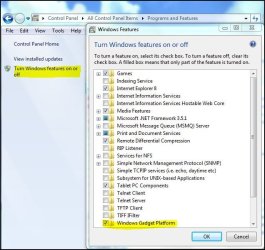
If that doesn't work, try going to Control Panel-Programs and Features-Turn Windows Features on or off and unchecking Windows Gadget Platform. Restart your computer, it will configure for a bit, then when you're back into Windows, go back and re enable it and see if that helps.

gadgetplatform.JPG

If that doesn't help, you could try a http://www.sevenforums.com/tutorials/3413-repair-install.html?ltr=R
 

My Computer

Computer type
PC/Desktop
Computer Manufacturer/Model Number
Airbot 2.0
OS
Windows 7 Ultimate x64 SP1
CPU
Core i7 920 (D0) @ 4Ghz, *26c idle *65c full load on air
Motherboard
Asus P6X58D Premium - Sata 6Gb/s - USB 3.0
Memory
12GB DDR3 Corsair Dominator -CMD12GX3M6A1600C8 at 1600MHz
Graphics Card(s)
Zotac Geforce GTX 770
Sound Card
ASUS Xonar D2X
Monitor(s) Displays
1 LG 24" Flatron W2453V-PF 1 Samsung 24" P2450H both 2ms RT
Screen Resolution
1920x1080@60hz
Hard Drives
1 Samsung 250GB 840 Evo SSD
1 OCZ Vertex2 180GB SSD
1 TB Samsung Spinpoint F1 7200RPM 32MB cache
2 500GB WD Caviar Blacks 7200RPM 32MB cache (WD5001AALS)

Pioneer DVD Burner DVR-S18M
PSU
Corsair HX1000W
Case
Cooler Master HAF 932
Cooling
Case Fans *3 230mm, *1 140mm/CPU - *Tuniq Tower 120 Extreme
Keyboard
Logitech Wireless MK700
Mouse
Logitech Wireless MK700
Internet Speed
DL 15 Mbps UL 0.98 Mbps
Antivirus
None
Browser
Firefox Nightly
Other Info
Processor-7.7 *RAM- 7.9 *Graphics-7.9 *Gaming Graphics- 7.9 *SSD- 7.8 W.E.I final score= 7.7
*Phone- LG Nexus 5
Thanks AirBot,

I tried the Turn Windows Feature On and Off
It was already checked so I unchecked it and restart it.
Then I went back and rechecked it and restarted again.
And I right click the desktop and went to gadgets and there was all the gadgets

Thanks
 

My Computer

OS
Windows 7
Glad it fixed it for you. :) Thanks for letting us know.
 

My Computer

Computer type
PC/Desktop
Computer Manufacturer/Model Number
Airbot 2.0
OS
Windows 7 Ultimate x64 SP1
CPU
Core i7 920 (D0) @ 4Ghz, *26c idle *65c full load on air
Motherboard
Asus P6X58D Premium - Sata 6Gb/s - USB 3.0
Memory
12GB DDR3 Corsair Dominator -CMD12GX3M6A1600C8 at 1600MHz
Graphics Card(s)
Zotac Geforce GTX 770
Sound Card
ASUS Xonar D2X
Monitor(s) Displays
1 LG 24" Flatron W2453V-PF 1 Samsung 24" P2450H both 2ms RT
Screen Resolution
1920x1080@60hz
Hard Drives
1 Samsung 250GB 840 Evo SSD
1 OCZ Vertex2 180GB SSD
1 TB Samsung Spinpoint F1 7200RPM 32MB cache
2 500GB WD Caviar Blacks 7200RPM 32MB cache (WD5001AALS)

Pioneer DVD Burner DVR-S18M
PSU
Corsair HX1000W
Case
Cooler Master HAF 932
Cooling
Case Fans *3 230mm, *1 140mm/CPU - *Tuniq Tower 120 Extreme
Keyboard
Logitech Wireless MK700
Mouse
Logitech Wireless MK700
Internet Speed
DL 15 Mbps UL 0.98 Mbps
Antivirus
None
Browser
Firefox Nightly
Other Info
Processor-7.7 *RAM- 7.9 *Graphics-7.9 *Gaming Graphics- 7.9 *SSD- 7.8 W.E.I final score= 7.7
*Phone- LG Nexus 5
Fixed it for me. But a restart wasn't necessary, just uncheck, then recheck.

Thanks for the tip :)
 
Last edited:

My Computer

OS
Windows 7
Back
Top