Windows Desktop Manager not working, wont work, can't fix.

Sdeve999

New member
Local time
12:28 AM
Messages
9
Greetings all, an apologies if this is in the wrong section.

Computer is a home build desktop, Asus M/B, AMD HD6670 graphics, 256meg SSD as boot drive c: Win7 32 bit.

I had a few problems with this computer and finally did a full format and re-install with system disk pre SP1. Everything working fine. Launched into full updates from windows, loaded all available updates and guess what; windows Desktop Manager fails and won't start. Computer is otherwise fine. I've installed latest drivers for the video card, updated my M/B bios, run sfc /scannow which showed all system files OK, full pre boot virus scan with Avast, full scan with Malwarebytes.

I've done all this about five times now. The problem seems to his after installing Iexplorer 10 and/or SP1. I haven't figured that one out yet, and I'd rather have a nearly working computer than one in a constant state of upheaval.

Having been looking around the web for an answer it would seem that this problem is not limited to certain hardware but seems quite happy to occur with just about anything. Any help that solves this will be much appreciated and rewarded with a curry and a beer.
 

My Computer My Computer

Computer type
PC/Desktop
Computer Manufacturer/Model Number
Asus custom build
OS
windows 7 32 bit

My Computer My Computer

Computer type
PC/Desktop
Computer Manufacturer/Model Number
Custom Built
OS
Windows 10 Pro
CPU
AMD Ryzen 5 2400G Processor with Radeon RX Vega 11 Graphics
Motherboard
ASRock X470 Master SLI/AC AM4 AMD Promontory X470 SATA 6Gb/s
Memory
G.SKILL Ripjaws V Series 16GB (2 x 8GB) 288-Pin DDR4 SDRAM D
Graphics Card(s)
2047MB NVIDIA GeForce GTX 1060 6GB (EVGA)
Sound Card
Motherboard Built in
Monitor(s) Displays
Acer R240HY bidx 23.8-Inch IPS HDMI DVI VGA (1920 x 1080) Wi
Screen Resolution
1920 x 1080
Hard Drives
1TB Sandisk SSD PLUS (Main drive)
500 GB Seagate 7200 RPM (Games)
500 GB Western Digital 7200 RPM (Virtual Machines)
PSU
CORSAIR TX Series TX650M 650W 80+ Gold Modular Power Supply
Case
CORSAIR CARBIDE SPEC-02 Mid-Tower Gaming Case, Red LED Fan
Cooling
220mm, two 120mm, and four 60mm fans
Keyboard
Wired Dell keyboard
Mouse
Wireless Logitech mouse
Internet Speed
250mb down, 30mb up
Antivirus
Panda Cloud Antivirus
Browser
Chrome-ish x64
Other Info
Your awesome for reading this.
Thanks for the response. I tried it and no luck, Still got the "Windows Desktop Manager Has Stopped Working" message. As far as the clean install goes, I've done that before and it didn't work. I'm pretty certain that this is actually a windows problem caused by some or other update. As I say, it goes OK until SP1 and/or Iexplorer 10. My bet is with SP1.
 

My Computer My Computer

Computer type
PC/Desktop
Computer Manufacturer/Model Number
Asus custom build
OS
windows 7 32 bit
Use the latest official installer with SP1 for your licensed version burned to DVD or written to flash stick with the tool also provided in Steps 1 and 2 of Clean Reinstall - Factory OEM Windows 7.

Stick only with the tools and methods exactly as given in the tutorial to assure a perfect baseline install.

During the booted CUstom install, delete all partitions to create and format new with the Drive Options shown in Steps 7 and 8 of Clean Install Windows 7 .

If you want to try to repair a sketchy pre-SP1 install, run SFC /SCANNOW Command to see what it finds. It may need three separate runs to repair files.
 
Gregrocker, A personal thank you for that tutorial. I shall stick to it in the event I need to do yet another full re-install. One thing it does seem to do, albeit unintentionally, is to illustrate what a Godawful mess Windows 7 has got itself into. From searching the net, it would appear that my particular problem with Desktop Manager Has Stopped Working is far from uncommon. Perhaps Microsoft might actually be able to figure out a cure themselves someday.

I can only say that the initial install works correctly every time. It's only after I install, via windows update on the net, SP1 and / or Iexplorer 10. As I was typing this, I ran sfc /scannow which resulted in the message "Windows resource protection did not find any integrity violations. The initial install, BTW, is from a genuine OEM system builder's pack, purchased from Maplins no less, and all subsequent updates installed via the internet using Windows Update.

I'm almost tempted to try Windows 8.1 in the hope that they might have fixed it by now.
 

My Computer My Computer

Computer type
PC/Desktop
Computer Manufacturer/Model Number
Asus custom build
OS
windows 7 32 bit
Just so you know, this is not a common error. You should not be having this problem. I have a feeling its a program you have installed. What antivirus software do you use?

When you install windows 7, and then do all updates, do you have any other software installed?

Try without anything installed and do all updates. Do a few at a time if need be. Then do all the updates and restart several times. Then install your programs one by one until you discover the issue.
 

My Computer My Computer

Computer type
PC/Desktop
Computer Manufacturer/Model Number
Custom Built
OS
Windows 10 Pro
CPU
AMD Ryzen 5 2400G Processor with Radeon RX Vega 11 Graphics
Motherboard
ASRock X470 Master SLI/AC AM4 AMD Promontory X470 SATA 6Gb/s
Memory
G.SKILL Ripjaws V Series 16GB (2 x 8GB) 288-Pin DDR4 SDRAM D
Graphics Card(s)
2047MB NVIDIA GeForce GTX 1060 6GB (EVGA)
Sound Card
Motherboard Built in
Monitor(s) Displays
Acer R240HY bidx 23.8-Inch IPS HDMI DVI VGA (1920 x 1080) Wi
Screen Resolution
1920 x 1080
Hard Drives
1TB Sandisk SSD PLUS (Main drive)
500 GB Seagate 7200 RPM (Games)
500 GB Western Digital 7200 RPM (Virtual Machines)
PSU
CORSAIR TX Series TX650M 650W 80+ Gold Modular Power Supply
Case
CORSAIR CARBIDE SPEC-02 Mid-Tower Gaming Case, Red LED Fan
Cooling
220mm, two 120mm, and four 60mm fans
Keyboard
Wired Dell keyboard
Mouse
Wireless Logitech mouse
Internet Speed
250mb down, 30mb up
Antivirus
Panda Cloud Antivirus
Browser
Chrome-ish x64
Other Info
Your awesome for reading this.

My Computer My Computer

Computer type
PC/Desktop
Computer Manufacturer/Model Number
Custom assembled by me :}
OS
Win-7-Pro64bit 7-H-Prem-64bit
CPU
i7-5930K 2nd i9-9940x both water blocked VRM's too
Motherboard
ASUS SABERTOOTH X99 2nd ASUS x299 Apex
Memory
Trident-z 3200C14 2nd Trident-z 3600C16
Graphics Card(s)
EVGA 1080ti ftw3 2nd Titan Xp both water blocked
Sound Card
Built-in Realtek
Monitor(s) Displays
1-AOC G2460PG 24"G-Sync 144Hz/ 2nd 1-ASUS VG248QE 24" 144Hz
Screen Resolution
1920 x 1080 144Hz
Hard Drives
2-Samsung M.2 Evo & Evo Plus
2-Samsung 850 EVO 500GB SSD's/ 3-2.5 W.D. Black 1tb-&3-1tb/3-3.5 WD Black 1tb hdd's
PSU
EVGA SuperNOVA 1000-P2 2nd 1200-P2
Case
2-Corsair Obsidian Series 450D Black ATX Mid Tower
Cooling
Custom water loops
Keyboard
Logitech G710+/ 2nd Logitech G910
Mouse
2-RedDragon M901 Perdition 16400 dpi Gaming mouse = wired
Internet Speed
Comcast Ping 19ms 89.31mbps download speed 6.12mbps upload
Antivirus
Malwarebytes Pro/ Superantispyware Pro
Browser
FireFox & Pale moon
Other Info
2nd ASUS X299 Apex/Intel i9-9940x with Custom water loop/7H-Prem-x64/Corsair 450D case/Ram Trident-z 3600C16 4x8gb / Samsung970Evo plus 500gb SSD/Dual ssd EZ swap evo/PSU EVGA SuperNova 1200w-P2 80+Platinum/GPU Titan Xp /8-ML-140 on push-pull on 2-280GTX rads
Thanks again for the suggestions.
While this may not be a common error, there are plenty of references to it on the internet. Furthermore, except with what would appear to be obvious mistakes, there has not been any cure that I can find. Nevertheless, I'll keep trying.

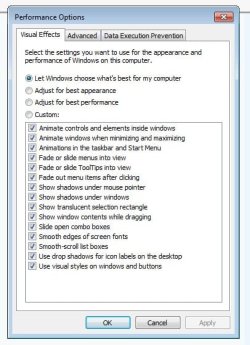
The last couple of (re)installs were bare bones, the last one was a straight install followed by immediate full update. No other software installed. My anti virus is Avast free. No third party themes. The 'Enable Destop Manager' part has revealed what may be of interest. Here's a screenshot (I hope) where you will notice several options absent.
 

Attachments

  • CropImage.jpg
    CropImage.jpg
    43.2 KB · Views: 21

My Computer My Computer

Computer type
PC/Desktop
Computer Manufacturer/Model Number
Asus custom build
OS
windows 7 32 bit
Just to make life even more interesting I have just tried to run the 'Windows Experience Index' program. It gets as far as 'Direct 3D 10 Batch assessment' and crashes with the message 'Windows System Assessment Tool Stopped.' I have the feeling that shouldn't happen.
 

My Computer My Computer

Computer type
PC/Desktop
Computer Manufacturer/Model Number
Asus custom build
OS
windows 7 32 bit
No that should not happen,
Use the link above my signature picture to Fill in your system spec's page,
List the hardware you replaced and from what is was before,
Could be improper assembly ?
I'm not sure but if you switch to Custom does the menu list change any if you notice the tutorial shows using custom,
I myself am only using 8 of about 20 aero features.
Cheers.
 

My Computer My Computer

Computer type
PC/Desktop
Computer Manufacturer/Model Number
Custom assembled by me :}
OS
Win-7-Pro64bit 7-H-Prem-64bit
CPU
i7-5930K 2nd i9-9940x both water blocked VRM's too
Motherboard
ASUS SABERTOOTH X99 2nd ASUS x299 Apex
Memory
Trident-z 3200C14 2nd Trident-z 3600C16
Graphics Card(s)
EVGA 1080ti ftw3 2nd Titan Xp both water blocked
Sound Card
Built-in Realtek
Monitor(s) Displays
1-AOC G2460PG 24"G-Sync 144Hz/ 2nd 1-ASUS VG248QE 24" 144Hz
Screen Resolution
1920 x 1080 144Hz
Hard Drives
2-Samsung M.2 Evo & Evo Plus
2-Samsung 850 EVO 500GB SSD's/ 3-2.5 W.D. Black 1tb-&3-1tb/3-3.5 WD Black 1tb hdd's
PSU
EVGA SuperNOVA 1000-P2 2nd 1200-P2
Case
2-Corsair Obsidian Series 450D Black ATX Mid Tower
Cooling
Custom water loops
Keyboard
Logitech G710+/ 2nd Logitech G910
Mouse
2-RedDragon M901 Perdition 16400 dpi Gaming mouse = wired
Internet Speed
Comcast Ping 19ms 89.31mbps download speed 6.12mbps upload
Antivirus
Malwarebytes Pro/ Superantispyware Pro
Browser
FireFox & Pale moon
Other Info
2nd ASUS X299 Apex/Intel i9-9940x with Custom water loop/7H-Prem-x64/Corsair 450D case/Ram Trident-z 3600C16 4x8gb / Samsung970Evo plus 500gb SSD/Dual ssd EZ swap evo/PSU EVGA SuperNova 1200w-P2 80+Platinum/GPU Titan Xp /8-ML-140 on push-pull on 2-280GTX rads
Right then! With visions of driving a stake through Bill Gates wallet, I flattened the whole computer out. Before that, I downloaded a disk image of Win7 which included SP1, and managed to hammer it onto a USB stick. It installed fine. Then I set windows update running and 136 updates and a couple of reboots later it's running OK, so far! I ran the Windows Experience Index and it went all the way to the end, getting a reading of 6.9. What I did notice was the sudden absence of the normal transparencies of the correctly running desktop. Interesting. Anyway, I've done a system backup, and installations will continue.
 

My Computer My Computer

Computer type
PC/Desktop
Computer Manufacturer/Model Number
Asus custom build
OS
windows 7 32 bit
@Sdeve999

Great job. :) Enjoy the fastest windows seven now. Clean install from that kind of installation will blow away anything that you get from the oem.
 

My Computer My Computer

Computer type
PC/Desktop
Computer Manufacturer/Model Number
Custom Built
OS
Windows 10 Pro
CPU
AMD Ryzen 5 2400G Processor with Radeon RX Vega 11 Graphics
Motherboard
ASRock X470 Master SLI/AC AM4 AMD Promontory X470 SATA 6Gb/s
Memory
G.SKILL Ripjaws V Series 16GB (2 x 8GB) 288-Pin DDR4 SDRAM D
Graphics Card(s)
2047MB NVIDIA GeForce GTX 1060 6GB (EVGA)
Sound Card
Motherboard Built in
Monitor(s) Displays
Acer R240HY bidx 23.8-Inch IPS HDMI DVI VGA (1920 x 1080) Wi
Screen Resolution
1920 x 1080
Hard Drives
1TB Sandisk SSD PLUS (Main drive)
500 GB Seagate 7200 RPM (Games)
500 GB Western Digital 7200 RPM (Virtual Machines)
PSU
CORSAIR TX Series TX650M 650W 80+ Gold Modular Power Supply
Case
CORSAIR CARBIDE SPEC-02 Mid-Tower Gaming Case, Red LED Fan
Cooling
220mm, two 120mm, and four 60mm fans
Keyboard
Wired Dell keyboard
Mouse
Wireless Logitech mouse
Internet Speed
250mb down, 30mb up
Antivirus
Panda Cloud Antivirus
Browser
Chrome-ish x64
Other Info
Your awesome for reading this.
Trouble is, I've only done the 'Monkey See, Money do.' principle. I still have no idea what the problem is/was. The only thing I haven't done is install any manufacturer's graphics drivers and at this stage I don't want to risk it in spite of the fact that I've got the very latest setup. Still, as the man said after jumping off the Empire State Building, 'So far so good'.
 

My Computer My Computer

Computer type
PC/Desktop
Computer Manufacturer/Model Number
Asus custom build
OS
windows 7 32 bit
Back
Top