Solved Windows detected not genuine after System Restore

TimotStillHere

New member
Local time
9:54 PM
Messages
45
Before detected not genuine, my Laptop won't start, and the system restore won't work because it said something about disk protection. So i followed a certain guide here and it worked.
After that my laptop started normally, but i still want to do system restore to prevent this kind of thing happened again and there it goes. Where it rebooted the message box saying windows is not genuine popped up.
I'm using Asus G75 bbk5 FR windows 7 home premium.
here is the MGADiag results

Code:
Diagnostic Report (1.9.0027.0):
-----------------------------------------
Windows Validation Data-->
 
Validation Code: 50
Cached Online Validation Code: 0x0
Windows Product Key: *****-*****-2QWT6-HCQXJ-9YQTR
Windows Product Key Hash: PVjSC5x6njvqunmbCY3lOD7rYDo=
Windows Product ID: 00359-OEM-8992687-00007
Windows Product ID Type: 2
Windows License Type: OEM SLP
Windows OS version: 6.1.7601.2.00010300.1.0.003
ID: {B76BB984-4E6F-4235-BEC3-25B4C16C6B77}(3)
Is Admin: Yes
TestCab: 0x0
LegitcheckControl ActiveX: N/A, hr = 0x80070002
Signed By: N/A, hr = 0x80070002
Product Name: Windows 7 Home Premium
Architecture: 0x00000009
Build lab: 7601.win7sp1_gdr.130318-1533
TTS Error: 
Validation Diagnostic: 
Resolution Status: N/A
 
Vista WgaER Data-->
ThreatID(s): N/A, hr = 0x80070002
Version: N/A, hr = 0x80070002
 
Windows XP Notifications Data-->
Cached Result: N/A, hr = 0x80070002
File Exists: No
Version: N/A, hr = 0x80070002
WgaTray.exe Signed By: N/A, hr = 0x80070002
WgaLogon.dll Signed By: N/A, hr = 0x80070002
 
OGA Notifications Data-->
Cached Result: N/A, hr = 0x80070002
Version: N/A, hr = 0x80070002
OGAExec.exe Signed By: N/A, hr = 0x80070002
OGAAddin.dll Signed By: N/A, hr = 0x80070002
 
OGA Data-->
Office Status: 109 N/A
OGA Version: N/A, 0x80070002
Signed By: N/A, hr = 0x80070002
Office Diagnostics: B4D0AA8B-604-645_025D1FF3-364-80041010_025D1FF3-229-80041010_025D1FF3-230-1_025D1FF3-517-80040154_025D1FF3-237-80040154_025D1FF3-238-2_025D1FF3-244-80070002_025D1FF3-258-3
 
Browser Data-->
Proxy settings: N/A
User Agent: Mozilla/4.0 (compatible; MSIE 8.0; Win32)
Default Browser: C:\Users\asus\AppData\Local\Google\Chrome\Application\chrome.exe
Download signed ActiveX controls: Prompt
Download unsigned ActiveX controls: Disabled
Run ActiveX controls and plug-ins: Allowed
Initialize and script ActiveX controls not marked as safe: Disabled
Allow scripting of Internet Explorer Webbrowser control: Disabled
Active scripting: Allowed
Script ActiveX controls marked as safe for scripting: Allowed
 
File Scan Data-->
 
Other data-->
Office Details: <GenuineResults><MachineData><UGUID>{B76BB984-4E6F-4235-BEC3-25B4C16C6B77}</UGUID><Version>1.9.0027.0</Version><OS>6.1.7601.2.00010300.1.0.003</OS><Architecture>x64</Architecture><PKey>*****-*****-*****-*****-9YQTR</PKey><PID>00359-OEM-8992687-00007</PID><PIDType>2</PIDType><SID>S-1-5-21-3766355003-1165880937-3182644717</SID><SYSTEM><Manufacturer>ASUSTeK COMPUTER INC.</Manufacturer><Model>G75VW</Model></SYSTEM><BIOS><Manufacturer>American Megatrends Inc.</Manufacturer><Version>G75VW.207</Version><SMBIOSVersion major="2" minor="7"/><Date>20120406000000.000000+000</Date></BIOS><HWID>C59C3107018400FE</HWID><UserLCID>0421</UserLCID><SystemLCID>0409</SystemLCID><TimeZone>SE Asia Standard Time(GMT+07:00)</TimeZone><iJoin>0</iJoin><SBID><stat>3</stat><msppid></msppid><name></name><model></model></SBID><OEM><OEMID>_ASUS_</OEMID><OEMTableID>Notebook</OEMTableID></OEM><GANotification/></MachineData><Software><Office><Result>109</Result><Products/><Applications/></Office></Software></GenuineResults> 
 
Spsys.log Content: 0x80070002
 
Licensing Data-->
C:\Windows\system32\slmgr.vbs(1131, 5) Microsoft VBScript runtime error: Permission denied
 
Windows Activation Technologies-->
HrOffline: 0x00000000
HrOnline: 0x00000000
HealthStatus: 0x0000000000000000
Event Time Stamp: 2:3:2014 01:14
ActiveX: Registered, Version: 7.1.7600.16395
Admin Service: Registered, Version: 7.1.7600.16395
HealthStatus Bitmask Output:
 
 
HWID Data-->
HWID Hash Current: MgAAAAIAAQABAAEAAAACAAAAAwABAAEAln3iGyJBdxa0JAbnFIEWZBaDiFuoTgS/lmM=
 
OEM Activation 1.0 Data-->
N/A
 
OEM Activation 2.0 Data-->
BIOS valid for OA 2.0: yes
Windows marker version: 0x20001
OEMID and OEMTableID Consistent: yes
BIOS Information: 
ACPI Table Name    OEMID Value    OEMTableID Value
APIC            _ASUS_        Notebook
FACP            _ASUS_        Notebook
HPET            _ASUS_        Notebook
MCFG            _ASUS_        Notebook
ECDT            _ASUS_        Notebook
SLIC            _ASUS_        Notebook
SSDT            PmRef        Cpu0Ist
BGRT            _ASUS_        Notebook

Thanks before, any help will be appreciated.
 
Last edited by a moderator:

My Computer My Computer

At a glance

Windows 7 Home Premium 64bitIntel i7 3610QM8gbNvidia GTX 660m
Computer type
Laptop
Computer Manufacturer/Model Number
Asus G75 BBK5 FR
OS
Windows 7 Home Premium 64bit
CPU
Intel i7 3610QM
Memory
8gb
Graphics Card(s)
Nvidia GTX 660m
Screen Resolution
1920x1080
Mouse
Logitech m235
Licensing Data-->
C:\Windows\system32\slmgr.vbs(1131, 5) Microsoft VBScript runtime error: Permission denied

This can be a difficult one to root the cause of.
It could be referring to either the vbs file itself (in which case it may be your AV getting in the way), or to one of the files it references or outputs to.

What Anti-Virus is installed? - what other AV's have ever been installed?

Please run the following commands, and post the results...

Code:
ICACLS %windir%\ServiceProfiles\NetworkService\AppData\Roaming\Microsoft\SoftwareProtectionPlatform
ICACLS C:\Windows
ICACLS %windir%\ServiceProfiles\NetworkService
 
.

Here are some instructions to make life easier :)
1) To open an Elevated Command Prompt Window (the ECP window), click on Start, All Programs, Accessories – then right-click on Command Prompt, and select Run as Administrator. Accept the UAC prompt.
2) To run the commands easier, highlight the block of commands, and right-click on the highlight – select Copy. In the CP Window, click on the black/white icon at top left – select Paste. The commands will run but may not complete the last command, so hit the Enter Key once.
3) To copy the results... click on the Black/White icon in the top left, and select Edit... 'Select All', and hit the Enter key - then use Ctrl+V or r-click+Paste to paste it into your response.
 

My Computer My Computer

At a glance

Win 7 x64 Home Premium (and x86 VirtualBox VM...i3 370M/i7 6500U8GB - finally :)/8GBit's an i3, dude!/dual Intel&nVidia
Computer type
Laptop
Computer Manufacturer/Model Number
Asus K52F or Lenovo B51-80
OS
Win 7 x64 Home Premium (and x86 VirtualBox VM)/Win10
CPU
i3 370M/i7 6500U
Motherboard
Asus/Lenovo
Memory
8GB - finally :)/8GB
Graphics Card(s)
it's an i3, dude!/dual Intel&nVidia
Sound Card
onboard
Monitor(s) Displays
15.6" built-in
Screen Resolution
1366x768/1920x1080
Hard Drives
750GB Seagate internal
Sundry external drives attached to other computers on the local network
1TB SSD on the Lenovo
PSU
n/a
Internet Speed
as much as I can get - usually on a dongle/phone, so <1MB/s
Antivirus
MSE/Defender
Browser
IE11/12/Edge/Chrome/FF(if I must)
Licensing Data-->
C:\Windows\system32\slmgr.vbs(1131, 5) Microsoft VBScript runtime error: Permission denied

This can be a difficult one to root the cause of.
It could be referring to either the vbs file itself (in which case it may be your AV getting in the way), or to one of the files it references or outputs to.

What Anti-Virus is installed? - what other AV's have ever been installed?

Please run the following commands, and post the results...

Code:
ICACLS %windir%\ServiceProfiles\NetworkService\AppData\Roaming\Microsoft\SoftwareProtectionPlatform
ICACLS C:\Windows
ICACLS %windir%\ServiceProfiles\NetworkService
 
.

Here are some instructions to make life easier :)
1) To open an Elevated Command Prompt Window (the ECP window), click on Start, All Programs, Accessories – then right-click on Command Prompt, and select Run as Administrator. Accept the UAC prompt.
2) To run the commands easier, highlight the block of commands, and right-click on the highlight – select Copy. In the CP Window, click on the black/white icon at top left – select Paste. The commands will run but may not complete the last command, so hit the Enter Key once.
3) To copy the results... click on the Black/White icon in the top left, and select Edit... 'Select All', and hit the Enter key - then use Ctrl+V or r-click+Paste to paste it into your response.

Antivirus? AVG free and a local Indonesian antivirus called Smadav.

Here's the result
Code:
Microsoft Windows [Version 6.1.7601]
Copyright (c) 2009 Microsoft Corporation.  All rights reserved.

C:\Windows\system32>ICACLS %windir%\ServiceProfiles\NetworkService\AppData\Roami
ng\Microsoft\SoftwareProtectionPlatform
C:\Windows\ServiceProfiles\NetworkService\AppData\Roaming\Microsoft\SoftwareProt
ectionPlatform NT AUTHORITY\SYSTEM:(I)(OI)(CI)(F)

               BUILTIN\Administrators:(I)(OI)(CI)(F)

               NT AUTHORITY\NETWORK SERVICE:(I)(OI)(CI)(F)

Successfully processed 1 files; Failed processing 0 files

C:\Windows\system32>ICACLS C:\Windows
C:\Windows NT SERVICE\TrustedInstaller:(F)
           NT SERVICE\TrustedInstaller:(CI)(IO)(F)
           NT AUTHORITY\SYSTEM:(M)
           NT AUTHORITY\SYSTEM:(OI)(CI)(IO)(F)
           BUILTIN\Administrators:(M)
           BUILTIN\Administrators:(OI)(CI)(IO)(F)
           BUILTIN\Users:(RX)
           BUILTIN\Users:(OI)(CI)(IO)(GR,GE)
           CREATOR OWNER:(OI)(CI)(IO)(F)

Successfully processed 1 files; Failed processing 0 files

C:\Windows\system32>
thanks for responding though
 

My Computer My Computer

At a glance

Windows 7 Home Premium 64bitIntel i7 3610QM8gbNvidia GTX 660m
Computer type
Laptop
Computer Manufacturer/Model Number
Asus G75 BBK5 FR
OS
Windows 7 Home Premium 64bit
CPU
Intel i7 3610QM
Memory
8gb
Graphics Card(s)
Nvidia GTX 660m
Screen Resolution
1920x1080
Mouse
Logitech m235
If you have two AV's installed at the same time, that could account for it - they will be fighting each other, I have no faith in what the developers claim in their forums.
Smadav looks to me to be very basic - and very inefficient (even the developers only appear to claim a 90% detection!).
I would uninstall it completely, and run any cleanup tool that the developers have.

I'd also uninstall AVG for the moment at least - run their cleanup too as well.

Download the AVG Remover from here
http://www.avg.com/us-en/utilities
Follow the instructions for running it, and then reboot the machine (whether it asks for it or not, and whether the program rebooted already or not).

Then either reinstall AVG, or install MSE .

This should get rid of any conflicts caused by having had two AV's installed.

Then run another MGADiag report, and post the results.
 

My Computer My Computer

At a glance

Win 7 x64 Home Premium (and x86 VirtualBox VM...i3 370M/i7 6500U8GB - finally :)/8GBit's an i3, dude!/dual Intel&nVidia
Computer type
Laptop
Computer Manufacturer/Model Number
Asus K52F or Lenovo B51-80
OS
Win 7 x64 Home Premium (and x86 VirtualBox VM)/Win10
CPU
i3 370M/i7 6500U
Motherboard
Asus/Lenovo
Memory
8GB - finally :)/8GB
Graphics Card(s)
it's an i3, dude!/dual Intel&nVidia
Sound Card
onboard
Monitor(s) Displays
15.6" built-in
Screen Resolution
1366x768/1920x1080
Hard Drives
750GB Seagate internal
Sundry external drives attached to other computers on the local network
1TB SSD on the Lenovo
PSU
n/a
Internet Speed
as much as I can get - usually on a dongle/phone, so <1MB/s
Antivirus
MSE/Defender
Browser
IE11/12/Edge/Chrome/FF(if I must)
Removed them and installed MSE.

Code:
Result of MGADiag
Diagnostic Report (1.9.0027.0):
-----------------------------------------
Windows Validation Data-->
 
Validation Code: 50
Cached Online Validation Code: 0x0
Windows Product Key: *****-*****-2QWT6-HCQXJ-9YQTR
Windows Product Key Hash: PVjSC5x6njvqunmbCY3lOD7rYDo=
Windows Product ID: 00359-OEM-8992687-00007
Windows Product ID Type: 2
Windows License Type: OEM SLP
Windows OS version: 6.1.7601.2.00010300.1.0.003
ID: {98CC95D3-DDAA-4F8A-9D1F-04B802C10978}(1)
Is Admin: Yes
TestCab: 0x0
LegitcheckControl ActiveX: N/A, hr = 0x80070002
Signed By: N/A, hr = 0x80070002
Product Name: Windows 7 Home Premium
Architecture: 0x00000009
Build lab: 7601.win7sp1_gdr.130318-1533
TTS Error: 
Validation Diagnostic: 
Resolution Status: N/A
 
Vista WgaER Data-->
ThreatID(s): N/A, hr = 0x80070002
Version: N/A, hr = 0x80070002
 
Windows XP Notifications Data-->
Cached Result: N/A, hr = 0x80070002
File Exists: No
Version: N/A, hr = 0x80070002
WgaTray.exe Signed By: N/A, hr = 0x80070002
WgaLogon.dll Signed By: N/A, hr = 0x80070002
 
OGA Notifications Data-->
Cached Result: N/A, hr = 0x80070002
Version: N/A, hr = 0x80070002
OGAExec.exe Signed By: N/A, hr = 0x80070002
OGAAddin.dll Signed By: N/A, hr = 0x80070002
 
OGA Data-->
Office Status: 109 N/A
OGA Version: N/A, 0x80070002
Signed By: N/A, hr = 0x80070002
Office Diagnostics: B4D0AA8B-604-645_025D1FF3-364-80041010_025D1FF3-229-80041010_025D1FF3-230-1_025D1FF3-517-80040154_025D1FF3-237-80040154_025D1FF3-238-2_025D1FF3-244-80070002_025D1FF3-258-3
 
Browser Data-->
Proxy settings: N/A
User Agent: Mozilla/4.0 (compatible; MSIE 8.0; Win32)
Default Browser: C:\Users\asus\AppData\Local\Google\Chrome\Application\chrome.exe
Download signed ActiveX controls: Prompt
Download unsigned ActiveX controls: Disabled
Run ActiveX controls and plug-ins: Allowed
Initialize and script ActiveX controls not marked as safe: Disabled
Allow scripting of Internet Explorer Webbrowser control: Disabled
Active scripting: Allowed
Script ActiveX controls marked as safe for scripting: Allowed
 
File Scan Data-->
 
Other data-->
Office Details: <GenuineResults><MachineData><UGUID>{98CC95D3-DDAA-4F8A-9D1F-04B802C10978}</UGUID><Version>1.9.0027.0</Version><OS>6.1.7601.2.00010300.1.0.003</OS><Architecture>x64</Architecture><PKey>*****-*****-*****-*****-9YQTR</PKey><PID>00359-OEM-8992687-00007</PID><PIDType>2</PIDType><SID>S-1-5-21-3766355003-1165880937-3182644717</SID><SYSTEM><Manufacturer>ASUSTeK COMPUTER INC.</Manufacturer><Model>G75VW</Model></SYSTEM><BIOS><Manufacturer>American Megatrends Inc.</Manufacturer><Version>G75VW.207</Version><SMBIOSVersion major="2" minor="7"/><Date>20120406000000.000000+000</Date></BIOS><HWID>C59C3107018400FE</HWID><UserLCID>0421</UserLCID><SystemLCID>0409</SystemLCID><TimeZone>SE Asia Standard Time(GMT+07:00)</TimeZone><iJoin>0</iJoin><SBID><stat>3</stat><msppid></msppid><name></name><model></model></SBID><OEM><OEMID>_ASUS_</OEMID><OEMTableID>Notebook</OEMTableID></OEM><GANotification/></MachineData><Software><Office><Result>109</Result><Products/><Applications/></Office></Software></GenuineResults> 
 
Spsys.log Content: 0x80070002
 
Licensing Data-->
C:\Windows\system32\slmgr.vbs(1131, 5) Microsoft VBScript runtime error: Permission denied
 
Windows Activation Technologies-->
HrOffline: 0x00000000
HrOnline: 0x00000000
HealthStatus: 0x0000000000000000
Event Time Stamp: 2:3:2014 01:14
ActiveX: Registered, Version: 7.1.7600.16395
Admin Service: Registered, Version: 7.1.7600.16395
HealthStatus Bitmask Output:
 
 
HWID Data-->
HWID Hash Current: MgAAAAIAAQABAAEAAAACAAAAAwABAAEAln3iGyJBdxa0JAbnFIEWZBaDiFuoTgS/lmM=
 
OEM Activation 1.0 Data-->
N/A
 
OEM Activation 2.0 Data-->
BIOS valid for OA 2.0: yes
Windows marker version: 0x20001
OEMID and OEMTableID Consistent: yes
BIOS Information: 
ACPI Table Name    OEMID Value    OEMTableID Value
APIC            _ASUS_        Notebook
FACP            _ASUS_        Notebook
HPET            _ASUS_        Notebook
MCFG            _ASUS_        Notebook
ECDT            _ASUS_        Notebook
SLIC            _ASUS_        Notebook
SSDT            PmRef        Cpu0Ist
BGRT            _ASUS_        Notebook
 
Last edited by a moderator:

My Computer My Computer

At a glance

Windows 7 Home Premium 64bitIntel i7 3610QM8gbNvidia GTX 660m
Computer type
Laptop
Computer Manufacturer/Model Number
Asus G75 BBK5 FR
OS
Windows 7 Home Premium 64bit
CPU
Intel i7 3610QM
Memory
8gb
Graphics Card(s)
Nvidia GTX 660m
Screen Resolution
1920x1080
Mouse
Logitech m235
No change :(

Let's look a little deeper into the system...

Open an Elevated Command Prompt, and run the following commands..


REG QUERY HKEY_CLASSES_ROOT\CLSID\{B54F3741-5B07-11cf-A4B0-00AA004A55E8} /S
REG QUERY HKEY_CLASSES_ROOT\CLSID\{B54F3742-5B07-11cf-A4B0-00AA004A55E8} /S
REG QUERY HKEY_CLASSES_ROOT\CLSID\{B54F3743-5B07-11cf-A4B0-00AA004A55E8} /S
ATTRIB %windir%\ServiceProfiles\NetworkService\AppData\Roaming\Microsoft\SoftwareProtectionPlatform\*.* /S
ATTRIB C:\Windows\System32\7B*.*

ICACLS C:\Windows\System32\7B*.*

copy/paste the results to your reply
 

My Computer My Computer

At a glance

Win 7 x64 Home Premium (and x86 VirtualBox VM...i3 370M/i7 6500U8GB - finally :)/8GBit's an i3, dude!/dual Intel&nVidia
Computer type
Laptop
Computer Manufacturer/Model Number
Asus K52F or Lenovo B51-80
OS
Win 7 x64 Home Premium (and x86 VirtualBox VM)/Win10
CPU
i3 370M/i7 6500U
Motherboard
Asus/Lenovo
Memory
8GB - finally :)/8GB
Graphics Card(s)
it's an i3, dude!/dual Intel&nVidia
Sound Card
onboard
Monitor(s) Displays
15.6" built-in
Screen Resolution
1366x768/1920x1080
Hard Drives
750GB Seagate internal
Sundry external drives attached to other computers on the local network
1TB SSD on the Lenovo
PSU
n/a
Internet Speed
as much as I can get - usually on a dongle/phone, so <1MB/s
Antivirus
MSE/Defender
Browser
IE11/12/Edge/Chrome/FF(if I must)
Results
Microsoft Windows [Version 6.1.7601]
Copyright (c) 2009 Microsoft Corporation. All rights reserved.

C:\Windows\system32>REG QUERY HKEY_CLASSES_ROOT\CLSID\{B54F3741-5B07-11cf-A4B0-0
0AA004A55E8} /S

HKEY_CLASSES_ROOT\CLSID\{B54F3741-5B07-11cf-A4B0-00AA004A55E8}
(Default) REG_SZ VB Script Language

HKEY_CLASSES_ROOT\CLSID\{B54F3741-5B07-11cf-A4B0-00AA004A55E8}\Implemented Categ
ories

HKEY_CLASSES_ROOT\CLSID\{B54F3741-5B07-11cf-A4B0-00AA004A55E8}\Implemented Categ
ories\{F0B7A1A1-9847-11CF-8F20-00805F2CD064}
(Default) REG_NONE

HKEY_CLASSES_ROOT\CLSID\{B54F3741-5B07-11cf-A4B0-00AA004A55E8}\Implemented Categ
ories\{F0B7A1A2-9847-11CF-8F20-00805F2CD064}
(Default) REG_NONE

HKEY_CLASSES_ROOT\CLSID\{B54F3741-5B07-11cf-A4B0-00AA004A55E8}\InprocServer32
(Default) REG_SZ C:\Windows\system32\VBScript.dll
ThreadingModel REG_SZ Both

HKEY_CLASSES_ROOT\CLSID\{B54F3741-5B07-11cf-A4B0-00AA004A55E8}\OLEScript
(Default) REG_NONE

HKEY_CLASSES_ROOT\CLSID\{B54F3741-5B07-11cf-A4B0-00AA004A55E8}\ProgID
(Default) REG_SZ VBScript


C:\Windows\system32>REG QUERY HKEY_CLASSES_ROOT\CLSID\{B54F3742-5B07-11cf-A4B0-0
0AA004A55E8} /S

HKEY_CLASSES_ROOT\CLSID\{B54F3742-5B07-11cf-A4B0-00AA004A55E8}
(Default) REG_SZ VB Script Language Authoring

HKEY_CLASSES_ROOT\CLSID\{B54F3742-5B07-11cf-A4B0-00AA004A55E8}\Implemented Categ
ories

HKEY_CLASSES_ROOT\CLSID\{B54F3742-5B07-11cf-A4B0-00AA004A55E8}\Implemented Categ
ories\{0AEE2A92-BCBB-11D0-8C72-00C04FC2B085}
(Default) REG_NONE

HKEY_CLASSES_ROOT\CLSID\{B54F3742-5B07-11cf-A4B0-00AA004A55E8}\InprocServer32
(Default) REG_SZ C:\Windows\system32\vbscript.dll
ThreadingModel REG_SZ Both

HKEY_CLASSES_ROOT\CLSID\{B54F3742-5B07-11cf-A4B0-00AA004A55E8}\OLEScript
(Default) REG_NONE

HKEY_CLASSES_ROOT\CLSID\{B54F3742-5B07-11cf-A4B0-00AA004A55E8}\ProgID
(Default) REG_SZ VBScript Author


C:\Windows\system32>REG QUERY HKEY_CLASSES_ROOT\CLSID\{B54F3743-5B07-11cf-A4B0-0
0AA004A55E8} /S

HKEY_CLASSES_ROOT\CLSID\{B54F3743-5B07-11cf-A4B0-00AA004A55E8}
(Default) REG_SZ VBScript Language Encoding

HKEY_CLASSES_ROOT\CLSID\{B54F3743-5B07-11cf-A4B0-00AA004A55E8}\Implemented Categ
ories

HKEY_CLASSES_ROOT\CLSID\{B54F3743-5B07-11cf-A4B0-00AA004A55E8}\Implemented Categ
ories\{F0B7A1A1-9847-11CF-8F20-00805F2CD064}
(Default) REG_NONE

HKEY_CLASSES_ROOT\CLSID\{B54F3743-5B07-11cf-A4B0-00AA004A55E8}\Implemented Categ
ories\{F0B7A1A2-9847-11CF-8F20-00805F2CD064}
(Default) REG_NONE

HKEY_CLASSES_ROOT\CLSID\{B54F3743-5B07-11cf-A4B0-00AA004A55E8}\Implemented Categ
ories\{F0B7A1A3-9847-11CF-8F20-00805F2CD064}
(Default) REG_NONE

HKEY_CLASSES_ROOT\CLSID\{B54F3743-5B07-11cf-A4B0-00AA004A55E8}\InprocServer32
(Default) REG_SZ C:\Windows\system32\vbscript.dll
ThreadingModel REG_SZ Both

HKEY_CLASSES_ROOT\CLSID\{B54F3743-5B07-11cf-A4B0-00AA004A55E8}\OLEScript
(Default) REG_NONE

HKEY_CLASSES_ROOT\CLSID\{B54F3743-5B07-11cf-A4B0-00AA004A55E8}\ProgID
(Default) REG_SZ VBScript.Encode


C:\Windows\system32>ATTRIB %windir%\ServiceProfiles\NetworkService\AppData\Roami
ng\Microsoft\SoftwareProtectionPlatform\*.* /S
A I C:\Windows\ServiceProfiles\NetworkService\AppData\Roaming\Microsoft
\SoftwareProtectionPlatform\Cache\cache.dat
A I C:\Windows\ServiceProfiles\NetworkService\AppData\Roaming\Microsoft
\SoftwareProtectionPlatform\tokens.dat

C:\Windows\system32>ATTRIB C:\Windows\System32\7B*.*
A H C:\Windows\System32\7B296FB0-376B-497e-B012-9C450E1B7327-5P-0.C7483
456-A289-439d-8115-601632D005A0
A H C:\Windows\System32\7B296FB0-376B-497e-B012-9C450E1B7327-5P-1.C7483
456-A289-439d-8115-601632D005A0

C:\Windows\system32>ICACLS C:\Windows\System32\7B*.*
C:\Windows\System32\7B296FB0-376B-497e-B012-9C450E1B7327-5P-0.C7483456-A289-439d
-8115-601632D005A0 NT AUTHORITY\SYSTEM:(I)(F)

BUILTIN\Administrators:(I)(F)

BUILTIN\Users:(I)(RX)

C:\Windows\System32\7B296FB0-376B-497e-B012-9C450E1B7327-5P-1.C7483456-A289-439d
-8115-601632D005A0 NT AUTHORITY\SYSTEM:(I)(F)

BUILTIN\Administrators:(I)(F)

BUILTIN\Users:(I)(RX)

Successfully processed 2 files; Failed processing 0 files

C:\Windows\system32>
 

My Computer My Computer

At a glance

Windows 7 Home Premium 64bitIntel i7 3610QM8gbNvidia GTX 660m
Computer type
Laptop
Computer Manufacturer/Model Number
Asus G75 BBK5 FR
OS
Windows 7 Home Premium 64bit
CPU
Intel i7 3610QM
Memory
8gb
Graphics Card(s)
Nvidia GTX 660m
Screen Resolution
1920x1080
Mouse
Logitech m235
All of that looks normal.

Let's look at the WMI subsystem now...

ICACLS C:\Windows\System32\WBEM
ICACLS C:\Windows\System32\WBEM\MOF
ICACLS C:\Windows\System32\WBEM\bcd.mof
ICACLS C:\Windows\System32\WBEM\xml
ICACLS C:\Windows\System32\WBEM\repository
ICACLS C:\Windows\System32\WBEM\en-us
 

My Computer My Computer

At a glance

Win 7 x64 Home Premium (and x86 VirtualBox VM...i3 370M/i7 6500U8GB - finally :)/8GBit's an i3, dude!/dual Intel&nVidia
Computer type
Laptop
Computer Manufacturer/Model Number
Asus K52F or Lenovo B51-80
OS
Win 7 x64 Home Premium (and x86 VirtualBox VM)/Win10
CPU
i3 370M/i7 6500U
Motherboard
Asus/Lenovo
Memory
8GB - finally :)/8GB
Graphics Card(s)
it's an i3, dude!/dual Intel&nVidia
Sound Card
onboard
Monitor(s) Displays
15.6" built-in
Screen Resolution
1366x768/1920x1080
Hard Drives
750GB Seagate internal
Sundry external drives attached to other computers on the local network
1TB SSD on the Lenovo
PSU
n/a
Internet Speed
as much as I can get - usually on a dongle/phone, so <1MB/s
Antivirus
MSE/Defender
Browser
IE11/12/Edge/Chrome/FF(if I must)
Here's the results
Microsoft Windows [Version 6.1.7601]
Copyright (c) 2009 Microsoft Corporation. All rights reserved.

C:\Windows\system32>ICACLS C:\Windows\System32\WBEM
C:\Windows\System32\WBEM NT SERVICE\TrustedInstaller:(F)
NT SERVICE\TrustedInstaller:(CI)(IO)(F)
NT AUTHORITY\SYSTEM:(M)
NT AUTHORITY\SYSTEM:(OI)(CI)(IO)(F)
BUILTIN\Administrators:(M)
BUILTIN\Administrators:(OI)(CI)(IO)(F)
BUILTIN\Users:(RX)
BUILTIN\Users:(OI)(CI)(IO)(GR,GE)
CREATOR OWNER:(OI)(CI)(IO)(F)

Successfully processed 1 files; Failed processing 0 files

C:\Windows\system32>ICACLS C:\Windows\System32\WBEM\MOF
C:\Windows\System32\WBEM\MOF BUILTIN\Administrators:(OI)(CI)(F)
NT AUTHORITY\SYSTEM:(OI)(CI)(F)

Successfully processed 1 files; Failed processing 0 files

C:\Windows\system32>ICACLS C:\Windows\System32\WBEM\bcd.mof
C:\Windows\System32\WBEM\bcd.mof NT SERVICE\TrustedInstaller:(F)
BUILTIN\Administrators:(RX)
NT AUTHORITY\SYSTEM:(RX)
BUILTIN\Users:(RX)

Successfully processed 1 files; Failed processing 0 files

C:\Windows\system32>ICACLS C:\Windows\System32\WBEM\xml
C:\Windows\System32\WBEM\xml NT SERVICE\TrustedInstaller:(F)
NT SERVICE\TrustedInstaller:(CI)(IO)(F)
NT AUTHORITY\SYSTEM:(M)
NT AUTHORITY\SYSTEM:(OI)(CI)(IO)(F)
BUILTIN\Administrators:(M)
BUILTIN\Administrators:(OI)(CI)(IO)(F)
BUILTIN\Users:(RX)
BUILTIN\Users:(OI)(CI)(IO)(GR,GE)
CREATOR OWNER:(OI)(CI)(IO)(F)

Successfully processed 1 files; Failed processing 0 files

C:\Windows\system32>ICACLS C:\Windows\System32\WBEM\repository
C:\Windows\System32\WBEM\repository BUILTIN\Users:(RX)
BUILTIN\Users:(OI)(CI)(IO)(GR,GE)
NT AUTHORITY\NETWORK SERVICE:(R)
NT AUTHORITY\NETWORK SERVICE:(OI)(CI)(IO)(GR
)
No mapping between account names and securit
y IDs was done.
(R,W)
No mapping between account names and securit
y IDs was done.
(OI)(CI)(IO)(GR,GW)
BUILTIN\Administrators:(F)
BUILTIN\Administrators:(OI)(CI)(IO)(F)
NT AUTHORITY\SYSTEM:(F)
NT AUTHORITY\SYSTEM:(OI)(CI)(IO)(F)
OWNER RIGHTS:(OI)(CI)(IO)(Rc)

Successfully processed 1 files; Failed processing 0 files

C:\Windows\system32>ICACLS C:\Windows\System32\WBEM\en-us
C:\Windows\System32\WBEM\en-us NT SERVICE\TrustedInstaller:(F)
NT SERVICE\TrustedInstaller:(CI)(IO)(F)
NT AUTHORITY\SYSTEM:(M)
NT AUTHORITY\SYSTEM:(OI)(CI)(IO)(F)
BUILTIN\Administrators:(M)
BUILTIN\Administrators:(OI)(CI)(IO)(F)
BUILTIN\Users:(RX)
BUILTIN\Users:(OI)(CI)(IO)(GR,GE)
CREATOR OWNER:(OI)(CI)(IO)(F)

Successfully processed 1 files; Failed processing 0 files

C:\Windows\system32>

Thank you for your time any way man :)
 

My Computer My Computer

At a glance

Windows 7 Home Premium 64bitIntel i7 3610QM8gbNvidia GTX 660m
Computer type
Laptop
Computer Manufacturer/Model Number
Asus G75 BBK5 FR
OS
Windows 7 Home Premium 64bit
CPU
Intel i7 3610QM
Memory
8gb
Graphics Card(s)
Nvidia GTX 660m
Screen Resolution
1920x1080
Mouse
Logitech m235
That all looks normal as well

Let's see if a blanket clearance of read-only status will fix it...


Open Windows Explorer (Computer)
Navigate to the C:\Windows folder
Find the System32 sub-folder and right-click on it
select Properties

Clear the 'blob' from the 'Read-only (Only applies to files in folder)' box by clicking on it until it's plain white.
Click on Apply.

Make sure that the radio button for 'Apply changes to this folder, subfolders and files' is set, and click OK.

Accept the Administrator prompt. After a couple of seconds, you'll be told there is an error - click on the 'Ignore all' button.

Wait for it to finish - it could take a couple of minutes.

OK out, and exit Windows Explorer.

Reboot twice

Post a new MGADiag report.
 

My Computer My Computer

At a glance

Win 7 x64 Home Premium (and x86 VirtualBox VM...i3 370M/i7 6500U8GB - finally :)/8GBit's an i3, dude!/dual Intel&nVidia
Computer type
Laptop
Computer Manufacturer/Model Number
Asus K52F or Lenovo B51-80
OS
Win 7 x64 Home Premium (and x86 VirtualBox VM)/Win10
CPU
i3 370M/i7 6500U
Motherboard
Asus/Lenovo
Memory
8GB - finally :)/8GB
Graphics Card(s)
it's an i3, dude!/dual Intel&nVidia
Sound Card
onboard
Monitor(s) Displays
15.6" built-in
Screen Resolution
1366x768/1920x1080
Hard Drives
750GB Seagate internal
Sundry external drives attached to other computers on the local network
1TB SSD on the Lenovo
PSU
n/a
Internet Speed
as much as I can get - usually on a dongle/phone, so <1MB/s
Antivirus
MSE/Defender
Browser
IE11/12/Edge/Chrome/FF(if I must)
Done.
First reboot took longer than second one.
MGADiag reports:
Diagnostic Report (1.9.0027.0):
-----------------------------------------
Windows Validation Data-->

Validation Code: 50
Cached Online Validation Code: 0x0
Windows Product Key: *****-*****-2QWT6-HCQXJ-9YQTR
Windows Product Key Hash: PVjSC5x6njvqunmbCY3lOD7rYDo=
Windows Product ID: 00359-OEM-8992687-00007
Windows Product ID Type: 2
Windows License Type: OEM SLP
Windows OS version: 6.1.7601.2.00010300.1.0.003
ID: {98CC95D3-DDAA-4F8A-9D1F-04B802C10978}(3)
Is Admin: Yes
TestCab: 0x0
LegitcheckControl ActiveX: N/A, hr = 0x80070002
Signed By: N/A, hr = 0x80070002
Product Name: Windows 7 Home Premium
Architecture: 0x00000009
Build lab: 7601.win7sp1_gdr.130318-1533
TTS Error:
Validation Diagnostic:
Resolution Status: N/A

Vista WgaER Data-->
ThreatID(s): N/A, hr = 0x80070002
Version: N/A, hr = 0x80070002

Windows XP Notifications Data-->
Cached Result: N/A, hr = 0x80070002
File Exists: No
Version: N/A, hr = 0x80070002
WgaTray.exe Signed By: N/A, hr = 0x80070002
WgaLogon.dll Signed By: N/A, hr = 0x80070002

OGA Notifications Data-->
Cached Result: N/A, hr = 0x80070002
Version: N/A, hr = 0x80070002
OGAExec.exe Signed By: N/A, hr = 0x80070002
OGAAddin.dll Signed By: N/A, hr = 0x80070002

OGA Data-->
Office Status: 109 N/A
OGA Version: N/A, 0x80070002
Signed By: N/A, hr = 0x80070002
Office Diagnostics: B4D0AA8B-604-645_025D1FF3-364-80041010_025D1FF3-229-80041010_025D1FF3-230-1_025D1FF3-517-80040154_025D1FF3-237-80040154_025D1FF3-238-2_025D1FF3-244-80070002_025D1FF3-258-3

Browser Data-->
Proxy settings: N/A
User Agent: Mozilla/4.0 (compatible; MSIE 8.0; Win32)
Default Browser: C:\Users\asus\AppData\Local\Google\Chrome\Application\chrome.exe
Download signed ActiveX controls: Prompt
Download unsigned ActiveX controls: Disabled
Run ActiveX controls and plug-ins: Allowed
Initialize and script ActiveX controls not marked as safe: Disabled
Allow scripting of Internet Explorer Webbrowser control: Disabled
Active scripting: Allowed
Script ActiveX controls marked as safe for scripting: Allowed

File Scan Data-->

Other data-->
Office Details: <GenuineResults><MachineData><UGUID>{98CC95D3-DDAA-4F8A-9D1F-04B802C10978}</UGUID><Version>1.9.0027.0</Version><OS>6.1.7601.2.00010300.1.0.003</OS><Architecture>x64</Architecture><PKey>*****-*****-*****-*****-9YQTR</PKey><PID>00359-OEM-8992687-00007</PID><PIDType>2</PIDType><SID>S-1-5-21-3766355003-1165880937-3182644717</SID><SYSTEM><Manufacturer>ASUSTeK COMPUTER INC.</Manufacturer><Model>G75VW</Model></SYSTEM><BIOS><Manufacturer>American Megatrends Inc.</Manufacturer><Version>G75VW.207</Version><SMBIOSVersion major="2" minor="7"/><Date>20120406000000.000000+000</Date></BIOS><HWID>C59C3107018400FE</HWID><UserLCID>0421</UserLCID><SystemLCID>0409</SystemLCID><TimeZone>SE Asia Standard Time(GMT+07:00)</TimeZone><iJoin>0</iJoin><SBID><stat>3</stat><msppid></msppid><name></name><model></model></SBID><OEM><OEMID>_ASUS_</OEMID><OEMTableID>Notebook</OEMTableID></OEM><GANotification/></MachineData><Software><Office><Result>109</Result><Products/><Applications/></Office></Software></GenuineResults>

Spsys.log Content: 0x80070002

Licensing Data-->
C:\Windows\system32\slmgr.vbs(1131, 5) Microsoft VBScript runtime error: Permission denied

Windows Activation Technologies-->
HrOffline: 0x00000000
HrOnline: 0x00000000
HealthStatus: 0x0000000000000000
Event Time Stamp: 2:3:2014 01:14
ActiveX: Registered, Version: 7.1.7600.16395
Admin Service: Registered, Version: 7.1.7600.16395
HealthStatus Bitmask Output:


HWID Data-->
HWID Hash Current: MgAAAAIAAQABAAEAAAACAAAAAwABAAEAln3iGyJBdxa0JAbnFIEWZBaDiFuoTgS/lmM=

OEM Activation 1.0 Data-->
N/A

OEM Activation 2.0 Data-->
BIOS valid for OA 2.0: yes
Windows marker version: 0x20001
OEMID and OEMTableID Consistent: yes
BIOS Information:
ACPI Table Name OEMID Value OEMTableID Value
APIC _ASUS_ Notebook
FACP _ASUS_ Notebook
HPET _ASUS_ Notebook
MCFG _ASUS_ Notebook
ECDT _ASUS_ Notebook
SLIC _ASUS_ Notebook
SSDT PmRef Cpu0Ist
SSDT PmRef Cpu0Ist
BGRT _ASUS_ Notebook
 

My Computer My Computer

At a glance

Windows 7 Home Premium 64bitIntel i7 3610QM8gbNvidia GTX 660m
Computer type
Laptop
Computer Manufacturer/Model Number
Asus G75 BBK5 FR
OS
Windows 7 Home Premium 64bit
CPU
Intel i7 3610QM
Memory
8gb
Graphics Card(s)
Nvidia GTX 660m
Screen Resolution
1920x1080
Mouse
Logitech m235

My Computer My Computer

At a glance

Win 7 x64 Home Premium (and x86 VirtualBox VM...i3 370M/i7 6500U8GB - finally :)/8GBit's an i3, dude!/dual Intel&nVidia
Computer type
Laptop
Computer Manufacturer/Model Number
Asus K52F or Lenovo B51-80
OS
Win 7 x64 Home Premium (and x86 VirtualBox VM)/Win10
CPU
i3 370M/i7 6500U
Motherboard
Asus/Lenovo
Memory
8GB - finally :)/8GB
Graphics Card(s)
it's an i3, dude!/dual Intel&nVidia
Sound Card
onboard
Monitor(s) Displays
15.6" built-in
Screen Resolution
1366x768/1920x1080
Hard Drives
750GB Seagate internal
Sundry external drives attached to other computers on the local network
1TB SSD on the Lenovo
PSU
n/a
Internet Speed
as much as I can get - usually on a dongle/phone, so <1MB/s
Antivirus
MSE/Defender
Browser
IE11/12/Edge/Chrome/FF(if I must)
Will try, might take long since it needed SURT which size is quite big.

one more thing, my friend said he tinkered a bit with my laptop with this guide here before i actually post this thread. So this might cause something, maybe?

Will give you the result after i done with Windows Update Posting Instructions.. Thanks man.
 

My Computer My Computer

At a glance

Windows 7 Home Premium 64bitIntel i7 3610QM8gbNvidia GTX 660m
Computer type
Laptop
Computer Manufacturer/Model Number
Asus G75 BBK5 FR
OS
Windows 7 Home Premium 64bit
CPU
Intel i7 3610QM
Memory
8gb
Graphics Card(s)
Nvidia GTX 660m
Screen Resolution
1920x1080
Mouse
Logitech m235
I hope he took note of my advice about registry cleaners! :)
 

My Computer My Computer

At a glance

Win 7 x64 Home Premium (and x86 VirtualBox VM...i3 370M/i7 6500U8GB - finally :)/8GBit's an i3, dude!/dual Intel&nVidia
Computer type
Laptop
Computer Manufacturer/Model Number
Asus K52F or Lenovo B51-80
OS
Win 7 x64 Home Premium (and x86 VirtualBox VM)/Win10
CPU
i3 370M/i7 6500U
Motherboard
Asus/Lenovo
Memory
8GB - finally :)/8GB
Graphics Card(s)
it's an i3, dude!/dual Intel&nVidia
Sound Card
onboard
Monitor(s) Displays
15.6" built-in
Screen Resolution
1366x768/1920x1080
Hard Drives
750GB Seagate internal
Sundry external drives attached to other computers on the local network
1TB SSD on the Lenovo
PSU
n/a
Internet Speed
as much as I can get - usually on a dongle/phone, so <1MB/s
Antivirus
MSE/Defender
Browser
IE11/12/Edge/Chrome/FF(if I must)
Hey there, sorry took so long.
Installed SURT
SFC / Scannow results
Microsoft Windows [Version 6.1.7601]
Copyright (c) 2009 Microsoft Corporation. All rights reserved.

C:\Windows\system32>sfc / scannow

Microsoft (R) Windows (R) Resource Checker Version 6.0
Copyright (c) 2006 Microsoft Corporation. All rights reserved.

Scans the integrity of all protected system files and replaces incorrect version
s with
correct Microsoft versions.

SFC [/SCANNOW] [/VERIFYONLY] [/SCANFILE=<file>] [/VERIFYFILE=<file>]
[/OFFWINDIR=<offline windows directory> /OFFBOOTDIR=<offline boot directory>
]

/SCANNOW Scans integrity of all protected system files and repairs files
with
problems when possible.
/VERIFYONLY Scans integrity of all protected system files. No repair operati
on is
performed.
/SCANFILE Scans integrity of the referenced file, repairs file if problems
are
identified. Specify full path <file>
/VERIFYFILE Verifies the integrity of the file with full path <file>. No re
pair
operation is performed.
/OFFBOOTDIR For offline repair specify the location of the offline boot dire
ctory
/OFFWINDIR For offline repair specify the location of the offline windows d
irectory

e.g.

sfc /SCANNOW
sfc /VERIFYFILE=c:\windows\system32\kernel32.dll
sfc /SCANFILE=d:\windows\system32\kernel32.dll /OFFBOOTDIR=d:\ /OFFWINDI
R=d:\windows
sfc /VERIFYONLY

C:\Windows\system32>


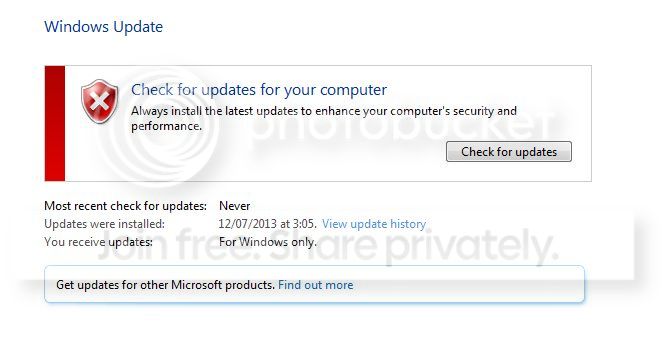
Windows Update Error Codes - Which there is none.
WindowsUpdate.jpg


CBS.zip
View attachment 305707
 

My Computer My Computer

At a glance

Windows 7 Home Premium 64bitIntel i7 3610QM8gbNvidia GTX 660m
Computer type
Laptop
Computer Manufacturer/Model Number
Asus G75 BBK5 FR
OS
Windows 7 Home Premium 64bit
CPU
Intel i7 3610QM
Memory
8gb
Graphics Card(s)
Nvidia GTX 660m
Screen Resolution
1920x1080
Mouse
Logitech m235
You put a spurious space in the command switch - which meant that the command didn't run
The proper syntax is

SFC /SCANNOW
 

My Computer My Computer

At a glance

Win 7 x64 Home Premium (and x86 VirtualBox VM...i3 370M/i7 6500U8GB - finally :)/8GBit's an i3, dude!/dual Intel&nVidia
Computer type
Laptop
Computer Manufacturer/Model Number
Asus K52F or Lenovo B51-80
OS
Win 7 x64 Home Premium (and x86 VirtualBox VM)/Win10
CPU
i3 370M/i7 6500U
Motherboard
Asus/Lenovo
Memory
8GB - finally :)/8GB
Graphics Card(s)
it's an i3, dude!/dual Intel&nVidia
Sound Card
onboard
Monitor(s) Displays
15.6" built-in
Screen Resolution
1366x768/1920x1080
Hard Drives
750GB Seagate internal
Sundry external drives attached to other computers on the local network
1TB SSD on the Lenovo
PSU
n/a
Internet Speed
as much as I can get - usually on a dongle/phone, so <1MB/s
Antivirus
MSE/Defender
Browser
IE11/12/Edge/Chrome/FF(if I must)
Microsoft Windows [Version 6.1.7601]
Copyright (c) 2009 Microsoft Corporation. All rights reserved.

C:\Windows\system32>SFC /SCANNOW

Beginning system scan. This process will take some time.

Beginning verification phase of system scan.
Verification 100% complete.
Windows Resource Protection found corrupt files but was unable to fix some of th
em.
Details are included in the CBS.Log windir\Logs\CBS\CBS.log. For example
C:\Windows\Logs\CBS\CBS.log

C:\Windows\system32>

View attachment 305722
 

My Computer My Computer

At a glance

Windows 7 Home Premium 64bitIntel i7 3610QM8gbNvidia GTX 660m
Computer type
Laptop
Computer Manufacturer/Model Number
Asus G75 BBK5 FR
OS
Windows 7 Home Premium 64bit
CPU
Intel i7 3610QM
Memory
8gb
Graphics Card(s)
Nvidia GTX 660m
Screen Resolution
1920x1080
Mouse
Logitech m235
You have a very common error - the second time I've seen this one in two days!

Code:
 Line 13247: 2014-02-10 19:28:16, Info                  CSI    000002ed [SR] Repairing 1 components
 Line 13248: 2014-02-10 19:28:16, Info                  CSI    000002ee [SR] Beginning Verify and Repair transaction
 Line 13251: 2014-02-10 19:28:16, Info                  CSI    000002f0 [SR] Cannot repair member file [l:22{11}]"PINTLGB.IMD" of Microsoft-Windows-IME-Simplified-Chinese-Core, Version = 6.1.7601.17514, pA = PROCESSOR_ARCHITECTURE_AMD64 (9), Culture neutral, VersionScope = 1 nonSxS, PublicKeyToken = {l:8 b:31bf3856ad364e35}, Type neutral, TypeName neutral, PublicKey neutral in the store, hash mismatch
 Line 13254: 2014-02-10 19:28:16, Info                  CSI    000002f2 [SR] Cannot repair member file [l:22{11}]"PINTLGB.IMD" of Microsoft-Windows-IME-Simplified-Chinese-Core, Version = 6.1.7601.17514, pA = PROCESSOR_ARCHITECTURE_AMD64 (9), Culture neutral, VersionScope = 1 nonSxS, PublicKeyToken = {l:8 b:31bf3856ad364e35}, Type neutral, TypeName neutral, PublicKey neutral in the store, hash mismatch
 Line 13255: 2014-02-10 19:28:16, Info                  CSI    000002f3 [SR] This component was referenced by [l:202{101}]"Microsoft-Windows-Foundation-Package~31bf3856ad364e35~amd64~~6.1.7601.17514.WindowsFoundationDelivery"
 Line 13260: 2014-02-10 19:28:16, Info                  CSI    000002f6 [SR] Could not reproject corrupted file [ml:520{260},l:62{31}]"\??\C:\Windows\IME\IMESC5\DICTS"\[l:22{11}]"PINTLGB.IMD"; source file in store is also corrupted
 Line 13273: 2014-02-10 19:28:16, Info                  CSI    000002f8 [SR] Repair complete


I've uploaded a file - tshaa.zip - to my SkyDrive at Noel's SkyDrive
Please download and save it.

Right-click on the saved file and select Extract all...
Change the target to C:\ and click on Extract
Close all windows (it would be a good idea to print these instructions!)

Now reboot to the Repair Environment - as soon as the machine restarts, start tapping F8 - this should bring up the Advanced Boot Menu, at the top of which should be the option 'Repair my Computer'
Pick that
You'll have to log in with your username and password.

Pick the option to use a Command Prompt
At the prompt type
DIR C:\tshaa
hit the enter key - if you get a 'Not Found' error try
DIR D:\tshaa
or
DIR E:\tshaa


The drive letter in use when you find the folder will need to be substituted (for<drive>) into the following command...


XCOPY <drive>:\tshaa <drive>:\windows\winsxs /y /i /s /v /h


(e.g. XCOPY P:\wfire P:\windows\winsxs /y /i /s /v /h )


run the command (it should take almost no time) and when the prompt returns, type
EXIT
and hit the Enter key to exit Command Prompt - reboot to Normal Mode Windows.

Now run SFC /SCANNOW in an Elevated Command Prompt
then reboot and upload the new CBS.log file to your reply
 

My Computer My Computer

At a glance

Win 7 x64 Home Premium (and x86 VirtualBox VM...i3 370M/i7 6500U8GB - finally :)/8GBit's an i3, dude!/dual Intel&nVidia
Computer type
Laptop
Computer Manufacturer/Model Number
Asus K52F or Lenovo B51-80
OS
Win 7 x64 Home Premium (and x86 VirtualBox VM)/Win10
CPU
i3 370M/i7 6500U
Motherboard
Asus/Lenovo
Memory
8GB - finally :)/8GB
Graphics Card(s)
it's an i3, dude!/dual Intel&nVidia
Sound Card
onboard
Monitor(s) Displays
15.6" built-in
Screen Resolution
1366x768/1920x1080
Hard Drives
750GB Seagate internal
Sundry external drives attached to other computers on the local network
1TB SSD on the Lenovo
PSU
n/a
Internet Speed
as much as I can get - usually on a dongle/phone, so <1MB/s
Antivirus
MSE/Defender
Browser
IE11/12/Edge/Chrome/FF(if I must)
Sfc scannow results
Microsoft Windows [Version 6.1.7601]
Copyright (c) 2009 Microsoft Corporation. All rights reserved.

C:\Windows\system32>sfc /scannow

Beginning system scan. This process will take some time.

Beginning verification phase of system scan.
Verification 100% complete.

Windows Resource Protection did not find any integrity violations.

C:\Windows\system32>

View attachment 305733
 

My Computer My Computer

At a glance

Windows 7 Home Premium 64bitIntel i7 3610QM8gbNvidia GTX 660m
Computer type
Laptop
Computer Manufacturer/Model Number
Asus G75 BBK5 FR
OS
Windows 7 Home Premium 64bit
CPU
Intel i7 3610QM
Memory
8gb
Graphics Card(s)
Nvidia GTX 660m
Screen Resolution
1920x1080
Mouse
Logitech m235
That's a good sign :)

I doubt it will have made any changes to the MGA status - but please try validating at www.microsoft.com/genuine/validate using Internet Explorer, and see what happens. If the green circle spins for more than a couple of minutes, just close it out.

Then post a new MGADiag report.
 

My Computer My Computer

At a glance

Win 7 x64 Home Premium (and x86 VirtualBox VM...i3 370M/i7 6500U8GB - finally :)/8GBit's an i3, dude!/dual Intel&nVidia
Computer type
Laptop
Computer Manufacturer/Model Number
Asus K52F or Lenovo B51-80
OS
Win 7 x64 Home Premium (and x86 VirtualBox VM)/Win10
CPU
i3 370M/i7 6500U
Motherboard
Asus/Lenovo
Memory
8GB - finally :)/8GB
Graphics Card(s)
it's an i3, dude!/dual Intel&nVidia
Sound Card
onboard
Monitor(s) Displays
15.6" built-in
Screen Resolution
1366x768/1920x1080
Hard Drives
750GB Seagate internal
Sundry external drives attached to other computers on the local network
1TB SSD on the Lenovo
PSU
n/a
Internet Speed
as much as I can get - usually on a dongle/phone, so <1MB/s
Antivirus
MSE/Defender
Browser
IE11/12/Edge/Chrome/FF(if I must)
Back
Top