Windows Disk Defrag Doesn't Defrag

Kaiachi

New member
Local time
8:23 AM
Messages
3
Disk defrag stops analyzing at 62% and doesn't go any further. So I downloaded Defraggler and ran it. It worked but it wouldn't defrag down to 0% fragmentation, It still shows 4% after defrag.
 

My Computer

Computer Manufacturer/Model Number
Hewlett-Packard dv7-3165dx
OS
Windows 7 Home Premium 64 bit

My Computer

Computer Manufacturer/Model Number
Insane hobo technologies. ;-)
OS
Windows 7 x64
CPU
Intel i7 2600k
Motherboard
Asrock z68 extreme 4 gen 3
Memory
G.skill Ripjaw 16gigs @ 1866
Graphics Card(s)
Nvidia gtx580 (evga)
Sound Card
Integrated HD audio + hdmi
Monitor(s) Displays
24" ASUS widescreen + 42" insignia
Screen Resolution
1080p (1920x1080)
Hard Drives
128 Samsung 830
256 Samsung 840
3 x 1tb storage drive (various)
1 western digital 1tb (eSATA)
1 Seagate 1tb (eSATA)
PSU
1 kilowatt SLI/Crossfire rated Silverstone modular
Case
NZXT Phantom + additional 220 fan
Cooling
Zalmann
Keyboard
Microsoft wireless 3000 (v2)
Mouse
MS - wireless 5000 (bluetrack)
Internet Speed
depends on if you ask me or my provider.
Other Info
The above information is provided as is, and the author assumes no responsibility for issues it may cause with your sanity or fanboyism.
If you don't mind paying a bit of money, I find PerfectDisk from Raxco to be excellent.
 

My Computer

OS
7x64 SP1
CPU
Intel 2600K
Motherboard
Intel DZ77GA-70K
Memory
8GB Samsung
Graphics Card(s)
MSI 670
Sound Card
HT Omega Striker 7.1
Monitor(s) Displays
Dell U2412M
Screen Resolution
1920x1200
Hard Drives
2x 3TB WD Green
1x 4TB Hitachi
1x Intel 330 Series 180GB SSD
PSU
Corsair HX850
There will always be a degree of fragmentation...

Certain system files cannot be deragged, which you can see in any 3rd party legend (colour explaination). The hibfile.sys and pagefile.sys (can be several GBs per file) are 2 such files that, depending on disk structure at time of install, can end up fragmented.

There may be 3rd party apps out there that can infact defrag these files but you'd have to google them ;)
 

My Computer

Computer Manufacturer/Model Number
Compaq Desktop
OS
Windows 7 Ultimate x64
CPU
AMD Sempron Dual Core
Memory
3GB
Graphics Card(s)
NVIDIA GeForce 6150SE nForce 430
Screen Resolution
1024x768
Hard Drives
150GB Sata
Some NTFS system files cant be defragged on a running system, you will always get some fragmentation with defraggler.

One interesting point is that defraggler seems to count the amount of fragmentation differently to the built in defragger, which shows a higher amount of fragmentation. I think it uses % of file size as opposed to % of number of files.
 

My Computer

Computer type
Laptop
Computer Manufacturer/Model Number
Hewlett-Packard/G62-107SA Notebook
OS
Microsoft Windows 7 Home Premium 64-bit Service Pack 1
CPU
Intel(R) Core(TM) i3 CPU M 330 @ 2.13GHz
Motherboard
Hewlett-Packard 1425
Memory
8 GB DDR3
Graphics Card(s)
Intel(R) HD Graphics
Sound Card
Realtek High Definition Audio
Monitor(s) Displays
Builtin
Screen Resolution
1366 x 768 x 32 bits (4294967296 colors) @ 60 Hz
Hard Drives
250 GB SATA Hard Disk Drive 7200 rpm
2TB Seagate GoFlex USB 2 Drive
1TB Iomega Prestige USB 2 Drive
1.5TB Iomega Prestige USB 2 Drive (Samsung)
2TB WD MyBook Live NAS.
Mouse
Logitech Anywhere MX
Internet Speed
152 Mbs download 10 Mbs upload
Antivirus
Norton 360
Browser
Chrome
I would recommend Diskeeper 2011, you can check out the free trial if you wish.
 

My Computer

OS
Vista
Definitely not free, but O&O is the best defragger. However even with it, you may have a very small percentage of fragmentation after running it only once. Sometimes a second pass will eliminate all fragmentation, but as the others have mentioned, it like other defraggers can't work on locked system files, but it does have a tab which displays exactly which files are fragmented, and to what degree. It is a good idea to empty the Recycle Bin, and disable hibernation and the page file before defragging. You can also uninstall all shadow copies before defragging (create a new one afterward), and then run an offline defrag so that it can handle the only locked file that is probably left (system volume information).

 

My Computer

Computer Manufacturer/Model Number
DIY
OS
W7x64 Pro, SuSe 12.1/** W7 x64 Pro, XP MCE
CPU
Phenom II 1090T w/Noctua NH-D14 /**4400+ X2 w/CM Hyper TX 3
Motherboard
ASRock 890FX Deluxe 4/**A8N-SLI
Memory
2 x 2GB Patriot PGS34g1600LLKA/**4x1GB Corsair VS
Graphics Card(s)
EVGA GTX460 SC/**EVGA 8800GTS
Sound Card
Asus Xonar D2X/**Xonar D1
Monitor(s) Displays
Acer X233H, Dell E152FPc /**LG M237-WD
Screen Resolution
1920x1080 & 1024x768/**1980x1080
Hard Drives
WDC 2TB, 1.5TB, 1TB, 500GB,Seagate 500GB , Maxtor 80GB /**500GB Seagate & WDC 1TB Black
PSU
CM RS600 w/ APC BX1000G/**Antec 500 TP w/ APC BX1000
Case
HAF922/**Antec 1040IIB
Cooling
3x200mm, 1x140 and 1x120mm/**5x80mm fans
Keyboard
Logitech Media USB/**Saitek Eclipse
Mouse
Cordless Trackman Wheel/**Ditto
Internet Speed
3.3Mbps
Other Info
SB 560 5.1 w/ Sennheiser RS140/**Creative T20 speakers, Dvico FusionHDTV7 Gold RT, Cisco E3000, HP 5510V AIO, Linksys E3000, Belkin F5U237 hub and **F5D8055 adapter
(** = 2nd rig)
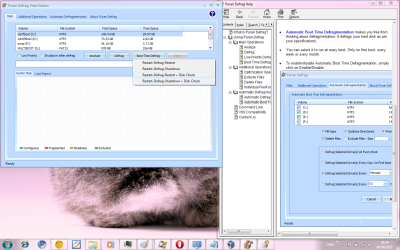
There are several good free defraggers. I used Auslogics Disk and Registry for ten years but recently have been more impressed by Puran which has a boot-time defrag that isn't interfered with by system files running. If you choose "Intelligent Optimizer" on its config tab it arranges the files so that you get better performance even on the slowest hardware.
 
OK, different people would recommend different 3rd party defragging software. But I have a rule that I often always do, that is do a cleaning of junk files with CCleaner before defragging. I would clear even browsing history and recycle bin..etc. That would in turn lessen the files to defrag and make the defragging operation finish faster. I use IObit Smart Defrag v2, there's a free version of it but its your choice on what to use.
 

My Computer

Computer Manufacturer/Model Number
Custom Built
OS
Windows 7 Ultimate 32 Bit, Windows Developer Preview, Linux Mint 9 Gnome 32 Bit
CPU
Intel Pentium Dual CPU E2180@2GHz
Motherboard
Elitegroup 671T-M3
Graphics Card(s)
NVIDIA GeForce 7200 GS
Monitor(s) Displays
AOC TFT1560 15" LCD Monitor
Screen Resolution
1024x768
Keyboard
Logitech USB Keyboard
If you use a sophisticated defragger/optimizer, it will delete files of your choice as it defragments, and exclude other files of your choice. To make things even faster, very large files can be excluded to make the defrag as quick as possible.. If it is defragmented at boot time, before Windows opens up a lot of system files, services and applications, those files can be defragmented too.

puran.pngpuran1.png
 

My Computer

Computer Manufacturer/Model Number
Acer 7520, Packard Bell dot se, Acer travelmate 2423
OS
Win 7 Ult + Starter, XP Pro +Home, 2kAS, Linux Mint 8, SuperOS
CPU
AMD 64 Athlon X2 , Intel Atom N450, Intel Celeron M 1.50 Ghz
Motherboard
Acer Fuquene
Memory
2.5GB ; 1GB; 2GB
Graphics Card(s)
Nvidia GeForce7000m; Intel; Intel
Sound Card
Realtek AC57
Monitor(s) Displays
17" ;10.1"; 19"
Screen Resolution
1440x900;1024x600;1440x900;
Hard Drives
WD 80, WD 320;
PSU
19v
Case
Laptop
Cooling
Air
Internet Speed
9.7Mb/s down 0.99Mb/s up
Other Info
ISP VIRGINMEDIA 10M cable broadband - D-Link DIR615 wireless router, 3Com OfficeConnect ASDL router used as wireless extender switch
Back
Top