Windows does not detect HDD sometimes

mboweman

New member
Local time
11:29 AM
Messages
15
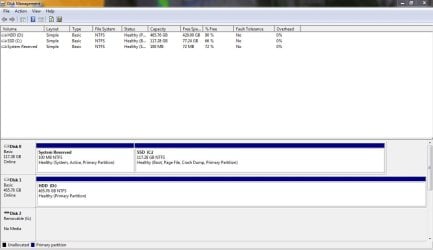
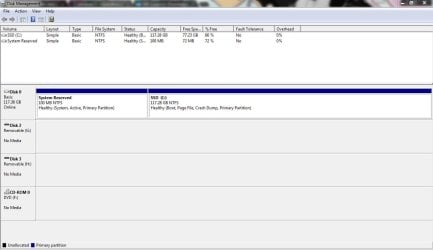
Hello, first post on these forums. I have a brand new rig I built recently and I've been a bit frustrated with this problem with my HDD. I have an SSD with Windows on my first SATA port, and an HDD on the second. My BIOS has no problem detecting the HDD, however it only shows up in Windows about half the time. When it doesn't show up I usually restart and it will appear. I have tried reseating the SATA cables numerous times. Everything in this PC is brand new, so I don't understand how it could be a failing drive/cable. If anyone has any suggestions I would appreciate it.
 

My Computer

Computer type
PC/Desktop
Computer Manufacturer/Model Number
Custom built
OS
Windows 7 Ultimate x64
CPU
i7 4770k
Motherboard
Asus Z87-A
Memory
8GB Kingston HyperX Red
Graphics Card(s)
EVGA GTX 465
Hard Drives
SSD: SanDisk SDSSDP 128GB
HDD: Western Digital WDC 500GB
Antivirus
MSE
Browser
Chrome
Hello, first post on these forums. I have a brand new rig I built recently and I've been a bit frustrated with this problem with my HDD. I have an SSD with Windows on my first SATA port, and an HDD on the second. My BIOS has no problem detecting the HDD, however it only shows up in Windows about half the time. When it doesn't show up I usually restart and it will appear. I have tried reseating the SATA cables numerous times. Everything in this PC is brand new, so I don't understand how it could be a failing drive/cable. If anyone has any suggestions I would appreciate it.

Could you post the Disk Management using your Snipping Tool. If you could post the one where it does show and one where it does not show, that might help. http://www.sevenforums.com/tutorials/9733-screenshots-files-upload-post-seven-forums.html
 

My Computer

Computer type
PC/Desktop
Computer Manufacturer/Model Number
Custom Build
OS
Windows 7 Home Premium 32-Bit - Build 7600 SP1
CPU
Intel Core i3-2120 3.30Ghz
Motherboard
Asus P8Z68-V LX Intel Z68 Socket H2 ATX
Memory
Kingston 4 GB DDR3 1333 mhz
Graphics Card(s)
AMD Radeon HD6670
Sound Card
Sound Blaster Audigy SE 24-Bit
Monitor(s) Displays
Asus VE228
Screen Resolution
1440 X 900
Hard Drives
OCZ Vertex 3 120 GB Sata 3 SSD ==
Kingston SH103/S3 120 G Hyper X 120 GB SSD ==
Western Digital 500 GB Caviar Green 7200 RPM ==
PSU
Corsair CX600M == 600 Watt
Case
NZXT Apollo - Silver with Clear Side Panel
Cooling
Three 120 mm Fans
Keyboard
Microsoft Natural 4000
Mouse
Microsoft Custom Optical 3000
Internet Speed
AT&T Fiber Optic Wireless Network
Antivirus
Microsoft Security Essentials
Browser
Chrome
Other Info
120 mm Blue LED Fan -- Three Blue LED Lazer Light Sticks
Hello, first post on these forums. I have a brand new rig I built recently and I've been a bit frustrated with this problem with my HDD. I have an SSD with Windows on my first SATA port, and an HDD on the second. My BIOS has no problem detecting the HDD, however it only shows up in Windows about half the time. When it doesn't show up I usually restart and it will appear. I have tried reseating the SATA cables numerous times. Everything in this PC is brand new, so I don't understand how it could be a failing drive/cable. If anyone has any suggestions I would appreciate it.

Could you post the Disk Management using your Snipping Tool. If you could post the one where it does show and one where it does not show, that might help. http://www.sevenforums.com/tutorials/9733-screenshots-files-upload-post-seven-forums.html

Here you go.
 

Attachments

  • withHDD.JPG
    withHDD.JPG
    102 KB · Views: 6
  • withoutHDD.JPG
    withoutHDD.JPG
    96.7 KB · Views: 4

My Computer

Computer type
PC/Desktop
Computer Manufacturer/Model Number
Custom built
OS
Windows 7 Ultimate x64
CPU
i7 4770k
Motherboard
Asus Z87-A
Memory
8GB Kingston HyperX Red
Graphics Card(s)
EVGA GTX 465
Hard Drives
SSD: SanDisk SDSSDP 128GB
HDD: Western Digital WDC 500GB
Antivirus
MSE
Browser
Chrome
This is strange. == You have probably done this, but plug the HDD into a different SATA port and see if it makes any difference.
 

My Computer

Computer type
PC/Desktop
Computer Manufacturer/Model Number
Custom Build
OS
Windows 7 Home Premium 32-Bit - Build 7600 SP1
CPU
Intel Core i3-2120 3.30Ghz
Motherboard
Asus P8Z68-V LX Intel Z68 Socket H2 ATX
Memory
Kingston 4 GB DDR3 1333 mhz
Graphics Card(s)
AMD Radeon HD6670
Sound Card
Sound Blaster Audigy SE 24-Bit
Monitor(s) Displays
Asus VE228
Screen Resolution
1440 X 900
Hard Drives
OCZ Vertex 3 120 GB Sata 3 SSD ==
Kingston SH103/S3 120 G Hyper X 120 GB SSD ==
Western Digital 500 GB Caviar Green 7200 RPM ==
PSU
Corsair CX600M == 600 Watt
Case
NZXT Apollo - Silver with Clear Side Panel
Cooling
Three 120 mm Fans
Keyboard
Microsoft Natural 4000
Mouse
Microsoft Custom Optical 3000
Internet Speed
AT&T Fiber Optic Wireless Network
Antivirus
Microsoft Security Essentials
Browser
Chrome
Other Info
120 mm Blue LED Fan -- Three Blue LED Lazer Light Sticks
This is strange. == You have probably done this, but plug the HDD into a different SATA port and see if it makes any difference.

I've moved it to SATA3, will see if that does any good. I should add that I've been having another possibly related issue, but I don't know if I should make a whole new thread for it. Sometimes Windows hangs on shutdown or startup, in which the only solution is to reset. I checked the event log and I'm seeing some errors with services like svchost.exe, nvvsvc.exe, and nvxdsync.exe.
 

My Computer

Computer type
PC/Desktop
Computer Manufacturer/Model Number
Custom built
OS
Windows 7 Ultimate x64
CPU
i7 4770k
Motherboard
Asus Z87-A
Memory
8GB Kingston HyperX Red
Graphics Card(s)
EVGA GTX 465
Hard Drives
SSD: SanDisk SDSSDP 128GB
HDD: Western Digital WDC 500GB
Antivirus
MSE
Browser
Chrome
This is strange. == You have probably done this, but plug the HDD into a different SATA port and see if it makes any difference.

I've moved it to SATA3, will see if that does any good. I should add that I've been having another possibly related issue, but I don't know if I should make a whole new thread for it. Sometimes Windows hangs on shutdown or startup, in which the only solution is to reset. I checked the event log and I'm seeing some errors with services like svchost.exe, nvvsvc.exe, and nvxdsync.exe.

We can work out both problems in this thread. Have you done a Virus Scan lately. If you do not have one installed this is a good free one. Microsoft Security Essentials - Microsoft Windows
== Since you are having two problems, you might try a Repair Install. This instructs you how. http://www.sevenforums.com/tutorials/3413-repair-install.html It will not remove any of your settings, but just correct files that might be giving you problems.
 

My Computer

Computer type
PC/Desktop
Computer Manufacturer/Model Number
Custom Build
OS
Windows 7 Home Premium 32-Bit - Build 7600 SP1
CPU
Intel Core i3-2120 3.30Ghz
Motherboard
Asus P8Z68-V LX Intel Z68 Socket H2 ATX
Memory
Kingston 4 GB DDR3 1333 mhz
Graphics Card(s)
AMD Radeon HD6670
Sound Card
Sound Blaster Audigy SE 24-Bit
Monitor(s) Displays
Asus VE228
Screen Resolution
1440 X 900
Hard Drives
OCZ Vertex 3 120 GB Sata 3 SSD ==
Kingston SH103/S3 120 G Hyper X 120 GB SSD ==
Western Digital 500 GB Caviar Green 7200 RPM ==
PSU
Corsair CX600M == 600 Watt
Case
NZXT Apollo - Silver with Clear Side Panel
Cooling
Three 120 mm Fans
Keyboard
Microsoft Natural 4000
Mouse
Microsoft Custom Optical 3000
Internet Speed
AT&T Fiber Optic Wireless Network
Antivirus
Microsoft Security Essentials
Browser
Chrome
Other Info
120 mm Blue LED Fan -- Three Blue LED Lazer Light Sticks
This is strange. == You have probably done this, but plug the HDD into a different SATA port and see if it makes any difference.

I've moved it to SATA3, will see if that does any good. I should add that I've been having another possibly related issue, but I don't know if I should make a whole new thread for it. Sometimes Windows hangs on shutdown or startup, in which the only solution is to reset. I checked the event log and I'm seeing some errors with services like svchost.exe, nvvsvc.exe, and nvxdsync.exe.

We can work out both problems in this thread. Have you done a Virus Scan lately. If you do not have one installed this is a good free one. Microsoft Security Essentials - Microsoft Windows
== Since you are having two problems, you might try a Repair Install. This instructs you how. http://www.sevenforums.com/tutorials/3413-repair-install.html It will not remove any of your settings, but just correct files that might be giving you problems.

I have MSE and have reinstalled Windows completely several times, and it did not fix the problem. Today I called Western Digital and they believe the drive is defective, so I'm being mailed a new one to replace it. Hopefully that will fix the issue. Just wanted to post this in case anyone else is having the same problem.
 

My Computer

Computer type
PC/Desktop
Computer Manufacturer/Model Number
Custom built
OS
Windows 7 Ultimate x64
CPU
i7 4770k
Motherboard
Asus Z87-A
Memory
8GB Kingston HyperX Red
Graphics Card(s)
EVGA GTX 465
Hard Drives
SSD: SanDisk SDSSDP 128GB
HDD: Western Digital WDC 500GB
Antivirus
MSE
Browser
Chrome
Thanks. If that does not do the job, let us know.
 

My Computer

Computer type
PC/Desktop
Computer Manufacturer/Model Number
Custom Build
OS
Windows 7 Home Premium 32-Bit - Build 7600 SP1
CPU
Intel Core i3-2120 3.30Ghz
Motherboard
Asus P8Z68-V LX Intel Z68 Socket H2 ATX
Memory
Kingston 4 GB DDR3 1333 mhz
Graphics Card(s)
AMD Radeon HD6670
Sound Card
Sound Blaster Audigy SE 24-Bit
Monitor(s) Displays
Asus VE228
Screen Resolution
1440 X 900
Hard Drives
OCZ Vertex 3 120 GB Sata 3 SSD ==
Kingston SH103/S3 120 G Hyper X 120 GB SSD ==
Western Digital 500 GB Caviar Green 7200 RPM ==
PSU
Corsair CX600M == 600 Watt
Case
NZXT Apollo - Silver with Clear Side Panel
Cooling
Three 120 mm Fans
Keyboard
Microsoft Natural 4000
Mouse
Microsoft Custom Optical 3000
Internet Speed
AT&T Fiber Optic Wireless Network
Antivirus
Microsoft Security Essentials
Browser
Chrome
Other Info
120 mm Blue LED Fan -- Three Blue LED Lazer Light Sticks
Well, after receiving the brand new hard drive and swapping it in, everything worked perfectly for a little while but now I am encountering the same problem again. I have also had occasional trouble booting up, and today I had a STOP 0x000000F4 error, which seems to be related to hardware failure from what I'm reading.
 

My Computer

Computer type
PC/Desktop
Computer Manufacturer/Model Number
Custom built
OS
Windows 7 Ultimate x64
CPU
i7 4770k
Motherboard
Asus Z87-A
Memory
8GB Kingston HyperX Red
Graphics Card(s)
EVGA GTX 465
Hard Drives
SSD: SanDisk SDSSDP 128GB
HDD: Western Digital WDC 500GB
Antivirus
MSE
Browser
Chrome

My Computer

Computer type
PC/Desktop
Computer Manufacturer/Model Number
Custom Build
OS
Windows 7 Home Premium 32-Bit - Build 7600 SP1
CPU
Intel Core i3-2120 3.30Ghz
Motherboard
Asus P8Z68-V LX Intel Z68 Socket H2 ATX
Memory
Kingston 4 GB DDR3 1333 mhz
Graphics Card(s)
AMD Radeon HD6670
Sound Card
Sound Blaster Audigy SE 24-Bit
Monitor(s) Displays
Asus VE228
Screen Resolution
1440 X 900
Hard Drives
OCZ Vertex 3 120 GB Sata 3 SSD ==
Kingston SH103/S3 120 G Hyper X 120 GB SSD ==
Western Digital 500 GB Caviar Green 7200 RPM ==
PSU
Corsair CX600M == 600 Watt
Case
NZXT Apollo - Silver with Clear Side Panel
Cooling
Three 120 mm Fans
Keyboard
Microsoft Natural 4000
Mouse
Microsoft Custom Optical 3000
Internet Speed
AT&T Fiber Optic Wireless Network
Antivirus
Microsoft Security Essentials
Browser
Chrome
Other Info
120 mm Blue LED Fan -- Three Blue LED Lazer Light Sticks
It happened again today for the first time in months. Interestingly, my external was plugged in at the time, which it usually isn't. I was also using my external a lot when I was having this issue back in January. I think this is definitely more than a coincidence. It seems that having the external hard drive plugged in during boot interferes with the internal HDD being detected. Any idea why this might be?
 

My Computer

Computer type
PC/Desktop
Computer Manufacturer/Model Number
Custom built
OS
Windows 7 Ultimate x64
CPU
i7 4770k
Motherboard
Asus Z87-A
Memory
8GB Kingston HyperX Red
Graphics Card(s)
EVGA GTX 465
Hard Drives
SSD: SanDisk SDSSDP 128GB
HDD: Western Digital WDC 500GB
Antivirus
MSE
Browser
Chrome
It happened again today for the first time in months. Interestingly, my external was plugged in at the time, which it usually isn't. I was also using my external a lot when I was having this issue back in January. I think this is definitely more than a coincidence. It seems that having the external hard drive plugged in during boot interferes with the internal HDD being detected. Any idea why this might be?

No, I don't have any idea. I would suggest, don't boot with the external plugged in. Boot and after it is running, connect the external. I always do that.
 

My Computer

Computer type
PC/Desktop
Computer Manufacturer/Model Number
Custom Build
OS
Windows 7 Home Premium 32-Bit - Build 7600 SP1
CPU
Intel Core i3-2120 3.30Ghz
Motherboard
Asus P8Z68-V LX Intel Z68 Socket H2 ATX
Memory
Kingston 4 GB DDR3 1333 mhz
Graphics Card(s)
AMD Radeon HD6670
Sound Card
Sound Blaster Audigy SE 24-Bit
Monitor(s) Displays
Asus VE228
Screen Resolution
1440 X 900
Hard Drives
OCZ Vertex 3 120 GB Sata 3 SSD ==
Kingston SH103/S3 120 G Hyper X 120 GB SSD ==
Western Digital 500 GB Caviar Green 7200 RPM ==
PSU
Corsair CX600M == 600 Watt
Case
NZXT Apollo - Silver with Clear Side Panel
Cooling
Three 120 mm Fans
Keyboard
Microsoft Natural 4000
Mouse
Microsoft Custom Optical 3000
Internet Speed
AT&T Fiber Optic Wireless Network
Antivirus
Microsoft Security Essentials
Browser
Chrome
Other Info
120 mm Blue LED Fan -- Three Blue LED Lazer Light Sticks
Just to update this thread: I fixed the problem, and the cause was the last thing I would have guessed. It was the CASE! After spending countless hours talking to my HDD, motherboard, and eventually case manufacturers, I found the issue. Apparently, there was some sort of grounding issue caused by the metal standoffs on the case that the motherboard is mounted to, and for whatever reason this was causing problems with HDD detection, and even causing the CPU to get stuck at POST sometimes.

I took all the parts out of my case and assembled them on top of a piece of cardboard, and now everything works perfectly. I just have to decide what I'm going to do with this case now.
 

My Computer

Computer type
PC/Desktop
Computer Manufacturer/Model Number
Custom built
OS
Windows 7 Ultimate x64
CPU
i7 4770k
Motherboard
Asus Z87-A
Memory
8GB Kingston HyperX Red
Graphics Card(s)
EVGA GTX 465
Hard Drives
SSD: SanDisk SDSSDP 128GB
HDD: Western Digital WDC 500GB
Antivirus
MSE
Browser
Chrome
Back
Top