Windows Easy Transfer question

vlakarmis

New member
Local time
10:01 PM
Messages
5
Hello,

I am trying to reinstall windows 32 bit on my mother's netbook as the repair person she took it to in Tunisia installed a non legit copy of windows 7 professional in French, so thats a double no no.

What I wanted to do is to use Window Easy Transfer to migrate her files to my laptop, reinstall windows using the original Windows 7 iso I have in a bootable USB drive and then migrate the files back to her fresh install.

The problem with this is that I am not sure whether by selecting my laptop as the new computer that Windows easy transfer will overwrite settings on my computer. I just want to transfer the files and settings but not for them to take effect on my laptop. So I have resorted to just connecting on the homegroup and using file sharing to transfer a hefty 14gb of files of a wireless network. Needless to say its taking forever.

Does anyone know if by saying that my laptop is the 'new computer' that it will have adverse effects, such as overwriting settings etc? or Will it just copy the files. I do not have much experience with Windows 7 and am currently studying for the 70-680 exam for microsoft, so migration is a big subject for me to master. Thanks in advance for your help
 

My Computer

Computer type
Laptop
Computer Manufacturer/Model Number
Lenovo
OS
Windows 7 64 Bit
CPU
Intel Core I5 2.5ghz
Memory
8 gb
Graphics Card(s)
Nvidia Geforce 2 gb
Antivirus
Kaspersky 2012
Browser
Chrome
It will likely bork your files. In your position, I don't think I would try to use Easy Transfer.

That's just me, other posters may know more.
 

My Computer

Computer type
PC/Desktop
Computer Manufacturer/Model Number
Mellon Labs (custom build)
OS
Win 7 Pro x64/Win 10 Pro x64 dual boot
CPU
AMD FX 8350 Vishera @ 4200
Motherboard
ASUS M5A97 R2.0
Memory
16 GB Mushkin Blackline DDR3-2400 @ 1866 (9-10-10-10-31)
Graphics Card(s)
XFX Radeon R9 280 Double D Black Edition
Sound Card
Realtek HD Audio on MB. Sounds great.
Monitor(s) Displays
Acer 24", Acer 22"
Screen Resolution
3840 x 1080
Hard Drives
1 x Mushkin Chronos 120 GB SSD (Win 10)
1 x Samsung 850 EVO 250 GB SSD (Win 7)
1 x WD 1TB SATA Blue
1 x WD 1TB SATA Green
PSU
Corsair TX-750
Case
CoolerMaster HAF 912+
Cooling
Coolermaster Seidon 240M Liquid AIO. 6 case fans
Keyboard
Logitech G710+
Mouse
Logitech G500s
Internet Speed
Much better since I got fiber, but still way overpriced.
Antivirus
MSE, Malware Bytes for scanning
Browser
Firefox
Other Info
Corsair VOID USB headphones.

A Mellon Labs X-1 - LCD Smartie driven system status display.

Brought to you by the letter E
Hello,

I am trying to reinstall windows 32 bit on my mother's netbook as the repair person she took it to in Tunisia installed a non legit copy of windows 7 professional in French, so thats a double no no.

What I wanted to do is to use Window Easy Transfer to migrate her files to my laptop, reinstall windows using the original Windows 7 iso I have in a bootable USB drive and then migrate the files back to her fresh install.

The problem with this is that I am not sure whether by selecting my laptop as the new computer that Windows easy transfer will overwrite settings on my computer. I just want to transfer the files and settings but not for them to take effect on my laptop. So I have resorted to just connecting on the homegroup and using file sharing to transfer a hefty 14gb of files of a wireless network. Needless to say its taking forever.

Does anyone know if by saying that my laptop is the 'new computer' that it will have adverse effects, such as overwriting settings etc? or Will it just copy the files. I do not have much experience with Windows 7 and am currently studying for the 70-680 exam for microsoft, so migration is a big subject for me to master. Thanks in advance for your help

If mothers PC is setup so that the Docs are on a different partition than the OS, there is no need to do anything but reinstall the OS.
 

My Computer

Computer type
PC/Desktop
Computer Manufacturer/Model Number
Custom Build
OS
Windows 7 Home Premium 32-Bit - Build 7600 SP1
CPU
Intel Core i3-2120 3.30Ghz
Motherboard
Asus P8Z68-V LX Intel Z68 Socket H2 ATX
Memory
Kingston 4 GB DDR3 1333 mhz
Graphics Card(s)
AMD Radeon HD6670
Sound Card
Sound Blaster Audigy SE 24-Bit
Monitor(s) Displays
Asus VE228
Screen Resolution
1440 X 900
Hard Drives
OCZ Vertex 3 120 GB Sata 3 SSD ==
Kingston SH103/S3 120 G Hyper X 120 GB SSD ==
Western Digital 500 GB Caviar Green 7200 RPM ==
PSU
Corsair CX600M == 600 Watt
Case
NZXT Apollo - Silver with Clear Side Panel
Cooling
Three 120 mm Fans
Keyboard
Microsoft Natural 4000
Mouse
Microsoft Custom Optical 3000
Internet Speed
AT&T Fiber Optic Wireless Network
Antivirus
Microsoft Security Essentials
Browser
Chrome
Other Info
120 mm Blue LED Fan -- Three Blue LED Lazer Light Sticks
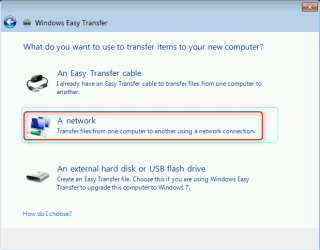
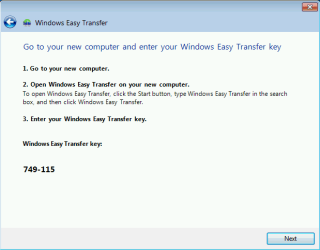
You need to use an external storage for this. Selecting Network as Easy Transfer method is only possible when you are transferring files and settings directly from your old Windows PC to a new one.

Selecting network here...

2014-01-12_02h19_54.png

... will not allow you to save the WET file on a networked computer but instead after telling WET this is your old PC, it asks you to start the file transferring directly on the new PC.

2014-01-12_02h26_14.png

Using an external USB drive will allow you to save the WET file on it, re-install your mom's Windows and then restore the WET file.

Tutorial: http://www.sevenforums.com/tutorials/11470-windows-easy-transfer-transfer-computers.html

Kari
 

My Computer

Computer type
Laptop
Computer Manufacturer/Model Number
HP ENVY 17-1150eg
OS
Windows 10 Pro x64 EN-GB
CPU
1.6 GHz Intel Core i7-720QM Processor
Memory
6 GB
Graphics Card(s)
ATI Mobility Radeon HD 5850 Graphics
Sound Card
Beats sound system with integrated subwoofer
Monitor(s) Displays
17" laptop display, 22" LED and 32" Full HD TV through HDMI
Screen Resolution
1600*900 (1), 1920*1080 (2&3)
Hard Drives
Internal: 2 x 500 GB SATA Hard Disk Drive 7200 rpm
External: 2TB for backups, 3TB USB3 network drive for media
Cooling
As Envy runs a bit warm, I have it on a Cooler Master pad
Keyboard
Logitech diNovo Media Desktop Laser (bluetooth)
Mouse
Logitech Performance Mouse MX
Internet Speed
50/10 Mbps VDSL
Antivirus
Windows Defender 4.3.9431.0
Browser
Maxthon 3.5.2., IE11
Back
Top