
subham kumar
New member
- Local time
- 12:17 AM
- Messages
- 1
Hello all, I was using the MSE on my laptop, I then removed it using a web tutorial, after I installed a purchased copy of Quick heal total security 2014 on the same pc.
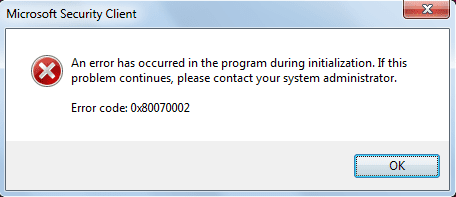
But when I restarted my pc, then it shows an error message on startup with error code 0x80070002,
Please see the real error message below,

Please help me with the solution as soon as possible.
Thanks in advance.
But when I restarted my pc, then it shows an error message on startup with error code 0x80070002,
Please see the real error message below,
Please help me with the solution as soon as possible.
Thanks in advance.
Attachments
My Computer
At a glance
Windows 7 Home Basic, 64 bitCORE i32 GB
- Computer type
- Laptop
- Computer Manufacturer/Model Number
- sony vaio
- OS
- Windows 7 Home Basic, 64 bit
- CPU
- CORE i3
- Memory
- 2 GB
- Hard Drives
- 320 GB
- Antivirus
- QUICK HEAL TOTAL SECURITY
- Browser
- FIRE FOX


