
Windows Experience Index - Reset

How to Reset the Windows Experience Index (WEI) in Vista, Windows 7, or Windows 8

   Information
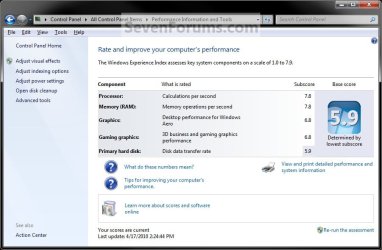
The Windows Experience Index is a measurement that tells you how well your PC works with Windows and uses a base score to rate the experience you can expect. A higher base score usually means that your PC will be faster and more responsive than a PC with a lower base score.

Each piece of hardware in your PC gets its own score called a subscore. The total base score for your PC is determined by the lowest individual subscore, rather than an average of them all. You can view the subscores to see how the hardware you care most about is performing, which can help your decide whether to upgrade some parts of your PC.

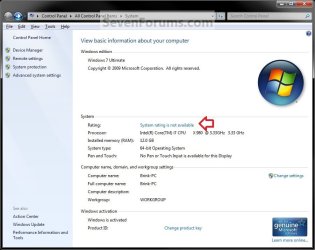
This tutorial will show you how to reset the Windows Experience Index (WEI) as unrated in Vista, Windows 7, and Windows 8. This way you can rate your computer WEI score again with a clean slate.


EXAMPLE: Windows Experience Index (WEI) with a Score
Default.jpg
EXAMPLE: Windows Experience Index (WEI) Reset to Unrated
WEI-1.jpg

WEI-2.jpg


OPTION ONE

Reset WEI in Advanced Tools


NOTE: This option is not available in Windows 8.1. To completely reset WEI, you should do either Option Two or Option Three below since they delete all of the .xml files so you can start fresh again.
1. Open the Control Panel (icons view), then click\tap on Performance and Information Tools.

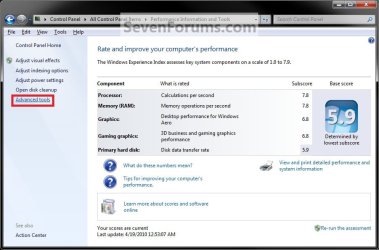
2. In the left pane, click\tap on the Advanced Tools link. (see screenshot below)
one.jpg
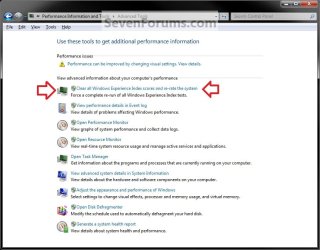
3. Click on the Clear all Windows Experience Index scores and re-rate the system link. (see screenshot below)
Two.jpg
4. If prompted by UAC, click on Yes if administrator or enter the administrator's password if standard user.

5. The WEI score will now be reset, and the WEI tests will now run automatically to rate this computer for a new WEI score.


OPTION TWO

Reset WEI in an Elevated Command Prompt


1. Open an elevated command prompt.

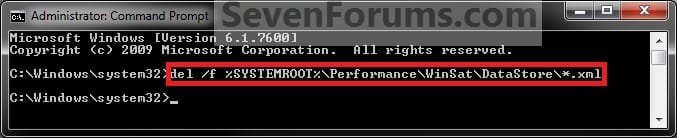
2. In the elevated command prompt, copy and paste (or type) the command below and press enter. (see screenshot below)

Code:
del /f %SYSTEMROOT%\Performance\WinSat\DataStore\*.xml
CMD.jpg
3. WEI has now been reset. You can now update your WEI score in Vista/Windows 7 or Windows 8/8.1 if you like.


OPTION THREE

Reset WEI Manually in Windows Explorer


1. Open Windows Explorer, and navigate to the location below.
NOTE: You can also "copy and paste" this location in the Start Menu search box and press enter to open directly to it.
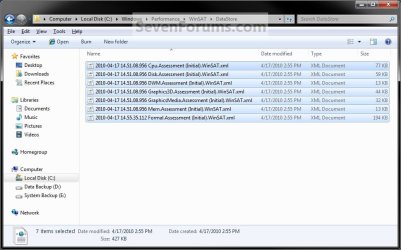
C:\Windows\Performance\WinSat\DataStore
2. In the DataStore folder, select only all of the listed .xml files and delete them. (see screenshot below)
files.jpg
3. Close Windows Explorer.

4. WEI has now been reset. You can now update your WEI score in Vista/Windows 7 or Windows 8/8.1 if you like.

That's it,
Shawn


Last edited:
Shouldn't this option be included in the tutorial, even though it doesn't seem to clear the older scores like it says it will?

Control Panel/Performance Information and Tools/Advanced tools/Clear all Windows Experience Index Scores and Re-Rate The System
 

My Computer

Computer type
PC/Desktop
Computer Manufacturer/Model Number
Airbot 2.0
OS
Windows 7 Ultimate x64 SP1
CPU
Core i7 920 (D0) @ 4Ghz, *26c idle *65c full load on air
Motherboard
Asus P6X58D Premium - Sata 6Gb/s - USB 3.0
Memory
12GB DDR3 Corsair Dominator -CMD12GX3M6A1600C8 at 1600MHz
Graphics Card(s)
Zotac Geforce GTX 770
Sound Card
ASUS Xonar D2X
Monitor(s) Displays
1 LG 24" Flatron W2453V-PF 1 Samsung 24" P2450H both 2ms RT
Screen Resolution
1920x1080@60hz
Hard Drives
1 Samsung 250GB 840 Evo SSD
1 OCZ Vertex2 180GB SSD
1 TB Samsung Spinpoint F1 7200RPM 32MB cache
2 500GB WD Caviar Blacks 7200RPM 32MB cache (WD5001AALS)

Pioneer DVD Burner DVR-S18M
PSU
Corsair HX1000W
Case
Cooler Master HAF 932
Cooling
Case Fans *3 230mm, *1 140mm/CPU - *Tuniq Tower 120 Extreme
Keyboard
Logitech Wireless MK700
Mouse
Logitech Wireless MK700
Internet Speed
DL 15 Mbps UL 0.98 Mbps
Antivirus
None
Browser
Firefox Nightly
Other Info
Processor-7.7 *RAM- 7.9 *Graphics-7.9 *Gaming Graphics- 7.9 *SSD- 7.8 W.E.I final score= 7.7
*Phone- LG Nexus 5
Hi Aaron,

Option added. Thank you. I forgot about that one. :)

It does reset the scores, but you will not notice that it say unrated unless you open another Performance Information and Tools window (refreshed) real quick while it's still runing the WEI tests.
 
Last edited:

My Computer

Computer type
PC/Desktop
Computer Manufacturer/Model Number
Self built custom
OS
64-bit Windows 11 Pro for Workstations
CPU
Intel i7-8700K OC'd to 5 GHz
Motherboard
ASUS ROG Maximus XI Formula Z390
Memory
64 GB (4x16GB) G.SKILL TridentZ RGB DDR4 3600 MHz
Graphics Card(s)
ASUS ROG-STRIX-GTX1080TI-O11G-GAMING
Sound Card
Integrated
Monitor(s) Displays
2 x Samsung Odyssey G7 27"
Screen Resolution
2560x1440
Hard Drives
1TB Samsung 990 PRO M.2,
4TB Samsung 990 PRO PRO M.2,
TerraMaster F8 SSD Plus NAS
PSU
Seasonic Prime Titanium 850W
Case
Thermaltake Core P3
Cooling
Corsair Hydro H115i
Keyboard
Logitech wireless K800
Mouse
Logitech MX Master 4
Internet Speed
2 Gb/s Download and 100 Mb/s Upload
Antivirus
Malwarebyte Anti-Malware Premium
Browser
Google Chrome
Other Info
Logitech Z625 speaker system,
Logitech BRIO 4K Pro webcam,
HP Color LaserJet Pro MFP M477fdn,
APC SMART-UPS RT 1000 XL - SURT1000XLI,
Galaxy S23 Plus phone
Oh, maybe I'm misunderstanding what it means when it says clear all scores and re-rate. When it says clears all scores, I was thinking it deletes any existing xml files in the Datastore, then re-rates it. Which it doesn't. I guess it just means it clears the present scores, and re-runs it.
 

My Computer

Computer type
PC/Desktop
Computer Manufacturer/Model Number
Airbot 2.0
OS
Windows 7 Ultimate x64 SP1
CPU
Core i7 920 (D0) @ 4Ghz, *26c idle *65c full load on air
Motherboard
Asus P6X58D Premium - Sata 6Gb/s - USB 3.0
Memory
12GB DDR3 Corsair Dominator -CMD12GX3M6A1600C8 at 1600MHz
Graphics Card(s)
Zotac Geforce GTX 770
Sound Card
ASUS Xonar D2X
Monitor(s) Displays
1 LG 24" Flatron W2453V-PF 1 Samsung 24" P2450H both 2ms RT
Screen Resolution
1920x1080@60hz
Hard Drives
1 Samsung 250GB 840 Evo SSD
1 OCZ Vertex2 180GB SSD
1 TB Samsung Spinpoint F1 7200RPM 32MB cache
2 500GB WD Caviar Blacks 7200RPM 32MB cache (WD5001AALS)

Pioneer DVD Burner DVR-S18M
PSU
Corsair HX1000W
Case
Cooler Master HAF 932
Cooling
Case Fans *3 230mm, *1 140mm/CPU - *Tuniq Tower 120 Extreme
Keyboard
Logitech Wireless MK700
Mouse
Logitech Wireless MK700
Internet Speed
DL 15 Mbps UL 0.98 Mbps
Antivirus
None
Browser
Firefox Nightly
Other Info
Processor-7.7 *RAM- 7.9 *Graphics-7.9 *Gaming Graphics- 7.9 *SSD- 7.8 W.E.I final score= 7.7
*Phone- LG Nexus 5
Nope, I see the same thing. Option One only seems to mark it as unrated and add to the .xml files with the new date, but doesn't delete the .xml files like Option Two & Three does for a more thorough reset.
 

My Computer

Computer type
PC/Desktop
Computer Manufacturer/Model Number
Self built custom
OS
64-bit Windows 11 Pro for Workstations
CPU
Intel i7-8700K OC'd to 5 GHz
Motherboard
ASUS ROG Maximus XI Formula Z390
Memory
64 GB (4x16GB) G.SKILL TridentZ RGB DDR4 3600 MHz
Graphics Card(s)
ASUS ROG-STRIX-GTX1080TI-O11G-GAMING
Sound Card
Integrated
Monitor(s) Displays
2 x Samsung Odyssey G7 27"
Screen Resolution
2560x1440
Hard Drives
1TB Samsung 990 PRO M.2,
4TB Samsung 990 PRO PRO M.2,
TerraMaster F8 SSD Plus NAS
PSU
Seasonic Prime Titanium 850W
Case
Thermaltake Core P3
Cooling
Corsair Hydro H115i
Keyboard
Logitech wireless K800
Mouse
Logitech MX Master 4
Internet Speed
2 Gb/s Download and 100 Mb/s Upload
Antivirus
Malwarebyte Anti-Malware Premium
Browser
Google Chrome
Other Info
Logitech Z625 speaker system,
Logitech BRIO 4K Pro webcam,
HP Color LaserJet Pro MFP M477fdn,
APC SMART-UPS RT 1000 XL - SURT1000XLI,
Galaxy S23 Plus phone
Just want to say a quick thank you as I have never been able to get WEI to work since I installed Windows 7 Just read your tip s and works a treat !!

Just need to buy a graphics card now to up that score
 

My Computer

Computer Manufacturer/Model Number
Self Build SFF
OS
Windows 7 64
CPU
AMD Phenom(tm) II X6 1100T Processor 3.3 GHZ
Motherboard
Gigabyte 880GMA-UD2H
Memory
8GB G SKILLS
Graphics Card(s)
HIS HD 5670 1GB GDDR5 IceQ
Sound Card
On Board
Monitor(s) Displays
Samsung LED 40 inch TV 6620
Screen Resolution
1080i
Hard Drives
Crucial C300 SSD 128 GB
WD 640GB Black
WD Passport 750 USB 3.0
PSU
OCZ Fatal1ty 550w Silent SLI Ready ATX2 Power Supply
Case
Silverstone Sugo
Cooling
Shuriken Rev. B CPU Cooler +3 80mm Fans
Keyboard
Logitech MX5500 Bluetooth Keyboard and Mouse
Internet Speed
Virgin 10meg
Other Info
Gigabyte USB3.0 Card
You're most welcome Ian. I;m happy to hear that you got it sorted. :)
 

My Computer

Computer type
PC/Desktop
Computer Manufacturer/Model Number
Self built custom
OS
64-bit Windows 11 Pro for Workstations
CPU
Intel i7-8700K OC'd to 5 GHz
Motherboard
ASUS ROG Maximus XI Formula Z390
Memory
64 GB (4x16GB) G.SKILL TridentZ RGB DDR4 3600 MHz
Graphics Card(s)
ASUS ROG-STRIX-GTX1080TI-O11G-GAMING
Sound Card
Integrated
Monitor(s) Displays
2 x Samsung Odyssey G7 27"
Screen Resolution
2560x1440
Hard Drives
1TB Samsung 990 PRO M.2,
4TB Samsung 990 PRO PRO M.2,
TerraMaster F8 SSD Plus NAS
PSU
Seasonic Prime Titanium 850W
Case
Thermaltake Core P3
Cooling
Corsair Hydro H115i
Keyboard
Logitech wireless K800
Mouse
Logitech MX Master 4
Internet Speed
2 Gb/s Download and 100 Mb/s Upload
Antivirus
Malwarebyte Anti-Malware Premium
Browser
Google Chrome
Other Info
Logitech Z625 speaker system,
Logitech BRIO 4K Pro webcam,
HP Color LaserJet Pro MFP M477fdn,
APC SMART-UPS RT 1000 XL - SURT1000XLI,
Galaxy S23 Plus phone
Nice one Shawn! You've been letting me misspell your name.:o
 

My Computer

Computer type
PC/Desktop
Computer Manufacturer/Model Number
Home Built Desktop By DataTech
OS
Windows 7 Ultimate X64 SP1
CPU
Intel i5-2550K, Differing ~4.4-4.8GHz No built in GPU
Motherboard
ASUS P8Z68-V PRO/GEN3
Memory
16GB G.Skill Sniper 1866MHz @ 2133MHz 2x8GB
Graphics Card(s)
ASUS GTX650TIB-DC2OC-2GD5, (650TI Boost)
Sound Card
Onboard Realtek 5-1
Monitor(s) Displays
Samsung P2570HD
Screen Resolution
1920x1080
Hard Drives
Samsung 840 Pro 256GB SSD for OS, 500GB Seagate Constellation (Enterprise drive) for Data
PSU
Corsair HX650W
Case
Inwin Dragon Rider
Cooling
Hyper 212 EVO w/two Noctua fans, push-pull, @1300 RPM
Keyboard
E-Z Eyes, bright yellow keys with large characters
Mouse
steelseries SENSEI Laser Pro Gaming
Internet Speed
48-51Mbs Mbs down, 11 Mbs up Xfinity Cable
Antivirus
Norton Internet Security 2013
Browser
IE 10, Opera, Pale Moon if needed
Other Info
4 case fans, LG BluRay-RE, ASUS DVD-RW, Mr. Fusion power supply, 1.21 gigawatts.
Hello Gary,

LOL, that's ok. We all misspell something. :)
 

My Computer

Computer type
PC/Desktop
Computer Manufacturer/Model Number
Self built custom
OS
64-bit Windows 11 Pro for Workstations
CPU
Intel i7-8700K OC'd to 5 GHz
Motherboard
ASUS ROG Maximus XI Formula Z390
Memory
64 GB (4x16GB) G.SKILL TridentZ RGB DDR4 3600 MHz
Graphics Card(s)
ASUS ROG-STRIX-GTX1080TI-O11G-GAMING
Sound Card
Integrated
Monitor(s) Displays
2 x Samsung Odyssey G7 27"
Screen Resolution
2560x1440
Hard Drives
1TB Samsung 990 PRO M.2,
4TB Samsung 990 PRO PRO M.2,
TerraMaster F8 SSD Plus NAS
PSU
Seasonic Prime Titanium 850W
Case
Thermaltake Core P3
Cooling
Corsair Hydro H115i
Keyboard
Logitech wireless K800
Mouse
Logitech MX Master 4
Internet Speed
2 Gb/s Download and 100 Mb/s Upload
Antivirus
Malwarebyte Anti-Malware Premium
Browser
Google Chrome
Other Info
Logitech Z625 speaker system,
Logitech BRIO 4K Pro webcam,
HP Color LaserJet Pro MFP M477fdn,
APC SMART-UPS RT 1000 XL - SURT1000XLI,
Galaxy S23 Plus phone
Just what I needed, thanks. -j
 

My Computer

Computer Manufacturer/Model Number
home grown
OS
Windows 7 Ultimate x64, SP1
CPU
i7 920 @ 4.4GHz
Motherboard
EVGA E758-TR 3-Way SLI
Memory
4GB (2GB Geil, 2GB Mushkin)
Graphics Card(s)
ATI Radeon 5750 (800, 1350MHz)
Sound Card
AMD HD Audio and Blackmagic Audio (Intensity Pro)
Monitor(s) Displays
SyncMaster T240HD(Digital)
Screen Resolution
1920X1080
Hard Drives
OCZ Agility 120GB SSD (OCZSSD2-1AGT120G); LSI SAS 5-drive (Seagate 1.5TB ST31500541AS) internal Raid-0 and external 2-drive (WD 300GB WD3000HLFS VelociRaptor) Raid-0; couple others.
PSU
OCZ Fatal1ty OCZ550FTY 550W ATX12V v2.2 modular
Case
Rosewill REDBONE U3, a nice red color addition to the family
Cooling
Thermalright IFX-14 Inferno Fire eXtinguisher
Internet Speed
1.5MHz
Why do we need WEI ?

I assume gamers might need WEI info ... but for us wrinkled-lizards-in-the-sun , do we really need WEI ?
Correct me if I am wrong ...
- WEI is almost non-existent in Win-8.1 (requires 3rd party app -OR- a cmd, to read WEI) ... and abandoned by MS in Win 10 ?
- I disabled WEI in my first Win7 PC a Toshiba laptop.

Is WEI always being recalculated or is it a one-off assessment ?
- in this answers.microsoft.com thread it appears WEI is most valuable in evaluating new PCs ... ?
- and some confusion by many

If I run the elevated command
Code:
winsat formal -restart
... will that reset WEI to be perpetually running (if that is what it does) ?
 
Last edited:

My Computer

Computer type
PC/Desktop
Computer Manufacturer/Model Number
Toshiba, Lenovo (laptops) + 4 rigs
OS
XP Pro (x86) | 7 HP (x86) & (x64) | 7 Pro (x64)

My Computer

Computer type
PC/Desktop
Computer Manufacturer/Model Number
Self built custom
OS
64-bit Windows 11 Pro for Workstations
CPU
Intel i7-8700K OC'd to 5 GHz
Motherboard
ASUS ROG Maximus XI Formula Z390
Memory
64 GB (4x16GB) G.SKILL TridentZ RGB DDR4 3600 MHz
Graphics Card(s)
ASUS ROG-STRIX-GTX1080TI-O11G-GAMING
Sound Card
Integrated
Monitor(s) Displays
2 x Samsung Odyssey G7 27"
Screen Resolution
2560x1440
Hard Drives
1TB Samsung 990 PRO M.2,
4TB Samsung 990 PRO PRO M.2,
TerraMaster F8 SSD Plus NAS
PSU
Seasonic Prime Titanium 850W
Case
Thermaltake Core P3
Cooling
Corsair Hydro H115i
Keyboard
Logitech wireless K800
Mouse
Logitech MX Master 4
Internet Speed
2 Gb/s Download and 100 Mb/s Upload
Antivirus
Malwarebyte Anti-Malware Premium
Browser
Google Chrome
Other Info
Logitech Z625 speaker system,
Logitech BRIO 4K Pro webcam,
HP Color LaserJet Pro MFP M477fdn,
APC SMART-UPS RT 1000 XL - SURT1000XLI,
Galaxy S23 Plus phone
Thanks Shawn for a lightning quick response :)

You were too quick for me while I edited my post to add "stuff"

If I run the elevated command
Code:
winsat formal -restart
... will that reset WEI to be perpetually running (if that is what it does) ?

I notice my WEI page in Control Panel has values. Would they be correct with WEI disabled.
 

My Computer

Computer type
PC/Desktop
Computer Manufacturer/Model Number
Toshiba, Lenovo (laptops) + 4 rigs
OS
XP Pro (x86) | 7 HP (x86) & (x64) | 7 Pro (x64)
No problem.

Sorry for the late reply now. I was heading off to sleep for a bit when I answered last.

If you disable WEI, then the score your see most likely would not be up to date.

That command would just rerun all assessments for WEI. See OPTION TWO below for more on this. :)

Windows Experience Index - Update or Refresh WEI Score in Windows 8
 

My Computer

Computer type
PC/Desktop
Computer Manufacturer/Model Number
Self built custom
OS
64-bit Windows 11 Pro for Workstations
CPU
Intel i7-8700K OC'd to 5 GHz
Motherboard
ASUS ROG Maximus XI Formula Z390
Memory
64 GB (4x16GB) G.SKILL TridentZ RGB DDR4 3600 MHz
Graphics Card(s)
ASUS ROG-STRIX-GTX1080TI-O11G-GAMING
Sound Card
Integrated
Monitor(s) Displays
2 x Samsung Odyssey G7 27"
Screen Resolution
2560x1440
Hard Drives
1TB Samsung 990 PRO M.2,
4TB Samsung 990 PRO PRO M.2,
TerraMaster F8 SSD Plus NAS
PSU
Seasonic Prime Titanium 850W
Case
Thermaltake Core P3
Cooling
Corsair Hydro H115i
Keyboard
Logitech wireless K800
Mouse
Logitech MX Master 4
Internet Speed
2 Gb/s Download and 100 Mb/s Upload
Antivirus
Malwarebyte Anti-Malware Premium
Browser
Google Chrome
Other Info
Logitech Z625 speaker system,
Logitech BRIO 4K Pro webcam,
HP Color LaserJet Pro MFP M477fdn,
APC SMART-UPS RT 1000 XL - SURT1000XLI,
Galaxy S23 Plus phone
Back
Top