Windows Experience missing

RealGoneKid

New member
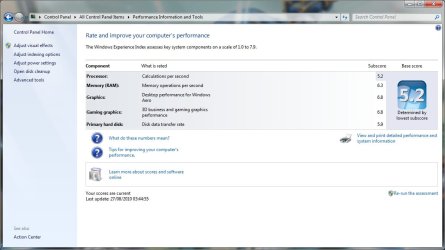
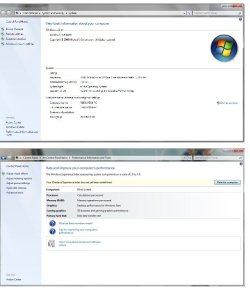
Hi I recently built this PC that I am using, Had a few buggy crashes in the beginning but all seemed well. Today I went to show off the windows experience index (A whoppin 5.2, Previous system was 3.6). I right clicked "My Computer" and went to properties. The WIE flashed for a second then vanished, I clicked the performance link at bottom left of this window and all the scores were gone. The "Rate this computer" button does nothing whatsoever. I have tried Method 1 in this thread
Windows Experience Index - Performance Information and Tools page is completely blank
But have had no joy,the second method is fruitless as the full tree path is not reachable in Windows 7 Ultimate X64.
Attached is a picture of the results when I try to view my scores.
If anyone can help I would be grateful, Thanks in advance.
RealGoneKid

Big Thanks to WHS for solving this problem....My WEI has now been attached to this thread.
RealGoneKid
 

Attachments
  • Windows experiance Rating Problem W7X64.jpg
    Windows experiance Rating Problem W7X64.jpg
    90.9 KB · Views: 293
  • My WEI Score 26-08-10.jpg
    My WEI Score 26-08-10.jpg
    148.1 KB · Views: 172
Last edited:

My Computer

Computer Manufacturer/Model Number
Custom
OS
Windows 7 Ultimate X64
CPU
AMD Phenom II X6 1100T Black Edition @3.6GHz
Motherboard
ASUS AM3+ CROSSHAIR V FORMULA S/L 990FX
Memory
16GB (4 X 4GB) Corsair CMZ8GX3M2A1600C9 1600MHz CL9 DDR3 Ven
Graphics Card(s)
2 X ATI Sapphire HD 5770 1GB DDR5 @850/1200MHz in CrossfireX
Sound Card
Onboard 7.1 HD Audio/Bluetooth Stereo Audio/C-Media USB 5.1
Monitor(s) Displays
LGW2363D 23", HANNspreeXM-S HANNSverona22" & 42"Samsung HDTV
Screen Resolution
2880X900
Hard Drives
Seagate Barracuda LP 1.5TB
SAMSUNG HD154UI 1.5TB
SAMSUNG HD 204UI 2TB
PSU
Evo Labs 900W 80+ 80 plus Dual 12V ATX PC PSU
Case
Cooler Master Mystique 631
Cooling
Corsair H50 With 2X120mm Push/Pull,3X 120mm (FrX1,SideX2).
Keyboard
Accuratus Toughball 2.4GHz
Mouse
Microsoft Laser Mouse 5000/Emprex Cheetah 2000dpi Optical
Internet Speed
5500kbps
Other Info
LG BH10LS30.AUAU10B 10x Internal Blu-Ray BDRW
Corsair H50 Water Cooling With Push/Pull 120mm Fans vent out
Front 120mm Intake
Side Panel 2 X120mm Intake
90mm Extraction fan in top of case.
OCZ - Extreme Thermal Convection
Quiet PC AcoustiPack Lite 2 Ply Sound Deadening both side panels, front, rear, top and bottom.
Read thru here - that may give you a clue.

You may try the steps given below and check if that helps.
1. Go to: %systemroot%\Performance\WinSAT\DataStore and try to delete everything but the most recent file.
2. Reboot the computer
3. Then try doing the re-assessment.

Also, try updating the drivers for the graphics card from the manufacturer’s website for the 64 bit Windows 7 and check what happens.
Refer to:
Update a driver for hardware that isn't working properly
http://windows.microsoft.com/en-us/windows7/Update-a-driver-for-hardware-that-isnt-working-properly
Update drivers: recommended links
http://windows.microsoft.com/en-US/windows7/Update-drivers-recommended-links
 

My Computer

Computer Manufacturer/Model Number
HP, Dell, Gateway, Toshiba - 4 laptops and 2 desktops
OS
Vista, Windows7, Mint Mate, Zorin, Windows 8
CPU
from 1.6GHz Duo to i7
Monitor(s) Displays
2x HP w2207
Hard Drives
5x HDD, 7x SSD, 12x Externals
Keyboard
with trackball - no mices
Mouse
Trackball mice
Internet Speed
DSL 6000
Odd. Not only is WEI missing but the Activation status/Genuine Logo as well.


Where did you get your copy of Windows?
 

My Computer

Computer Manufacturer/Model Number
Custom (Self Build)
OS
Windows 7 Home Premium 64bit
CPU
Intel Core i7 2700k
Motherboard
eVGA P67 SLI
Memory
8GB Mushkin Redline Ridgebacks @1866
Graphics Card(s)
EVGA GTX570 SC
Sound Card
XiFi Titanium HD
Monitor(s) Displays
LG W2453V
Screen Resolution
1920x1080
Hard Drives
Intel 320 80GB -- Intel X25-V 40GB --WD Black 1TB x2 -- WD Blue 640GB
PSU
Seasonic x750
Case
Corsair 600T SE White
Cooling
eVGA Superclocked CPU Cooler
Keyboard
Saitek Cyborg
Antivirus
Kaspersky
Browser
IE
Other Info
LG BD/DVD
Read thru here - that may give you a clue.

You may try the steps given below and check if that helps.
1. Go to: %systemroot%\Performance\WinSAT\DataStore and try to delete everything but the most recent file.
2. Reboot the computer
3. Then try doing the re-assessment.

Also, try updating the drivers for the graphics card from the manufacturer’s website for the 64 bit Windows 7 and check what happens.
Refer to:
Update a driver for hardware that isn't working properly
http://windows.microsoft.com/en-us/windows7/Update-a-driver-for-hardware-that-isnt-working-properly
Update drivers: recommended links
http://windows.microsoft.com/en-US/windows7/Update-drivers-recommended-links
Hi & thanks, I copied and pasted " %systemroot%\Performance\WinSAT\DataStore" into start menu search box, deleted the whole lot (after making a backup copy) and when I went to properties the WIE was there again. Thank you so much for your help.
Solved.....
RealGoneKid
 

My Computer

Computer Manufacturer/Model Number
Custom
OS
Windows 7 Ultimate X64
CPU
AMD Phenom II X6 1100T Black Edition @3.6GHz
Motherboard
ASUS AM3+ CROSSHAIR V FORMULA S/L 990FX
Memory
16GB (4 X 4GB) Corsair CMZ8GX3M2A1600C9 1600MHz CL9 DDR3 Ven
Graphics Card(s)
2 X ATI Sapphire HD 5770 1GB DDR5 @850/1200MHz in CrossfireX
Sound Card
Onboard 7.1 HD Audio/Bluetooth Stereo Audio/C-Media USB 5.1
Monitor(s) Displays
LGW2363D 23", HANNspreeXM-S HANNSverona22" & 42"Samsung HDTV
Screen Resolution
2880X900
Hard Drives
Seagate Barracuda LP 1.5TB
SAMSUNG HD154UI 1.5TB
SAMSUNG HD 204UI 2TB
PSU
Evo Labs 900W 80+ 80 plus Dual 12V ATX PC PSU
Case
Cooler Master Mystique 631
Cooling
Corsair H50 With 2X120mm Push/Pull,3X 120mm (FrX1,SideX2).
Keyboard
Accuratus Toughball 2.4GHz
Mouse
Microsoft Laser Mouse 5000/Emprex Cheetah 2000dpi Optical
Internet Speed
5500kbps
Other Info
LG BH10LS30.AUAU10B 10x Internal Blu-Ray BDRW
Corsair H50 Water Cooling With Push/Pull 120mm Fans vent out
Front 120mm Intake
Side Panel 2 X120mm Intake
90mm Extraction fan in top of case.
OCZ - Extreme Thermal Convection
Quiet PC AcoustiPack Lite 2 Ply Sound Deadening both side panels, front, rear, top and bottom.
I am glad it worked - thanks to that site .
 

My Computer

Computer Manufacturer/Model Number
HP, Dell, Gateway, Toshiba - 4 laptops and 2 desktops
OS
Vista, Windows7, Mint Mate, Zorin, Windows 8
CPU
from 1.6GHz Duo to i7
Monitor(s) Displays
2x HP w2207
Hard Drives
5x HDD, 7x SSD, 12x Externals
Keyboard
with trackball - no mices
Mouse
Trackball mice
Internet Speed
DSL 6000
Back
Top