Windows Explorer Address Bar disappearing

Sometimes Windows can be quite the elusive beast!

I've just run sfc on my system (I used /verifyonly first, as a precaution) and it reports it found no problems at all.

Definitely worth a try though, so thanks for the suggestion. :)

I have a sinking feeling I should just bite the proverbial, reformat and re-install. Sigh. Such a pain though, because it's a big job. I'll have to re-install all my apps and reconfigure them from scratch, since I don't know whence the problem derives.

Ugghhh.
 

My Computer My Computer

Computer Manufacturer/Model Number
Components
OS
Windows 7 Home Premium 64bit
CPU
Intel i5-760 2.93 GHz
Motherboard
Gigabyte GA-P55-USB3
Memory
6 GB
Graphics Card(s)
ATI Radeon HD5700
Sound Card
Realtek 5.1 onboard
Monitor(s) Displays
Samsung SyncMaster EX2220
Screen Resolution
1920x1080
Hard Drives
2 x WD SATA 1.5 TB
1 x WD USB2 (Ext.) 1.5 TB
1 x Samsung USB3 (Ext.) 2 TB
Internet Speed
24 Mbps ADSL2+
Note:
The word d-r-i-v-e-r disappears from my posts when I log out.
confused.gif


Before you reinstall:

  • Make sure that all of your hardware d-r-i-v-e-r-s are up-to-date first (just in case).
  • Check if you have all of the OS updates.
Transfer your installers (d-r-i-v-e-r-s and programs) and important files onto another HDD, in case you have to reinstall your OS anyway. :geek:

If you end up having to reinstall:

  1. Install all of the OS updates.
  2. Install all of your drivers.
  3. Make a backup image (use Windows backup or a free program like Macrium Reflect).
  4. Start reinstalling your programs.
  5. Once all of your programs have been reinstalled, make another backup image.
Unless you are really annoyed about this problem, I'd wait for a couple of days, just in case someone comes up with a solution that works for you.
 

My Computer My Computer

Computer type
PC/Desktop
Computer Manufacturer/Model Number
n/a
OS
W7 Ultimate SP1, LM19.2 MATE, W10 Home 1703, W10 Pro 1703 VM, #All 64 bit
CPU
AMD Phenom II x6 1100T, 3.3 GHz
Motherboard
ASUS M4A88T-M/USB3 (AM3)
Memory
12GB DDR3 1333 G-Skill (4GB x 2), G-Skill (2GB x 2)
Graphics Card(s)
NVIDIA GeForce GTX 660
Sound Card
Realtek?
Monitor(s) Displays
Samsung S23B350
Screen Resolution
1920x1080
Hard Drives
WD Green 2TB (SATA), WD Green 3TB (SATA), WD Blue 4TB (SATA), WD Blue 6TB (SATA)
PSU
Cooler Master
Case
Antec GX300 Tower
Cooling
3x Antec TRICOOL 120mm Fans
Mouse
Wired Optical
Internet Speed
DSL
Antivirus
Avast
Browser
Pale Moon (64 bit)
Other Info
2018-12-27 Upgraded HDDs
2015-12-10 Upgraded case, graphics card, storage
2015-08-15 Upgraded motherboard & RAM
2015-07-15 Upgraded LM17.1 to LM17.2
Another case to show the importance of a good and current back up.
It does help to have an image or your system, updated, while it is running perfectly. An image restore in usually 30 minutes and you have all of your programs and settings right back.
 

My Computer My Computer

Computer type
PC/Desktop
Computer Manufacturer/Model Number
Home Built Desktop By DataTech
OS
Windows 7 Ultimate X64 SP1
CPU
Intel i5-2550K, Differing ~4.4-4.8GHz No built in GPU
Motherboard
ASUS P8Z68-V PRO/GEN3
Memory
16GB G.Skill Sniper 1866MHz @ 2133MHz 2x8GB
Graphics Card(s)
ASUS GTX650TIB-DC2OC-2GD5, (650TI Boost)
Sound Card
Onboard Realtek 5-1
Monitor(s) Displays
Samsung P2570HD
Screen Resolution
1920x1080
Hard Drives
Samsung 840 Pro 256GB SSD for OS, 500GB Seagate Constellation (Enterprise drive) for Data
PSU
Corsair HX650W
Case
Inwin Dragon Rider
Cooling
Hyper 212 EVO w/two Noctua fans, push-pull, @1300 RPM
Keyboard
E-Z Eyes, bright yellow keys with large characters
Mouse
steelseries SENSEI Laser Pro Gaming
Internet Speed
48-51Mbs Mbs down, 11 Mbs up Xfinity Cable
Antivirus
Norton Internet Security 2013
Browser
IE 10, Opera, Pale Moon if needed
Other Info
4 case fans, LG BluRay-RE, ASUS DVD-RW, Mr. Fusion power supply, 1.21 gigawatts.
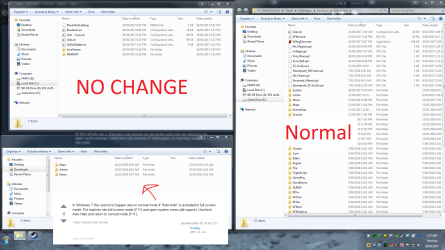
Just wanna post on here as I also seem to have this problem, and here are my examples(so they're fresh and should be valid and not 404 anytime soon or ever until the forum closes or something since the attachments are hosted on the forums! :P) and the other guy's examples are deleted/404, check out the attachments I uploaded. Also I tried the solutions here: How do I repair a missing Windows Explorer Address bar? - Super User but they did not work, again refer to my attachments to see what I get...
 

Attachments

  • 1 (1).png
    1 (1).png
    161.7 KB · Views: 6
  • 1 (2).png
    1 (2).png
    22.6 KB · Views: 0

My Computer My Computer

Computer type
PC/Desktop
Computer Manufacturer/Model Number
custom build
OS
The one I am using to register is my Windows 7 Professional x64 one.
CPU
Intel Core i7-3970x
Motherboard
Asus Rampage 4 Extreme
Memory
Cosair Dominator Platinum
Graphics Card(s)
2x eVGA GTX 770 4GB CLassified with ACX cooler
Antivirus
I have KIS 2016 which is an internet security suite....?
Browser
Fiefox
Just an update to my problem, it would appear if you *already* have a borked window, that now becomes fixed but the other windows that weren't borked before, now become with no address bar, no back button or forward button, etc... Interesting....
 

My Computer My Computer

Computer type
PC/Desktop
Computer Manufacturer/Model Number
custom build
OS
The one I am using to register is my Windows 7 Professional x64 one.
CPU
Intel Core i7-3970x
Motherboard
Asus Rampage 4 Extreme
Memory
Cosair Dominator Platinum
Graphics Card(s)
2x eVGA GTX 770 4GB CLassified with ACX cooler
Antivirus
I have KIS 2016 which is an internet security suite....?
Browser
Fiefox
Just an update to my problem, it would appear if you *already* have a borked window, that now becomes fixed but the other windows that weren't borked before, now become with no address bar, no back button or forward button, etc... Interesting....


hello i have the same issue ! had you resolve it?
 

My Computer My Computer

Computer type
PC/Desktop
OS
Microsoft Windows 7 Professional 64 bit 7601 Multiprocessor Free Service Pack 1
CPU
Intel(R) Core(TM) i7-4770 CPU @ 3.40GHz
Motherboard
ASUSTeK COMPUTER INC. B85M-E
Memory
16 giga
Graphics Card(s)
NVIDIA Quadro K600
Sound Card
(1) Realtek High Definition Audio (2) NVIDIA High Definiti
Monitor(s) Displays
HP 23 "
Screen Resolution
1920X1080
Hard Drives
(1) ATA Samsung SSD 840 SCSI Disk Device (2) ATA ST500DM002-1BD14 SCSI Disk Device (3) ATA WDC WD20EFRX-68E SCSI Disk Device
Keyboard
LOGYTECH K120
Mouse
LOGITECH M100
Internet Speed
5 MEGA
Antivirus
avast INTERNET SECURITY
Browser
firefox
Have you tried to toggle the Windows Explorer window using the F11 key (Full Screen view)?
 

My Computer My Computer

Computer type
PC/Desktop
Computer Manufacturer/Model Number
n/a
OS
W7 Ultimate SP1, LM19.2 MATE, W10 Home 1703, W10 Pro 1703 VM, #All 64 bit
CPU
AMD Phenom II x6 1100T, 3.3 GHz
Motherboard
ASUS M4A88T-M/USB3 (AM3)
Memory
12GB DDR3 1333 G-Skill (4GB x 2), G-Skill (2GB x 2)
Graphics Card(s)
NVIDIA GeForce GTX 660
Sound Card
Realtek?
Monitor(s) Displays
Samsung S23B350
Screen Resolution
1920x1080
Hard Drives
WD Green 2TB (SATA), WD Green 3TB (SATA), WD Blue 4TB (SATA), WD Blue 6TB (SATA)
PSU
Cooler Master
Case
Antec GX300 Tower
Cooling
3x Antec TRICOOL 120mm Fans
Mouse
Wired Optical
Internet Speed
DSL
Antivirus
Avast
Browser
Pale Moon (64 bit)
Other Info
2018-12-27 Upgraded HDDs
2015-12-10 Upgraded case, graphics card, storage
2015-08-15 Upgraded motherboard & RAM
2015-07-15 Upgraded LM17.1 to LM17.2
Yes of course but the address bar is missing
 

My Computer My Computer

Computer type
PC/Desktop
OS
Microsoft Windows 7 Professional 64 bit 7601 Multiprocessor Free Service Pack 1
CPU
Intel(R) Core(TM) i7-4770 CPU @ 3.40GHz
Motherboard
ASUSTeK COMPUTER INC. B85M-E
Memory
16 giga
Graphics Card(s)
NVIDIA Quadro K600
Sound Card
(1) Realtek High Definition Audio (2) NVIDIA High Definiti
Monitor(s) Displays
HP 23 "
Screen Resolution
1920X1080
Hard Drives
(1) ATA Samsung SSD 840 SCSI Disk Device (2) ATA ST500DM002-1BD14 SCSI Disk Device (3) ATA WDC WD20EFRX-68E SCSI Disk Device
Keyboard
LOGYTECH K120
Mouse
LOGITECH M100
Internet Speed
5 MEGA
Antivirus
avast INTERNET SECURITY
Browser
firefox
System File Checker

Have you tried running sfc?

Open the Command Prompt (Use the "Run as administrator" option in the context menu).
Type:
sfc /scannow

Tutorial

SFC /SCANNOW Command - System File Checker
 

My Computer My Computer

Computer type
PC/Desktop
Computer Manufacturer/Model Number
n/a
OS
W7 Ultimate SP1, LM19.2 MATE, W10 Home 1703, W10 Pro 1703 VM, #All 64 bit
CPU
AMD Phenom II x6 1100T, 3.3 GHz
Motherboard
ASUS M4A88T-M/USB3 (AM3)
Memory
12GB DDR3 1333 G-Skill (4GB x 2), G-Skill (2GB x 2)
Graphics Card(s)
NVIDIA GeForce GTX 660
Sound Card
Realtek?
Monitor(s) Displays
Samsung S23B350
Screen Resolution
1920x1080
Hard Drives
WD Green 2TB (SATA), WD Green 3TB (SATA), WD Blue 4TB (SATA), WD Blue 6TB (SATA)
PSU
Cooler Master
Case
Antec GX300 Tower
Cooling
3x Antec TRICOOL 120mm Fans
Mouse
Wired Optical
Internet Speed
DSL
Antivirus
Avast
Browser
Pale Moon (64 bit)
Other Info
2018-12-27 Upgraded HDDs
2015-12-10 Upgraded case, graphics card, storage
2015-08-15 Upgraded motherboard & RAM
2015-07-15 Upgraded LM17.1 to LM17.2

My Computer My Computer

Computer type
PC/Desktop
OS
Microsoft Windows 7 Professional 64 bit 7601 Multiprocessor Free Service Pack 1
CPU
Intel(R) Core(TM) i7-4770 CPU @ 3.40GHz
Motherboard
ASUSTeK COMPUTER INC. B85M-E
Memory
16 giga
Graphics Card(s)
NVIDIA Quadro K600
Sound Card
(1) Realtek High Definition Audio (2) NVIDIA High Definiti
Monitor(s) Displays
HP 23 "
Screen Resolution
1920X1080
Hard Drives
(1) ATA Samsung SSD 840 SCSI Disk Device (2) ATA ST500DM002-1BD14 SCSI Disk Device (3) ATA WDC WD20EFRX-68E SCSI Disk Device
Keyboard
LOGYTECH K120
Mouse
LOGITECH M100
Internet Speed
5 MEGA
Antivirus
avast INTERNET SECURITY
Browser
firefox
I posted this on jim78b post regarding the "Windows Explorer Address Bar" So I think I should post it here as well.

I think I may have found a solution to your issue. Try this.

1= Hit Windows key + R
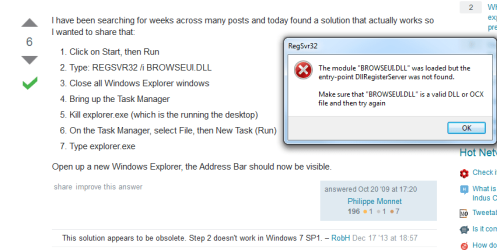
2= Type: REGSVR32 /i BROWSEUI.DLL Hit Enter.
3= Close all Windows Explorer windows
4= Bring up the Task Manager "Ctrl + Shift + Esc"
5= Select the Processes tab. Right click on Explorer.exe and End Task.
6= In Task Manager, select File, then New Task (Run)
7= Type Explorer.exe

Open Windows Explorer. The address bar should now be there. Let us know if this works.
 

My Computer My Computer

Computer type
PC/Desktop
Computer Manufacturer/Model Number
Custom Built By Me.
OS
Windows 10 Pro 64 bit
CPU
AMD FX 9590 8 Core Black Edition
Motherboard
MSI 990FXA GAMING (MS-7893)
Memory
Corsair Vengeance 16GB DDR3
Graphics Card(s)
AMD Radeon (TM) R9 380 Gaming Series
Sound Card
AMD High Definition
Monitor(s) Displays
Samsung 32" 60Hz 4ms Curved PLS LED
Screen Resolution
1920 X 1080
Hard Drives
C: 223 GB SSD = E: 465 GB HDD = F: 931 GB HDD = G: 149 GB HDD = H: 931 GB HDD
PSU
EVGA Supernova NEX750B 750W ATX EPS12V 80PLUS Bronze
Case
Cool Master
Cooling
Noctua NH-D15 Premium Cooler with 2x NF-A15 PWM 140mm Fan
Internet Speed
Fiber Optic: Download 332.7 Mbps / Upload 331.5 Mbps
Antivirus
Windows Defender
Browser
Slimjet (64bit)
I posted this on jim78b post regarding the "Windows Explorer Address Bar" So I think I should post it here as well.

I think I may have found a solution to your issue. Try this.

1= Hit Windows key + R
2= Type: REGSVR32 /i BROWSEUI.DLL Hit Enter.
3= Close all Windows Explorer windows
4= Bring up the Task Manager "Ctrl + Shift + Esc"
5= Select the Processes tab. Right click on Explorer.exe and End Task.
6= In Task Manager, select File, then New Task (Run)
7= Type Explorer.exe

Open Windows Explorer. The address bar should now be there. Let us know if this works.


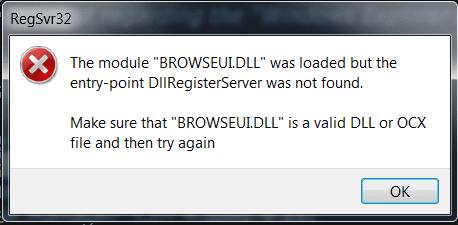
Oh you are so kindly .when i have time i try it ...But I use regsvr....And win gave me an error ....
 

My Computer My Computer

Computer type
PC/Desktop
OS
Microsoft Windows 7 Professional 64 bit 7601 Multiprocessor Free Service Pack 1
CPU
Intel(R) Core(TM) i7-4770 CPU @ 3.40GHz
Motherboard
ASUSTeK COMPUTER INC. B85M-E
Memory
16 giga
Graphics Card(s)
NVIDIA Quadro K600
Sound Card
(1) Realtek High Definition Audio (2) NVIDIA High Definiti
Monitor(s) Displays
HP 23 "
Screen Resolution
1920X1080
Hard Drives
(1) ATA Samsung SSD 840 SCSI Disk Device (2) ATA ST500DM002-1BD14 SCSI Disk Device (3) ATA WDC WD20EFRX-68E SCSI Disk Device
Keyboard
LOGYTECH K120
Mouse
LOGITECH M100
Internet Speed
5 MEGA
Antivirus
avast INTERNET SECURITY
Browser
firefox
Oh you are so kindly .when i have time i try it ...But I use regsvr....And win gave me an error ....

I'm very sorry Jim that I didn't test this on my system. So I just did and I got this error. Is this what came up with you? I'll look into this error.

If anyone has any info on this error please jump in!


"Jim. We should pick this up from your original post. I'll post the error message there."

Also.. Sorry to the OP that I jumped in to this post with jim78b issue. But it is one and the same.
 

Attachments

  • RegSvr32 Error.png
    RegSvr32 Error.png
    9.7 KB · Views: 39

My Computer My Computer

Computer type
PC/Desktop
Computer Manufacturer/Model Number
Custom Built By Me.
OS
Windows 10 Pro 64 bit
CPU
AMD FX 9590 8 Core Black Edition
Motherboard
MSI 990FXA GAMING (MS-7893)
Memory
Corsair Vengeance 16GB DDR3
Graphics Card(s)
AMD Radeon (TM) R9 380 Gaming Series
Sound Card
AMD High Definition
Monitor(s) Displays
Samsung 32" 60Hz 4ms Curved PLS LED
Screen Resolution
1920 X 1080
Hard Drives
C: 223 GB SSD = E: 465 GB HDD = F: 931 GB HDD = G: 149 GB HDD = H: 931 GB HDD
PSU
EVGA Supernova NEX750B 750W ATX EPS12V 80PLUS Bronze
Case
Cool Master
Cooling
Noctua NH-D15 Premium Cooler with 2x NF-A15 PWM 140mm Fan
Internet Speed
Fiber Optic: Download 332.7 Mbps / Upload 331.5 Mbps
Antivirus
Windows Defender
Browser
Slimjet (64bit)
hello i have the same issue ! had you resolve it?
...nope...:cry:
I'm very sorry Jim that I didn't test this on my system. So I just did and I got this error. Is this what came up with you? I'll look into this error.

If anyone has any info on this error please jump in!


"Jim. We should pick this up from your original post. I'll post the error message there."

Also.. Sorry to the OP that I jumped in to this post with jim78b issue. But it is one and the same.
Well I guess you guys must have missed my post, because if you didn't, you would have seen I had the same result too.....
 

My Computer My Computer

Computer type
PC/Desktop
Computer Manufacturer/Model Number
custom build
OS
The one I am using to register is my Windows 7 Professional x64 one.
CPU
Intel Core i7-3970x
Motherboard
Asus Rampage 4 Extreme
Memory
Cosair Dominator Platinum
Graphics Card(s)
2x eVGA GTX 770 4GB CLassified with ACX cooler
Antivirus
I have KIS 2016 which is an internet security suite....?
Browser
Fiefox
Yes Even for me :( i appreciate your help .But why this error?
 

My Computer My Computer

Computer type
PC/Desktop
OS
Microsoft Windows 7 Professional 64 bit 7601 Multiprocessor Free Service Pack 1
CPU
Intel(R) Core(TM) i7-4770 CPU @ 3.40GHz
Motherboard
ASUSTeK COMPUTER INC. B85M-E
Memory
16 giga
Graphics Card(s)
NVIDIA Quadro K600
Sound Card
(1) Realtek High Definition Audio (2) NVIDIA High Definiti
Monitor(s) Displays
HP 23 "
Screen Resolution
1920X1080
Hard Drives
(1) ATA Samsung SSD 840 SCSI Disk Device (2) ATA ST500DM002-1BD14 SCSI Disk Device (3) ATA WDC WD20EFRX-68E SCSI Disk Device
Keyboard
LOGYTECH K120
Mouse
LOGITECH M100
Internet Speed
5 MEGA
Antivirus
avast INTERNET SECURITY
Browser
firefox
Yes Even for me :( i appreciate your help .But why this error?

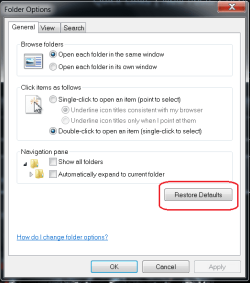
Try going into Control Panel and go to Folder Options. Select Restore Defaults and Apply. A shot in the dark!
 

Attachments

  • Untitled.png
    Untitled.png
    16.5 KB · Views: 31

My Computer My Computer

Computer type
PC/Desktop
Computer Manufacturer/Model Number
Custom Built By Me.
OS
Windows 10 Pro 64 bit
CPU
AMD FX 9590 8 Core Black Edition
Motherboard
MSI 990FXA GAMING (MS-7893)
Memory
Corsair Vengeance 16GB DDR3
Graphics Card(s)
AMD Radeon (TM) R9 380 Gaming Series
Sound Card
AMD High Definition
Monitor(s) Displays
Samsung 32" 60Hz 4ms Curved PLS LED
Screen Resolution
1920 X 1080
Hard Drives
C: 223 GB SSD = E: 465 GB HDD = F: 931 GB HDD = G: 149 GB HDD = H: 931 GB HDD
PSU
EVGA Supernova NEX750B 750W ATX EPS12V 80PLUS Bronze
Case
Cool Master
Cooling
Noctua NH-D15 Premium Cooler with 2x NF-A15 PWM 140mm Fan
Internet Speed
Fiber Optic: Download 332.7 Mbps / Upload 331.5 Mbps
Antivirus
Windows Defender
Browser
Slimjet (64bit)

My Computer My Computer

Computer type
PC/Desktop
Computer Manufacturer/Model Number
custom build
OS
The one I am using to register is my Windows 7 Professional x64 one.
CPU
Intel Core i7-3970x
Motherboard
Asus Rampage 4 Extreme
Memory
Cosair Dominator Platinum
Graphics Card(s)
2x eVGA GTX 770 4GB CLassified with ACX cooler
Antivirus
I have KIS 2016 which is an internet security suite....?
Browser
Fiefox
Oh I think to tried it ...But Sonetimes address bar at startup missing if i stop win7 with open folders .it is a bug my Friend
 

My Computer My Computer

Computer type
PC/Desktop
OS
Microsoft Windows 7 Professional 64 bit 7601 Multiprocessor Free Service Pack 1
CPU
Intel(R) Core(TM) i7-4770 CPU @ 3.40GHz
Motherboard
ASUSTeK COMPUTER INC. B85M-E
Memory
16 giga
Graphics Card(s)
NVIDIA Quadro K600
Sound Card
(1) Realtek High Definition Audio (2) NVIDIA High Definiti
Monitor(s) Displays
HP 23 "
Screen Resolution
1920X1080
Hard Drives
(1) ATA Samsung SSD 840 SCSI Disk Device (2) ATA ST500DM002-1BD14 SCSI Disk Device (3) ATA WDC WD20EFRX-68E SCSI Disk Device
Keyboard
LOGYTECH K120
Mouse
LOGITECH M100
Internet Speed
5 MEGA
Antivirus
avast INTERNET SECURITY
Browser
firefox
i know what is the cause of the problem...today I brought my pc in service help ...and when the wifi or internet is disconnected after 15 reboot with open folders there is no address bar or arrow missing , but when i connect automatically to internet the problem sometimes repeats.
 

My Computer My Computer

Computer type
PC/Desktop
OS
Microsoft Windows 7 Professional 64 bit 7601 Multiprocessor Free Service Pack 1
CPU
Intel(R) Core(TM) i7-4770 CPU @ 3.40GHz
Motherboard
ASUSTeK COMPUTER INC. B85M-E
Memory
16 giga
Graphics Card(s)
NVIDIA Quadro K600
Sound Card
(1) Realtek High Definition Audio (2) NVIDIA High Definiti
Monitor(s) Displays
HP 23 "
Screen Resolution
1920X1080
Hard Drives
(1) ATA Samsung SSD 840 SCSI Disk Device (2) ATA ST500DM002-1BD14 SCSI Disk Device (3) ATA WDC WD20EFRX-68E SCSI Disk Device
Keyboard
LOGYTECH K120
Mouse
LOGITECH M100
Internet Speed
5 MEGA
Antivirus
avast INTERNET SECURITY
Browser
firefox
Only seems to happen when you have a window opened into one of the folders, have the option "remember opened folders" or something like that, shutdown or restart, and boot back into the desktop. Hasnt happened when I close all windows and then restart/shutdown and then boot PC back on next day or whenever the next time I use it and then open up a window explorer pointing to any folder. I think it's a bug...
 

My Computer My Computer

Computer type
PC/Desktop
Computer Manufacturer/Model Number
custom build
OS
The one I am using to register is my Windows 7 Professional x64 one.
CPU
Intel Core i7-3970x
Motherboard
Asus Rampage 4 Extreme
Memory
Cosair Dominator Platinum
Graphics Card(s)
2x eVGA GTX 770 4GB CLassified with ACX cooler
Antivirus
I have KIS 2016 which is an internet security suite....?
Browser
Fiefox
Back
Top