
mikeplaysmusic
New member
- Local time
- 8:40 PM
- Messages
- 1
Hey guys, this is my first post. Sorry if this should be in another spot... I've been looking everywhere and I haven't found anyone with this exact problem. So, I had this annoying little malware that kept changing my default search engine. No big deal. Removed all traces of it, fixed that. Well, it entered something in the registry, so I open CCleaner to get rid of it, and I "Fixed" ALL of the errors it found. I don't know if it's a coincidence, but since then, when I open Windows Explorer, all my shortcuts (Favorites, all the links under Libraries like My Music, etc.) in the program disappear, and it only shows "Favorites, Libraries, and Homegroup." No sub-links. When I restart my computer, it goes back to normal, but when I go to certain folders (Happens quite often, not sure which one(s) specifically) it makes the links disappear. It also seems to happen when I click on My Computer from the Start Menu. When this happens, Control Panel is blank, and the "My Computer" folder will not load anything. I have to search for specific folders. I've restarted the services/processes in task manager, replaced the explorer.exe file and shell32.dll, ran "scannow" in cmd, scanned for malware/viruses countless times with multiple programs, gone to the registry editor thing in Windows and made sure everything is pointing in the right direction.... still the same result. Running out of ideas before I just re-install... your help is DEARLY appreciated. Thanks for taking a look.
Attachments
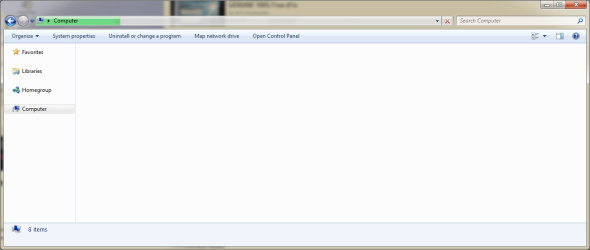
My Computer
- OS
- Windows 7 Home Premium x64


