
Windows Explorer doesn't find systems on home LAN

TakuSkan

New member
Member
Local time
10:12 AM
Messages
41
Every once in a while I open up Win7's Windows Explorer, click Network, and it refuses to display the 2 other systems on my home LAN.. both Win10 PCs. Win10's File Explorer on my notebook sees both the Win7 PC and Win10 PC. File Explorer on the Win10 PC sees neither of the 2 other systems. It's been doing this for a few days, and I've not made any changes to the OS or old Netgear router recently.

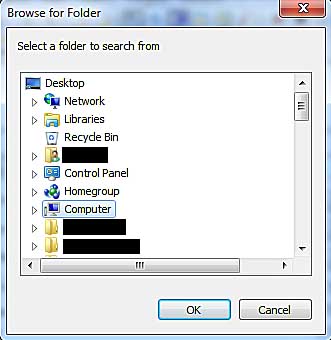
However when I pull down Windows Explorer's address bar and type in the name of another system on the network, \\[SYSTEM NAME], the shared folders pop up fine. That's great for most work I do. But some applications like Notebook++ don't provide Explorer style interface when for example with Notepad++ I need to use the "Find in Files" function and click the "Directory" button to navigate to the remote system. In there the menu to browse the network, like the Network option Windows Explorer doesn't see any other PCs on the network.

Is this something simple my searches have yet to find a solution for?

Thanks for any feedback on this. :-)
 

My Computer My Computer

Computer type
PC/Desktop
Computer Manufacturer/Model Number
Custom: MSI G41M-P28 Motherboard
OS
Microsoft Windows 7 Ultimate 64-bit 7601 Multiprocessor Free Service Pack 1
CPU
Intel(R) Core(TM)2 Quad CPU Q6600 @ 2.40GHz
Motherboard
MSI G41M-P28 (MS-7592)
Memory
8.00 GB
Graphics Card(s)
AMD Radeon HD 5570
Sound Card
Onboard MB 1: AMD HDMI Output 2: VIA High Definition Audio
Monitor(s) Displays
Planar PX2710MW, Samsung MU6290 Model UN55MU6290FXZA HDTV
Screen Resolution
1920 x 1080 x 32 bits (4294967296 colors) @ 60 Hz
Hard Drives
(1) Hitachi HDS5C3020ALA632 ATA Device (2) ST1000DM003-1CH162 ATA Device (3) WDC WD10EZEX-08WN4A0 ATA Device
PSU
750w
Internet Speed
66mbps
Antivirus
Avast 18.8.2341 build 18.5.3931.338
Browser
Firefox, Chrome, Internet Explorer, Opera
Windows doesnt look for pc on the local subnet it asks the master browser if you turn a pc off its removed from the list and when turned on can take 20+ mins to be found. Often pinging other pc can kick it into life
 

My Computer My Computer

Computer type
PC/Desktop
OS
win 8 32 bit
Windows doesnt look for pc on the local subnet it asks the master browser if you turn a pc off its removed from the list and when turned on can take 20+ mins to be found. Often pinging other pc can kick it into life
Thanks for the input samura. I've had all systems running for 3-4 hours now, but the Win7 system still doesn't see any other PCs. I've had the command prompt opened on both the Win7 and Win10 PCs, pinging each other from time to time, and still they don't show up in their respective Windows/File Explorer under Network. Frustrating. :banghead:
 

My Computer My Computer

Computer type
PC/Desktop
Computer Manufacturer/Model Number
Custom: MSI G41M-P28 Motherboard
OS
Microsoft Windows 7 Ultimate 64-bit 7601 Multiprocessor Free Service Pack 1
CPU
Intel(R) Core(TM)2 Quad CPU Q6600 @ 2.40GHz
Motherboard
MSI G41M-P28 (MS-7592)
Memory
8.00 GB
Graphics Card(s)
AMD Radeon HD 5570
Sound Card
Onboard MB 1: AMD HDMI Output 2: VIA High Definition Audio
Monitor(s) Displays
Planar PX2710MW, Samsung MU6290 Model UN55MU6290FXZA HDTV
Screen Resolution
1920 x 1080 x 32 bits (4294967296 colors) @ 60 Hz
Hard Drives
(1) Hitachi HDS5C3020ALA632 ATA Device (2) ST1000DM003-1CH162 ATA Device (3) WDC WD10EZEX-08WN4A0 ATA Device
PSU
750w
Internet Speed
66mbps
Antivirus
Avast 18.8.2341 build 18.5.3931.338
Browser
Firefox, Chrome, Internet Explorer, Opera
Is netbios running on all PC's? Can you connect via \\pcnameor IP
 

My Computer My Computer

Computer type
PC/Desktop
OS
win 8 32 bit
Am I old or what? I have not heard of my old friend netbios for years! Does Windows 7 Professional still have an active netbios?
 

My Computer My Computer

Computer type
PC/Desktop
Computer Manufacturer/Model Number
Antec desktop; Acer Aspire laptops
OS
Windows 7 Professional 64-bit
CPU
Desktop i5; Acers i5 & i7
Memory
desktop 16GB; 1 Acer 8GB & 1 Acer 16GB
Hard Drives
1TB split into 2 equal partitions [OS and data] usable by RJS
Internet Speed
AT&T DSL
Browser
FF, GChrome, msIE
Other Info
Windows 7 Firewall, Emsisoft AM/AV, MSE [scan-only], SpywareBlaster, Ruiware/BillP combine
Is netbios running on all PC's? Can you connect via \\pcnameor IP
Yes. As I pointed out in my 1st post, I can pull down Windows Explorer's address bar and enter the name of a remote system, \\[System Name] and all shared directories on that system will indeed be listed. But again, my problem is that some applications like Notepad++ do not provide a navigation interface similar to Windows Explorer.

pX4oKii.jpg


This is what Notepad++ opens to navigate. When I select the Network option at the top, it only lists the local system, folders & files. There's no way to type in the name/address of a remote system.

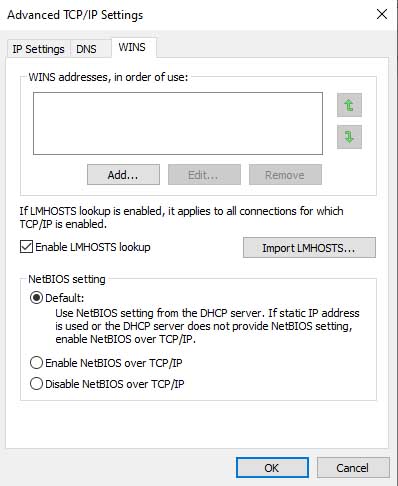
EDIT: Yes. Netbios is enabled. This from my Win10 notebook:

KZSBw9N.jpg


Same for the Win10 PC
 
Last edited:

My Computer My Computer

Computer type
PC/Desktop
Computer Manufacturer/Model Number
Custom: MSI G41M-P28 Motherboard
OS
Microsoft Windows 7 Ultimate 64-bit 7601 Multiprocessor Free Service Pack 1
CPU
Intel(R) Core(TM)2 Quad CPU Q6600 @ 2.40GHz
Motherboard
MSI G41M-P28 (MS-7592)
Memory
8.00 GB
Graphics Card(s)
AMD Radeon HD 5570
Sound Card
Onboard MB 1: AMD HDMI Output 2: VIA High Definition Audio
Monitor(s) Displays
Planar PX2710MW, Samsung MU6290 Model UN55MU6290FXZA HDTV
Screen Resolution
1920 x 1080 x 32 bits (4294967296 colors) @ 60 Hz
Hard Drives
(1) Hitachi HDS5C3020ALA632 ATA Device (2) ST1000DM003-1CH162 ATA Device (3) WDC WD10EZEX-08WN4A0 ATA Device
PSU
750w
Internet Speed
66mbps
Antivirus
Avast 18.8.2341 build 18.5.3931.338
Browser
Firefox, Chrome, Internet Explorer, Opera
In the last photo NetBIOS should be set to NetBIOS over trip. It provides name resolution on local subnet must be set on all PC's
 

My Computer My Computer

Computer type
PC/Desktop
OS
win 8 32 bit
In the last photo NetBIOS should be set to NetBIOS over trip. It provides name resolution on local subnet must be set on all PC's

Still no joy.
 

My Computer My Computer

Computer type
PC/Desktop
Computer Manufacturer/Model Number
Custom: MSI G41M-P28 Motherboard
OS
Microsoft Windows 7 Ultimate 64-bit 7601 Multiprocessor Free Service Pack 1
CPU
Intel(R) Core(TM)2 Quad CPU Q6600 @ 2.40GHz
Motherboard
MSI G41M-P28 (MS-7592)
Memory
8.00 GB
Graphics Card(s)
AMD Radeon HD 5570
Sound Card
Onboard MB 1: AMD HDMI Output 2: VIA High Definition Audio
Monitor(s) Displays
Planar PX2710MW, Samsung MU6290 Model UN55MU6290FXZA HDTV
Screen Resolution
1920 x 1080 x 32 bits (4294967296 colors) @ 60 Hz
Hard Drives
(1) Hitachi HDS5C3020ALA632 ATA Device (2) ST1000DM003-1CH162 ATA Device (3) WDC WD10EZEX-08WN4A0 ATA Device
PSU
750w
Internet Speed
66mbps
Antivirus
Avast 18.8.2341 build 18.5.3931.338
Browser
Firefox, Chrome, Internet Explorer, Opera
I found an old post you replied to on this issue samuria:
10 mins is about average time to get updated. There isn't a simple solution as mb can change at anytime. Simple things like pinging from the PC connecting to network resources restarting browser service. All are a bit of a mess it's all a bit of pot look as it may update every 10 mins so you could be lucky and it could rescan as you connect or it could be 10 mins if you miss. It only applies to NetBIOS scans you can connect straight away via IP

You can bypass it if you assign every pc a fixed ip then add all entries to host file on every pc so it wont need to use netbios then netbios is basically local dns
I think I can get the info from ipconfig to configure 'IP address', 'Subnet mask' and 'Default gateway' for IPv4 in each PC's network adapter settings. Something like this I think:

IP address: 192.168.1.4
Subnet mask: 255.255.255.0
Default gateway: 192.168.1.1

But how would I go about setting up a host file on each PC? I'm guessing I may have to tweak all of that if I ever have to reboot my router, or the power goes down and the router reboots when it comes back on, and assigns new addresses
 

My Computer My Computer

Computer type
PC/Desktop
Computer Manufacturer/Model Number
Custom: MSI G41M-P28 Motherboard
OS
Microsoft Windows 7 Ultimate 64-bit 7601 Multiprocessor Free Service Pack 1
CPU
Intel(R) Core(TM)2 Quad CPU Q6600 @ 2.40GHz
Motherboard
MSI G41M-P28 (MS-7592)
Memory
8.00 GB
Graphics Card(s)
AMD Radeon HD 5570
Sound Card
Onboard MB 1: AMD HDMI Output 2: VIA High Definition Audio
Monitor(s) Displays
Planar PX2710MW, Samsung MU6290 Model UN55MU6290FXZA HDTV
Screen Resolution
1920 x 1080 x 32 bits (4294967296 colors) @ 60 Hz
Hard Drives
(1) Hitachi HDS5C3020ALA632 ATA Device (2) ST1000DM003-1CH162 ATA Device (3) WDC WD10EZEX-08WN4A0 ATA Device
PSU
750w
Internet Speed
66mbps
Antivirus
Avast 18.8.2341 build 18.5.3931.338
Browser
Firefox, Chrome, Internet Explorer, Opera
I set static IPs in each system's network adapter settings as I wrote above, and put these in each system's host file:

192.168.1.4 [hostname PC1]
192.168.1.6 [hostname PC2]
192.168.1.9 [hostname PC3]

Rebooted each several times and they still wouldn't report seeing each other properly. I've given up. Windows just seems to have it's own mind whatever I do.
 

My Computer My Computer

Computer type
PC/Desktop
Computer Manufacturer/Model Number
Custom: MSI G41M-P28 Motherboard
OS
Microsoft Windows 7 Ultimate 64-bit 7601 Multiprocessor Free Service Pack 1
CPU
Intel(R) Core(TM)2 Quad CPU Q6600 @ 2.40GHz
Motherboard
MSI G41M-P28 (MS-7592)
Memory
8.00 GB
Graphics Card(s)
AMD Radeon HD 5570
Sound Card
Onboard MB 1: AMD HDMI Output 2: VIA High Definition Audio
Monitor(s) Displays
Planar PX2710MW, Samsung MU6290 Model UN55MU6290FXZA HDTV
Screen Resolution
1920 x 1080 x 32 bits (4294967296 colors) @ 60 Hz
Hard Drives
(1) Hitachi HDS5C3020ALA632 ATA Device (2) ST1000DM003-1CH162 ATA Device (3) WDC WD10EZEX-08WN4A0 ATA Device
PSU
750w
Internet Speed
66mbps
Antivirus
Avast 18.8.2341 build 18.5.3931.338
Browser
Firefox, Chrome, Internet Explorer, Opera
Back
Top