
- Local time
- 2:07 AM
- Messages
- 49
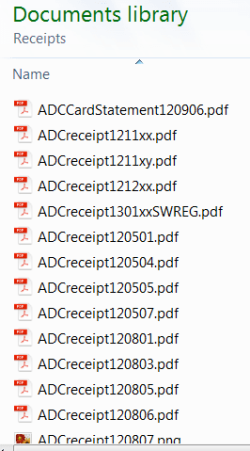
Sometimes Windows Explorer seems to fail to sort files into the correct order. In the attached image, which is the list of files in the folder Receipts, which you can see from the little arrow I have requested to be sorted in ascending order of file name, why are the files ADCreceipt1211xx.pdf. ADCreceipt1211xy.pdf, ADCreceipt1212xx.pdf and ADCreceipt1301xxSWREG.pdf listed before the file ADCreceipt120501.pdf? By any sort algorithm that I can imagine, 1205 ought to come before 1211, oughtn't it?
Is this possibly something to do with the strange phenomenon in recent versions of Windows that Explorer seems incapable of showing recently changed files (i.e. files recently created, deleted or renamed). This gives some really strange effects, such as when you delete a file and then rename a different file to the same name as the deleted file. If you don't believe me, try it!
Any suggestions on how to get around these problems?
Thanks - Rowan
Is this possibly something to do with the strange phenomenon in recent versions of Windows that Explorer seems incapable of showing recently changed files (i.e. files recently created, deleted or renamed). This gives some really strange effects, such as when you delete a file and then rename a different file to the same name as the deleted file. If you don't believe me, try it!
Any suggestions on how to get around these problems?
Thanks - Rowan
Attachments
My Computer
At a glance
Windows 7 Pro
- OS
- Windows 7 Pro


