Windows Explorer doesn't work after resuming from sleep

SevenUser6

New member
Local time
8:14 PM
Messages
4
Hello,

I have a Dell XPS L702X (i5 -2.3 Ghz, 6GB RAM) laptop running Windows 7 Home Premium 64-Bit that has been giving me issues for some time now and I haven't been able to find a solution. Windows explorer works fine when I start the computer. However, after resuming from sleep, 90% of the time trying to open any explorer window (my computer, my docs, etc.) will not work. I can open up documents within their respective applications (a word doc by opening word first, for example). But double clicking folders doesn't do anything, neither from the desktop nor from the start menu. When this happens, I've noticed 2 instances of explorer running in the task manager, in order to get it to work again I have to force quit both of them and log off. When I log on again, it usually works again. HOWEVER, if I leave an explorer window open before putting the laptop in sleep mode, it works fine upon resuming.

All drivers are up to date, as well as the Bios version. This has been driving me crazy for some time, would appreciate if anyone has an solution. Thanks!
 

My Computer

Computer type
PC/Desktop
Computer Manufacturer/Model Number
Dell XPS L702X
OS
Windows 7 Home Premium SP1 Win 64
CPU
i5-2.3GHz
Memory
6GB
it's not exactly normal to have 2 explorer.exe processes running, I would first check where each is, if one is anywhere other than C:/Windows, you should delete the exe in question and run an antivirus scan traight away.
 

My Computer

Computer type
Laptop
Computer Manufacturer/Model Number
Dell
OS
Windows 7 Enterprise x64
CPU
Intel i5 Dual Core
Screen Resolution
1366x768
Keyboard
built in Keyboard
Antivirus
System Centre Endpoint Protection
Browser
Google Chrome, Firefox and Internet Explorer
Thanks for that response.

Right now windows explorer is working normally, and there are two instances of windows explorer open in the task manager. I checked, and both seem to be coming from the same C:/Windows folder. I have run anti-virus checks a number of times with AVG and Spybot since this problem started ages ago and have never found any problems.

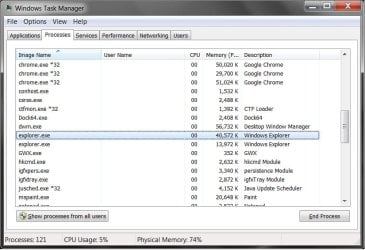
One explorer instance is always significantly smaller than the other. I just tried force quitting the smaller instance while everything was working fine and while all of my menus and everything have remained unchanged, deleting the smaller instance caused the problem I've been having, namely that I can no longer open any folders, my computer, etc. I'm posting a pic of the task manager.
 

Attachments

  • Double Explorer to Post.jpg
    Double Explorer to Post.jpg
    65 KB · Views: 0

My Computer

Computer type
PC/Desktop
Computer Manufacturer/Model Number
Dell XPS L702X
OS
Windows 7 Home Premium SP1 Win 64
CPU
i5-2.3GHz
Memory
6GB
You could try Process Explorer. Its default view might let you see which app started the second instance of Explorer.


After playing with Process Explorer, just as a test, uninstall AVG and Spybot. Install only MSE instead. Then see if you still have two instances of Explorer.
 

My Computer

Computer type
Laptop
Computer Manufacturer/Model Number
Employer provided Dell Latitude
OS
W7 Pro SP1 64bit
CPU
i7
Memory
8GB
Graphics Card(s)
Intel HD Graphics
Hard Drives
crappy SSD
Antivirus
Employer mandated Symantec Endpoint Protection
Browser
Pale Moon 64bit, IE11 64bit & Chrome 64bit
After doing some research, the reason I have 2 instances of explorer is because I have "Launch folder windows in a separate process" checked under the advanced options of files and folders. Supposedly this should increase stability. I have a second laptop that is similar to this one, Dell XPS L701X but running windows 7 Professional without this problem, with the same settings.

It doesn't seem like the fact that there are 2 explorer processes is the problem, as this happens normally when starting the computer and browsing. The problem under normal use only occurs when coming out of sleep, and as I mentioned above, I was able to replicate it by killing the second explorer process.
 

My Computer

Computer type
PC/Desktop
Computer Manufacturer/Model Number
Dell XPS L702X
OS
Windows 7 Home Premium SP1 Win 64
CPU
i5-2.3GHz
Memory
6GB
You might want to revert to an older version of the videodrivers or uncheck that folder option.
 

My Computer

Computer type
Laptop
Computer Manufacturer/Model Number
Employer provided Dell Latitude
OS
W7 Pro SP1 64bit
CPU
i7
Memory
8GB
Graphics Card(s)
Intel HD Graphics
Hard Drives
crappy SSD
Antivirus
Employer mandated Symantec Endpoint Protection
Browser
Pale Moon 64bit, IE11 64bit & Chrome 64bit
Thanks for the response.

So maybe a little more insight:

Opening any folder opens a second instance of explorer in the task manager.

Closing all folders closes the second instance of explorer in the task manager.

Upon resuming from sleep, then selecting "Computer" from the start menu, a second instance of explorer is opened but only half of the time an actual folder window opens. The rest of the time the explorer instance starts but nothing happens, and I am unable to open any folders via start menu, desktop or anywhere else.

Video card drivers are often suggested as the problem for issues like this, so I've tried different versions (albeit all newer) with no effect.

Tried running sfc /SCANNOW, no corrupted files found.

I could uncheck the box under folder options, but this works fine on my other comp and apparently on most everyone else's computers. Would prefer to actually find out why it's doing this.
 

My Computer

Computer type
PC/Desktop
Computer Manufacturer/Model Number
Dell XPS L702X
OS
Windows 7 Home Premium SP1 Win 64
CPU
i5-2.3GHz
Memory
6GB
Sleep is mostly handled by video software. That is why you see people suggest changing that software.

The option that you have checked is not checked by default. So, it apparently works "on most everyone else's computers" that happened to check that option. I'm not sure how many users have that option checked.


I don't know how to find the cause - unless you can make the issue go away by changing video software.
 

My Computer

Computer type
Laptop
Computer Manufacturer/Model Number
Employer provided Dell Latitude
OS
W7 Pro SP1 64bit
CPU
i7
Memory
8GB
Graphics Card(s)
Intel HD Graphics
Hard Drives
crappy SSD
Antivirus
Employer mandated Symantec Endpoint Protection
Browser
Pale Moon 64bit, IE11 64bit & Chrome 64bit
Back
Top