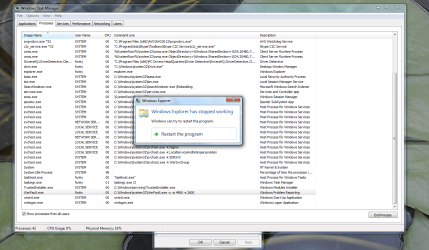
Windows Explorer has stopped working error every 2 mins.

funkle17

New member
Local time
4:51 AM
Messages
9
I know this is a common problem and have tried many fixes and posted this on another forum for help where nothing has come of it.
I'm sure I can safely rule out the first few replies as they seem to be common ones.
So here are the facts:

I dont use IE, prefer firefox.
Am running Windows 7
Have run Avast, Malwarebytes and the free AVG and none of them have helped.
The notification pops up about every 2 minutes.
It happens more than 50 times before it finally stops and the only way to prevent it is to leave my PC on 24/7. (not really an option)
Any restart and the problem starts again.
I can not upgrade to IE 9, it fails to completely install.
I can not disable or remove IE either.
Have had the problem for months.
It persists even in Safe Mode.
When I close the error message or click to Restart Explorer, all windows I have open are closed. Meaning if Im looking at pics or folders I only have 2 mins if I want to move things or do anything before it all closes on me.
In the event viewer I have 21 errors in the last hour. ID. 1000
Have attached a screen shot from task manager of the problem.
Will also attach CBS logs.

Any ideas would be greatly appreciated! Im trying to hold off taking the PC into someone as Im not sure what it would cost.

Thank you all. :)
 

Attachments

  • Untitled.png
    Untitled.png
    146.2 KB · Views: 29

My Computer

OS
Windows 7 64bit

My Computer

Computer type
PC/Desktop
Computer Manufacturer/Model Number
Custom Build
OS
Windows 7 Home Premium 64 bit
CPU
Intel Core i7-4790
Motherboard
GA-Z87X-D3H
Memory
G.SKILL 8GB (2 x 4GB) DDR3 F3-10666CL9D-8GBNT
Graphics Card(s)
AMD Radeon R7 250
Sound Card
Realtek ALC892
Monitor(s) Displays
Samsung UN32EH5000, Dell 1703FPT
Screen Resolution
1920 x 1080, 1280 x 1024
Hard Drives
WD5003AZEX
WD10EZEX
Samsung HD103SJ
Samsung 128 GB 840 PRO
PSU
SeaSonic M12II SS-500GM
Case
Fractal Design Define R4
Cooling
Zalman CNPS9900ALED
Keyboard
Logitech K800
Mouse
Logitech M705
Internet Speed
16 Mbps
Antivirus
Avast
Browser
Firefox
Other Info
Bose Companion 2 Multimedia Speakers
Did it fix your IE problem?
 

My Computer

Computer type
PC/Desktop
Computer Manufacturer/Model Number
Custom Build
OS
Windows 7 Home Premium 64 bit
CPU
Intel Core i7-4790
Motherboard
GA-Z87X-D3H
Memory
G.SKILL 8GB (2 x 4GB) DDR3 F3-10666CL9D-8GBNT
Graphics Card(s)
AMD Radeon R7 250
Sound Card
Realtek ALC892
Monitor(s) Displays
Samsung UN32EH5000, Dell 1703FPT
Screen Resolution
1920 x 1080, 1280 x 1024
Hard Drives
WD5003AZEX
WD10EZEX
Samsung HD103SJ
Samsung 128 GB 840 PRO
PSU
SeaSonic M12II SS-500GM
Case
Fractal Design Define R4
Cooling
Zalman CNPS9900ALED
Keyboard
Logitech K800
Mouse
Logitech M705
Internet Speed
16 Mbps
Antivirus
Avast
Browser
Firefox
Other Info
Bose Companion 2 Multimedia Speakers
You definitely have some broken stuff. Since your SFC found them but couldn't repair, have you tried doing so using the Windows installation or recovery disk?
 

My Computer

Computer Manufacturer/Model Number
Me
OS
Windows 7 Pro x64
CPU
Intel Core i7 920
Motherboard
ASUS P6T Deluxe V2
Memory
Corsair XMS3 12GB (3x2GB) DDR3 1333
Graphics Card(s)
EVGA GTX 470 1280MB GDDR5 DX11
Monitor(s) Displays
ASUS VW246H | ACER AL2216W
Screen Resolution
3600x1080
Hard Drives
1x Corsair Vertex 3 SSD (120GB)
1x Corsair Vertex 2 SSD (60GB)
2x Western Digital Black (500GB/1TB)
1x External WD Green eSATA (1TB)
PSU
Corsair 850HX
Case
Velocity Micro FullTower
Keyboard
Logitech G110
Mouse
Logitech G500
Internet Speed
http://www.speedtest.net/result/1226664359.png
Antivirus
MSE
Browser
Chrome
Other Info
Logitech Z-5500 5.1 Surround Sound
Logitech C260 Webcam
Creative Fatal1ty Headset
Either your file system or system disc is broke.
Do you also get BSOD?
 

My Computer

Computer Manufacturer/Model Number
custom
OS
Windows 7 Ultimate x64
CPU
i7-950
Motherboard
asus p6t deluxe v2
Memory
ocz 6gb 8-8-8-24
Graphics Card(s)
gtx 570
Sound Card
creative x-fi
Monitor(s) Displays
samsung 27
Hard Drives
vertex4
PSU
cougar 1000w
Case
silentmaxx
Cooling
cpu air, gpu water
You definitely have some broken stuff. Since your SFC found them but couldn't repair, have you tried doing so using the Windows installation or recovery disk?


I have the install disc. Will I lose any files if I run it?


Also, I had a notice from an Admin about reading the info on BSOD before posting about it. Ummm I NEVER said I had that. Someone asked if I did, I said no.

I read somewhere about deleting a file, SecuROM, found it and deleted. No change.
 

My Computer

OS
Windows 7 64bit

My Computer

Computer type
PC/Desktop
OS
Windows 10 Home x64
CPU
INTEL Core i5-750 Quad-Core 3.37GHz
Motherboard
ASUS P7P55D
Memory
HyperX Fury Black Series 8GB (2 x 4GB) 1866Mhz
Graphics Card(s)
EVGA GeForce GTX 750 Superclocked 1GB 128-Bit GDDR5
Monitor(s) Displays
LG 32MA68HY 32" IPS
Screen Resolution
1920 x 1080
Hard Drives
Samsung 840 Evo 120GB, SEAGATE 500GB Barracuda® 7200.12, SATA 3 Gb/s, 7200 RPM, 16MB cache
PSU
ANTEC TruePower New TP-550, 80 PLUS, 550W
Case
ANTEC Three Hundred Illusion
Cooling
COOLER MASTER Hyper 212 Plus, 4 x 120mm 1 x 140mm Noctua's
Internet Speed
85 + Mbps
Antivirus
Avast
Browser
Vivaldi
You have so many errors, a Repair install would be my 1st choice.

http://www.sevenforums.com/tutorials/3413-repair-install.html

You will not lose any files or programs. BTW attaching the SFCDetail.txt is much easier to read as mentioned in Option Three of the SFC tutorial. A Guy

Ok have attached the SFCDetail.txt

I don't think I have the original disk to perform the repair install, got my PC 2nd hand from a mate. Will check if he has it though.
 

Attachments

My Computer

OS
Windows 7 64bit
Yikes! What a mess, sorry. A Clean Install would likely be called for. You can attempt the Repair Install, but with so many system files corrupted, it calls into question the original install itself.

http://www.sevenforums.com/tutorials/1649-clean-install-windows-7-a.html

You are going to need an install disc either way. I hope the install is legit?

A Guy
 

My Computer

Computer type
PC/Desktop
OS
Windows 10 Home x64
CPU
INTEL Core i5-750 Quad-Core 3.37GHz
Motherboard
ASUS P7P55D
Memory
HyperX Fury Black Series 8GB (2 x 4GB) 1866Mhz
Graphics Card(s)
EVGA GeForce GTX 750 Superclocked 1GB 128-Bit GDDR5
Monitor(s) Displays
LG 32MA68HY 32" IPS
Screen Resolution
1920 x 1080
Hard Drives
Samsung 840 Evo 120GB, SEAGATE 500GB Barracuda® 7200.12, SATA 3 Gb/s, 7200 RPM, 16MB cache
PSU
ANTEC TruePower New TP-550, 80 PLUS, 550W
Case
ANTEC Three Hundred Illusion
Cooling
COOLER MASTER Hyper 212 Plus, 4 x 120mm 1 x 140mm Noctua's
Internet Speed
85 + Mbps
Antivirus
Avast
Browser
Vivaldi
Yikes! What a mess, sorry. A Clean Install would likely be called for. You can attempt the Repair Install, but with so many system files corrupted, it calls into question the original install itself.

http://www.sevenforums.com/tutorials/1649-clean-install-windows-7-a.html

You are going to need an install disc either way. I hope the install is legit?

A Guy


Ok thanks A Guy.
Had a look at the link and I think it would be best for a clean install. I do have another install disc that my GF has for her PC so I'm thinking that would be fine to use.

Aside from that, the only thing I need to do is back up my hard drives to an external drive, yes?
 

My Computer

OS
Windows 7 64bit
The one thing you hadn't tried for Windows Explorer not responding errors is scheduling a run of the Disk Check tool. I ran into those enough times back in late May and Early June until I had to run the Disk Check for something else like the dual boot with the Windows 8 RP.

You can schedule a run of that with the repair switch by opening up an elevated command prompt typing in "chkdsk /r" and press enter then type Y for yes when the message asking to schedule appears. Or you can right click on the C drive icon in any explorer window to open Tools>Error checking and click on the Check now button.

The command prompt option adds the repair switch however. But to start that up immediately you can also boot live from the 7 dvd and open the command prompt option in the repair tools and type "chkdsk c: /f" and press enter to watch it run live.

The not responding error is usually seen when errors on the C volume are present where this is one method to clean things up before simply tossing the present 7 install if it is not in particular other need to be wiped or repaired.
 

My Computers

System One System Two

  • Computer type
    PC/Desktop
    Computer Manufacturer/Model Number
    Custom builds = 2
    OS
    W7 Ultimate x64/W10 Pro x64/W11 Pro Triple Boot - Main PC W7 Remote PC Micro ATX W7 Pro x64/W11 Pro
    CPU
    AMD Phenom II X4 975 Deneb 3.6ghz - 965 2nd remote pc
    Motherboard
    Gigabyte GA-790XTA-UD4-Gigabyte GA-880GM-D2H remote pc
    Memory
    Kingston Hyper X DDR3 1600 1.5v 16gb - Hyper X Fury 8gb 2nd
    Graphics Card(s)
    MSI HD Radeon 5750 1gb - MSI HD Radeon 6450 on mini tower
    Sound Card
    Creative Labs X-Fi Xtreme Audio P - Realtek onooard 2nd case
    Monitor(s) Displays
    ASUS VW199T-P 19" HP 2082a Main-HP 2082a 20" remote pc
    Screen Resolution
    Asus 1440x900 - HP 1600x900
    Hard Drives
    WD Black 1TB HD per OS W7, W10, and pending W11 presently on 500gb OS Drive - Pending Triple 1TB HDs for Spanned Storage/backup volume
    Single 2TB external USB enclosure, single 1TB System 7 Host/Boot drive, Pending 8TB external HD for system image b
    PSU
    Corsair 750TX - primary / Corsair CX600 - second
    Case
    Antec 900-2 - SSD compatible / NZXT Vulcan mini tower
    Cooling
    Zalman CNPS9900A
    Keyboard
    AZIO L70 Backlit Letters Gaming - ONN Cordless/USB
    Mouse
    MSI DS200 Programmable, Logitech Cordless
    Internet Speed
    30mbps upgrade - primary hard wired - mini tower usb WiFi
    Antivirus
    GFI VIPRE Internet Security 2014 on W7 2016 beta on W10,
    Browser
    Cyberfox, WaterFox 64bit FF variants, FireFox x64, Pale Moon
    Other Info
    Accomdata fan cooled usb 2.0 PIDE/Sata II, III external enclosure.
    Sambient usb/eSata PATA/Sata II, III external enclosure.
  • Computer type
    PC/Desktop
    System Manufacturer/Model Number
    CUSTOM ASSEMBLY
    OS
    W7 Pro x64/W11 Pro
    CPU
    AMD Deneb 3.6ghz - 965
    Motherboard
    Gigabyte GA-880GM-D2H remote pc
    Memory
    Kingston Hyper X Fury 8gb
    Graphics Card(s)
    MSI HD Radeon 6450 DVI Output
    Sound Card
    Realtek onooard Creative or Other separate PENDING
    Monitor(s) Displays
    VIZIO 32" LCD TV Separate LCD Pending
    Screen Resolution
    1600x1080
    Hard Drives
    WD 500GB OS Host/Boot WD Green 1TB Storage/Backup
    PSU
    Corsair 600W - THERMALTAKE 600W spare case
    Case
    NZXT Vulcan mini tower
    Cooling
    Twin 120mm Top Fans - 240mm Side Cover
    Keyboard
    ONN Cordless/USB Logitech Cordless
    Mouse
    ONN USB/Cordless - Logitech Cordless
    Internet Speed
    DSL 5G
    Browser
    MS Edge, FireFox, WaterFox x64, FireFox Nightly
    Other Info
    OS Testing-Remote Access to Main TeamViewer
I did notice you have Driver Detective running.
 

My Computer

Computer type
PC/Desktop
Computer Manufacturer/Model Number
Home made Desktop
OS
Windows 10 Pro. 64/ version 1709 Windows 7 Pro/64
CPU
Intel i7-6800K @ 4.3
Motherboard
ASUS X-99 Deluxe II
Memory
Corsair Platinum 16 gig @2400
Graphics Card(s)
EVGA GTX 1070 OC
Monitor(s) Displays
Asus 27" LED LCD/VE278Q
Screen Resolution
1920-1080 or 1280-720 HDMI
Hard Drives
INTEL SSD 730-240 Gb Sata 3.0/
PSU
EVGA Platium 1200W
Case
Phanteks Luxe Tempered Glass 8 fans/ one radiator
Cooling
XSPC/ Water Cooled CPU
Keyboard
Das 4 Professional
Mouse
Logitech M705/MX Anywhere 2-S
Internet Speed
100 mbits
Antivirus
Microsoft Security Essentials/ Malwarebytes Premium 3.0/ SAS
Browser
I.E. 11 default/Firefox/ ISP Time Warner Cable/Spectrum
Other Info
LG BluRay Burner/
Sound system-KLipsch-THX/
Icy Dock ssd Hot Swap bays.
The one thing you hadn't tried for Windows Explorer not responding errors is scheduling a run of the Disk Check tool. I ran into those enough times back in late May and Early June until I had to run the Disk Check for something else like the dual boot with the Windows 8 RP.

You can schedule a run of that with the repair switch by opening up an elevated command prompt typing in "chkdsk /r" and press enter then type Y for yes when the message asking to schedule appears. Or you can right click on the C drive icon in any explorer window to open Tools>Error checking and click on the Check now button.

The command prompt option adds the repair switch however. But to start that up immediately you can also boot live from the 7 dvd and open the command prompt option in the repair tools and type "chkdsk c: /f" and press enter to watch it run live.

The not responding error is usually seen when errors on the C volume are present where this is one method to clean things up before simply tossing the present 7 install if it is not in particular other need to be wiped or repaired.

Umm you lost me a bit in that last sentance, Night Hawk. Are you saying that the errors may be on my C volume and therefore reinstalling Windows would not fix the problem?
 

My Computer

OS
Windows 7 64bit
If you should run into the "explorer not responding" error where IE and WE windows suddenly stall and lock up on you this can be caused when there are errors present on the C volume which would be the C OS drive. The Disk Check is the tool to schedule in order to see any cleaned up.

Afterwards when windows are not found to freeze up on you you will know the tool did the job. This problem usually starts to appear after a Windows installation has been on for some time. One example was the last clean install here back in May 2010 and later a full system image restored later in October 2010 and 7 run until this past summer!

Between the need for a clean install being overdue plus a glitch booting into 7 when an entry was seen in the Win 8 RP's PC Refresh option resulting in both versions freezing up upon just reaching the desktop and going to click on anything the Disk Check was then run live to see both Windows back running again.

The explorer not responding error had been an annoyance I would have to see corrected anyways while the Disk Check was run followed by a clean install of 7. In you situation there not knowing how long the present 7 install has been on I would simply give the Disk Check tool a good run to see if that clears the problem up right away.
 

My Computers

System One System Two

  • Computer type
    PC/Desktop
    Computer Manufacturer/Model Number
    Custom builds = 2
    OS
    W7 Ultimate x64/W10 Pro x64/W11 Pro Triple Boot - Main PC W7 Remote PC Micro ATX W7 Pro x64/W11 Pro
    CPU
    AMD Phenom II X4 975 Deneb 3.6ghz - 965 2nd remote pc
    Motherboard
    Gigabyte GA-790XTA-UD4-Gigabyte GA-880GM-D2H remote pc
    Memory
    Kingston Hyper X DDR3 1600 1.5v 16gb - Hyper X Fury 8gb 2nd
    Graphics Card(s)
    MSI HD Radeon 5750 1gb - MSI HD Radeon 6450 on mini tower
    Sound Card
    Creative Labs X-Fi Xtreme Audio P - Realtek onooard 2nd case
    Monitor(s) Displays
    ASUS VW199T-P 19" HP 2082a Main-HP 2082a 20" remote pc
    Screen Resolution
    Asus 1440x900 - HP 1600x900
    Hard Drives
    WD Black 1TB HD per OS W7, W10, and pending W11 presently on 500gb OS Drive - Pending Triple 1TB HDs for Spanned Storage/backup volume
    Single 2TB external USB enclosure, single 1TB System 7 Host/Boot drive, Pending 8TB external HD for system image b
    PSU
    Corsair 750TX - primary / Corsair CX600 - second
    Case
    Antec 900-2 - SSD compatible / NZXT Vulcan mini tower
    Cooling
    Zalman CNPS9900A
    Keyboard
    AZIO L70 Backlit Letters Gaming - ONN Cordless/USB
    Mouse
    MSI DS200 Programmable, Logitech Cordless
    Internet Speed
    30mbps upgrade - primary hard wired - mini tower usb WiFi
    Antivirus
    GFI VIPRE Internet Security 2014 on W7 2016 beta on W10,
    Browser
    Cyberfox, WaterFox 64bit FF variants, FireFox x64, Pale Moon
    Other Info
    Accomdata fan cooled usb 2.0 PIDE/Sata II, III external enclosure.
    Sambient usb/eSata PATA/Sata II, III external enclosure.
  • Computer type
    PC/Desktop
    System Manufacturer/Model Number
    CUSTOM ASSEMBLY
    OS
    W7 Pro x64/W11 Pro
    CPU
    AMD Deneb 3.6ghz - 965
    Motherboard
    Gigabyte GA-880GM-D2H remote pc
    Memory
    Kingston Hyper X Fury 8gb
    Graphics Card(s)
    MSI HD Radeon 6450 DVI Output
    Sound Card
    Realtek onooard Creative or Other separate PENDING
    Monitor(s) Displays
    VIZIO 32" LCD TV Separate LCD Pending
    Screen Resolution
    1600x1080
    Hard Drives
    WD 500GB OS Host/Boot WD Green 1TB Storage/Backup
    PSU
    Corsair 600W - THERMALTAKE 600W spare case
    Case
    NZXT Vulcan mini tower
    Cooling
    Twin 120mm Top Fans - 240mm Side Cover
    Keyboard
    ONN Cordless/USB Logitech Cordless
    Mouse
    ONN USB/Cordless - Logitech Cordless
    Internet Speed
    DSL 5G
    Browser
    MS Edge, FireFox, WaterFox x64, FireFox Nightly
    Other Info
    OS Testing-Remote Access to Main TeamViewer
Ok thanks. I have run the Disk Check tool a couple of times and it hasn't fixed the problem but i'll give it another go. It usually takes a while to run.
It sounds like I need a clean install either way.
I have a separate hard drive installed which is just for storage so Ill back up files I need to that. Should I unplug it for the clean install or will it not be affected?

Thanks
 

My Computer

OS
Windows 7 64bit
The only time you would need to unplug a storage drive would be if the Windows installer sees that as the first drive on the system and would place boot files there and not on the main OS drive. With a pair of Sata 3 drives here along with a pair of Sata II models I had to unplug the Sata II drives when going to install 7 initially on the first of the S3 drives due to that.

The best move for the repeat run of the Disk Check tool now would be while booted live from the 7 dvd or repair cd to start up the tool while at the command prompt option there. There won't be anything else running to get in the way. Simply type in the "chkdsk c: /f" command and press enter to watch it run.

Without any active system processes or some program trying to access one small part of the drive you wouldn't have to worry about thing hindering any repair the tool might not otherwise be able to fix. If this clears everything up you should be all set.

If however you still keep running into explorer hangs and other problems then you will know the problem is too deeply rooted where the clean install would then be considered. You may even opt for a repair install if not having the time to go through each program install at the moment while the clean install is the last resort to insure the best results.

Once Windows and all programs are in working order that would be the time to create a full system image backup of C to keep onhand. Whether the Disk Check tool does clean it up or you are given the last resort option having a full system image onhand can bail you out of a tight spot in a matter of minutes over the time it takes to clean install everything.

Don't forget the Windows Easy Transfer tool can help backup your user files and settings you can restore if you go with a clean install. With that you can pick and choose what to see included in the backup to be stored on the second drive.
 

My Computers

System One System Two

  • Computer type
    PC/Desktop
    Computer Manufacturer/Model Number
    Custom builds = 2
    OS
    W7 Ultimate x64/W10 Pro x64/W11 Pro Triple Boot - Main PC W7 Remote PC Micro ATX W7 Pro x64/W11 Pro
    CPU
    AMD Phenom II X4 975 Deneb 3.6ghz - 965 2nd remote pc
    Motherboard
    Gigabyte GA-790XTA-UD4-Gigabyte GA-880GM-D2H remote pc
    Memory
    Kingston Hyper X DDR3 1600 1.5v 16gb - Hyper X Fury 8gb 2nd
    Graphics Card(s)
    MSI HD Radeon 5750 1gb - MSI HD Radeon 6450 on mini tower
    Sound Card
    Creative Labs X-Fi Xtreme Audio P - Realtek onooard 2nd case
    Monitor(s) Displays
    ASUS VW199T-P 19" HP 2082a Main-HP 2082a 20" remote pc
    Screen Resolution
    Asus 1440x900 - HP 1600x900
    Hard Drives
    WD Black 1TB HD per OS W7, W10, and pending W11 presently on 500gb OS Drive - Pending Triple 1TB HDs for Spanned Storage/backup volume
    Single 2TB external USB enclosure, single 1TB System 7 Host/Boot drive, Pending 8TB external HD for system image b
    PSU
    Corsair 750TX - primary / Corsair CX600 - second
    Case
    Antec 900-2 - SSD compatible / NZXT Vulcan mini tower
    Cooling
    Zalman CNPS9900A
    Keyboard
    AZIO L70 Backlit Letters Gaming - ONN Cordless/USB
    Mouse
    MSI DS200 Programmable, Logitech Cordless
    Internet Speed
    30mbps upgrade - primary hard wired - mini tower usb WiFi
    Antivirus
    GFI VIPRE Internet Security 2014 on W7 2016 beta on W10,
    Browser
    Cyberfox, WaterFox 64bit FF variants, FireFox x64, Pale Moon
    Other Info
    Accomdata fan cooled usb 2.0 PIDE/Sata II, III external enclosure.
    Sambient usb/eSata PATA/Sata II, III external enclosure.
  • Computer type
    PC/Desktop
    System Manufacturer/Model Number
    CUSTOM ASSEMBLY
    OS
    W7 Pro x64/W11 Pro
    CPU
    AMD Deneb 3.6ghz - 965
    Motherboard
    Gigabyte GA-880GM-D2H remote pc
    Memory
    Kingston Hyper X Fury 8gb
    Graphics Card(s)
    MSI HD Radeon 6450 DVI Output
    Sound Card
    Realtek onooard Creative or Other separate PENDING
    Monitor(s) Displays
    VIZIO 32" LCD TV Separate LCD Pending
    Screen Resolution
    1600x1080
    Hard Drives
    WD 500GB OS Host/Boot WD Green 1TB Storage/Backup
    PSU
    Corsair 600W - THERMALTAKE 600W spare case
    Case
    NZXT Vulcan mini tower
    Cooling
    Twin 120mm Top Fans - 240mm Side Cover
    Keyboard
    ONN Cordless/USB Logitech Cordless
    Mouse
    ONN USB/Cordless - Logitech Cordless
    Internet Speed
    DSL 5G
    Browser
    MS Edge, FireFox, WaterFox x64, FireFox Nightly
    Other Info
    OS Testing-Remote Access to Main TeamViewer
Ok the Disk Check ran quicker but didn't fix anything.
I created another User profile to see if the same problem occurred. It did but it had more information with it this time.
Here's what popped up with it....can I delete the files or do i need them?? Thanks

Files that help describe the problem:
C:\Users\Simon\AppData\Local\Temp\WERDD96.tmp.WERInternalMetadata.xml
C:\Users\Simon\AppData\Local\Temp\WERF922.tmp.appcompat.txt
C:\Users\Simon\AppData\Local\Temp\WERF942.tmp.mdmp
 

My Computer

OS
Windows 7 64bit
The data in the dump file could be helpful for sure since you can grab a app called BlueScreenView for a good partial analysis. If you decide to go with a fresh install of 7 they wouldn't be good for anything then however.
 

My Computers

System One System Two

  • Computer type
    PC/Desktop
    Computer Manufacturer/Model Number
    Custom builds = 2
    OS
    W7 Ultimate x64/W10 Pro x64/W11 Pro Triple Boot - Main PC W7 Remote PC Micro ATX W7 Pro x64/W11 Pro
    CPU
    AMD Phenom II X4 975 Deneb 3.6ghz - 965 2nd remote pc
    Motherboard
    Gigabyte GA-790XTA-UD4-Gigabyte GA-880GM-D2H remote pc
    Memory
    Kingston Hyper X DDR3 1600 1.5v 16gb - Hyper X Fury 8gb 2nd
    Graphics Card(s)
    MSI HD Radeon 5750 1gb - MSI HD Radeon 6450 on mini tower
    Sound Card
    Creative Labs X-Fi Xtreme Audio P - Realtek onooard 2nd case
    Monitor(s) Displays
    ASUS VW199T-P 19" HP 2082a Main-HP 2082a 20" remote pc
    Screen Resolution
    Asus 1440x900 - HP 1600x900
    Hard Drives
    WD Black 1TB HD per OS W7, W10, and pending W11 presently on 500gb OS Drive - Pending Triple 1TB HDs for Spanned Storage/backup volume
    Single 2TB external USB enclosure, single 1TB System 7 Host/Boot drive, Pending 8TB external HD for system image b
    PSU
    Corsair 750TX - primary / Corsair CX600 - second
    Case
    Antec 900-2 - SSD compatible / NZXT Vulcan mini tower
    Cooling
    Zalman CNPS9900A
    Keyboard
    AZIO L70 Backlit Letters Gaming - ONN Cordless/USB
    Mouse
    MSI DS200 Programmable, Logitech Cordless
    Internet Speed
    30mbps upgrade - primary hard wired - mini tower usb WiFi
    Antivirus
    GFI VIPRE Internet Security 2014 on W7 2016 beta on W10,
    Browser
    Cyberfox, WaterFox 64bit FF variants, FireFox x64, Pale Moon
    Other Info
    Accomdata fan cooled usb 2.0 PIDE/Sata II, III external enclosure.
    Sambient usb/eSata PATA/Sata II, III external enclosure.
  • Computer type
    PC/Desktop
    System Manufacturer/Model Number
    CUSTOM ASSEMBLY
    OS
    W7 Pro x64/W11 Pro
    CPU
    AMD Deneb 3.6ghz - 965
    Motherboard
    Gigabyte GA-880GM-D2H remote pc
    Memory
    Kingston Hyper X Fury 8gb
    Graphics Card(s)
    MSI HD Radeon 6450 DVI Output
    Sound Card
    Realtek onooard Creative or Other separate PENDING
    Monitor(s) Displays
    VIZIO 32" LCD TV Separate LCD Pending
    Screen Resolution
    1600x1080
    Hard Drives
    WD 500GB OS Host/Boot WD Green 1TB Storage/Backup
    PSU
    Corsair 600W - THERMALTAKE 600W spare case
    Case
    NZXT Vulcan mini tower
    Cooling
    Twin 120mm Top Fans - 240mm Side Cover
    Keyboard
    ONN Cordless/USB Logitech Cordless
    Mouse
    ONN USB/Cordless - Logitech Cordless
    Internet Speed
    DSL 5G
    Browser
    MS Edge, FireFox, WaterFox x64, FireFox Nightly
    Other Info
    OS Testing-Remote Access to Main TeamViewer
Back
Top