Windows Explorer Navigation Pane Autoscroll

schrantz

New member
Local time
8:11 PM
Messages
2
Maybe this has been discussed before, but I'm noticing that the navigation pane in Windows Explorer doesn't automatically scroll left and right anymore in the latest builds. Nor is there a horizontal scroll bar on that pane, like there was on XP. So if you have folders that are nested more than four or five deep, the only way to see the deeper levels is to drag that pane wider.

This is happening in both 7048 and 7057. Are others seeing this? Is this a bug or are they changing the way horizontal scrolling works and it's just not finished?
 

My Computer

OS
Windows Vista SP1
I couldn't say about the navigation pane as I always disable all the extra windows options for the explorer windows. As for the horizontal scroll - if I understand you correctly, that is still there but you have to scale the window horizontally until there is less than one tiles worth of space. Otherwise the icons just auto tile themselves.
 

My Computer

OS
Windows Seven 7068 x64
CPU
Core Duo e6300 @ 2.8ghz
Motherboard
Gigabyte GA-P965-DS3
Memory
3gb DDR2 800
Graphics Card(s)
9600GT
Sound Card
XFi extrememusic
Monitor(s) Displays
22" LCD WIDE
Screen Resolution
1680x1050
Hard Drives
2 Diamondmax 80 GB
PSU
400W PSU
Case
Coolermaster Mystique
Cooling
Stock cooling
Keyboard
Logitech Illuminated
Mouse
Logitech MX Revolution
Internet Speed
2Mb
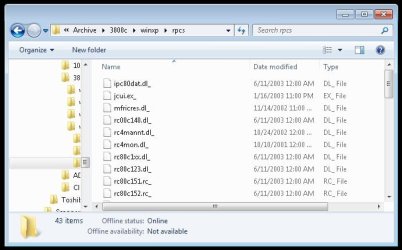
Here's a screenshot:

win7.jpg

You can see the folder list on the left is unusable. In Vista, the list automatically scrolls sideways so the folder you're in is visible. In XP there's a scroll bar so you can do it manually. In build 7057 there's nothing.
 

My Computer

OS
Windows Vista SP1
Hello Schrantz, and welcome to Seven Forums.

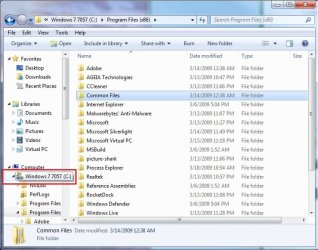
I believe it was removed in Windows 7 since a lot of people have complained about it taking priority over the auto vertical scroll in that pane instead from Vista. When you have the Navigation pane active and hover the mouse pointer over a item that goes beyond the horizontal boundry, it will automatically pop-up with the rest of it to compensate for this though.

nav_pane.jpg
 

My Computer

Computer type
PC/Desktop
Computer Manufacturer/Model Number
Self built custom
OS
64-bit Windows 11 Pro for Workstations
CPU
Intel i7-8700K OC'd to 5 GHz
Motherboard
ASUS ROG Maximus XI Formula Z390
Memory
64 GB (4x16GB) G.SKILL TridentZ RGB DDR4 3600 MHz
Graphics Card(s)
ASUS ROG-STRIX-GTX1080TI-O11G-GAMING
Sound Card
Integrated
Monitor(s) Displays
2 x Samsung Odyssey G7 27"
Screen Resolution
2560x1440
Hard Drives
1TB Samsung 990 PRO M.2,
4TB Samsung 990 PRO PRO M.2,
TerraMaster F8 SSD Plus NAS
PSU
Seasonic Prime Titanium 850W
Case
Thermaltake Core P3
Cooling
Corsair Hydro H115i
Keyboard
Logitech wireless K800
Mouse
Logitech MX Master 4
Internet Speed
2 Gb/s Download and 100 Mb/s Upload
Antivirus
Malwarebyte Anti-Malware Premium
Browser
Google Chrome
Other Info
Logitech Z625 speaker system,
Logitech BRIO 4K Pro webcam,
HP Color LaserJet Pro MFP M477fdn,
APC SMART-UPS RT 1000 XL - SURT1000XLI,
Galaxy S23 Plus phone
Add Horizontal scroll to Nav panel

Is there a hack that can add the horizontal scroll bar to the Nav pane with large trees I have to pull the pane wider and that is a pain!
 

My Computer

Computer type
PC/Desktop
Computer Manufacturer/Model Number
Home built
OS
Windows 7 Home Premium 64bit
CPU
AMD Phenom II X6 1075T 3.0GHz
Motherboard
ASUS M4A88T-M
Memory
4 GB
Silvera, I totally agree!! Typical of Microsoft yet again!! Giving us all these "new features" without even considering if they're a good idea. Changing the horizontal scroll bar to multi-dimensional scrolling, I can understand. Getting rid of mutli-dimensional scrolling because no-one liked it, I can understand. Then leaving the navigation pane with no scrolling option at all? That makes absolutely no sense whatsoever!! It's one of my biggest peeves with Windows 7.
 

My Computer

Computer Manufacturer/Model Number
Acer Aspire 5741
OS
windows 7 Home Premium
CPU
Intel Core i5 @ 2.27GHz 32nm Technology
Motherboard
Acer Aspire 5741 (CPU)
Memory
DDR3 4.0GB
Graphics Card(s)
Intel(R) Graphics Media Accelerator HD
Sound Card
Realtek High Definition Audio Intel(R) Display Audio
Monitor(s) Displays
Generic PnP Monitor on Intel Graphics Media Accelerator HD
Screen Resolution
1366x768
Hard Drives
Seagate 2.5" SATA 500GB
Keyboard
Synaptics PS/2 Port TouchPad
Mouse
Microsoft Comfort Mouse 4500 (IntelliPoint)
Back
Top