
Solved Windows Explorer Navigation Pane Problems

brewersomething

New member
Local time
12:00 PM
Messages
3
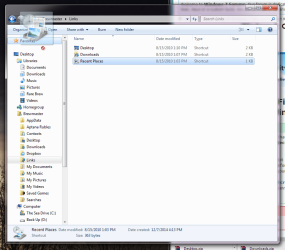
Hello SevenForums, I am having a particularly annoying problem with my favorites shortcuts in my navigation pane. I have no idea what I actually did but I know I accidentally altered the "Links" file in C:/(Users)/(MyUser)/Links. Ever since then my "Favorites" shortcuts in the navigation pane are completely empty. I cannot add new links either.

I have tried everything from the simple "restore favorite links" option to manually editing the registry value to be sure in included the "IsShortcut" entry. I have tried the techniques from several different threads on this very website. I have tried every single option from each one of these tutorials:

http://www.sevenforums.com/tutorials/78879-favorites-empty-navigation-pane-fix.html
http://www.sevenforums.com/tutorial...e-default-favorite-links-navigation-pane.html
http://www.sevenforums.com/tutorials/18583-user-folders-restore-default-location.html
http://www.sevenforums.com/tutorials/19449-default-file-type-associations-restore.html

Nothing has fixed the problem.

In addition to this all the sections in the navigation pane that used to independent (IE - Libraries, Computer, Network, ETC) are all now contained under the "Desktop" category. This is a recent issue and not nearly as maddening as the favorites issue I described above.

So priority one for me is to fix the favorites links. If anyone can shed some light on the situation I would greatly appreciate it.
 

Attachments
  • NoFavorites.png
    NoFavorites.png
    196.7 KB · Views: 1
Last edited:

My Computer

Computer type
PC/Desktop
Computer Manufacturer/Model Number
Custom Build
OS
Windows 7 Ultimate 64bit
CPU
Intel Core i3-2100
Motherboard
MSI H61M-P23
Memory
4GB DDR2
Graphics Card(s)
Onboard
Antivirus
Only Malewarebytes
Browser
Chrome, Firefox, Safari, Internet Explorer
Hello brewersomething, and welcome to Seven Forums.

All of your default Favorites are there in the right pane when you have Favorites selected. It appears that you need to expand open Favorites in the navigation pane by clicking on the small white outlined triangle just to the left of Favorites.

It looks like you have your navigation pane set to "show all folders". Unchecking this option using the method in the tutorial below will have your navigation pane show in separate groups again.

http://www.sevenforums.com/tutorials/853-navigation-pane-show-all-folders.html

Hope this helps for now, :)
Shawn
 

My Computer

Computer type
PC/Desktop
Computer Manufacturer/Model Number
Self built custom
OS
64-bit Windows 11 Pro for Workstations
CPU
Intel i7-8700K OC'd to 5 GHz
Motherboard
ASUS ROG Maximus XI Formula Z390
Memory
64 GB (4x16GB) G.SKILL TridentZ RGB DDR4 3600 MHz
Graphics Card(s)
ASUS ROG-STRIX-GTX1080TI-O11G-GAMING
Sound Card
Integrated
Monitor(s) Displays
2 x Samsung Odyssey G7 27"
Screen Resolution
2560x1440
Hard Drives
1TB Samsung 990 PRO M.2,
4TB Samsung 990 PRO PRO M.2,
TerraMaster F8 SSD Plus NAS
PSU
Seasonic Prime Titanium 850W
Case
Thermaltake Core P3
Cooling
Corsair Hydro H115i
Keyboard
Logitech wireless K800
Mouse
Logitech MX Master 4
Internet Speed
2 Gb/s Download and 100 Mb/s Upload
Antivirus
Malwarebyte Anti-Malware Premium
Browser
Google Chrome
Other Info
Logitech Z625 speaker system,
Logitech BRIO 4K Pro webcam,
HP Color LaserJet Pro MFP M477fdn,
APC SMART-UPS RT 1000 XL - SURT1000XLI,
Galaxy S23 Plus phone
Hi Shawn,

Thanks so much for the tip about the "show all folders" that solved my secondary issue but my primary issue persists. The Favorites section in the navigation pane does not have a white triangle. The right pane you are seeing in the attached image is actually the 'Links' folder (C:\Users\Brewmaster\Links) whose location is set to "C:\Users\Brewmaster\Favorites" yet the favorites in the navigation pane remain empty and will not allow me to add any new files to them. I am at a loss. Please let me know if you need more information or particular screenshots and I will happily provide them to try and fix this issue.
 
Last edited:

My Computer

Computer type
PC/Desktop
Computer Manufacturer/Model Number
Custom Build
OS
Windows 7 Ultimate 64bit
CPU
Intel Core i3-2100
Motherboard
MSI H61M-P23
Memory
4GB DDR2
Graphics Card(s)
Onboard
Antivirus
Only Malewarebytes
Browser
Chrome, Firefox, Safari, Internet Explorer

My Computer

Computer type
PC/Desktop
Computer Manufacturer/Model Number
Self built custom
OS
64-bit Windows 11 Pro for Workstations
CPU
Intel i7-8700K OC'd to 5 GHz
Motherboard
ASUS ROG Maximus XI Formula Z390
Memory
64 GB (4x16GB) G.SKILL TridentZ RGB DDR4 3600 MHz
Graphics Card(s)
ASUS ROG-STRIX-GTX1080TI-O11G-GAMING
Sound Card
Integrated
Monitor(s) Displays
2 x Samsung Odyssey G7 27"
Screen Resolution
2560x1440
Hard Drives
1TB Samsung 990 PRO M.2,
4TB Samsung 990 PRO PRO M.2,
TerraMaster F8 SSD Plus NAS
PSU
Seasonic Prime Titanium 850W
Case
Thermaltake Core P3
Cooling
Corsair Hydro H115i
Keyboard
Logitech wireless K800
Mouse
Logitech MX Master 4
Internet Speed
2 Gb/s Download and 100 Mb/s Upload
Antivirus
Malwarebyte Anti-Malware Premium
Browser
Google Chrome
Other Info
Logitech Z625 speaker system,
Logitech BRIO 4K Pro webcam,
HP Color LaserJet Pro MFP M477fdn,
APC SMART-UPS RT 1000 XL - SURT1000XLI,
Galaxy S23 Plus phone
Option 2 did the trick! Thank you so much for your help. You've got a great forum here.
 

My Computer

Computer type
PC/Desktop
Computer Manufacturer/Model Number
Custom Build
OS
Windows 7 Ultimate 64bit
CPU
Intel Core i3-2100
Motherboard
MSI H61M-P23
Memory
4GB DDR2
Graphics Card(s)
Onboard
Antivirus
Only Malewarebytes
Browser
Chrome, Firefox, Safari, Internet Explorer
You're most welcome. I'm glad it could help. :)
 

My Computer

Computer type
PC/Desktop
Computer Manufacturer/Model Number
Self built custom
OS
64-bit Windows 11 Pro for Workstations
CPU
Intel i7-8700K OC'd to 5 GHz
Motherboard
ASUS ROG Maximus XI Formula Z390
Memory
64 GB (4x16GB) G.SKILL TridentZ RGB DDR4 3600 MHz
Graphics Card(s)
ASUS ROG-STRIX-GTX1080TI-O11G-GAMING
Sound Card
Integrated
Monitor(s) Displays
2 x Samsung Odyssey G7 27"
Screen Resolution
2560x1440
Hard Drives
1TB Samsung 990 PRO M.2,
4TB Samsung 990 PRO PRO M.2,
TerraMaster F8 SSD Plus NAS
PSU
Seasonic Prime Titanium 850W
Case
Thermaltake Core P3
Cooling
Corsair Hydro H115i
Keyboard
Logitech wireless K800
Mouse
Logitech MX Master 4
Internet Speed
2 Gb/s Download and 100 Mb/s Upload
Antivirus
Malwarebyte Anti-Malware Premium
Browser
Google Chrome
Other Info
Logitech Z625 speaker system,
Logitech BRIO 4K Pro webcam,
HP Color LaserJet Pro MFP M477fdn,
APC SMART-UPS RT 1000 XL - SURT1000XLI,
Galaxy S23 Plus phone
Back
Top