Windows Explorer not displaying.Har files

djandy

New member
Local time
3:53 AM
Messages
5
Hi,

First time post here so I'm really hoping you can help me out.

I have a DVR for CCTV which places recordings of its video files on my PC over my local network. It puts them in a .HAR filetype which it seems that windows will not acknowledge exists.

From the software on the DVR I can see files in the folder but when I open the same folder directly in windows it tells me that it's empty.

I've no idea what to do so would welcome any help.

Thanks
Andy
 

My Computer

Computer type
PC/Desktop
Computer Manufacturer/Model Number
Packard Bell
OS
Windows 7 Home Premium
Antivirus
Norton
Browser
IE
If you're reading that correctly, that file type is so obscure that even FILExt - The File Extension Source and File extension HAR - How to open .har files -- two pretty comprehensive sources of information -- don't know about it as other than "primarily associated with 'e-Sword' by Rick Meyers. e-Sword is an effective way to study the Bible."

You'll have to ask the manufacturer of the DVR/CCTV system.
 

My Computer

Computer type
PC/Desktop
Computer Manufacturer/Model Number
custom
OS
Windows 7 Pro x64
CPU
Intel Core i5 3570K
Motherboard
ASRock Z77 Extreme 6
Memory
8 GB
Graphics Card(s)
Intel HD 4000 (on chip)
Monitor(s) Displays
Dell U2412M
Screen Resolution
1920 x 1200
Hard Drives
Crucial 128 GB SSD M4-CT128M4SSD2 (C:)
Western Digital 1 TB SATA III WD10EALX (D: (users); E:)
Western Digital 200 GB IDE WD2000JB (H:)
Western Digital 2 TB SATA III WD20 EFRX (USB 3 external)(F:,G:)
ASUS DRW-24B1ST SATA DVD read/write
PSU
Intel core i5-3570K
Antivirus
Eset NOD32 a/v v. 6
Browser
Firefox 20
Hi Andy, welcome to the Seven Forums.

Can you see the files if you go to that folder in Command Prompt and give the attrib command?
 

My Computer

Computer type
Laptop
Computer Manufacturer/Model Number
HP ENVY 17-1150eg
OS
Windows 10 Pro x64 EN-GB
CPU
1.6 GHz Intel Core i7-720QM Processor
Memory
6 GB
Graphics Card(s)
ATI Mobility Radeon HD 5850 Graphics
Sound Card
Beats sound system with integrated subwoofer
Monitor(s) Displays
17" laptop display, 22" LED and 32" Full HD TV through HDMI
Screen Resolution
1600*900 (1), 1920*1080 (2&3)
Hard Drives
Internal: 2 x 500 GB SATA Hard Disk Drive 7200 rpm
External: 2TB for backups, 3TB USB3 network drive for media
Cooling
As Envy runs a bit warm, I have it on a Cooler Master pad
Keyboard
Logitech diNovo Media Desktop Laser (bluetooth)
Mouse
Logitech Performance Mouse MX
Internet Speed
50/10 Mbps VDSL
Antivirus
Windows Defender 4.3.9431.0
Browser
Maxthon 3.5.2., IE11
Hi - thanks for the welcome.

I've tried the attrib command and it says file not found so even that's not helping!
 

My Computer

Computer type
PC/Desktop
Computer Manufacturer/Model Number
Packard Bell
OS
Windows 7 Home Premium
Antivirus
Norton
Browser
IE
When the attrib command is given in a folder without any parameters it lists the full content showing set attributes for each file and folder. IF it shows no content the folder is as far as I know empty.

Please right click the folder in question in Windows Explorer, select Properties, make a screenshot of Properties windowd and post it here.

Kari
 

My Computer

Computer type
Laptop
Computer Manufacturer/Model Number
HP ENVY 17-1150eg
OS
Windows 10 Pro x64 EN-GB
CPU
1.6 GHz Intel Core i7-720QM Processor
Memory
6 GB
Graphics Card(s)
ATI Mobility Radeon HD 5850 Graphics
Sound Card
Beats sound system with integrated subwoofer
Monitor(s) Displays
17" laptop display, 22" LED and 32" Full HD TV through HDMI
Screen Resolution
1600*900 (1), 1920*1080 (2&3)
Hard Drives
Internal: 2 x 500 GB SATA Hard Disk Drive 7200 rpm
External: 2TB for backups, 3TB USB3 network drive for media
Cooling
As Envy runs a bit warm, I have it on a Cooler Master pad
Keyboard
Logitech diNovo Media Desktop Laser (bluetooth)
Mouse
Logitech Performance Mouse MX
Internet Speed
50/10 Mbps VDSL
Antivirus
Windows Defender 4.3.9431.0
Browser
Maxthon 3.5.2., IE11
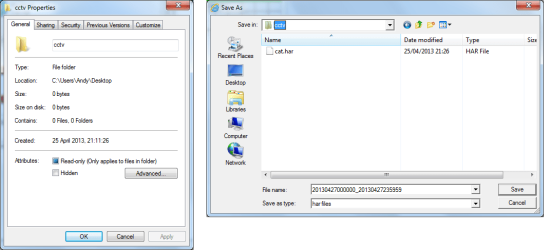
Screenshot of the properties as requested.

I've also put a side by side of the folder viewed through the DVR's download tool which shows a file in there.
 

Attachments

  • screenshot.png
    screenshot.png
    30.4 KB · Views: 11

My Computer

Computer type
PC/Desktop
Computer Manufacturer/Model Number
Packard Bell
OS
Windows 7 Home Premium
Antivirus
Norton
Browser
IE
Does the Public desktop have the CCTV folder (C:\Users\Public\Desktop)?
 

My Computer

Computer type
Laptop
Computer Manufacturer/Model Number
HP ENVY 17-1150eg
OS
Windows 10 Pro x64 EN-GB
CPU
1.6 GHz Intel Core i7-720QM Processor
Memory
6 GB
Graphics Card(s)
ATI Mobility Radeon HD 5850 Graphics
Sound Card
Beats sound system with integrated subwoofer
Monitor(s) Displays
17" laptop display, 22" LED and 32" Full HD TV through HDMI
Screen Resolution
1600*900 (1), 1920*1080 (2&3)
Hard Drives
Internal: 2 x 500 GB SATA Hard Disk Drive 7200 rpm
External: 2TB for backups, 3TB USB3 network drive for media
Cooling
As Envy runs a bit warm, I have it on a Cooler Master pad
Keyboard
Logitech diNovo Media Desktop Laser (bluetooth)
Mouse
Logitech Performance Mouse MX
Internet Speed
50/10 Mbps VDSL
Antivirus
Windows Defender 4.3.9431.0
Browser
Maxthon 3.5.2., IE11
Nope.

The CCTV folder is in C:\Users\Andy\Desktop
 

My Computer

Computer type
PC/Desktop
Computer Manufacturer/Model Number
Packard Bell
OS
Windows 7 Home Premium
Antivirus
Norton
Browser
IE
I asked other members to take a look of this, I really do not have any ideas. Very strange issue indeed.
 

My Computer

Computer type
Laptop
Computer Manufacturer/Model Number
HP ENVY 17-1150eg
OS
Windows 10 Pro x64 EN-GB
CPU
1.6 GHz Intel Core i7-720QM Processor
Memory
6 GB
Graphics Card(s)
ATI Mobility Radeon HD 5850 Graphics
Sound Card
Beats sound system with integrated subwoofer
Monitor(s) Displays
17" laptop display, 22" LED and 32" Full HD TV through HDMI
Screen Resolution
1600*900 (1), 1920*1080 (2&3)
Hard Drives
Internal: 2 x 500 GB SATA Hard Disk Drive 7200 rpm
External: 2TB for backups, 3TB USB3 network drive for media
Cooling
As Envy runs a bit warm, I have it on a Cooler Master pad
Keyboard
Logitech diNovo Media Desktop Laser (bluetooth)
Mouse
Logitech Performance Mouse MX
Internet Speed
50/10 Mbps VDSL
Antivirus
Windows Defender 4.3.9431.0
Browser
Maxthon 3.5.2., IE11
Thanks a lot.

Any suggestions gratefully received! It's got me stumped.
 

My Computer

Computer type
PC/Desktop
Computer Manufacturer/Model Number
Packard Bell
OS
Windows 7 Home Premium
Antivirus
Norton
Browser
IE

My Computer

Computer type
Laptop
Computer Manufacturer/Model Number
HP ENVY 17-1150eg
OS
Windows 10 Pro x64 EN-GB
CPU
1.6 GHz Intel Core i7-720QM Processor
Memory
6 GB
Graphics Card(s)
ATI Mobility Radeon HD 5850 Graphics
Sound Card
Beats sound system with integrated subwoofer
Monitor(s) Displays
17" laptop display, 22" LED and 32" Full HD TV through HDMI
Screen Resolution
1600*900 (1), 1920*1080 (2&3)
Hard Drives
Internal: 2 x 500 GB SATA Hard Disk Drive 7200 rpm
External: 2TB for backups, 3TB USB3 network drive for media
Cooling
As Envy runs a bit warm, I have it on a Cooler Master pad
Keyboard
Logitech diNovo Media Desktop Laser (bluetooth)
Mouse
Logitech Performance Mouse MX
Internet Speed
50/10 Mbps VDSL
Antivirus
Windows Defender 4.3.9431.0
Browser
Maxthon 3.5.2., IE11
As I suggested a while ago, you really need to speak with the manufacturer of the CCTV system -- or at least identify it so someone could do a little research. In the meantime, you might be interested in the following discussion about the unreadability of files produced by CCTV security systems --> CCTV file formats - CCTV Forum
 

My Computer

Computer type
PC/Desktop
Computer Manufacturer/Model Number
custom
OS
Windows 7 Pro x64
CPU
Intel Core i5 3570K
Motherboard
ASRock Z77 Extreme 6
Memory
8 GB
Graphics Card(s)
Intel HD 4000 (on chip)
Monitor(s) Displays
Dell U2412M
Screen Resolution
1920 x 1200
Hard Drives
Crucial 128 GB SSD M4-CT128M4SSD2 (C:)
Western Digital 1 TB SATA III WD10EALX (D: (users); E:)
Western Digital 200 GB IDE WD2000JB (H:)
Western Digital 2 TB SATA III WD20 EFRX (USB 3 external)(F:,G:)
ASUS DRW-24B1ST SATA DVD read/write
PSU
Intel core i5-3570K
Antivirus
Eset NOD32 a/v v. 6
Browser
Firefox 20
Screenshot of the properties as requested.

I've also put a side by side of the folder viewed through the DVR's download tool which shows a file in there.
I concur with contacting the manufacturer...
...while we await a reply from them:

I have questions about your screenshot:
1) Where both windows open at the same time? I wondered if your request for the files created a catalog file shown in the "Save As" dialog box. I found some websites talking about HAR files as H.264 video files and other websites talking about them as text JSON files.

2) That looks like an IE "Save As" dialog box with XP style shortcuts. Are you using a W7 stock Windows (file) explorer?


That "Save As" dialog box is usually nothing more than a different looking Windows (file) Explorer.

Maybe you can...
...right click on the column headers
...select More from the context menu
...place a check by Attributes from the Choose Details window
...scroll down and place a check by Owner from that same window
Then resize the columns and the window itself to show all of the columns in your next screenshot.

You can also try (from within the "Save As" dialog box)...
...right-clicking on the file of interest
...selecting Copy from the context menu
(leave the "Save As" dialog box open)
...right-click on an empty place on your desktop
...select Paste from the context menu

If need be, we can walk you thru using Process Monitor to watch what is being written to that cctv folder (filter results for path contains cctv).
 

My Computer

Computer type
Laptop
Computer Manufacturer/Model Number
Employer provided Dell Latitude
OS
W7 Pro SP1 64bit
CPU
i7
Memory
8GB
Graphics Card(s)
Intel HD Graphics
Hard Drives
crappy SSD
Antivirus
Employer mandated Symantec Endpoint Protection
Browser
Pale Moon 64bit, IE11 64bit & Chrome 64bit
I have had similar issues in the past, i install cctv systems and we had some recordings on a DVR from NHS (hospital) premises that was required for evidence by police and the DVD drive on the machine was broken so swapped out HDDs and put it in a PC but never got it to work in the end police forensics took the HDD of me and retrieved it themselves then gave the drive back but they also needed the original DVR to get it to work

Please post back your findings especially if you do get it to work

I figured my problem was the fact the recordings were never intended to go through as PC but dealt with by the DVR onboard hardware/codecs so never spent much time on it
 
Last edited:

My Computer

Computer type
PC/Desktop
Computer Manufacturer/Model Number
Pauly Special
OS
Win7 Ultimate X64
CPU
Intel i5 3570K
Motherboard
Gigabyte Z77X-DS3H
Memory
8GB DDR3 1600
Graphics Card(s)
Onboard
Sound Card
Onboard
Screen Resolution
1280x1024
Hard Drives
Samsung 840 Evo SSD (OS)
1TB Spinner (Data)
PSU
800W Arctic
Case
Cooler Master
Cooling
3x120mm Fans
Keyboard
MS Wireless
Mouse
MS Wireless
Internet Speed
20M
Back
Top