Windows Explorer Taskbar Icon - Change Open To Target

How to Change the Windows 7 Pinned Windows Explorer Taskbar Icon Open To Target


   Information
This will show you how to change the Windows 7 pinned Windows Explorer taskbar icon from the default Open To the Libraries window target to Open To the Computer window target or other possible locations that are available to choose from instead when you click on the Windows Explorer icon on the taskbar.
   Note
Special thanks to Chappy (aka: Dave) for pointing this out to me, and to Limneos for the additional locations.
   Warning
By design in Windows, these shortcuts will open a new window in a new process (explorer.exe) each time you use the shortcut. When you close the opened window from the shortcut, the extra explorer.exe process will close with it as well a few moments afterwards.

EXAMPLE: Windows Explorer icon pinned to the taskbar
3580d1232887815-windows-explorer-taskbar-icon-change-open-target-taskbar.jpg

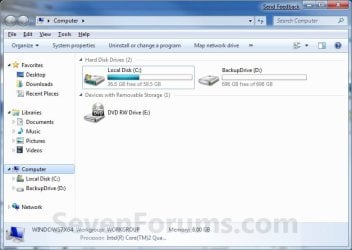
EXAMPLE: Opens to Libraries (default) or Computer
NOTE: You can also select from the other available options below.
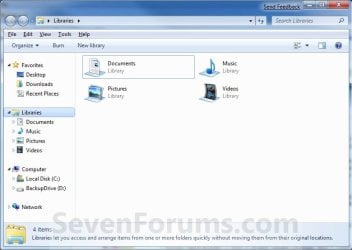
Libraries.jpg

Computer.jpg

Here's How:
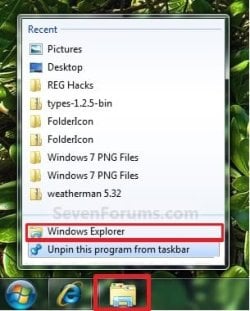
1. Right click on the pinned Windows Explorer taskbar icon, then right click on Windows Explorer in the Jump List and click on Properties. (see screenshot below)
Unpin.jpg
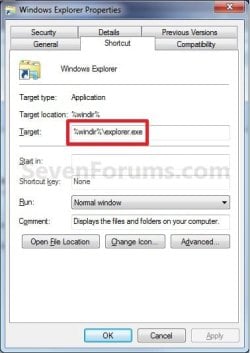
2. In the Shortcut tab, make sure that the field box to the right of Start in is empty.

3. In the Shortcut tab and to the right of Target, type or copy the path (code) for the location below that you want the Windows Explorer icon to open to instead, then click on OK. (see screenshot below)

NOTE: You can do this for any item that you know it's {CLSID} registry entry for. You can also specify a specific folder e.g. :
%windir%\explorer.exe /n, /e, /select, C:\somefolder
Target_Properties.jpg

   Note
Using the Explorer.exe Command Line Syntax/:


%windir%\explorer.exe [/n][/e][,/root],X,[[/Select],Y]
  • X - Secifies the object, and optionally with sub-object Y.
  • /e - Uses Windows Explorer view. Shows the left Windows Explorer tree view in the navigation pane together with the right pane in list view.
  • /n - Opens in a new window.
  • /root - Will have Explorer.exe explore the root object X and objects belonging to X. On the other hand, when the /root switch is not present, Explorer.exe explores the object X, its children, and other Explorer objects as well.
  • /Select - Puts the focus on a file or folder. The parent folder is opened and the specified object is selected.
  • /Separate - Opens in a separate process.
For example:

Code:
%windir%\explorer.exe /N,/Select,%WinDir%\system32\calc.exe
The command above will explore the C:\Windows\System32 folder and put the focus on the calc.exe (calculator) program.
   Tip
If you want the navigation pane to exand open to the item in Windows 8, then you will need to turn on "Expand to Current Folder" in the navigation pane.


  • Windows Explorer (default) (opens to Libraries)
(Windows 7)
Code:
%windir%\explorer.exe
(Windows 8)
Code:
%AppData%\Microsoft\Windows\Start Menu\Programs\System Tools\File Explorer.lnk

  • Computer
(Opens in new process)
Code:
%windir%\explorer.exe /n /Separate,::{20D04FE0-3AEA-1069-A2D8-08002B30309D}

OR
Code:
%windir%\explorer.exe shell:MyComputerFolder

  • My Documents
(Opens in new process)
Code:
%windir%\explorer.exe /n /Separate,::{450D8FBA-AD25-11D0-98A8-0800361B1103}

  • Documents Library
Code:
%UserProfile%\AppData\Roaming\Microsoft\Windows\Libraries\Documents.library-ms

  • Downloads
Code:
%UserProfile%\Downloads

  • Recycle Bin
(Opens in new process)
Code:
%windir%\explorer.exe /n /Separate,::{645FF040-5081-101B-9F08-00AA002F954E

  • Network Neighborhood
(Opens in new process)
Code:
%windir%\explorer.exe /n /Separate,::{208D2C60-3AEA-1069-A2D7-08002B30309D}

  • Default Web Browser (ex: Internet Explorer)
(Opens in new process)
Code:
%windir%\explorer.exe /n /Separate,::{871C5380-42A0-1069-A2EA-08002B30309D}

  • Computer Search Results Folder
(Opens in new process)
Code:
%windir%\explorer.exe /n /Separate,::{1F4DE370-D627-11D1-BA4F-00A0C91EEDBA}

  • Network Search Results Folder
(Opens in new process)
Code:
%windir%\explorer.exe /n /Separate,::{E17D4FC0-5564-11D1-83F2-00A0C90DC849}

  • Web Folders
(Opens in new process)
Code:
%windir%\explorer.exe /n /Separate,::{20D04FE0-3AEA-1069-A2D8-08002B30309D}\::{BDEADF00-C265-11D0-BCED-00A0C90AB50F}

  • Control Panel
(Opens in new process)
Code:
%windir%\explorer.exe /n /Separate,::{20D04FE0-3AEA-1069-A2D8-08002B30309D}\::{21EC2020-3AEA-1069-A2DD-08002B30309D}

  • Printers and Faxes
(Opens in new process)
Code:
%windir%\explorer.exe /n /Separate,::{20D04FE0-3AEA-1069-A2D8-08002B30309D}\::{21EC2020-3AEA-1069-A2DD-08002B30309D}\::{2227A280-3AEA-1069-A2DE-08002B30309D}

  • Scanners and Cameras
(Opens in new process)
Code:
%windir%\explorer.exe /n /Separate,::{20D04FE0-3AEA-1069-A2D8-08002B30309D}\::{21EC2020-3AEA-1069-A2DD-08002B30309D}\::{E211B736-43FD-11D1-9EFB-0000F8757FCD}

  • Fonts
(Opens in new process)
Code:
%windir%\explorer.exe /n /Separate,::{20D04FE0-3AEA-1069-A2D8-08002B30309D}\::{21EC2020-3AEA-1069-A2DD-08002B30309D}\::{D20EA4E1-3957-11d2-A40B-0C5020524152}

  • Network Connections or My Network Place
(Opens in new process)
Code:
%windir%\explorer.exe /n /Separate,::{20D04FE0-3AEA-1069-A2D8-08002B30309D}\::{21EC2020-3AEA-1069-A2DD-08002B30309D}\::{7007ACC7-3202-11D1-AAD2-00805FC1270E}

  • Administrative Tools
(Opens in new process)
Code:
%windir%\explorer.exe /n /Separate,::{20D04FE0-3AEA-1069-A2D8-08002B30309D}\::{21EC2020-3AEA-1069-A2DD-08002B30309D}\::{D20EA4E1-3957-11d2-A40B-0C5020524153}

  • Tasks Scheduler
(Opens in new process)
Code:
%windir%\explorer.exe /n /Separate,::{20D04FE0-3AEA-1069-A2D8-08002B30309D}\::{21EC2020-3AEA-1069-A2DD-08002B30309D}\::{D6277990-4C6A-11CF-8D87-00AA0060F5BF}

  • User Profile (personal) Folder
Code:
%windir%\explorer.exe shell:Profile

That's it,
Shawn


Attachments

  • Taskbar.jpg
    Taskbar.jpg
    8.5 KB · Views: 194,553
Last edited:
:::wishes that it had been correct:::
:::wishes for a way to control that nav pane/pain:::

Yeah, unfortunately the nav pane can only be on or off universally. :(
 
Last edited:

My Computer My Computer

Computer type
PC/Desktop
Computer Manufacturer/Model Number
Self built custom
OS
64-bit Windows 11 Pro for Workstations
CPU
Intel i7-8700K OC'd to 5 GHz
Motherboard
ASUS ROG Maximus XI Formula Z390
Memory
64 GB (4x16GB) G.SKILL TridentZ RGB DDR4 3600 MHz
Graphics Card(s)
ASUS ROG-STRIX-GTX1080TI-O11G-GAMING
Sound Card
Integrated
Monitor(s) Displays
2 x Samsung Odyssey G7 27"
Screen Resolution
2560x1440
Hard Drives
1TB Samsung 990 PRO M.2,
4TB Samsung 990 PRO PRO M.2,
TerraMaster F8 SSD Plus NAS
PSU
Seasonic Prime Titanium 850W
Case
Thermaltake Core P3
Cooling
Corsair Hydro H115i
Keyboard
Logitech wireless K800
Mouse
Logitech MX Master 4
Internet Speed
2 Gb/s Download and 100 Mb/s Upload
Antivirus
Malwarebyte Anti-Malware Premium
Browser
Google Chrome
Other Info
Logitech Z625 speaker system,
Logitech BRIO 4K Pro webcam,
HP Color LaserJet Pro MFP M477fdn,
APC SMART-UPS RT 1000 XL - SURT1000XLI,
Galaxy S23 Plus phone
It would help me to help you if you posted the line that you are using for the shortcut target.

If I click on Start > Run and paste this in
%windir%\explorer.exeI do not see a new instance of explorer within task manager. I can repeat that several times and have several explorer windows open, but still only one instance of explorer showing within task manager.
If I use the /n switch, I see the a new explorer window open and a new instance of explorer within task manager.
%windir%\explorer.exe /n

If you happen to be working with an application that is causing explorer to crash (thus taking down your desktop and taskbar), it is nice to open a new instance of explorer and then open the problematic app via that new instance. That way, when the app crashes, it does not take out the desktop/taskbar.

These are what I used:

Code:
%windir%\explorer.exe /n,::{20D04FE0-3AEA-1069-A2D8-08002B30309D}

Code:
%windir%\explorer.exe ,::{20D04FE0-3AEA-1069-A2D8-08002B30309D}

In both the cases, I see new explorer.exe's opening up in task manager and navigation pane is shown in both cases.
 

My Computer My Computer

Computer type
PC/Desktop
OS
Windows 7 Home Premium x64
roboticarm,
I see the same thing: a new explorer.exe within task manager for each window. I would not have expected that.

Brink,
/n - Opens a new window in a new process in a single-paned (My Computer) view
I still see two panes. The nav pane on the left and the other pane on the right.

And the example does not work for me either:
Code:
%windir%\explorer.exe /N,%WinDir%\System32,/Select,%WinDir%\system32\calc.exe
It highlights the system32 folder in the right pane. Does it highlight the calc exe for you?
 

My Computer My Computer

Computer type
Laptop
Computer Manufacturer/Model Number
Employer provided Dell Latitude
OS
W7 Pro SP1 64bit
CPU
i7
Memory
8GB
Graphics Card(s)
Intel HD Graphics
Hard Drives
crappy SSD
Antivirus
Employer mandated Symantec Endpoint Protection
Browser
Pale Moon 64bit, IE11 64bit & Chrome 64bit
Try this below with "Expand to current folder" checked.

Code:
%windir%\explorer.exe /N,/Select,%WinDir%\system32\calc.exe
 

My Computer My Computer

Computer type
PC/Desktop
Computer Manufacturer/Model Number
Self built custom
OS
64-bit Windows 11 Pro for Workstations
CPU
Intel i7-8700K OC'd to 5 GHz
Motherboard
ASUS ROG Maximus XI Formula Z390
Memory
64 GB (4x16GB) G.SKILL TridentZ RGB DDR4 3600 MHz
Graphics Card(s)
ASUS ROG-STRIX-GTX1080TI-O11G-GAMING
Sound Card
Integrated
Monitor(s) Displays
2 x Samsung Odyssey G7 27"
Screen Resolution
2560x1440
Hard Drives
1TB Samsung 990 PRO M.2,
4TB Samsung 990 PRO PRO M.2,
TerraMaster F8 SSD Plus NAS
PSU
Seasonic Prime Titanium 850W
Case
Thermaltake Core P3
Cooling
Corsair Hydro H115i
Keyboard
Logitech wireless K800
Mouse
Logitech MX Master 4
Internet Speed
2 Gb/s Download and 100 Mb/s Upload
Antivirus
Malwarebyte Anti-Malware Premium
Browser
Google Chrome
Other Info
Logitech Z625 speaker system,
Logitech BRIO 4K Pro webcam,
HP Color LaserJet Pro MFP M477fdn,
APC SMART-UPS RT 1000 XL - SURT1000XLI,
Galaxy S23 Plus phone
Try this below with "Expand to current folder" checked.

Code:
%windir%\explorer.exe /N,/Select,%WinDir%\system32\calc.exe
Yep - that works. Thanks for fixing the tut.

Too bad about not being able to open explorer with a single pane view. Some folders we want to see without the nav pane; but for most folders, we need that nav pane. So we manually toggle that option many times each day. We could do this in XP... but such is life.
 

My Computer My Computer

Computer type
Laptop
Computer Manufacturer/Model Number
Employer provided Dell Latitude
OS
W7 Pro SP1 64bit
CPU
i7
Memory
8GB
Graphics Card(s)
Intel HD Graphics
Hard Drives
crappy SSD
Antivirus
Employer mandated Symantec Endpoint Protection
Browser
Pale Moon 64bit, IE11 64bit & Chrome 64bit
Is there any switch that allows to move one folder back in Explorer?
 

My Computer My Computer

Computer type
PC/Desktop
OS
Windows 7 Home Premium x64
Is there any switch that allows to move one folder back in Explorer?
I do not understand what you are asking about. Explorer opens to a certain folder. We will call this explorer window #1. Are you asking for a shortcut to explorer.exe (with a switch) that causes explorer window #1 to move one folder back?
 

My Computer My Computer

Computer type
Laptop
Computer Manufacturer/Model Number
Employer provided Dell Latitude
OS
W7 Pro SP1 64bit
CPU
i7
Memory
8GB
Graphics Card(s)
Intel HD Graphics
Hard Drives
crappy SSD
Antivirus
Employer mandated Symantec Endpoint Protection
Browser
Pale Moon 64bit, IE11 64bit & Chrome 64bit
Yes exactly. But never mind, I was just being silly lol
 

My Computer My Computer

Computer type
PC/Desktop
OS
Windows 7 Home Premium x64
I can do what I described... just not using a shortcut to explorer. You can open a new thread if you want to automate some actions within an existing explorer window. However, if you moved forward one folder level, then you can move back one folder level via the backspace key.
 

My Computer My Computer

Computer type
Laptop
Computer Manufacturer/Model Number
Employer provided Dell Latitude
OS
W7 Pro SP1 64bit
CPU
i7
Memory
8GB
Graphics Card(s)
Intel HD Graphics
Hard Drives
crappy SSD
Antivirus
Employer mandated Symantec Endpoint Protection
Browser
Pale Moon 64bit, IE11 64bit & Chrome 64bit
Actually I was thinking of this:

Setting the target to the default "%windir%\explorer.exe" which does not create new processes and open up libraries and then using some special switch, make it go to "Computer" folder automatically thus preventing new explorer.exe's. ;)
 

My Computer My Computer

Computer type
PC/Desktop
OS
Windows 7 Home Premium x64
Actually I was thinking of this:

Setting the target to the default "%windir%\explorer.exe" which does not create new processes and open up libraries and then using some special switch, make it go to "Computer" folder automatically thus preventing new explorer.exe's. ;)
There might be a switch that opens it directly to the view that you want and does not create a new explorer process. The same view can be created multiple ways.

Silly silly me - to think that I understood what the W7 OS was doing when it comes to the absence of the /n switch.

The video below is from a Virtual Machine (VM) with nothing installed. (Virtual box guest additions and OS updates are installed.) The pinned shortcut has not been modified. Process Explorer has been set to show changes for 9 seconds. In other words, when a new explorer process shows up, it will be green for a while. When explorer exits RAM, it will turn red and will stay red for about 9 seconds. As opposed to the task manager window which shows explorer processes coming and going rather quickly. Task Manager's update speed is set to High.

There does not seem to be any rhyme or reason to when a new explorer process will appear. And they can go away without closing the explorer window that caused them (or maybe caused them). These are definately different from the new "persistent" processes that you get with the /n switch. But I can no longer state that the absence of that /n switch will prevent a new explorer process.

Just letting the VM sit for a while or doing other things does not make these new processes of the explorer app come and go... so they seem to be tied to opening new explorer windows. Even if those explorer windows will are managed by the same explorer process that is presenting the desktop and taskbar.

(Best viewed at 720p and in the full screen mode.)
 
Last edited:

My Computer My Computer

Computer type
Laptop
Computer Manufacturer/Model Number
Employer provided Dell Latitude
OS
W7 Pro SP1 64bit
CPU
i7
Memory
8GB
Graphics Card(s)
Intel HD Graphics
Hard Drives
crappy SSD
Antivirus
Employer mandated Symantec Endpoint Protection
Browser
Pale Moon 64bit, IE11 64bit & Chrome 64bit
I understood what you said. The fact that the new processes end automatically is good enough. Though I'll still try finding a workaround and post here if I'm successful anyday... ;)
 

My Computer My Computer

Computer type
PC/Desktop
OS
Windows 7 Home Premium x64
Robot Man,

Another thought for you is that it's better to have it start as a new process. Otherwise, if one explorer should crash, it would crash all of them running on the same process. Having them run with separate processes helps to prevent that.
 

My Computer My Computer

Computer type
PC/Desktop
Computer Manufacturer/Model Number
Self built custom
OS
64-bit Windows 11 Pro for Workstations
CPU
Intel i7-8700K OC'd to 5 GHz
Motherboard
ASUS ROG Maximus XI Formula Z390
Memory
64 GB (4x16GB) G.SKILL TridentZ RGB DDR4 3600 MHz
Graphics Card(s)
ASUS ROG-STRIX-GTX1080TI-O11G-GAMING
Sound Card
Integrated
Monitor(s) Displays
2 x Samsung Odyssey G7 27"
Screen Resolution
2560x1440
Hard Drives
1TB Samsung 990 PRO M.2,
4TB Samsung 990 PRO PRO M.2,
TerraMaster F8 SSD Plus NAS
PSU
Seasonic Prime Titanium 850W
Case
Thermaltake Core P3
Cooling
Corsair Hydro H115i
Keyboard
Logitech wireless K800
Mouse
Logitech MX Master 4
Internet Speed
2 Gb/s Download and 100 Mb/s Upload
Antivirus
Malwarebyte Anti-Malware Premium
Browser
Google Chrome
Other Info
Logitech Z625 speaker system,
Logitech BRIO 4K Pro webcam,
HP Color LaserJet Pro MFP M477fdn,
APC SMART-UPS RT 1000 XL - SURT1000XLI,
Galaxy S23 Plus phone
Thanks Brink, I am aware of that. Actually, the lesser the no. of processes, the happier I am :p
 

My Computer My Computer

Computer type
PC/Desktop
OS
Windows 7 Home Premium x64
:thumbsup:
 

My Computer My Computer

Computer type
PC/Desktop
Computer Manufacturer/Model Number
Self built custom
OS
64-bit Windows 11 Pro for Workstations
CPU
Intel i7-8700K OC'd to 5 GHz
Motherboard
ASUS ROG Maximus XI Formula Z390
Memory
64 GB (4x16GB) G.SKILL TridentZ RGB DDR4 3600 MHz
Graphics Card(s)
ASUS ROG-STRIX-GTX1080TI-O11G-GAMING
Sound Card
Integrated
Monitor(s) Displays
2 x Samsung Odyssey G7 27"
Screen Resolution
2560x1440
Hard Drives
1TB Samsung 990 PRO M.2,
4TB Samsung 990 PRO PRO M.2,
TerraMaster F8 SSD Plus NAS
PSU
Seasonic Prime Titanium 850W
Case
Thermaltake Core P3
Cooling
Corsair Hydro H115i
Keyboard
Logitech wireless K800
Mouse
Logitech MX Master 4
Internet Speed
2 Gb/s Download and 100 Mb/s Upload
Antivirus
Malwarebyte Anti-Malware Premium
Browser
Google Chrome
Other Info
Logitech Z625 speaker system,
Logitech BRIO 4K Pro webcam,
HP Color LaserJet Pro MFP M477fdn,
APC SMART-UPS RT 1000 XL - SURT1000XLI,
Galaxy S23 Plus phone
How do I set two folder in Target box. I am frequently working on Two Folder.

With the help of above solution I set one folder at a time and don;t want to create another shortcut.

Please help me on it.

Thank you in advanced.
 

My Computer My Computer

Computer type
PC/Desktop
OS
Windows 7 Enterprise 64bit

My Computer My Computer

Computer type
PC/Desktop
Computer Manufacturer/Model Number
Self built custom
OS
64-bit Windows 11 Pro for Workstations
CPU
Intel i7-8700K OC'd to 5 GHz
Motherboard
ASUS ROG Maximus XI Formula Z390
Memory
64 GB (4x16GB) G.SKILL TridentZ RGB DDR4 3600 MHz
Graphics Card(s)
ASUS ROG-STRIX-GTX1080TI-O11G-GAMING
Sound Card
Integrated
Monitor(s) Displays
2 x Samsung Odyssey G7 27"
Screen Resolution
2560x1440
Hard Drives
1TB Samsung 990 PRO M.2,
4TB Samsung 990 PRO PRO M.2,
TerraMaster F8 SSD Plus NAS
PSU
Seasonic Prime Titanium 850W
Case
Thermaltake Core P3
Cooling
Corsair Hydro H115i
Keyboard
Logitech wireless K800
Mouse
Logitech MX Master 4
Internet Speed
2 Gb/s Download and 100 Mb/s Upload
Antivirus
Malwarebyte Anti-Malware Premium
Browser
Google Chrome
Other Info
Logitech Z625 speaker system,
Logitech BRIO 4K Pro webcam,
HP Color LaserJet Pro MFP M477fdn,
APC SMART-UPS RT 1000 XL - SURT1000XLI,
Galaxy S23 Plus phone
Thnx for quick reply,

Is there any other way like any software available for that?
 

My Computer My Computer

Computer type
PC/Desktop
OS
Windows 7 Enterprise 64bit
Not that I'm aware of.
 

My Computer My Computer

Computer type
PC/Desktop
Computer Manufacturer/Model Number
Self built custom
OS
64-bit Windows 11 Pro for Workstations
CPU
Intel i7-8700K OC'd to 5 GHz
Motherboard
ASUS ROG Maximus XI Formula Z390
Memory
64 GB (4x16GB) G.SKILL TridentZ RGB DDR4 3600 MHz
Graphics Card(s)
ASUS ROG-STRIX-GTX1080TI-O11G-GAMING
Sound Card
Integrated
Monitor(s) Displays
2 x Samsung Odyssey G7 27"
Screen Resolution
2560x1440
Hard Drives
1TB Samsung 990 PRO M.2,
4TB Samsung 990 PRO PRO M.2,
TerraMaster F8 SSD Plus NAS
PSU
Seasonic Prime Titanium 850W
Case
Thermaltake Core P3
Cooling
Corsair Hydro H115i
Keyboard
Logitech wireless K800
Mouse
Logitech MX Master 4
Internet Speed
2 Gb/s Download and 100 Mb/s Upload
Antivirus
Malwarebyte Anti-Malware Premium
Browser
Google Chrome
Other Info
Logitech Z625 speaker system,
Logitech BRIO 4K Pro webcam,
HP Color LaserJet Pro MFP M477fdn,
APC SMART-UPS RT 1000 XL - SURT1000XLI,
Galaxy S23 Plus phone
Very good tutorial. Big time saver. I wish I would of found it ALONG time ago.
 

My Computer My Computer

Computer type
PC/Desktop
Computer Manufacturer/Model Number
Dell T7600 Precision
OS
Microsoft Windows 7 Professional 64-bit 7601 Multiprocessor Free Service Pack 1
CPU
Intel(R) Xeon(R) CPU E5-2630 0 @ 2.30GHz
Motherboard
Dell Inc. 0VHRW1
Memory
16.00 GB
Graphics Card(s)
(1) LogMeIn Mirror Driver (2) NVIDIA Quadro 4000
Sound Card
(1) NVIDIA High Definition Audio (2) Realtek High Definiti
Screen Resolution
1920 x 1200 x 32 bits (4294967296 colors) @ 59 Hz
Hard Drives
(1) ATA ST500DM002-1BD14 SCSI Disk Device (2) Generic Ultra HS-SD/MMC USB Device (3) Generic- Compact Flash USB Device (4) Generic- MS/MS-Pro USB Device (5) Generic- SD/MMC USB Device (6) Generic- SM/xD Picture USB Device
Internet Speed
9.59 Mbps Down 9.06 Mbps UP
Antivirus
Trend Micro Security Agent
Browser
IE 10
Back
Top