Windows Explorer Taskbar Icon - Change Open To Target

How to Change the Windows 7 Pinned Windows Explorer Taskbar Icon Open To Target


   Information
This will show you how to change the Windows 7 pinned Windows Explorer taskbar icon from the default Open To the Libraries window target to Open To the Computer window target or other possible locations that are available to choose from instead when you click on the Windows Explorer icon on the taskbar.
   Note
Special thanks to Chappy (aka: Dave) for pointing this out to me, and to Limneos for the additional locations.
   Warning
By design in Windows, these shortcuts will open a new window in a new process (explorer.exe) each time you use the shortcut. When you close the opened window from the shortcut, the extra explorer.exe process will close with it as well a few moments afterwards.

EXAMPLE: Windows Explorer icon pinned to the taskbar
3580d1232887815-windows-explorer-taskbar-icon-change-open-target-taskbar.jpg

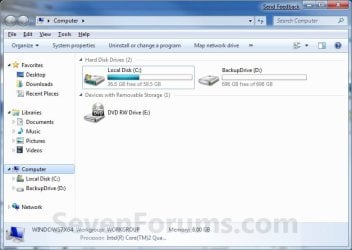
EXAMPLE: Opens to Libraries (default) or Computer
NOTE: You can also select from the other available options below.
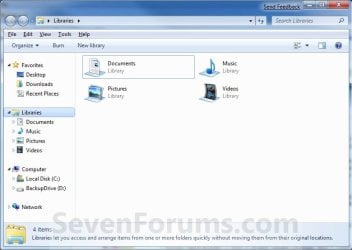
Libraries.jpg

Computer.jpg

Here's How:
1. Right click on the pinned Windows Explorer taskbar icon, then right click on Windows Explorer in the Jump List and click on Properties. (see screenshot below)
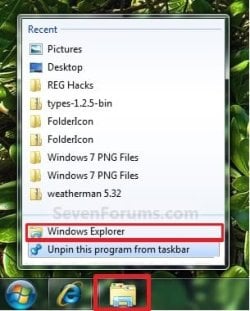
Unpin.jpg
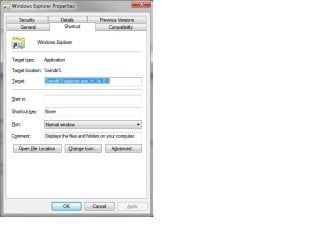
2. In the Shortcut tab, make sure that the field box to the right of Start in is empty.

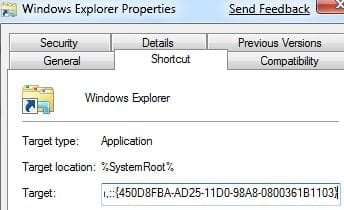
3. In the Shortcut tab and to the right of Target, type or copy the path (code) for the location below that you want the Windows Explorer icon to open to instead, then click on OK. (see screenshot below)

NOTE: You can do this for any item that you know it's {CLSID} registry entry for. You can also specify a specific folder e.g. :
%windir%\explorer.exe /n, /e, /select, C:\somefolder
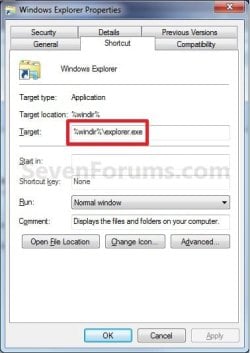
Target_Properties.jpg

   Note
Using the Explorer.exe Command Line Syntax/:


%windir%\explorer.exe [/n][/e][,/root],X,[[/Select],Y]
  • X - Secifies the object, and optionally with sub-object Y.
  • /e - Uses Windows Explorer view. Shows the left Windows Explorer tree view in the navigation pane together with the right pane in list view.
  • /n - Opens in a new window.
  • /root - Will have Explorer.exe explore the root object X and objects belonging to X. On the other hand, when the /root switch is not present, Explorer.exe explores the object X, its children, and other Explorer objects as well.
  • /Select - Puts the focus on a file or folder. The parent folder is opened and the specified object is selected.
  • /Separate - Opens in a separate process.
For example:

Code:
%windir%\explorer.exe /N,/Select,%WinDir%\system32\calc.exe
The command above will explore the C:\Windows\System32 folder and put the focus on the calc.exe (calculator) program.
   Tip
If you want the navigation pane to exand open to the item in Windows 8, then you will need to turn on "Expand to Current Folder" in the navigation pane.


  • Windows Explorer (default) (opens to Libraries)
(Windows 7)
Code:
%windir%\explorer.exe
(Windows 8)
Code:
%AppData%\Microsoft\Windows\Start Menu\Programs\System Tools\File Explorer.lnk

  • Computer
(Opens in new process)
Code:
%windir%\explorer.exe /n /Separate,::{20D04FE0-3AEA-1069-A2D8-08002B30309D}

OR
Code:
%windir%\explorer.exe shell:MyComputerFolder

  • My Documents
(Opens in new process)
Code:
%windir%\explorer.exe /n /Separate,::{450D8FBA-AD25-11D0-98A8-0800361B1103}

  • Documents Library
Code:
%UserProfile%\AppData\Roaming\Microsoft\Windows\Libraries\Documents.library-ms

  • Downloads
Code:
%UserProfile%\Downloads

  • Recycle Bin
(Opens in new process)
Code:
%windir%\explorer.exe /n /Separate,::{645FF040-5081-101B-9F08-00AA002F954E

  • Network Neighborhood
(Opens in new process)
Code:
%windir%\explorer.exe /n /Separate,::{208D2C60-3AEA-1069-A2D7-08002B30309D}

  • Default Web Browser (ex: Internet Explorer)
(Opens in new process)
Code:
%windir%\explorer.exe /n /Separate,::{871C5380-42A0-1069-A2EA-08002B30309D}

  • Computer Search Results Folder
(Opens in new process)
Code:
%windir%\explorer.exe /n /Separate,::{1F4DE370-D627-11D1-BA4F-00A0C91EEDBA}

  • Network Search Results Folder
(Opens in new process)
Code:
%windir%\explorer.exe /n /Separate,::{E17D4FC0-5564-11D1-83F2-00A0C90DC849}

  • Web Folders
(Opens in new process)
Code:
%windir%\explorer.exe /n /Separate,::{20D04FE0-3AEA-1069-A2D8-08002B30309D}\::{BDEADF00-C265-11D0-BCED-00A0C90AB50F}

  • Control Panel
(Opens in new process)
Code:
%windir%\explorer.exe /n /Separate,::{20D04FE0-3AEA-1069-A2D8-08002B30309D}\::{21EC2020-3AEA-1069-A2DD-08002B30309D}

  • Printers and Faxes
(Opens in new process)
Code:
%windir%\explorer.exe /n /Separate,::{20D04FE0-3AEA-1069-A2D8-08002B30309D}\::{21EC2020-3AEA-1069-A2DD-08002B30309D}\::{2227A280-3AEA-1069-A2DE-08002B30309D}

  • Scanners and Cameras
(Opens in new process)
Code:
%windir%\explorer.exe /n /Separate,::{20D04FE0-3AEA-1069-A2D8-08002B30309D}\::{21EC2020-3AEA-1069-A2DD-08002B30309D}\::{E211B736-43FD-11D1-9EFB-0000F8757FCD}

  • Fonts
(Opens in new process)
Code:
%windir%\explorer.exe /n /Separate,::{20D04FE0-3AEA-1069-A2D8-08002B30309D}\::{21EC2020-3AEA-1069-A2DD-08002B30309D}\::{D20EA4E1-3957-11d2-A40B-0C5020524152}

  • Network Connections or My Network Place
(Opens in new process)
Code:
%windir%\explorer.exe /n /Separate,::{20D04FE0-3AEA-1069-A2D8-08002B30309D}\::{21EC2020-3AEA-1069-A2DD-08002B30309D}\::{7007ACC7-3202-11D1-AAD2-00805FC1270E}

  • Administrative Tools
(Opens in new process)
Code:
%windir%\explorer.exe /n /Separate,::{20D04FE0-3AEA-1069-A2D8-08002B30309D}\::{21EC2020-3AEA-1069-A2DD-08002B30309D}\::{D20EA4E1-3957-11d2-A40B-0C5020524153}

  • Tasks Scheduler
(Opens in new process)
Code:
%windir%\explorer.exe /n /Separate,::{20D04FE0-3AEA-1069-A2D8-08002B30309D}\::{21EC2020-3AEA-1069-A2DD-08002B30309D}\::{D6277990-4C6A-11CF-8D87-00AA0060F5BF}

  • User Profile (personal) Folder
Code:
%windir%\explorer.exe shell:Profile

That's it,
Shawn


Attachments

  • Taskbar.jpg
    Taskbar.jpg
    8.5 KB · Views: 194,553
Last edited:
Thanks, I was struggling with this to get it, I've been using it that way since W 98
as I see this is excellent for opening 1 window alone but when u have the necessity to open many windows at the time, this is not exactly a shortcut . . .
I open the folder containing the item I want to copy for instance, then I have to go to desktop or start menu to open an other window, to paste in, or I have to close the first window to open an other without having to right click the pin and open an other window, so the use of pins isn't exactly a very big advantage even if just more beautiful
 

My Computer

OS
XP 64 , Vista 64 , W7 64 tripple boot
CPU
Intel Core 2 Quad 2.4 // I 7 extreme
Motherboard
Intel 975 XBX2 // Asus P6T7 WS Revolution
Memory
Kingston 8GB DDR2 800 HX // Kingston 24 GB DDR3 1800 HX
Graphics Card(s)
BFG 280 GTX OCX soon to be Quadro FX 5800 X 2
Sound Card
Creative XFI Fatal1ty edition // M Audio
Monitor(s) Displays
Samsung Synchmaster 22" 1080 screen X 2
Screen Resolution
3840X1080@60
Hard Drives
too many Seagates, totallling about 5.2 TB // as many Seagates at least 1 of which SSD
PSU
Thermaltake toughpower 1200 // Thermaltake toughpower 2000
Case
Thermaltake Tai-Chi // Thermaltake Kandalf LCS or Sword M
Cooling
air cooling // Liquid cooling
Keyboard
Logitech G15 (blue), soon X 2 if not a Lebedev
Mouse
MS trackball explorer, hopefully soon X 2
Internet Speed
512 down 128 up
Other Info
first u'll se my actual system, and the // shows what my next system will be, then the actual system will be remote adminned by the then big system same way I'm now accessing my HT system, which is back up and storage
You're welcome t16skyhopper, and welcome to Seven Forums.

Shawn
 

My Computer

Computer type
PC/Desktop
Computer Manufacturer/Model Number
Self built custom
OS
64-bit Windows 11 Pro for Workstations
CPU
Intel i7-8700K OC'd to 5 GHz
Motherboard
ASUS ROG Maximus XI Formula Z390
Memory
64 GB (4x16GB) G.SKILL TridentZ RGB DDR4 3600 MHz
Graphics Card(s)
ASUS ROG-STRIX-GTX1080TI-O11G-GAMING
Sound Card
Integrated
Monitor(s) Displays
2 x Samsung Odyssey G7 27"
Screen Resolution
2560x1440
Hard Drives
1TB Samsung 990 PRO M.2,
4TB Samsung 990 PRO PRO M.2,
TerraMaster F8 SSD Plus NAS
PSU
Seasonic Prime Titanium 850W
Case
Thermaltake Core P3
Cooling
Corsair Hydro H115i
Keyboard
Logitech wireless K800
Mouse
Logitech MX Master 4
Internet Speed
2 Gb/s Download and 100 Mb/s Upload
Antivirus
Malwarebyte Anti-Malware Premium
Browser
Google Chrome
Other Info
Logitech Z625 speaker system,
Logitech BRIO 4K Pro webcam,
HP Color LaserJet Pro MFP M477fdn,
APC SMART-UPS RT 1000 XL - SURT1000XLI,
Galaxy S23 Plus phone
Libraries Taskbar Icon- Change Default Opening Location

   Note
By default, Windows Explorer in Windows 7 opens the Libraries location. Following this tutorial you will find how you can change this location to "My Computer" or other possible locations that are available to choose from


HERE'S HOW:

1. Right-click the Libraries icon on the taskbar.
2. Right-click Windows Explorer icon (usually third from bottom on the list)
and select "Properties".​

3. In the Target text box under Shortcut tab, change the value to one of the following to open either Documents or Computer by default:​

To Make Computer as Default Folder to Open by Windows Explorer upon Launching:
Code:
%windir%\explorer.exe /e,::{20D04FE0-3AEA-1069-A2D8-08002B30309D}

To Make Documents as Default Folder to Open by Windows Explorer upon Launching:

Code:
%windir%\explorer.exe /n,::{450D8FBA-AD25-11D0-98A8-0800361B1103}

4. Click OK and you're done.

   Note
You can do this for any item that you know it's {CLSID}. You can also specify a specific folder e.g. : %windir%\explorer.exe /n, /e, /select, C:\somefolder


Limneos


More available locations:

Recycle Bin
%windir%\explorer.exe /N,::{645FF040-5081-101B-9F08-00AA002F954E}
Network Neighborhood
%windir%\explorer.exe /N,::{208D2C60-3AEA-1069-A2D7-08002B30309D}
Default Web Browser or Navigator (IE, Firefox, Safari, Google Chrome)
%windir%\explorer.exe /N,::{871C5380-42A0-1069-A2EA-08002B30309D}
Computer Search Results Folder
%windir%\explorer.exe /N,::{1F4DE370-D627-11D1-BA4F-00A0C91EEDBA}
Network Search Results Folder
%windir%\explorer.exe /N,::{E17D4FC0-5564-11D1-83F2-00A0C90DC849}
Web Folders
%windir%\explorer.exe /N,::{20D04FE0-3AEA-1069-A2D8-08002B30309D}\::{BDEADF00-C265-11D0-BCED-00A0C90AB50F}
Control Panel
%windir%\explorer.exe /N,::{20D04FE0-3AEA-1069-A2D8-08002B30309D}\::{21EC2020-3AEA-1069-A2DD-08002B30309D}
Printers and Faxes
%windir%\explorer.exe /N,::{20D04FE0-3AEA-1069-A2D8-08002B30309D}\::{21EC2020-3AEA-1069-A2DD-08002B30309D}\::{2227A280-3AEA-1069-A2DE-08002B30309D}
Scanners and Cameras
%windir%\explorer.exe /N,::{20D04FE0-3AEA-1069-A2D8-08002B30309D}\::{21EC2020-3AEA-1069-A2DD-08002B30309D}\::{E211B736-43FD-11D1-9EFB-0000F8757FCD}
Fonts
%windir%\explorer.exe /N,::{20D04FE0-3AEA-1069-A2D8-08002B30309D}\::{21EC2020-3AEA-1069-A2DD-08002B30309D}\::{D20EA4E1-3957-11d2-A40B-0C5020524152}
Network Connections or My Network Place
%windir%\explorer.exe /N,::{20D04FE0-3AEA-1069-A2D8-08002B30309D}\::{21EC2020-3AEA-1069-A2DD-08002B30309D}\::{7007ACC7-3202-11D1-AAD2-00805FC1270E}
Administrative Tools
%windir%\explorer.exe /N,::{20D04FE0-3AEA-1069-A2D8-08002B30309D}\::{21EC2020-3AEA-1069-A2DD-08002B30309D}\::{D20EA4E1-3957-11d2-A40B-0C5020524153}
Tasks Scheduler
%windir%\explorer.exe /N,::{20D04FE0-3AEA-1069-A2D8-08002B30309D}\::{21EC2020-3AEA-1069-A2DD-08002B30309D}\::{D6277990-4C6A-11CF-8D87-00AA0060F5BF}
 

Attachments

  • test.jpg
    test.jpg
    11.4 KB · Views: 199,497
  • test2.jpg
    test2.jpg
    19.8 KB · Views: 68,485
Last edited by a moderator:

My Computer

Computer Manufacturer/Model Number
ENIAC
OS
Windows 7 RC 7100 32bit/64bit
CPU
Intel Core2Duo E4500 2.20 GHz
Motherboard
ASUS P5LD2-X/1333
Memory
2x1GB Kinsgston DDR2 800MHz
Graphics Card(s)
Nvidia 8500GT
Sound Card
Onboard High Definition Audio Device
Monitor(s) Displays
Sony Bravia 42"
Case
LINKW 2222
Cooling
Standard Intel
Keyboard
Some cheap one
Mouse
Microsoft Intellimouse something
Internet Speed
24MBps ADSL
Limneos,

Thank you for the additional locations. :)
 

My Computer

Computer type
PC/Desktop
Computer Manufacturer/Model Number
Self built custom
OS
64-bit Windows 11 Pro for Workstations
CPU
Intel i7-8700K OC'd to 5 GHz
Motherboard
ASUS ROG Maximus XI Formula Z390
Memory
64 GB (4x16GB) G.SKILL TridentZ RGB DDR4 3600 MHz
Graphics Card(s)
ASUS ROG-STRIX-GTX1080TI-O11G-GAMING
Sound Card
Integrated
Monitor(s) Displays
2 x Samsung Odyssey G7 27"
Screen Resolution
2560x1440
Hard Drives
1TB Samsung 990 PRO M.2,
4TB Samsung 990 PRO PRO M.2,
TerraMaster F8 SSD Plus NAS
PSU
Seasonic Prime Titanium 850W
Case
Thermaltake Core P3
Cooling
Corsair Hydro H115i
Keyboard
Logitech wireless K800
Mouse
Logitech MX Master 4
Internet Speed
2 Gb/s Download and 100 Mb/s Upload
Antivirus
Malwarebyte Anti-Malware Premium
Browser
Google Chrome
Other Info
Logitech Z625 speaker system,
Logitech BRIO 4K Pro webcam,
HP Color LaserJet Pro MFP M477fdn,
APC SMART-UPS RT 1000 XL - SURT1000XLI,
Galaxy S23 Plus phone
Thanks works gr8! Actually wanted it this way for 1 click My computer access from anywhere! Very useful for copy/cut paste operations!
 

My Computer

Computer type
PC/Desktop
Computer Manufacturer/Model Number
Custom built
OS
Windows 7 Ultimate (64 bit) dual boot with Fedora KDE
CPU
Intel Corei5-3470 @ 3.20Ghz (Turbo 3.60Ghz) [6MB L3 cache]
Motherboard
GIGABYTE GA-B75M-D3H [intel B75 Express Chipset]
Memory
8 GB [4 GB x 2] DDR3 1600 Mhz G.Skill
Graphics Card(s)
Zotac nVidia GeForce GTX 650 1024 MB GDDR5 (128 bit)
Sound Card
Realtek ALC 887 HD Audio codec onboard
Monitor(s) Displays
Samsung SyncMaster 2033SW+
Screen Resolution
1600 x 900 @ 60Hz
Hard Drives
1 x S-ATA II Seagate 1 TB [Win7 Ultimate x86-64 RTM]
1 x S-ATA Samsung 1 TB [Fedora]
PSU
Cooler Master Thunder 650W
Case
Cooler Master Elite 344 - USB 3
Cooling
All Fan [1 on front and 1 at back]
Keyboard
Microsoft PS/2 Multimedia keyboard
Mouse
Microsoft Optical Mouse USB
Internet Speed
1 Mbps Cable
Antivirus
Kaspersky Internet Security
Browser
Firefox
Great info. Thanks guys.
 

My Computer

Computer Manufacturer/Model Number
Dell XPS420
OS
Vista Ult 64 bit Seven Ult RTM x64
CPU
Intel Core2 Quad Q6600 2.40 gigahertz
Memory
Crucial Ballistix 4x2GB PC2 6400
Graphics Card(s)
NVIDIA GeForce 8600 GTS 256 MB
Sound Card
Creative SB X-Fi audio
Monitor(s) Displays
HP w2207 + HPvs15
Screen Resolution
1680x1050 + 1024x768
Hard Drives
2-WD5000AAKS-500 GB
WD5000AAV-500 GB external
Keyboard
Microsoft Comfort Curve
Mouse
MX Revolution
Other Info
Wacom Intuos 2 Graphics Tablet
Experience Index=5.5
Thanks :)>.
 

My Computer

Computer Manufacturer/Model Number
Real Ultimate
OS
Dualboot (Vista Home Premium 32b + Windows 7 Ultimate 32b)
CPU
Intel Core2Duo E6300 (1,86 Ghz)
Motherboard
Asus P5L-VM 1394
Memory
4 gb DDR2 @ 600 MHz - Kingston SDram
Graphics Card(s)
PCI-e EN7600GS 512mb Silencer | nVidia 7600GS
Sound Card
5.1 channel audio
Monitor(s) Displays
Hannstar G - 17 inch
Screen Resolution
1280x1024
Hard Drives
SATA II 250Gb 7200RPM 8MB Maxtor
PSU
400watt Silent
Keyboard
Logitech Wireless
Mouse
Logitech Wireless Rechargable
Internet Speed
Very fast
Other Info
Luxe cardreader with FireWire
DVD Brander +/- Writer/Rewriter Dual Layer Lightscribe

My Computer

Computer Manufacturer/Model Number
ENIAC
OS
Windows 7 RC 7100 32bit/64bit
CPU
Intel Core2Duo E4500 2.20 GHz
Motherboard
ASUS P5LD2-X/1333
Memory
2x1GB Kinsgston DDR2 800MHz
Graphics Card(s)
Nvidia 8500GT
Sound Card
Onboard High Definition Audio Device
Monitor(s) Displays
Sony Bravia 42"
Case
LINKW 2222
Cooling
Standard Intel
Keyboard
Some cheap one
Mouse
Microsoft Intellimouse something
Internet Speed
24MBps ADSL
great

and if u want to change the icon

Shift + R Click on the Explorer icon
and click on Properties then in the Customize tab choose Change icon button


and for more icons type
%SystemRoot%\system32\SHELL32.dll

in the location bar
 

My Computer

OS
Windows 7
It works also with shell-commands

%SystemRoot%\explorer.exe shell:My Video
or
%SystemRoot%\explorer.exe shell:System
 

My Computer

OS
Win 7
Is it just me or does it take explorer much longer (about 5 sec) to load if you add the extensions. i tried adding "shell:MyComputerFolder" and "/e,::{20D04FE0-3AEA-1069-A2D8-08002B30309D}" everytime i try to open explorer it takes 5 secs. Then i removed it again so it opens Libraries and it opened much faster... i am using windows 7 build 7057. it may because the new build because i upgraded from 7048 and didnt noticed this before
 

My Computer

OS
Windows 7
Hmmm... Interesting, as I've been using this kinda setup for years. All the way back to Windows 98 days.. C:\ for XP and E:\ for Win7 :)
 

Attachments

  • Windows 7 Explorer Properties.jpg
    Windows 7 Explorer Properties.jpg
    28.1 KB · Views: 872

My Computer

Computer type
PC/Desktop
Computer Manufacturer/Model Number
Generic Homebuilt
OS
Windows 7 Home Premium 64bit
CPU
Int i7 950 [3.06] O.C @3.36ghz Quad Core (HT) = 7.6 WEI
Motherboard
ATX LGA1366 DDR3 Asus Rampage III Formula
Memory
DDR3 6GB/Kit PC3-16000 Patriot @ 1733 mhz = 7.9 WEI
Graphics Card(s)
NVIDIA GTS450 1GB PCI-E Zotac = 7.2 WEI
Sound Card
X-Fi 2 Built-in 8-Channel High Definition
Monitor(s) Displays
LG-27"
Screen Resolution
1920 x1200
Hard Drives
Kingston 2.5" 120GB SATA 3.x MLC Int. SSD. = 7.9 WEI, 1TB WD SATA 3.x 64MB Blue.
PSU
600W Coolermaster eXtremePower Plus
Case
Coolermaster Centurion 590
Cooling
Zalman CNPS10X Extreme
Keyboard
Multimedia USB Logitech Wave
Mouse
Team Scorpion (Wired)
Other Info
Windows Experience Index = 7.2 overall
Is it just me or does it take explorer much longer (about 5 sec) to load if you add the extensions. i tried adding "shell:MyComputerFolder" and "/e,::{20D04FE0-3AEA-1069-A2D8-08002B30309D}" everytime i try to open explorer it takes 5 secs. Then i removed it again so it opens Libraries and it opened much faster... i am using windows 7 build 7057. it may because the new build because i upgraded from 7048 and didnt noticed this before

Hello Chibits, and welcome to Seven Forums.

I have not had any problems like that using:

%windir%\explorer.exe /root,::{20D04FE0-3AEA-1069-A2D8-08002B30309D}

You might give it a try to see how it works for you.

It seems that the new 7057 uses %windir% now instead of %SystemRoot%. They open the same folder, but the tutorial has been updated anyway. :)

Hope this helps,
Shawn
 

My Computer

Computer type
PC/Desktop
Computer Manufacturer/Model Number
Self built custom
OS
64-bit Windows 11 Pro for Workstations
CPU
Intel i7-8700K OC'd to 5 GHz
Motherboard
ASUS ROG Maximus XI Formula Z390
Memory
64 GB (4x16GB) G.SKILL TridentZ RGB DDR4 3600 MHz
Graphics Card(s)
ASUS ROG-STRIX-GTX1080TI-O11G-GAMING
Sound Card
Integrated
Monitor(s) Displays
2 x Samsung Odyssey G7 27"
Screen Resolution
2560x1440
Hard Drives
1TB Samsung 990 PRO M.2,
4TB Samsung 990 PRO PRO M.2,
TerraMaster F8 SSD Plus NAS
PSU
Seasonic Prime Titanium 850W
Case
Thermaltake Core P3
Cooling
Corsair Hydro H115i
Keyboard
Logitech wireless K800
Mouse
Logitech MX Master 4
Internet Speed
2 Gb/s Download and 100 Mb/s Upload
Antivirus
Malwarebyte Anti-Malware Premium
Browser
Google Chrome
Other Info
Logitech Z625 speaker system,
Logitech BRIO 4K Pro webcam,
HP Color LaserJet Pro MFP M477fdn,
APC SMART-UPS RT 1000 XL - SURT1000XLI,
Galaxy S23 Plus phone
excellent post,i was wondering how to change its location to my computer :confused:
Im loving the new taskbar ,much better than vista quicklaunch !

hold on, whos Vista :D

(btw, great to see tutorials for win7, i loved the vista ones you done shawn
there a great hive of knowledge on the internet now)
 

My Computer

OS
Windows 7 Ultimate build7232 x64
CPU
PhenomII 940 BE
Motherboard
DFI DK 790FX M2RS
Memory
2x2GB Corsair XMS2
Graphics Card(s)
Nvidia 8600GT
Monitor(s) Displays
SONY TFT
Hard Drives
2x WD 500GB AAK
1 TB WD Elements -USB
1 500GB WD Elements -USB
PSU
ANTEC 550W Earthwatts
Case
Antec 900 Gamers
Keyboard
Microsoft Wireless 6000v3
Mouse
Microsoft Laser Mouse 5000
Internet Speed
16 MB
You're welcome Skyfly, and welcome to Seven Forums.

Thank you,
Shawn
 

My Computer

Computer type
PC/Desktop
Computer Manufacturer/Model Number
Self built custom
OS
64-bit Windows 11 Pro for Workstations
CPU
Intel i7-8700K OC'd to 5 GHz
Motherboard
ASUS ROG Maximus XI Formula Z390
Memory
64 GB (4x16GB) G.SKILL TridentZ RGB DDR4 3600 MHz
Graphics Card(s)
ASUS ROG-STRIX-GTX1080TI-O11G-GAMING
Sound Card
Integrated
Monitor(s) Displays
2 x Samsung Odyssey G7 27"
Screen Resolution
2560x1440
Hard Drives
1TB Samsung 990 PRO M.2,
4TB Samsung 990 PRO PRO M.2,
TerraMaster F8 SSD Plus NAS
PSU
Seasonic Prime Titanium 850W
Case
Thermaltake Core P3
Cooling
Corsair Hydro H115i
Keyboard
Logitech wireless K800
Mouse
Logitech MX Master 4
Internet Speed
2 Gb/s Download and 100 Mb/s Upload
Antivirus
Malwarebyte Anti-Malware Premium
Browser
Google Chrome
Other Info
Logitech Z625 speaker system,
Logitech BRIO 4K Pro webcam,
HP Color LaserJet Pro MFP M477fdn,
APC SMART-UPS RT 1000 XL - SURT1000XLI,
Galaxy S23 Plus phone
Grrrrrrrrr

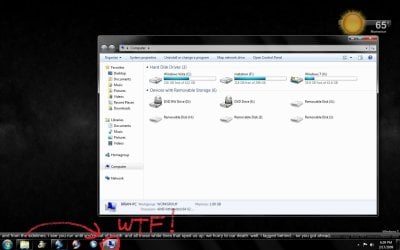
I just did a clean install of 7057 x86, and this is what happens when I put "%windir%\explorer.exe /e,::{20D04FE0-3AEA-1069-A2D8-08002B30309D}" in the target box

Windows opens up a second taskbar icon and uses it instead of using the regular one. It only does this when I add that command for it to open to My Computer instead of Libraries. :cry:


Attachments

  • 42b30_Untitled.jpg
    42b30_Untitled.jpg
    97.7 KB · Views: 867

My Computer

OS
Windows 7, of course.
Hello Thenext8seconds,

The command should be this below instead for Computer. ;)

%windir%\explorer.exe /root,::{20D04FE0-3AEA-1069-A2D8-08002B30309D}

Shawn
 

My Computer

Computer type
PC/Desktop
Computer Manufacturer/Model Number
Self built custom
OS
64-bit Windows 11 Pro for Workstations
CPU
Intel i7-8700K OC'd to 5 GHz
Motherboard
ASUS ROG Maximus XI Formula Z390
Memory
64 GB (4x16GB) G.SKILL TridentZ RGB DDR4 3600 MHz
Graphics Card(s)
ASUS ROG-STRIX-GTX1080TI-O11G-GAMING
Sound Card
Integrated
Monitor(s) Displays
2 x Samsung Odyssey G7 27"
Screen Resolution
2560x1440
Hard Drives
1TB Samsung 990 PRO M.2,
4TB Samsung 990 PRO PRO M.2,
TerraMaster F8 SSD Plus NAS
PSU
Seasonic Prime Titanium 850W
Case
Thermaltake Core P3
Cooling
Corsair Hydro H115i
Keyboard
Logitech wireless K800
Mouse
Logitech MX Master 4
Internet Speed
2 Gb/s Download and 100 Mb/s Upload
Antivirus
Malwarebyte Anti-Malware Premium
Browser
Google Chrome
Other Info
Logitech Z625 speaker system,
Logitech BRIO 4K Pro webcam,
HP Color LaserJet Pro MFP M477fdn,
APC SMART-UPS RT 1000 XL - SURT1000XLI,
Galaxy S23 Plus phone
Hello Thenext8seconds,

The command should be this below instead for Computer. ;)

%windir%\explorer.exe /root,::{20D04FE0-3AEA-1069-A2D8-08002B30309D}

Shawn

still does the exact same thing....
 

My Computer

OS
Windows 7, of course.
As a test, try this below. It will remove and replace your current pinned Windows Explorer taskbar icon.
  • Right click on the Windows Explorer icon on the taskbar and click on Unpin this program from the taskbar.
  • Open the Start menu.
  • Click on All Programs, Accessories, and right click on the Windows Explorer shortcut and click on Properties.
  • Change the Target to: %windir%\explorer.exe /root,::{20D04FE0-3AEA-1069-A2D8-08002B30309D}
  • Right click on the Windows Explorer shortcut in the Start menu, and click on Pin to Taskbar.
Hopefully it will now only open with the one icon on the taskbar for you now.
 

My Computer

Computer type
PC/Desktop
Computer Manufacturer/Model Number
Self built custom
OS
64-bit Windows 11 Pro for Workstations
CPU
Intel i7-8700K OC'd to 5 GHz
Motherboard
ASUS ROG Maximus XI Formula Z390
Memory
64 GB (4x16GB) G.SKILL TridentZ RGB DDR4 3600 MHz
Graphics Card(s)
ASUS ROG-STRIX-GTX1080TI-O11G-GAMING
Sound Card
Integrated
Monitor(s) Displays
2 x Samsung Odyssey G7 27"
Screen Resolution
2560x1440
Hard Drives
1TB Samsung 990 PRO M.2,
4TB Samsung 990 PRO PRO M.2,
TerraMaster F8 SSD Plus NAS
PSU
Seasonic Prime Titanium 850W
Case
Thermaltake Core P3
Cooling
Corsair Hydro H115i
Keyboard
Logitech wireless K800
Mouse
Logitech MX Master 4
Internet Speed
2 Gb/s Download and 100 Mb/s Upload
Antivirus
Malwarebyte Anti-Malware Premium
Browser
Google Chrome
Other Info
Logitech Z625 speaker system,
Logitech BRIO 4K Pro webcam,
HP Color LaserJet Pro MFP M477fdn,
APC SMART-UPS RT 1000 XL - SURT1000XLI,
Galaxy S23 Plus phone
Back
Top