Solved windows explorer

roneg

New member
Local time
10:36 AM
Messages
13
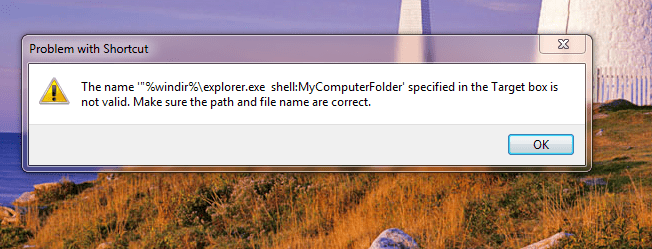
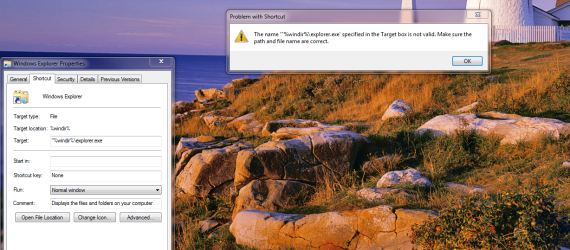
Hello, I was trying to change my windows explorer to open with "computer" and I got this error now after several failed attempts.
 

Attachments

  • explorer problem.PNG
    explorer problem.PNG
    330.3 KB · Views: 4

My Computer

Computer type
PC/Desktop
Computer Manufacturer/Model Number
custom
OS
10 Pro/7Ultimate x64
CPU
i7 980
Motherboard
Asus SaberTooth x58
Memory
24 GB
Graphics Card(s)
Radeon RX 570
Monitor(s) Displays
2x Samsung 24"
Browser
Foxfire
You have missed " off the end. You have typed " at the beginning, but not at the end.

That is why it doesn't understand what you are looking for.

"%windir%\explorer.exe" will open explorer at libraries.
 

My Computers

System One System Two

  • Computer type
    PC/Desktop
    OS
    7 X64
    CPU
    i5 8400
    Motherboard
    gigabyte b365m ds3h
    Memory
    2x8gb 3200mhz
    Hard Drives
    various
    PSU
    pure power 11 400w cm
    Case
    Coolermaster
    Cooling
    cryorig m9i
  • Computer type
    PC/Desktop
    OS
    7x64
    CPU
    g5400
    Motherboard
    ga b365m ds3h
    Memory
    8gb ddr4 2400
    PSU
    xfx pro 450w
I'm sure one of the big boys will help but why not just start in My Computer?

Whoops! I see that one of the big boys already answered as I was typing.
 

My Computer

Computer type
Laptop
Computer Manufacturer/Model Number
Dell M6500 Precision Work Station
OS
Windows 7 Pro SP1 64 bit
Memory
8 GB
Screen Resolution
1920x
Internet Speed
30 Mbps
Antivirus
Norton Security
Browser
IE 11
If you want to open it on computer folder, you could use one of these:

%windir%\explorer.exe shell:MyComputerFolder

Or

%windir%\explorer.exe /n,/select,%SystemDrive%
 

My Computers

System One System Two

  • Computer type
    PC/Desktop
    OS
    7 X64
    CPU
    i5 8400
    Motherboard
    gigabyte b365m ds3h
    Memory
    2x8gb 3200mhz
    Hard Drives
    various
    PSU
    pure power 11 400w cm
    Case
    Coolermaster
    Cooling
    cryorig m9i
  • Computer type
    PC/Desktop
    OS
    7x64
    CPU
    g5400
    Motherboard
    ga b365m ds3h
    Memory
    8gb ddr4 2400
    PSU
    xfx pro 450w
Hum....
 

Attachments

  • not working.PNG
    not working.PNG
    65.9 KB · Views: 11

My Computer

Computer type
PC/Desktop
Computer Manufacturer/Model Number
custom
OS
10 Pro/7Ultimate x64
CPU
i7 980
Motherboard
Asus SaberTooth x58
Memory
24 GB
Graphics Card(s)
Radeon RX 570
Monitor(s) Displays
2x Samsung 24"
Browser
Foxfire
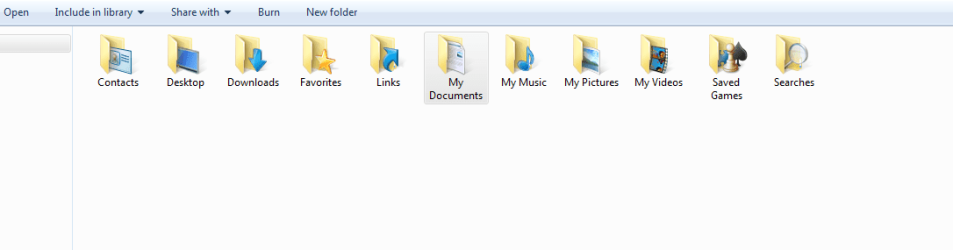
I want explorer to open to this page.
 

Attachments

  • I want explorer to open to this page..PNG
    I want explorer to open to this page..PNG
    29.9 KB · Views: 2

My Computer

Computer type
PC/Desktop
Computer Manufacturer/Model Number
custom
OS
10 Pro/7Ultimate x64
CPU
i7 980
Motherboard
Asus SaberTooth x58
Memory
24 GB
Graphics Card(s)
Radeon RX 570
Monitor(s) Displays
2x Samsung 24"
Browser
Foxfire
Also, When I add "Computer" with a space in front it doesn't work.
 

My Computer

Computer type
PC/Desktop
Computer Manufacturer/Model Number
custom
OS
10 Pro/7Ultimate x64
CPU
i7 980
Motherboard
Asus SaberTooth x58
Memory
24 GB
Graphics Card(s)
Radeon RX 570
Monitor(s) Displays
2x Samsung 24"
Browser
Foxfire
You already have My Computer in All Programs, Accessories, System Tools and can send it to your desktop as a shortcut from there (right click on it and select Send To, Desktop).

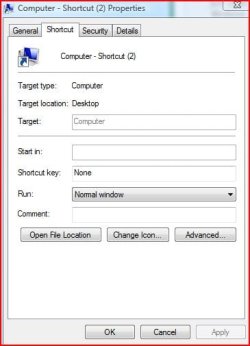
For information, I'm on my Vista system right now and the Computer shortcut (It's not called My Computer in Vista) properties are as shown below
 

Attachments

  • Computershortcut.JPG
    Computershortcut.JPG
    29.2 KB · Views: 9

My Computer

Computer type
Laptop
Computer Manufacturer/Model Number
Dell M6500 Precision Work Station
OS
Windows 7 Pro SP1 64 bit
Memory
8 GB
Screen Resolution
1920x
Internet Speed
30 Mbps
Antivirus
Norton Security
Browser
IE 11
Thank You for that advice wither 2, I may have to settle for that. I would rather have it in the task-bar under the windows explorer icon. Pretty sure I had it that way before when I has win 7 previously. Just don't remember how I got it that way.


Ron
 

My Computer

Computer type
PC/Desktop
Computer Manufacturer/Model Number
custom
OS
10 Pro/7Ultimate x64
CPU
i7 980
Motherboard
Asus SaberTooth x58
Memory
24 GB
Graphics Card(s)
Radeon RX 570
Monitor(s) Displays
2x Samsung 24"
Browser
Foxfire
%windir%\explorer.exe /n,/select,%SystemDrive% opens to;
 

Attachments

  • system drive.PNG
    system drive.PNG
    12.1 KB · Views: 1

My Computer

Computer type
PC/Desktop
Computer Manufacturer/Model Number
custom
OS
10 Pro/7Ultimate x64
CPU
i7 980
Motherboard
Asus SaberTooth x58
Memory
24 GB
Graphics Card(s)
Radeon RX 570
Monitor(s) Displays
2x Samsung 24"
Browser
Foxfire
I suppose you could change the icon for the My Computer shortcut to that of Windows Explorer or something similar.
 

My Computer

Computer type
Laptop
Computer Manufacturer/Model Number
Dell M6500 Precision Work Station
OS
Windows 7 Pro SP1 64 bit
Memory
8 GB
Screen Resolution
1920x
Internet Speed
30 Mbps
Antivirus
Norton Security
Browser
IE 11
Thank You wither 2, I got it. Target, looks like this;%SystemRoot%\explorer.exe ::{20D04FE0-3AEA-1069-A2D8-08002B30309D}
 

My Computer

Computer type
PC/Desktop
Computer Manufacturer/Model Number
custom
OS
10 Pro/7Ultimate x64
CPU
i7 980
Motherboard
Asus SaberTooth x58
Memory
24 GB
Graphics Card(s)
Radeon RX 570
Monitor(s) Displays
2x Samsung 24"
Browser
Foxfire
How did you come up with that? :cool:
 

My Computer

Computer type
Laptop
Computer Manufacturer/Model Number
Dell M6500 Precision Work Station
OS
Windows 7 Pro SP1 64 bit
Memory
8 GB
Screen Resolution
1920x
Internet Speed
30 Mbps
Antivirus
Norton Security
Browser
IE 11
I stumbled across it in a google search. :D It works.
 

My Computer

Computer type
PC/Desktop
Computer Manufacturer/Model Number
custom
OS
10 Pro/7Ultimate x64
CPU
i7 980
Motherboard
Asus SaberTooth x58
Memory
24 GB
Graphics Card(s)
Radeon RX 570
Monitor(s) Displays
2x Samsung 24"
Browser
Foxfire

My Computer

Computer type
PC/Desktop
Computer Manufacturer/Model Number
HP Desktop & Compaq Laptop
OS
Win 10 x64, Linux Lite, Win 7 x64, BlackArch, & Kali
Hard Drives
Samsung 850 Pro 256Gb,
Hitachi HDD 1Tb,
Crucial MX SSD 250Gb
Segate 3Tb USB 3.0 Ext. Backup HDD
Internet Speed
150Mbps dn, 20Mbps up
Antivirus
Avast Free, Malwarebytes Anti-Exploit & Anti-Ransomware
Browser
Firefox, Chrome, Opera, & VPN
Snick Thanks for that...mo better!
 

My Computer

Computer type
PC/Desktop
Computer Manufacturer/Model Number
custom
OS
10 Pro/7Ultimate x64
CPU
i7 980
Motherboard
Asus SaberTooth x58
Memory
24 GB
Graphics Card(s)
Radeon RX 570
Monitor(s) Displays
2x Samsung 24"
Browser
Foxfire
roneg

Glad to see it is MO BETTER for you!
 

My Computer

Computer type
PC/Desktop
Computer Manufacturer/Model Number
HP Desktop & Compaq Laptop
OS
Win 10 x64, Linux Lite, Win 7 x64, BlackArch, & Kali
Hard Drives
Samsung 850 Pro 256Gb,
Hitachi HDD 1Tb,
Crucial MX SSD 250Gb
Segate 3Tb USB 3.0 Ext. Backup HDD
Internet Speed
150Mbps dn, 20Mbps up
Antivirus
Avast Free, Malwarebytes Anti-Exploit & Anti-Ransomware
Browser
Firefox, Chrome, Opera, & VPN
Back
Top