Windows Failed To Start. No Advanced Boot Options

macdonald5150

New member
Local time
10:24 AM
Messages
2
my computer crashed and when it started back up i get the error windows failed to start due to a new hardware change blah blah

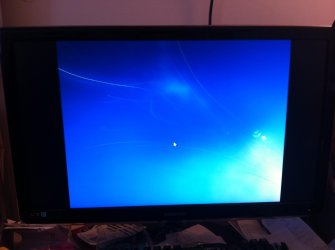
when i choose the recommended repair option it just goes to an empty screen where i can use the mouse but there is nothing to click on or any prompt to continue the rapair!!!

so i tried to go into the advanced boot options so i can boot in safe mode and possibly repair or restore windows to a previous date or whatever but i have NO ADVANCED BOOT OPTIONS!!!! WTF!!

im goin crazy here!!!
 

Attachments
  • IMG_0589.jpg
    IMG_0589.jpg
    194.9 KB · Views: 0
  • IMG_0592.jpg
    IMG_0592.jpg
    226 KB · Views: 0

My Computer My Computer

At a glance

windows 7 64 bit
Computer type
PC/Desktop
OS
windows 7 64 bit
press F8 on boot a few times so you see the advanced boot options. Repair your computer is one of them.

windows failed to start due to a new hardware change blah blah
Any error code, stopcode.... or... give all info or camshot
 

My Computer My Computer

At a glance

Microsoft Windows 7 Home Premium 64-bits 7601...Intel(R) Core(TM) i3 CPU M 370 @ 2.40GHz4,00 GBATI Mobility Radeon HD 5400 Series
Computer type
Laptop
Computer Manufacturer/Model Number
ACER ASPIRE 5742G
OS
Microsoft Windows 7 Home Premium 64-bits 7601 Multiprocessor Free Service Pack 1
CPU
Intel(R) Core(TM) i3 CPU M 370 @ 2.40GHz
Motherboard
Acer Aspire 5742G
Memory
4,00 GB
Graphics Card(s)
ATI Mobility Radeon HD 5400 Series
Sound Card
(1) AMD High Definition Audio Device (2) Realtek High Defi
Screen Resolution
1366 x 768 x 32 bits (4294967296 colors) @ 60 Hz
Hard Drives
WDC WD5000BEVT-22ZAT0
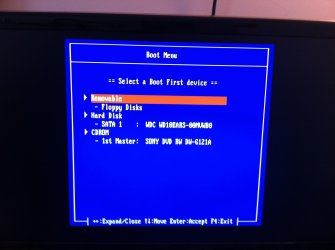
F8 takes me to that blue boot menu it does not take me to advanced boot options!!

i have no way to get to safe mode

hard drive is the first boot device already. does not start up

there is no error code it says

windows failed to start. a recent hardware or software change might be the cause.

again F8 does not take me to the advanced boot menu just that blue boot menu screen that i have attached a picture of!
 

My Computer My Computer

At a glance

windows 7 64 bit
Computer type
PC/Desktop
OS
windows 7 64 bit
So you have a Asus which also uses F8 for BIOS Boot Menu? I'm having to guess since there are no System Specs filled in or even the mention of your PC make and model.

In that case, select HD to boot from first F8 menu, and then immediately tap F8 key again to see if you can trigger Advanced Boot Options.

If this fails work from boot using the bootable solutions in Troubleshooting Windows 7 Failure to Start booted from the F8 BIOS Boot menu.
 
Back
Top