Windows Firewall and Media Center

149047

New member
Member
Local time
2:34 PM
Messages
57
Hi all!
I am experiencing issues with WMC in combination with Windows Firewall. With the FW turned on I cannot watch live TV and get an event viewer message "WMDRM-ND" Error. Turning Windows Firewall off resolves the problem. As I do not want to turn the FW on and off all the time I would like to know where I have to apply the relevant tweaks so I can watch TV with the FW on.
Ideas anyone?
Thanks for reading
Markus
 

My Computer My Computer

OS
xp, w7
CPU
q6600
Motherboard
gigabyte p35 dq6
Memory
2x 4gb kingston 1066, hyperx cl5
Graphics Card(s)
x1950pro
If the firewall is the reason behind it im not to sure what there is that you can do to "Tweak it". What firewall are you using Microsoft Security Essentials? I think this would be one of the situations where you have to just bite the bullet. Your router should have a built in firewall system? Should be fine for protecting your computer for the hour or two you spend watching tv. If its not the firewall its going to be because maybe an update was applied incorrectly? Thats my best guess.

Couldnt you just watch your shows on a TV? :D
 

My Computer My Computer

Computer Manufacturer/Model Number
ASUS G74xs
OS
x64 Windows 7 Home
CPU
Intel® Core™ i7 2630QM Processor
Motherboard
Intel® HM65 Express Chipset
Memory
8 GBs DDR3 1333 MHz SDRAM, 4 x SO-DIMM socket Up To 16GB
Graphics Card(s)
NVIDIA® GeForce® GTX 560M with 2GB GDDR5 VRAM
Sound Card
EAX Advanced HD 5.0, THX TruStudio
Screen Resolution
17.3" 16:9 HD+ (1600x900)
Hard Drives
2.5 SATA 500GB 7200rpm x2
Mouse
Razer Deathadder 3500 DPI
Internet Speed
25/5 MB Comcast High Speed (Lulz)
Hi all!
I am experiencing issues with WMC in combination with Windows Firewall. With the FW turned on I cannot watch live TV and get an event viewer message "WMDRM-ND" Error. Turning Windows Firewall off resolves the problem.
What is your TV tuner hardware? Is this for cable system content, through an M-Card enabled tuner (either internal, USB, or external network-based)?

Are you trying to play copy-protected programs from WMC to a remote HDTV? That can't be done without the use of a media center extender. What channel and program are you trying to watch? Does it also happen when trying to watch the same program when it's recorded rather than "live"?

What is your cable company and where do you live?

Please describe more completely exactly what is the whole story is when you get this error. Is it while trying to watch on the monitor of your HTPC, or only on a remote HDTV? And how are you delivering WMC content to that remote HDTV?
 

My Computer My Computer

Computer type
PC/Desktop
Computer Manufacturer/Model Number
Home-built, two systems (1) and (2)
OS
Windows 7 Pro x64 (1), Win7 Pro X64 (2)
CPU
i5-3350p 3.1Ghz/6MB-cache (1); E8400 3.0Ghz/6MB-cache (2)
Motherboard
ASUS P8Z77-V Pro (1); ASUS P5Q3 (2)
Memory
8GB PC3-12800 DDR3 (1); 4GB PC3-10600 DDR3 (2)
Graphics Card(s)
ATI HD7750 (1), (see TV cards); ATI R7 250 (2)
Sound Card
Realtek ALC892 HD Audio (1); Realtek ALC1200 HD Audio (2)
Monitor(s) Displays
Eizo HD2441W LCD, Eizo S2433W (1); Eizo 24" S2433W (2)
Screen Resolution
1920x1200, 1920x1200 (1); 1920x1200 (2)
Hard Drives
(1) 1TB SATA-II (7200RPM), 2x2TB SATA-III (7200RPM), 250GB SATA-III (10000RPM) for OS; 2x2TB external USB 3.0

(2) 320GB SATA-II (7200RPM), 750GB SATA-II (7200RPM), 150GB SATA-II (10000RPM) for OS; 2TB external USB 3.0
PSU
Nesteq ECS-6001 600W (1); Nesteq ECS-5001 500W (2)
Case
Acousti-Case 360 (1) and (2)
Cooling
Noctua NH-U12P SE2 for CPU, 2x120mm case fans (1) and (2)
Keyboard
IBM PS/2 (1) and (2)
Mouse
Logitech MX Revolution wireless (1); Microsoft wired (2)
Internet Speed
100mbps down / 10mbps up
Antivirus
Microsoft Security Essentials; Malwarebyte Anti-Malware Pro
Browser
Firefox
Other Info
Ceton InfiniTV 4-tuner cablecard-enabled TV card as well as Hauppauge HVR-2250 OTA/ATSC 2-tuner TV card in (1), running under Win7 WMC
Hi!
Let me got through your questions:
1) trying to watch plain non copy protected dvb-c television on my xbox360 extender
2) the problem occurs with any channel digital/analog
3) i live in Austria and use Kabelsignal kabelplus Ihr Multimedia-Anbieter - kabelplus

The error ocurrs under the following circumstances:
i have a cinergy htc (dvb-c) tuner on my win7 64bit pc to enable digital cable tv. on the pc all works fine. to watch tv on my video projector screen i transfer the signal from my pc (via router) to the xbox360 which takes over the signal and feeds it into windows media center. whenever i open media center (on the xbox) i can see the entire epg list but when trying to watch a channel (any) i get the above mentioned error. i found that turning off my windows firewall on the win7 pc resolves the problem. however i d not really want to turn the FW on and off all the time.

thanks for reading
Markus
 

My Computer My Computer

OS
xp, w7
CPU
q6600
Motherboard
gigabyte p35 dq6
Memory
2x 4gb kingston 1066, hyperx cl5
Graphics Card(s)
x1950pro
If you're getting WMDRM-ND errors, I would have to conclude that WMC believes the digital content IS copy-protected, whether that is what you expect or not.

Now the fact that you can overcome that through disabling of Windows Firewall clearly points to an incomplete set of definitions in Windows Firewall for the exceptions required to support connection to an extender (i.e. your xBox) for delivery of copy-protected content.

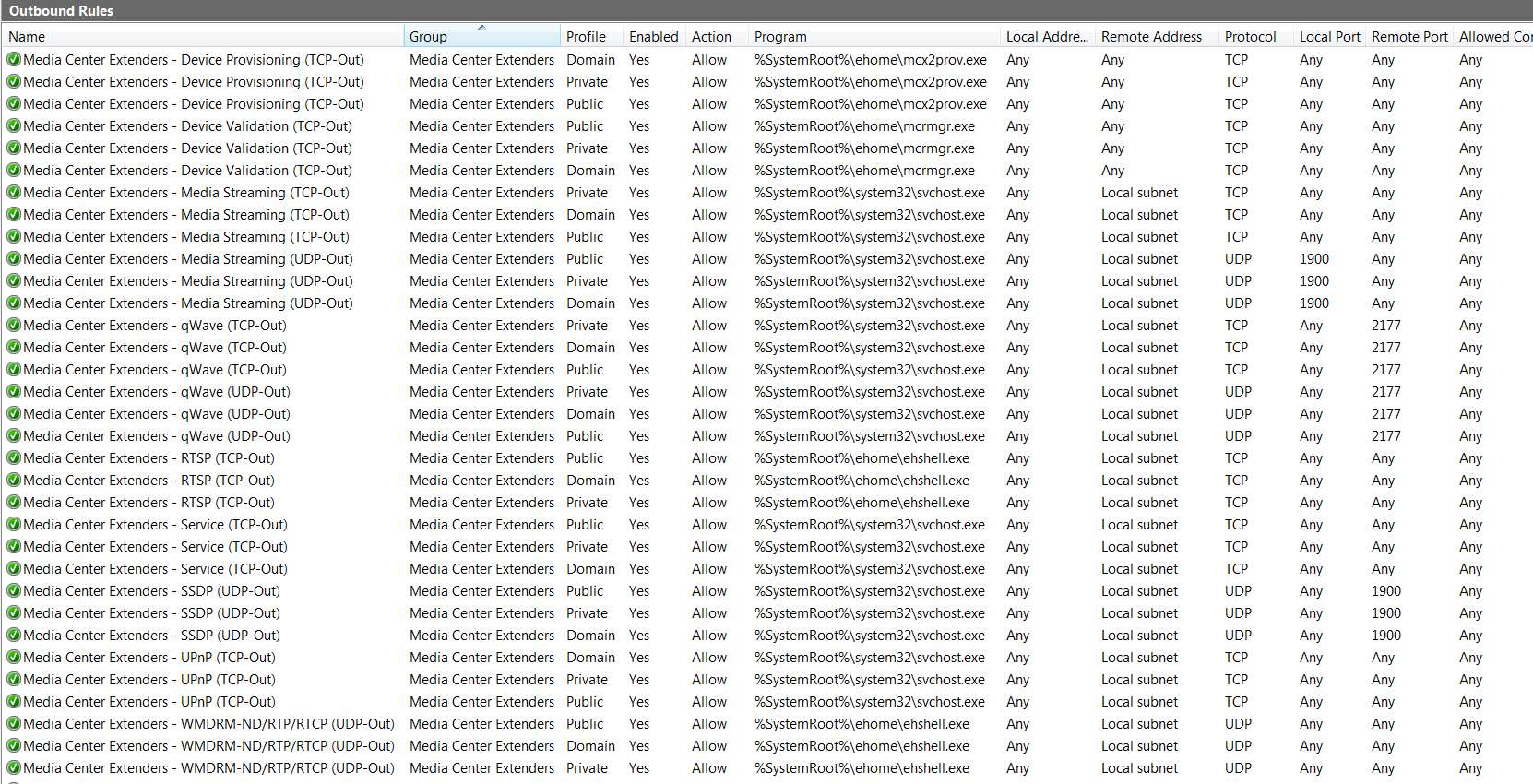
You can read about WMC and extenders and Windows Firewall, and problems related to this subject, on this Microsoft web page. Specifically you should be concerned with the EHSHELL.EXE settings with UDP, which is the "PLAY" part of WMC involved with WMDRM-ND.

For your own reference, here is a screenshot of my complete set of Windows Firewall "advanced settings" showing all of the WMC-related exceptions. These were apparently all set up automatically by Win7 when I added my two Linksys DMA2100 extenders. I have no problem whatsoever delivering copy-protected content from WMC to both of these.

Look specifically at the final three EHSHELL.EXE entries for UDP, which pertain to WMDRM-ND.


wmcfirewallsettingsexte.jpg
 

My Computer My Computer

Computer type
PC/Desktop
Computer Manufacturer/Model Number
Home-built, two systems (1) and (2)
OS
Windows 7 Pro x64 (1), Win7 Pro X64 (2)
CPU
i5-3350p 3.1Ghz/6MB-cache (1); E8400 3.0Ghz/6MB-cache (2)
Motherboard
ASUS P8Z77-V Pro (1); ASUS P5Q3 (2)
Memory
8GB PC3-12800 DDR3 (1); 4GB PC3-10600 DDR3 (2)
Graphics Card(s)
ATI HD7750 (1), (see TV cards); ATI R7 250 (2)
Sound Card
Realtek ALC892 HD Audio (1); Realtek ALC1200 HD Audio (2)
Monitor(s) Displays
Eizo HD2441W LCD, Eizo S2433W (1); Eizo 24" S2433W (2)
Screen Resolution
1920x1200, 1920x1200 (1); 1920x1200 (2)
Hard Drives
(1) 1TB SATA-II (7200RPM), 2x2TB SATA-III (7200RPM), 250GB SATA-III (10000RPM) for OS; 2x2TB external USB 3.0

(2) 320GB SATA-II (7200RPM), 750GB SATA-II (7200RPM), 150GB SATA-II (10000RPM) for OS; 2TB external USB 3.0
PSU
Nesteq ECS-6001 600W (1); Nesteq ECS-5001 500W (2)
Case
Acousti-Case 360 (1) and (2)
Cooling
Noctua NH-U12P SE2 for CPU, 2x120mm case fans (1) and (2)
Keyboard
IBM PS/2 (1) and (2)
Mouse
Logitech MX Revolution wireless (1); Microsoft wired (2)
Internet Speed
100mbps down / 10mbps up
Antivirus
Microsoft Security Essentials; Malwarebyte Anti-Malware Pro
Browser
Firefox
Other Info
Ceton InfiniTV 4-tuner cablecard-enabled TV card as well as Hauppauge HVR-2250 OTA/ATSC 2-tuner TV card in (1), running under Win7 WMC
i have a cinergy htc (dvb-c) tuner on my win7 64bit pc to enable digital cable tv. on the pc all works fine.
That's because watching copy-protected TV on your PC's monitor is a different story than delivering copy-protected content to an extender.

The PC monitor is covered by the HTPC-enabled digital connection (via DVI or HDMI, from your video card). As part of the "DCA (digital cable advisor)" setup or other TV-related setup checking when WMC is first initialized, the HTPC-enabled display is one of the things checked in order to deliver copy-protected digital content to that locally connected digital display device.

Delivering copy-protected digital content to an external digital display device (e.g. your extender and its HDMI-attached HDTV) is a separate matter. And that's where this Windows Firewall and WMDRM-ND issue comes into play.
 

My Computer My Computer

Computer type
PC/Desktop
Computer Manufacturer/Model Number
Home-built, two systems (1) and (2)
OS
Windows 7 Pro x64 (1), Win7 Pro X64 (2)
CPU
i5-3350p 3.1Ghz/6MB-cache (1); E8400 3.0Ghz/6MB-cache (2)
Motherboard
ASUS P8Z77-V Pro (1); ASUS P5Q3 (2)
Memory
8GB PC3-12800 DDR3 (1); 4GB PC3-10600 DDR3 (2)
Graphics Card(s)
ATI HD7750 (1), (see TV cards); ATI R7 250 (2)
Sound Card
Realtek ALC892 HD Audio (1); Realtek ALC1200 HD Audio (2)
Monitor(s) Displays
Eizo HD2441W LCD, Eizo S2433W (1); Eizo 24" S2433W (2)
Screen Resolution
1920x1200, 1920x1200 (1); 1920x1200 (2)
Hard Drives
(1) 1TB SATA-II (7200RPM), 2x2TB SATA-III (7200RPM), 250GB SATA-III (10000RPM) for OS; 2x2TB external USB 3.0

(2) 320GB SATA-II (7200RPM), 750GB SATA-II (7200RPM), 150GB SATA-II (10000RPM) for OS; 2TB external USB 3.0
PSU
Nesteq ECS-6001 600W (1); Nesteq ECS-5001 500W (2)
Case
Acousti-Case 360 (1) and (2)
Cooling
Noctua NH-U12P SE2 for CPU, 2x120mm case fans (1) and (2)
Keyboard
IBM PS/2 (1) and (2)
Mouse
Logitech MX Revolution wireless (1); Microsoft wired (2)
Internet Speed
100mbps down / 10mbps up
Antivirus
Microsoft Security Essentials; Malwarebyte Anti-Malware Pro
Browser
Firefox
Other Info
Ceton InfiniTV 4-tuner cablecard-enabled TV card as well as Hauppauge HVR-2250 OTA/ATSC 2-tuner TV card in (1), running under Win7 WMC
ok - in fact i did not know that dvb-c signals are copy protected. my solution so far is turning off windows forewall and substitute it by 3rd party (panda).
thank you all for helping!
markus
 

My Computer My Computer

OS
xp, w7
CPU
q6600
Motherboard
gigabyte p35 dq6
Memory
2x 4gb kingston 1066, hyperx cl5
Graphics Card(s)
x1950pro
Back
Top