Solved Windows Firewall Disabled Code 5

mcbeat257

Banned
Local time
7:30 PM
Messages
58
Hi,
I am having a lot of issues with my computer. First of all, I had installed AVG Internet Security, and then when that expired, I got rid of it. The one thing that I found suspicious is that all of my firewall settings are wiped out, but I cannot change them due to error code 5 or "access denied". I am an administrator of the computer but it still says it. Also I checked to see if the firewall services are running and they are running correctly.


I am running an Acer Aspire One AO722 with an AMD C-50 Processor with 2 gigs of ram.
 

My Computer

Computer type
Laptop
Computer Manufacturer/Model Number
Acer and HP
OS
Windows 7 Home Premium 64 Bit
CPU
AMD C-50 Processor and AMD Phenom II Triplecore Processor
Memory
2 to 4 Gigs
Graphics Card(s)
AMD Radeon HD Graphics
Sound Card
Conexant Audio and Beats Audio
Screen Resolution
1366x768 and N/A
Mouse
Synaptics Touchpad
Internet Speed
Over 2 MBPS according to speedtest.net
Antivirus
MS Security Essentials and AVG
Browser
Google Chrome

My Computer

Computer type
PC/Desktop
Computer Manufacturer/Model Number
Home made Desktop
OS
Windows 10 Pro. 64/ version 1709 Windows 7 Pro/64
CPU
Intel i7-6800K @ 4.3
Motherboard
ASUS X-99 Deluxe II
Memory
Corsair Platinum 16 gig @2400
Graphics Card(s)
EVGA GTX 1070 OC
Monitor(s) Displays
Asus 27" LED LCD/VE278Q
Screen Resolution
1920-1080 or 1280-720 HDMI
Hard Drives
INTEL SSD 730-240 Gb Sata 3.0/
PSU
EVGA Platium 1200W
Case
Phanteks Luxe Tempered Glass 8 fans/ one radiator
Cooling
XSPC/ Water Cooled CPU
Keyboard
Das 4 Professional
Mouse
Logitech M705/MX Anywhere 2-S
Internet Speed
100 mbits
Antivirus
Microsoft Security Essentials/ Malwarebytes Premium 3.0/ SAS
Browser
I.E. 11 default/Firefox/ ISP Time Warner Cable/Spectrum
Other Info
LG BluRay Burner/
Sound system-KLipsch-THX/
Icy Dock ssd Hot Swap bays.
In Reply To #1

I tried to use some alternates, and it did not work. I had an avast trial and currently have VNC and MS Security Essentials and currently I am running the sfc test and will get back to you on that. I have also recently had some issues with parental controls so it should be sort of a system error.

I will be here until around 11 EST to answer.
 

My Computer

Computer type
Laptop
Computer Manufacturer/Model Number
Acer and HP
OS
Windows 7 Home Premium 64 Bit
CPU
AMD C-50 Processor and AMD Phenom II Triplecore Processor
Memory
2 to 4 Gigs
Graphics Card(s)
AMD Radeon HD Graphics
Sound Card
Conexant Audio and Beats Audio
Screen Resolution
1366x768 and N/A
Mouse
Synaptics Touchpad
Internet Speed
Over 2 MBPS according to speedtest.net
Antivirus
MS Security Essentials and AVG
Browser
Google Chrome
Are you trying to change it from: Control Panel\All Control Panel Items\Windows Firewall?
 

My Computer

Computer type
PC/Desktop
Computer Manufacturer/Model Number
Home Built Desktop By DataTech
OS
Windows 7 Ultimate X64 SP1
CPU
Intel i5-2550K, Differing ~4.4-4.8GHz No built in GPU
Motherboard
ASUS P8Z68-V PRO/GEN3
Memory
16GB G.Skill Sniper 1866MHz @ 2133MHz 2x8GB
Graphics Card(s)
ASUS GTX650TIB-DC2OC-2GD5, (650TI Boost)
Sound Card
Onboard Realtek 5-1
Monitor(s) Displays
Samsung P2570HD
Screen Resolution
1920x1080
Hard Drives
Samsung 840 Pro 256GB SSD for OS, 500GB Seagate Constellation (Enterprise drive) for Data
PSU
Corsair HX650W
Case
Inwin Dragon Rider
Cooling
Hyper 212 EVO w/two Noctua fans, push-pull, @1300 RPM
Keyboard
E-Z Eyes, bright yellow keys with large characters
Mouse
steelseries SENSEI Laser Pro Gaming
Internet Speed
48-51Mbs Mbs down, 11 Mbs up Xfinity Cable
Antivirus
Norton Internet Security 2013
Browser
IE 10, Opera, Pale Moon if needed
Other Info
4 case fans, LG BluRay-RE, ASUS DVD-RW, Mr. Fusion power supply, 1.21 gigawatts.
I am trying to restore my firewall from windows firewall with advanced security. Just completed sfc test and came back with CBS.log in "windir\Logs\CBS\" to be corrupted. I have no idea what that means.
 

My Computer

Computer type
Laptop
Computer Manufacturer/Model Number
Acer and HP
OS
Windows 7 Home Premium 64 Bit
CPU
AMD C-50 Processor and AMD Phenom II Triplecore Processor
Memory
2 to 4 Gigs
Graphics Card(s)
AMD Radeon HD Graphics
Sound Card
Conexant Audio and Beats Audio
Screen Resolution
1366x768 and N/A
Mouse
Synaptics Touchpad
Internet Speed
Over 2 MBPS according to speedtest.net
Antivirus
MS Security Essentials and AVG
Browser
Google Chrome
I am trying to restore my firewall from windows firewall with advanced security. Just completed sfc test and came back with CBS.log in "windir\Logs\CBS\" to be corrupted. I have no idea what that means.
I don't know what that means. Try running the sfc scan 3 times and reboot between each one.
 

My Computer

Computer type
PC/Desktop
Computer Manufacturer/Model Number
Home Built Desktop By DataTech
OS
Windows 7 Ultimate X64 SP1
CPU
Intel i5-2550K, Differing ~4.4-4.8GHz No built in GPU
Motherboard
ASUS P8Z68-V PRO/GEN3
Memory
16GB G.Skill Sniper 1866MHz @ 2133MHz 2x8GB
Graphics Card(s)
ASUS GTX650TIB-DC2OC-2GD5, (650TI Boost)
Sound Card
Onboard Realtek 5-1
Monitor(s) Displays
Samsung P2570HD
Screen Resolution
1920x1080
Hard Drives
Samsung 840 Pro 256GB SSD for OS, 500GB Seagate Constellation (Enterprise drive) for Data
PSU
Corsair HX650W
Case
Inwin Dragon Rider
Cooling
Hyper 212 EVO w/two Noctua fans, push-pull, @1300 RPM
Keyboard
E-Z Eyes, bright yellow keys with large characters
Mouse
steelseries SENSEI Laser Pro Gaming
Internet Speed
48-51Mbs Mbs down, 11 Mbs up Xfinity Cable
Antivirus
Norton Internet Security 2013
Browser
IE 10, Opera, Pale Moon if needed
Other Info
4 case fans, LG BluRay-RE, ASUS DVD-RW, Mr. Fusion power supply, 1.21 gigawatts.
I did try to restart my Base Filtering Engine like one post said to try and it came up with code 5 access denied.
 

My Computer

Computer type
Laptop
Computer Manufacturer/Model Number
Acer and HP
OS
Windows 7 Home Premium 64 Bit
CPU
AMD C-50 Processor and AMD Phenom II Triplecore Processor
Memory
2 to 4 Gigs
Graphics Card(s)
AMD Radeon HD Graphics
Sound Card
Conexant Audio and Beats Audio
Screen Resolution
1366x768 and N/A
Mouse
Synaptics Touchpad
Internet Speed
Over 2 MBPS according to speedtest.net
Antivirus
MS Security Essentials and AVG
Browser
Google Chrome
It still gives me the same log file error.
 

My Computer

Computer type
Laptop
Computer Manufacturer/Model Number
Acer and HP
OS
Windows 7 Home Premium 64 Bit
CPU
AMD C-50 Processor and AMD Phenom II Triplecore Processor
Memory
2 to 4 Gigs
Graphics Card(s)
AMD Radeon HD Graphics
Sound Card
Conexant Audio and Beats Audio
Screen Resolution
1366x768 and N/A
Mouse
Synaptics Touchpad
Internet Speed
Over 2 MBPS according to speedtest.net
Antivirus
MS Security Essentials and AVG
Browser
Google Chrome
Hi mcbeat, welcome to 7F! :)

If you have a problem you need to stay with the members that are willing to help, you can't just go applying "fixes from other posts". Each situation is unique.

1.) You never answered LaybackBear's question: "Did you use the AVG removal tool?"
Your answer; "I tried to use some alternates".

Did you or didn't you? The AVG tool is designed specifically for AVG, if you would use it you can be sure it removed all traces of AVG.

2.) You didn't fully read the http://www.sevenforums.com/tutorials/1538-sfc-scannow-command-system-file-checker.html Tutorial or else you would have seen:

   Note

  • If SFC could not fix something, then run the command again to see if it may be able to the next time. Sometimes it may take running the sfc /scannow command 3 or more times to completely fix everything that it's able to.
  • If not, then you can attempt to run a System Restore using a restore point dated before the bad file occured to fix it. You may need to repeat doing a System Restore until you find a older restore point that may work.
  • If still not, then you can use the steps in the TIP box in the OPTION THREE section below to manually replace the files that SFC could not fix.
And that is with reboots in between each run of SFC.

That is why Britton asked you "Try running the sfc scan 3 times and reboot between each one."
Your answer; "I did try to restart my Base Filtering Engine like one post said to try"

Me; What does your answer have to do with Britton's question???

There is no way we can help you if you are going to continually ignore our help.
 

My Computer

Computer type
PC/Desktop
Computer Manufacturer/Model Number
Gateway DX4831-01e (Mid-Tower Desktop)
OS
Originally Win 7 Hm Prem x64 Ver 6.1.7600 Build 7601-SP1 | Upgraded to Windows 10 December 14, 2019
CPU
Intel i3 530 2.93GHz, 2933MHz 2 Cores 4 Logical Processors
Motherboard
Gateway H57M01 133 megahertz
Memory
6GB of 1,333MHz DDR3 SDRAM
Graphics Card(s)
32MB Intel Graphics Media Accelerator HD IGChip
Sound Card
Realtek High Definition Audio
Monitor(s) Displays
Gateway HX2000 20inch TFT active matrix TN
Screen Resolution
1600 x 900 x 59 hertz
Hard Drives
WDC WD10EADS-00M2B0 [HDD] (1000.20 GB) -- drive 0,
HL-DT-ST DVDRAM GH41N [CD-ROM dr]
Four card readers, and Four USB 2.0
PSU
300watts.
Case
Mid-Tower Desktop
Cooling
Stock from Gateway
Keyboard
Natural Ergonomic Keyboard 4000, see Other Info
Mouse
Orig. Gateway wore out now using Insignia USB wired optical
Internet Speed
Vz FIOS 10ms png 57.64Mbps down 65.53Mbps up Speedtest.org
Antivirus
Zamana Anti-logger with Anti-malware, MSE, Windows Firewall,
Browser
IE11.0.9600.19399-Upd ver11.0.135, Firefox 68.0.1 x64
Other Info
System Specs by Belarc.

BIOS: American Megatrends Inc. P01-A0 11/17/2009

Replaced the MS 'Natural' Standard PS/2 Enhanced 101-102 Keyboard with a new Natural Ergonomic Keyboard 4000 on August 1st 2014.

Canon Pixma MG3222 Printer.

Updated to IE11 on 12102015 | Fios Quantum Router g1100

Additional AV: SpywareBlaster, manual Mbam, SAS
Okay, first of all, I think you had no idea what I was saying.
I tried the sfc scannow command 3 times and it still says CBS.log may be corrupted. I already said that I tried that.
Yes I did use the AVG alternate uninstaller and none helped so it probably has nothing to do with AVG.
Also I did try a method that was on a previous form with these 2 reg files. It did absolutely nothing.
Are you telling me to be specific? Okay I will be that way.
 

My Computer

Computer type
Laptop
Computer Manufacturer/Model Number
Acer and HP
OS
Windows 7 Home Premium 64 Bit
CPU
AMD C-50 Processor and AMD Phenom II Triplecore Processor
Memory
2 to 4 Gigs
Graphics Card(s)
AMD Radeon HD Graphics
Sound Card
Conexant Audio and Beats Audio
Screen Resolution
1366x768 and N/A
Mouse
Synaptics Touchpad
Internet Speed
Over 2 MBPS according to speedtest.net
Antivirus
MS Security Essentials and AVG
Browser
Google Chrome
Mate it is of no earthly good getting testy about things in fact you will make yourself more uptight and secondly it will be less inducement for anyone to help you.
Sorry it that is a bit blunt but I would not myself walk into a free store and start getting upset because I couldn't get the exact thing I wanted for free and right now, and I am also guessing that you would not either.

The others in my mind have been very helpful from what I have seen and would a little appreciation and patience from yourself. I know things computing can be extremely frustrating but it is like I said of no use to get so uptight about it.:)

This is just my observation and you can criticise me for perhaps jumping in where I am not needed.

Personally I think a) AVG is a total piece of crap b) why don't you just download a free security suite for instance such as the Comodo free.

Free Internet Security - Download Internet Security Software Suit my advice for whatever you think it is worth is that you do not use the utilities that are included they are too "buggy" yet.

It does real time and has firewall. I am testing Bitdefender at the moment because I found the Comodo was a little "naggy" however it does not come with a firewall. The paid for versions do.

Something else you might find helpful is this Probably the Best Free Security List in the World

If you like you can check to see in regedit if AVG has been completely cleared as I have in the past used the tools Revo and the Windows uninstaller to get rid of the pest.


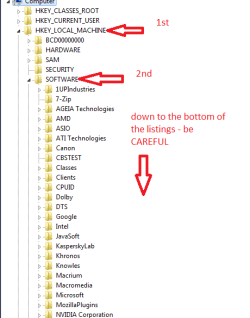
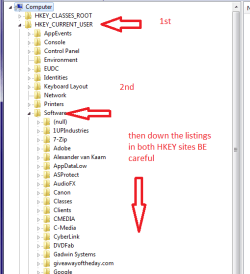
To do that if you are interested is to go to regedit and find the reg entries in the HKEY(s) _CURRENT_USER and _LOCAL_MACHINE go to Software and search down the lists to check if the AVG is indeed gone.
 

Attachments

  • REG2.PNG
    REG2.PNG
    44.4 KB · Views: 0
  • REG1.PNG
    REG1.PNG
    49.7 KB · Views: 1

My Computer

Computer type
PC/Desktop
Computer Manufacturer/Model Number
Own build (new) Desk1 / Asus ROG Win 7 / Desk2 1st build
OS
Desk1 7 Home Prem / Desk2 10 Pro / Main lap Asus ROG 10 Pro 2 laptop Toshiba 7 Pro Asus P2520 7 & 10
CPU
Desk1 i5 3750K / Laptop i7 GTX 860M / Desk2 i5 2500
Motherboard
Desk1 Asus P877-V / Desk2 Gigabyte H67 UD3H / Laptop ?
Memory
Desk1 8GB (1866) / Desk2 16GB (1333) / Laptop 8Gb DDR3
Graphics Card(s)
Desk 1& 2NVidia GTX 650 & Laptops on board Intel
Sound Card
Desk 1 & 2 -XONAR DG Realtek High Def audio Laptop
Monitor(s) Displays
Desk 1 Benq HD 2450 / Desk2 Philips 24" / Laptop 17.5"
Screen Resolution
1920x1080 D1 & D2 & Laptop 1
Hard Drives
Desk1 Samsung 120GB 830 SSD
Asus ROG 256GB 850 Pro SSD
Desk2 Samsung 840 256 SSD
Toshiba 120GB EVO
PSU
Desk 1 Corsair HX 1050/ Laptop ? / Desk 2 Corsair HX 650
Case
Desk 1 Cooler HAF XM ? Toshiba laptop / Desk2 Coolermaster
Cooling
Fans on all Desk1 -2 Desk2 - all Coolermasters 5 Laptop ?
Keyboard
Desk 1 MS Sidewinder X6 Desk 2 MS Sidewinder X 4
Mouse
Desk 1&2 - Gigabyte MS 900 gamer - laptop - Logitec wireless
Internet Speed
ADSL2+
Other Info
One other Desktop (tester) and spare Toshba laptop both with SSD's
Running Kaspersky 2016 ISS on all machines config'd identically
Logitec audio stereo systems on each machine (x3)
Canon MG5250MFC
Router/modem TP-Link running WPA2SK
fix it centre

Hi Mcbeat
please go to Microsoft Fix it, where you will, hopefully, find a solution to your to your code 5 problem, there are various catagories for security/firewall issues.

Please note as the previous posters have mentioned uninstall any/all AV previously used, by going to thier homepage and downloading the uninstall program before you run the MS hotfix
note 2 you will still find files and folders in your libraries even after running these they are of no consequence.
note 3 download all removal tools and hotfixes then go off line and run them for better security

Roy .
 

My Computer

Computer type
PC/Desktop
Computer Manufacturer/Model Number
medionl/Aspire 6930G/acer x55a
OS
W7 home premium 32bit/W7HP 64bit/w10 tp insider ring
CPU
E5300 dual core
Motherboard
medion MS7366
Memory
3gb
Graphics Card(s)
Nvidia Geforce 7100 Nforce 630i
Monitor(s) Displays
avixc
Internet Speed
n (isp resticted to 72)
Antivirus
mse/pands
Browser
palemoon
Other Info
Belkin Fd7050 n USB using Railink RT2870 drivers, more upto date
Hi Everyone,
I have tried Microsoft Fix-It and it does not help the problem at all. I do now know that AVG is a piece of crap, and I have talked to customer service reps there and they are useless. I have Microsoft Security Essentials and always have had it, but AVG just does not want me to get rid of their software! I did find out that I still have C:\ProgramData\AVG2013\ , and also, if this makes a difference, I had AVG PC tuneup before, and it sucked as well. Does PC Tuneup affect the firewall issue at all?

I also want to re-mention that this error happens in Windows Firewall with Advanced Security whenever I try to create new rules or import a policy.
Also resetting the firewall to default does no help either.
Note: I did not check to delete user preferences during uninstallation.
 
Last edited:

My Computer

Computer type
Laptop
Computer Manufacturer/Model Number
Acer and HP
OS
Windows 7 Home Premium 64 Bit
CPU
AMD C-50 Processor and AMD Phenom II Triplecore Processor
Memory
2 to 4 Gigs
Graphics Card(s)
AMD Radeon HD Graphics
Sound Card
Conexant Audio and Beats Audio
Screen Resolution
1366x768 and N/A
Mouse
Synaptics Touchpad
Internet Speed
Over 2 MBPS according to speedtest.net
Antivirus
MS Security Essentials and AVG
Browser
Google Chrome
mcbeat257.

Let's see if we can get to the root of the problem...

Please download Farbar Service Scanner

Save to the Desktop
  • Make sure the following options are checked:
    • Internet Services
    • Windows Firewall
    • System Restore
    • Security Center
    • Windows Update
    • Windows Defender
  • Press: Scan
  • FSS creates a log, FSS.txt, on the Desktop.
Please provide the FSS.txt in your reply.
 

My Computer

Computer type
PC/Desktop
Computer Manufacturer/Model Number
An ol' eMachines
OS
Windows 7 Home Premium
Internet Speed
Fine for me...I'm retired!
I did wanna mention that for some reason a software was able to modify what OEM I had and put little brackets on it, and I forgot the software that did it, but it probably needs to be changed back.

Anyway, here is the log file:

Farbar Service Scanner Version: 03-03-2013
Ran by mcbeat257 (administrator) on 07-04-2013 at 19:53:38
Running from "C:\Users\***PROTECTEDINFO***\Desktop"
Windows 7 Home Premium (Mcbeat Version) Service Pack 1 (X64)
Boot Mode: Normal
****************************************************************

Internet Services:
============

Connection Status:
==============
Localhost is accessible.
LAN connected.
Google IP is accessible.
Google.com is accessible.
Attempt to access Yahoo IP returned error. Yahoo IP is offline
Yahoo.com is accessible.


Windows Firewall:
=============

Firewall Disabled Policy:
==================


System Restore:
============

System Restore Disabled Policy:
========================


Action Center:
============

Windows Update:
============

Windows Autoupdate Disabled Policy:
============================


Windows Defender:
==============
WinDefend Service is not running. Checking service configuration:
The start type of WinDefend service is set to Demand. The default start type is Auto.
The ImagePath of WinDefend service is OK.
The ServiceDll of WinDefend service is OK.


Windows Defender Disabled Policy:
==========================
[HKEY_LOCAL_MACHINE\SOFTWARE\Microsoft\Windows Defender]
"DisableAntiSpyware"=DWORD:1


Other Services:
==============


File Check:
========
C:\Windows\System32\nsisvc.dll => MD5 is legit
C:\Windows\System32\drivers\nsiproxy.sys => MD5 is legit
C:\Windows\System32\dhcpcore.dll => MD5 is legit
C:\Windows\System32\drivers\afd.sys => MD5 is legit
C:\Windows\System32\drivers\tdx.sys => MD5 is legit
C:\Windows\System32\Drivers\tcpip.sys => MD5 is legit
C:\Windows\System32\dnsrslvr.dll => MD5 is legit
C:\Windows\System32\mpssvc.dll => MD5 is legit
C:\Windows\System32\bfe.dll => MD5 is legit
C:\Windows\System32\drivers\mpsdrv.sys => MD5 is legit
C:\Windows\System32\SDRSVC.dll => MD5 is legit
C:\Windows\System32\vssvc.exe => MD5 is legit
C:\Windows\System32\wscsvc.dll => MD5 is legit
C:\Windows\System32\wbem\WMIsvc.dll => MD5 is legit
C:\Windows\System32\wuaueng.dll => MD5 is legit
C:\Windows\System32\qmgr.dll => MD5 is legit
C:\Windows\System32\es.dll => MD5 is legit
C:\Windows\System32\cryptsvc.dll => MD5 is legit
C:\Program Files\Windows Defender\MpSvc.dll => MD5 is legit
C:\Windows\System32\svchost.exe => MD5 is legit
C:\Windows\System32\rpcss.dll => MD5 is legit


**** End of log ****
 

My Computer

Computer type
Laptop
Computer Manufacturer/Model Number
Acer and HP
OS
Windows 7 Home Premium 64 Bit
CPU
AMD C-50 Processor and AMD Phenom II Triplecore Processor
Memory
2 to 4 Gigs
Graphics Card(s)
AMD Radeon HD Graphics
Sound Card
Conexant Audio and Beats Audio
Screen Resolution
1366x768 and N/A
Mouse
Synaptics Touchpad
Internet Speed
Over 2 MBPS according to speedtest.net
Antivirus
MS Security Essentials and AVG
Browser
Google Chrome
I would like to also know what are the registry files for where windows firewall is? I might be missing a permission or something.
I deleted AVG completely but still access denied.
 

My Computer

Computer type
Laptop
Computer Manufacturer/Model Number
Acer and HP
OS
Windows 7 Home Premium 64 Bit
CPU
AMD C-50 Processor and AMD Phenom II Triplecore Processor
Memory
2 to 4 Gigs
Graphics Card(s)
AMD Radeon HD Graphics
Sound Card
Conexant Audio and Beats Audio
Screen Resolution
1366x768 and N/A
Mouse
Synaptics Touchpad
Internet Speed
Over 2 MBPS according to speedtest.net
Antivirus
MS Security Essentials and AVG
Browser
Google Chrome
This is the error:
Capture.PNG
 
Last edited:

My Computer

Computer type
Laptop
Computer Manufacturer/Model Number
Acer and HP
OS
Windows 7 Home Premium 64 Bit
CPU
AMD C-50 Processor and AMD Phenom II Triplecore Processor
Memory
2 to 4 Gigs
Graphics Card(s)
AMD Radeon HD Graphics
Sound Card
Conexant Audio and Beats Audio
Screen Resolution
1366x768 and N/A
Mouse
Synaptics Touchpad
Internet Speed
Over 2 MBPS according to speedtest.net
Antivirus
MS Security Essentials and AVG
Browser
Google Chrome
mcbeat257,

Please download the Windows Repair:
http://www.tweaking.com/files/setups/tweaking.com_windows_repair_aio_setup.exe
Save to the Desktop

Right-click the downloaded file and select: Run as Administrator
Follow the prompts to install...

At the program's console:
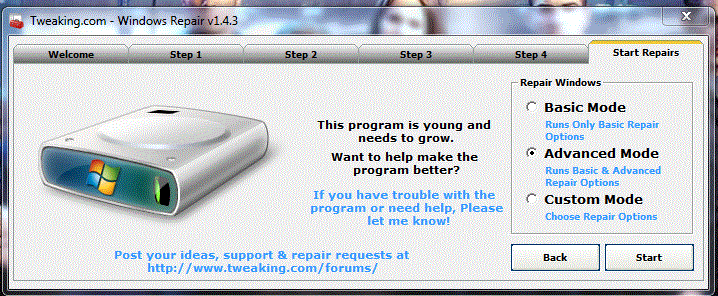
Capture1.gif

Go to the Start Repairs tab
Press: Start
When asked to create a Restore Point, please do so.

At the prompt presenting Repair Options (on the left side) press: Unselect all

Now, under Repair Options only check/select:
Reset registry permissions
Reset File Permissions
Repair WMI
Repair Windows Firewall.
Remove Policies Set By Infections

Also click: Restart/Shutdown System When Finished
...and click: Restart

Press the Start button.

See if you can reinstate your Firewall settings without: error code 5 or access denied

Please provide the outcome.
 

My Computer

Computer type
PC/Desktop
Computer Manufacturer/Model Number
An ol' eMachines
OS
Windows 7 Home Premium
Internet Speed
Fine for me...I'm retired!
Wow, thank you guys so much for helping me! Cottonball's method actually worked and now I don't have any code 5 errors!
 

My Computer

Computer type
Laptop
Computer Manufacturer/Model Number
Acer and HP
OS
Windows 7 Home Premium 64 Bit
CPU
AMD C-50 Processor and AMD Phenom II Triplecore Processor
Memory
2 to 4 Gigs
Graphics Card(s)
AMD Radeon HD Graphics
Sound Card
Conexant Audio and Beats Audio
Screen Resolution
1366x768 and N/A
Mouse
Synaptics Touchpad
Internet Speed
Over 2 MBPS according to speedtest.net
Antivirus
MS Security Essentials and AVG
Browser
Google Chrome
 

My Computer

Computer type
PC/Desktop
Computer Manufacturer/Model Number
An ol' eMachines
OS
Windows 7 Home Premium
Internet Speed
Fine for me...I'm retired!
Back
Top