Solved Windows Folder Icons

hawke7

New member
Local time
8:29 AM
Messages
15
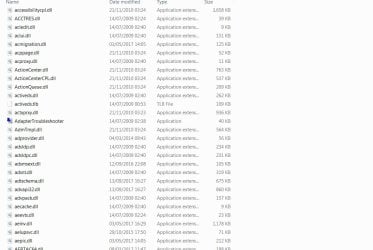
I attempted to open a folder in c/windows/system32 by opening with Internet Explorer and many of the folders changed its Icon to Internet Explorer. (I didn't open it by the way)
Please see attached screenshot.(This is just some of the icons)
Is there a way of changing back to the original icon.(I believe it was a yellow folder)
Has any harm been done?
 

Attachments
  • Files.jpg
    Files.jpg
    58.5 KB · Views: 4

My Computer

Computer type
PC/Desktop
Computer Manufacturer/Model Number
custom build
OS
windows 7 pro
CPU
amd athlon 64x2 dual core 3800+/64 bit
Motherboard
asus m2v am2
Memory
4 x 1gb kingston ddr2 800 mhz 6400
Graphics Card(s)
ati radeon hd 6670
Hard Drives
500gb Seagate barracuda 7200.12 sata
Antivirus
avira
Browser
ie 11

My Computer

Computer type
PC/Desktop
Computer Manufacturer/Model Number
Custom Built
OS
Windows 10 Pro x64, Windows 8.1 Pro x64, Windows 7 Ultimate x64 SP1,
CPU
INTEL i9-7920X LGA 2066
Motherboard
Gigabyte X299-WU8 F3
Memory
64 GB (4 X 16 GB) G-Skill V Series DDR4 3200 Quad Channel
Graphics Card(s)
EVGA GTX 1060 SC 3 GB
Sound Card
Realtek Onboard ALC1220
Monitor(s) Displays
2 x Samsung S27E310
Screen Resolution
1920x1080
Hard Drives
Samsung 2 x 970 EVO Plus 500 GB NVMe
1 x 6TB WD 6003FZBX SATA
1 x 6TB WD 60EFRX SATA
12 x 3TB WD 30EFRX SATA
PSU
Seasonic X-1050
Case
Thermaltake Armor+
Cooling
Corsair H80i V2 Liquid AOI Cooler
Keyboard
Logitech G510s
Mouse
Logitech MX Master 2S
Internet Speed
200 Mb/s
Antivirus
ESET NOD32 13.1
Browser
EDGE (Dev, Canary, Beta), Chrome
Other Info
ASUS RT-AC68U router
Malwarebytes 4.0.4
pbcopter,

Thanks for that.
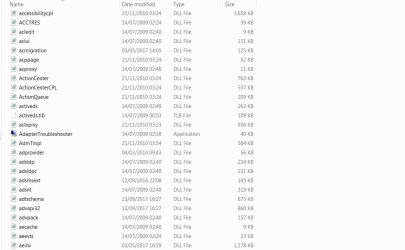
Did as you requested - please see attached screenshot.
Is this back to as it should be?
 

Attachments

  • Files2.jpg
    Files2.jpg
    78.1 KB · Views: 2

My Computer

Computer type
PC/Desktop
Computer Manufacturer/Model Number
custom build
OS
windows 7 pro
CPU
amd athlon 64x2 dual core 3800+/64 bit
Motherboard
asus m2v am2
Memory
4 x 1gb kingston ddr2 800 mhz 6400
Graphics Card(s)
ati radeon hd 6670
Hard Drives
500gb Seagate barracuda 7200.12 sata
Antivirus
avira
Browser
ie 11
Yes they appear to be normal now.
 

My Computer

Computer type
PC/Desktop
Computer Manufacturer/Model Number
Custom Built
OS
Windows 10 Pro x64, Windows 8.1 Pro x64, Windows 7 Ultimate x64 SP1,
CPU
INTEL i9-7920X LGA 2066
Motherboard
Gigabyte X299-WU8 F3
Memory
64 GB (4 X 16 GB) G-Skill V Series DDR4 3200 Quad Channel
Graphics Card(s)
EVGA GTX 1060 SC 3 GB
Sound Card
Realtek Onboard ALC1220
Monitor(s) Displays
2 x Samsung S27E310
Screen Resolution
1920x1080
Hard Drives
Samsung 2 x 970 EVO Plus 500 GB NVMe
1 x 6TB WD 6003FZBX SATA
1 x 6TB WD 60EFRX SATA
12 x 3TB WD 30EFRX SATA
PSU
Seasonic X-1050
Case
Thermaltake Armor+
Cooling
Corsair H80i V2 Liquid AOI Cooler
Keyboard
Logitech G510s
Mouse
Logitech MX Master 2S
Internet Speed
200 Mb/s
Antivirus
ESET NOD32 13.1
Browser
EDGE (Dev, Canary, Beta), Chrome
Other Info
ASUS RT-AC68U router
Malwarebytes 4.0.4
pbcopter,

Problem gone away.

Sincere thanks for your assistance - really great.
Obviously not a yellow folder!! :)
 

My Computer

Computer type
PC/Desktop
Computer Manufacturer/Model Number
custom build
OS
windows 7 pro
CPU
amd athlon 64x2 dual core 3800+/64 bit
Motherboard
asus m2v am2
Memory
4 x 1gb kingston ddr2 800 mhz 6400
Graphics Card(s)
ati radeon hd 6670
Hard Drives
500gb Seagate barracuda 7200.12 sata
Antivirus
avira
Browser
ie 11
You're welcome. However, they are files and not folders. Only folders, that are capable of containing files and other folders, have the default yellow icon.
 

My Computer

Computer type
PC/Desktop
Computer Manufacturer/Model Number
Custom Built
OS
Windows 10 Pro x64, Windows 8.1 Pro x64, Windows 7 Ultimate x64 SP1,
CPU
INTEL i9-7920X LGA 2066
Motherboard
Gigabyte X299-WU8 F3
Memory
64 GB (4 X 16 GB) G-Skill V Series DDR4 3200 Quad Channel
Graphics Card(s)
EVGA GTX 1060 SC 3 GB
Sound Card
Realtek Onboard ALC1220
Monitor(s) Displays
2 x Samsung S27E310
Screen Resolution
1920x1080
Hard Drives
Samsung 2 x 970 EVO Plus 500 GB NVMe
1 x 6TB WD 6003FZBX SATA
1 x 6TB WD 60EFRX SATA
12 x 3TB WD 30EFRX SATA
PSU
Seasonic X-1050
Case
Thermaltake Armor+
Cooling
Corsair H80i V2 Liquid AOI Cooler
Keyboard
Logitech G510s
Mouse
Logitech MX Master 2S
Internet Speed
200 Mb/s
Antivirus
ESET NOD32 13.1
Browser
EDGE (Dev, Canary, Beta), Chrome
Other Info
ASUS RT-AC68U router
Malwarebytes 4.0.4
pbcopter,

Thanks for response.
That'll teach me not to meddle again.
 

My Computer

Computer type
PC/Desktop
Computer Manufacturer/Model Number
custom build
OS
windows 7 pro
CPU
amd athlon 64x2 dual core 3800+/64 bit
Motherboard
asus m2v am2
Memory
4 x 1gb kingston ddr2 800 mhz 6400
Graphics Card(s)
ati radeon hd 6670
Hard Drives
500gb Seagate barracuda 7200.12 sata
Antivirus
avira
Browser
ie 11
No worries, that's why we're all here.
 

My Computer

Computer type
PC/Desktop
Computer Manufacturer/Model Number
Custom Built
OS
Windows 10 Pro x64, Windows 8.1 Pro x64, Windows 7 Ultimate x64 SP1,
CPU
INTEL i9-7920X LGA 2066
Motherboard
Gigabyte X299-WU8 F3
Memory
64 GB (4 X 16 GB) G-Skill V Series DDR4 3200 Quad Channel
Graphics Card(s)
EVGA GTX 1060 SC 3 GB
Sound Card
Realtek Onboard ALC1220
Monitor(s) Displays
2 x Samsung S27E310
Screen Resolution
1920x1080
Hard Drives
Samsung 2 x 970 EVO Plus 500 GB NVMe
1 x 6TB WD 6003FZBX SATA
1 x 6TB WD 60EFRX SATA
12 x 3TB WD 30EFRX SATA
PSU
Seasonic X-1050
Case
Thermaltake Armor+
Cooling
Corsair H80i V2 Liquid AOI Cooler
Keyboard
Logitech G510s
Mouse
Logitech MX Master 2S
Internet Speed
200 Mb/s
Antivirus
ESET NOD32 13.1
Browser
EDGE (Dev, Canary, Beta), Chrome
Other Info
ASUS RT-AC68U router
Malwarebytes 4.0.4
A filename extension is an identifier specified as a suffix to the name of a computer file. The extension indicates a characteristic of the file contents or its intended use. By default, Windows Explorer hides file name extensions in Windows 7 and earlier versions of Windows. However, you can make file name extensions visible.


  1. Start Windows Explorer, you can do this by opening up any folder.
  2. Click Organize.
  3. Click Folder and search options.
  4. Click the View tab.
  5. Scroll down until you notice Hide extensions for known file types, un-check this line by clicking the check box.

    Note To hide file name extensions, check this line.
  6. Click OK
 

My Computer

Computer type
PC/Desktop
Computer Manufacturer/Model Number
Custom Build
OS
Windows 10 Pro x64
CPU
Intel Core i5 6600
Motherboard
Gigabyte Technology Z170M-D3H-CF (U3E1)
Memory
Corsair Vengeance LPX 16GB 2666MHz DDR4
Graphics Card(s)
AMD Radeon R9 380 Series
Hard Drives
SSD
HDD
Antivirus
Eset Smart Security
Browser
Mozila Firefox
Back
Top