Solved Windows freezes at startup when Wi-Fi Ethernet cable not plugged in

Jind

New member
Local time
10:59 AM
Messages
5
[Solved] PC freezes when Wi-Fi Ethernet cable not plugged in

Hello,

My ASUS N61Jq laptop worked fine up until last night when I put it into Hibernation mode, as I frequently do.

I started it up again the morning, and the PC simply froze while the desktop was loading. All the icons were able to load, but the right hand side widgets had not yet appeared, and the Wireless network icon was still searching for a network. I tried rebooting several times but it systematically froze shortly after Windows had started loading.

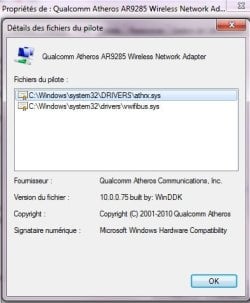
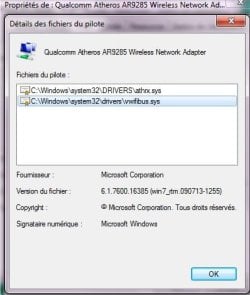
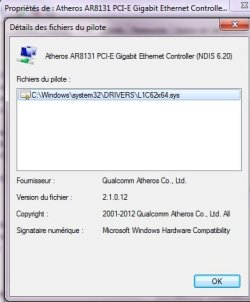
The same problem occured in Safe Mode with Networking. In fact, the freezing always seemed to happen while the system was searching for an Internet network. I have an Atheros AR8131 PCI-E Gigabit Ethernet Controller that I updated 3 days ago (driver version 2.1.0.12) and an Atheros AR9285 Wireless Network Adapter (driver version 3.0.8.1). My wi-fi router was on, and my desktop PC was able to connect to it just fine, so the problem didn't seem to come from there.

I tried turning off the Wi-Fi button on the laptop, and all it did was cause the freezing to happen almost immediately after the User Account selection screen appeared.


The computer did work fine in Safe Mode, in which I ran CCleaner, Glary Utilities, performed a full Avast scan and a sfc/SCANNOW: no problem.

I tried disabling various non-system items in the Startup Group: no change.

Looking at the Event Viewer after a given crash, there weren't any error or warning messages logged.

What worked:

I plugged the wi-fi router to the laptop using an Ethernet cable, and Windows was able to run properly this time. It's been plugged in for over an hour, and everything works fine, including the broadband connection. The only thing odd is that the Network icon has a red cross on it, as if it wasn't connected to anything:
networkicon.jpg


As I said above, the Ethernet controller driver was updated 3 days ago along with several other driver updates, but everything had been working fine up until this morning, that's why I haven't tried restoring the computer to a previous date. Could that be the problem?


As having the laptop stuck in one place with such a short cord isn't exactly handy for the work I have to do, any help to solve this would be greatly appreciated!

Many thanks in advance and have a Great Sunday :)
 
Last edited:

My Computer My Computer

At a glance

Windows 7 Home Premium x64
Computer Manufacturer/Model Number
ASUS
OS
Windows 7 Home Premium x64
upload your MSINFO32.nfo file.

  1. Click on the start button
  2. Type "msinfo32" (without quotes) in the search bar of the start menu, click the resulting link. It will open the System Information window.
  3. File>Save. In the "File Name" filed, put "MSINFO32" (without Quote), give the save location to desktop, and click the "save" button.
  4. Give the time for processing, it will save a .nfo file on your desktop.
  5. Zip it, and upload it following the instruction.
 

My Computer My Computer

At a glance

Microsoft Windows 10 Pro Insider Preview 64-bitIntel(R) Core(TM) i3-4130 CPU @ 3.40GHzCorsair Vengence 4GB x2 (8.00GB Dual-Channel ...2047MB GeForce GTS 450 (ZOTAC International)
Computer type
PC/Desktop
Computer Manufacturer/Model Number
Self Assembled
OS
Microsoft Windows 10 Pro Insider Preview 64-bit
CPU
Intel(R) Core(TM) i3-4130 CPU @ 3.40GHz
Motherboard
Gigabyte Technology Co., Ltd. B85M-D3H
Memory
Corsair Vengence 4GB x2 (8.00GB Dual-Channel DDR3 @ 798MHz)
Graphics Card(s)
2047MB GeForce GTS 450 (ZOTAC International)
Sound Card
Onboard (Realtek High Definition Audio)
Monitor(s) Displays
LG Flatron E2040T
Screen Resolution
1600x900
Hard Drives
Western Digital 1 TB
Seagate 500 GB
PSU
Corsair VS550
Case
Cooler Master K380
Cooling
Cooler Master Seidon 120V Plus
Keyboard
Logitech MK260r
Mouse
Logitech MK260r
Internet Speed
PMPL Broadband
Antivirus
Windows Defender + MBAM
Browser
Firefox
Other Info
Dell Studio 15" Laptop
Ok, thanks! Here it is. Sorry, it's all in French. If you need any help with it, please let me know.
 

Attachments

My Computer My Computer

At a glance

Windows 7 Home Premium x64
Computer Manufacturer/Model Number
ASUS
OS
Windows 7 Home Premium x64
The uploaded .nfo file is not opening.

upload your MSINFO32.nfo file as text document.


  1. Click on the start button
  2. Type "msinfo32" (without quotes) in the search bar of the start menu, click the resulting link. It will open the System Information window.
  3. File>Export. In the "File Name" filed, put "MSINFO32" (without Quote), give the save location to desktop, and click the "save" button.
  4. Give the time for processing, it will save a .txt file on your desktop.
  5. Zip it, and upload it following the instruction.
 

My Computer My Computer

At a glance

Microsoft Windows 10 Pro Insider Preview 64-bitIntel(R) Core(TM) i3-4130 CPU @ 3.40GHzCorsair Vengence 4GB x2 (8.00GB Dual-Channel ...2047MB GeForce GTS 450 (ZOTAC International)
Computer type
PC/Desktop
Computer Manufacturer/Model Number
Self Assembled
OS
Microsoft Windows 10 Pro Insider Preview 64-bit
CPU
Intel(R) Core(TM) i3-4130 CPU @ 3.40GHz
Motherboard
Gigabyte Technology Co., Ltd. B85M-D3H
Memory
Corsair Vengence 4GB x2 (8.00GB Dual-Channel DDR3 @ 798MHz)
Graphics Card(s)
2047MB GeForce GTS 450 (ZOTAC International)
Sound Card
Onboard (Realtek High Definition Audio)
Monitor(s) Displays
LG Flatron E2040T
Screen Resolution
1600x900
Hard Drives
Western Digital 1 TB
Seagate 500 GB
PSU
Corsair VS550
Case
Cooler Master K380
Cooling
Cooler Master Seidon 120V Plus
Keyboard
Logitech MK260r
Mouse
Logitech MK260r
Internet Speed
PMPL Broadband
Antivirus
Windows Defender + MBAM
Browser
Firefox
Other Info
Dell Studio 15" Laptop
Ok, here:
 

Attachments

My Computer My Computer

At a glance

Windows 7 Home Premium x64
Computer Manufacturer/Model Number
ASUS
OS
Windows 7 Home Premium x64
:o unfortunately I dont know the language of your system, the text file I cannot read. Sorry.
But, you may do one more thing to get the required information ..... update the network driver.
First, download the network card driver from manufactuer's website.
Then reinstall the driver:

  1. Click the Start Button, type "devmgmt.msc" (without quotation marks) in the Start Menu Search box and press Enter.
  2. Double click to expand "Network adaptors".
  3. Right click your network card and Click "properties"
  4. In the properties window, Click the "Driver" tab.
  5. Click the "driver details" button.
  6. Take a snip using snipping tool and upload the snip for us.
 

My Computer My Computer

At a glance

Microsoft Windows 10 Pro Insider Preview 64-bitIntel(R) Core(TM) i3-4130 CPU @ 3.40GHzCorsair Vengence 4GB x2 (8.00GB Dual-Channel ...2047MB GeForce GTS 450 (ZOTAC International)
Computer type
PC/Desktop
Computer Manufacturer/Model Number
Self Assembled
OS
Microsoft Windows 10 Pro Insider Preview 64-bit
CPU
Intel(R) Core(TM) i3-4130 CPU @ 3.40GHz
Motherboard
Gigabyte Technology Co., Ltd. B85M-D3H
Memory
Corsair Vengence 4GB x2 (8.00GB Dual-Channel DDR3 @ 798MHz)
Graphics Card(s)
2047MB GeForce GTS 450 (ZOTAC International)
Sound Card
Onboard (Realtek High Definition Audio)
Monitor(s) Displays
LG Flatron E2040T
Screen Resolution
1600x900
Hard Drives
Western Digital 1 TB
Seagate 500 GB
PSU
Corsair VS550
Case
Cooler Master K380
Cooling
Cooler Master Seidon 120V Plus
Keyboard
Logitech MK260r
Mouse
Logitech MK260r
Internet Speed
PMPL Broadband
Antivirus
Windows Defender + MBAM
Browser
Firefox
Other Info
Dell Studio 15" Laptop
That's ok, no problem. Here are the caps for the Ethernet Controller and the Network Adapter:
 

Attachments

  • ethernetdriver.jpg
    ethernetdriver.jpg
    22.1 KB · Views: 9
  • networkdriver1.jpg
    networkdriver1.jpg
    25.2 KB · Views: 8
  • networkdriver2.jpg
    networkdriver2.jpg
    24.9 KB · Views: 8

My Computer My Computer

At a glance

Windows 7 Home Premium x64
Computer Manufacturer/Model Number
ASUS
OS
Windows 7 Home Premium x64

My Computer My Computer

At a glance

Microsoft Windows 10 Pro Insider Preview 64-bitIntel(R) Core(TM) i3-4130 CPU @ 3.40GHzCorsair Vengence 4GB x2 (8.00GB Dual-Channel ...2047MB GeForce GTS 450 (ZOTAC International)
Computer type
PC/Desktop
Computer Manufacturer/Model Number
Self Assembled
OS
Microsoft Windows 10 Pro Insider Preview 64-bit
CPU
Intel(R) Core(TM) i3-4130 CPU @ 3.40GHz
Motherboard
Gigabyte Technology Co., Ltd. B85M-D3H
Memory
Corsair Vengence 4GB x2 (8.00GB Dual-Channel DDR3 @ 798MHz)
Graphics Card(s)
2047MB GeForce GTS 450 (ZOTAC International)
Sound Card
Onboard (Realtek High Definition Audio)
Monitor(s) Displays
LG Flatron E2040T
Screen Resolution
1600x900
Hard Drives
Western Digital 1 TB
Seagate 500 GB
PSU
Corsair VS550
Case
Cooler Master K380
Cooling
Cooler Master Seidon 120V Plus
Keyboard
Logitech MK260r
Mouse
Logitech MK260r
Internet Speed
PMPL Broadband
Antivirus
Windows Defender + MBAM
Browser
Firefox
Other Info
Dell Studio 15" Laptop
Hi and thanks for your help.
Thus far I thought that everything was up-to-date, as I last updated the drivers on Thursday, but after some Googling, I found out there was an even newer driver for the Atheros AR8131 Ethernet Controller, i.e. 2.1.0.14, which is available in the "AR813X AR815X Family Drivers" drop-down list here: Qualcomm Atheros :: Corporate :: Customer Portal

I guess there were just bugs with version 2.1.0.12.
I've applied this update and my PC can now boot without being plugged to the router with the Ethernet cable!

Thanks again! :)
 

My Computer My Computer

At a glance

Windows 7 Home Premium x64
Computer Manufacturer/Model Number
ASUS
OS
Windows 7 Home Premium x64
Good to know :) If you think that your issue is solved by doing the driver update, mark it as solved, so that it may be easily indexed in future, and can some others having the same issue.

And, if there is any further issue, let us know :)
 

My Computer My Computer

At a glance

Microsoft Windows 10 Pro Insider Preview 64-bitIntel(R) Core(TM) i3-4130 CPU @ 3.40GHzCorsair Vengence 4GB x2 (8.00GB Dual-Channel ...2047MB GeForce GTS 450 (ZOTAC International)
Computer type
PC/Desktop
Computer Manufacturer/Model Number
Self Assembled
OS
Microsoft Windows 10 Pro Insider Preview 64-bit
CPU
Intel(R) Core(TM) i3-4130 CPU @ 3.40GHz
Motherboard
Gigabyte Technology Co., Ltd. B85M-D3H
Memory
Corsair Vengence 4GB x2 (8.00GB Dual-Channel DDR3 @ 798MHz)
Graphics Card(s)
2047MB GeForce GTS 450 (ZOTAC International)
Sound Card
Onboard (Realtek High Definition Audio)
Monitor(s) Displays
LG Flatron E2040T
Screen Resolution
1600x900
Hard Drives
Western Digital 1 TB
Seagate 500 GB
PSU
Corsair VS550
Case
Cooler Master K380
Cooling
Cooler Master Seidon 120V Plus
Keyboard
Logitech MK260r
Mouse
Logitech MK260r
Internet Speed
PMPL Broadband
Antivirus
Windows Defender + MBAM
Browser
Firefox
Other Info
Dell Studio 15" Laptop
Back
Top