
Solved Windows freezing randomly while working

uday359

New member
Local time
1:38 AM
Messages
5
Hello

Sorry in advanced if this is the wrong location to post.

I believe I have quite the problem here.I recently bought a new system and installed all necessary software and started using. one day suddenly it freezed while I was surfing the web. I didn't think too much about it and force rebooted it. A couple of minutes in it freezed again in the middle of a file transfer and I just can't figure out what it is,Today the problem was at its peak back to back it has freezed 8 times and everytime i restart it it gets stuck at welcome logo .if had manually restarted it by pressing power button it gets stuck while i am refreshing it.

I am not sure if it is a virus problem or any software problem.

During the freeze I cannot move my mouse nor use my keyboard and the only solution is a forced restart or manual shutdown by pressing power button.

Help would be really nice .

my PC specs-

motherboard-Gigabyte GA-B75M-D3H
processor- Intel I3-3220 3.30 GHz
RAM-Kingston hyperX 8GB
Seagate 500 GB HDD
Windows 7 ultimate 32bit

Please help me with my problem. now i was able to perform SF debug test and uploaded the file
 

Attachments

Last edited:

My Computer

Computer type
PC/Desktop
Computer Manufacturer/Model Number
custom build
OS
windows 7 ultimate 32 bit
CPU
intel i3-3220 3.30GHz (3rd gen)
Motherboard
Gigabyte GA-B75M-D3H
Memory
kingston hyperX DDR3 8GB
Hard Drives
seagate
It sounds like a hardware issue. I would take it to where you bought it without delay. If it was purchased online contact their support and tell them there seems to be a defective component.
 

My Computer

Computer Manufacturer/Model Number
HP Media Center
OS
Windows 7 32 bit
CPU
AMD 5200+ dual core
Memory
2 GB
Graphics Card(s)
NVidia GeForce 6150SE 128 MB
Monitor(s) Displays
CRT
Screen Resolution
1280x1024
Hard Drives
500 GB Sata internal :

SIIG USB 3.0 docking stations w/WD Caviar Black 6 Gb/s drives
Keyboard
PS/2
Mouse
PS/2 Wheel Mouse
Other Info
SIIG USB 3.0 PCIexpress card.
@ milesahead.

This is a customer build, so we will need to determine what hardware is causing the freezing.

Does event viewer show any suggestions or errors?
 

My Computer

Computer type
PC/Desktop
Computer Manufacturer/Model Number
Custom Built
OS
Windows 10 Pro
CPU
AMD Ryzen 5 2400G Processor with Radeon RX Vega 11 Graphics
Motherboard
ASRock X470 Master SLI/AC AM4 AMD Promontory X470 SATA 6Gb/s
Memory
G.SKILL Ripjaws V Series 16GB (2 x 8GB) 288-Pin DDR4 SDRAM D
Graphics Card(s)
2047MB NVIDIA GeForce GTX 1060 6GB (EVGA)
Sound Card
Motherboard Built in
Monitor(s) Displays
Acer R240HY bidx 23.8-Inch IPS HDMI DVI VGA (1920 x 1080) Wi
Screen Resolution
1920 x 1080
Hard Drives
1TB Sandisk SSD PLUS (Main drive)
500 GB Seagate 7200 RPM (Games)
500 GB Western Digital 7200 RPM (Virtual Machines)
PSU
CORSAIR TX Series TX650M 650W 80+ Gold Modular Power Supply
Case
CORSAIR CARBIDE SPEC-02 Mid-Tower Gaming Case, Red LED Fan
Cooling
220mm, two 120mm, and four 60mm fans
Keyboard
Wired Dell keyboard
Mouse
Wireless Logitech mouse
Internet Speed
250mb down, 30mb up
Antivirus
Panda Cloud Antivirus
Browser
Chrome-ish x64
Other Info
Your awesome for reading this.
how to check if its a hardware problem??? I dont know why this happens to me but when i take to service center every thing will work fine... :( as soon as i come home it starts freezing again.
 

My Computer

Computer type
PC/Desktop
Computer Manufacturer/Model Number
custom build
OS
windows 7 ultimate 32 bit
CPU
intel i3-3220 3.30GHz (3rd gen)
Motherboard
Gigabyte GA-B75M-D3H
Memory
kingston hyperX DDR3 8GB
Hard Drives
seagate
Work through the Troubleshooting Steps for Windows 7 starting with the hardware tests.

Report back as you go through the steps as others might be indicated.

Did you get a COA sticker with the preinstalled copy of Ultimate to prove its legal? If not I would insist on it as it's a crime to sell bootleg Win7 and it must have a COA sticker provided to prove its Genuine. Then if necessary you can assure a perfect install following these same steps for Clean Reinstall - Factory OEM Windows 7.
 
@ milesahead.

This is a customer build, so we will need to determine what hardware is causing the freezing.

Does event viewer show any suggestions or errors?

I recently bought a new system and installed all necessary software and started using.

Reads like he bought it from someone to me. In system specs it says "custom build" which is not necessarily a "customer build." e.g. he bought it from an outfit that sells PCs built to order.
 

My Computer

Computer Manufacturer/Model Number
HP Media Center
OS
Windows 7 32 bit
CPU
AMD 5200+ dual core
Memory
2 GB
Graphics Card(s)
NVidia GeForce 6150SE 128 MB
Monitor(s) Displays
CRT
Screen Resolution
1280x1024
Hard Drives
500 GB Sata internal :

SIIG USB 3.0 docking stations w/WD Caviar Black 6 Gb/s drives
Keyboard
PS/2
Mouse
PS/2 Wheel Mouse
Other Info
SIIG USB 3.0 PCIexpress card.
how to check if its a hardware problem??? I dont know why this happens to me but when i take to service center every thing will work fine... :( as soon as i come home it starts freezing again.

How long do they leave it run when checking it? Probably not long. Try letting the machine sit for several hours. Turn it on and set a timer or write down the current time. When it freezes write down how long it was running when it froze. Do this a few times. If the run time to lock up is approximately the same time note that and make sure they run the machine at least that long when testing. If the time varies greatly then it may be more difficult to trace. But if it's close to the same duration every time, chances are some component fails when it reaches normal operating temperature.


Or you could have a cooling issue. But it probably fails as soon as you get home because it is already warm from the testing and therefore reaches the critical temp much sooner.
 

My Computer

Computer Manufacturer/Model Number
HP Media Center
OS
Windows 7 32 bit
CPU
AMD 5200+ dual core
Memory
2 GB
Graphics Card(s)
NVidia GeForce 6150SE 128 MB
Monitor(s) Displays
CRT
Screen Resolution
1280x1024
Hard Drives
500 GB Sata internal :

SIIG USB 3.0 docking stations w/WD Caviar Black 6 Gb/s drives
Keyboard
PS/2
Mouse
PS/2 Wheel Mouse
Other Info
SIIG USB 3.0 PCIexpress card.
When days after you installed it ?

I do not know, maybe the system was in updating process.
 

My Computer

Computer type
PC/Desktop
Computer Manufacturer/Model Number
Assembled PC
OS
64-bit Windows 7 Professional
CPU
Intel i5-3450 3.1 Ghz
Motherboard
ASUS P8H77-M PRO
Memory
8 GB (2x4) Corsair Vengeance Red DDR3 1600Mhz
Graphics Card(s)
ASUS HD 7770 DC 1.5GB
Sound Card
Realtek HD Audio / Headphones Asus Orion Pro
Monitor(s) Displays
20" Samsung S20B300N
Screen Resolution
1600x900
Hard Drives
500GB SEAGATE HDD SATA
PSU
Corsair GS600 80PLUS Bronze Gaming
Case
Cooler Master Storm Enforcer
Cooling
Cooler Master Hyper 212 EVO
Keyboard
Logitech K200 USB
Mouse
Logitech M100 USB / Logitech G500 Gaming Mouse
Antivirus
ESET
Browser
Internet Explorer
Other Info
All the hardware selected by myself. I never imagined upgrade my PC :)
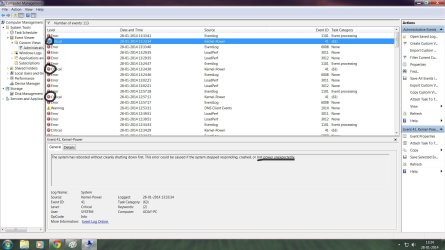
i have gone through windows trouble shooting and checked event viewer and found these warnings some are errors and some are critical.... it is showing that may be loss of power.. is it the reason or any other or any other??
 

Attachments

  • critical.jpg
    critical.jpg
    172.4 KB · Views: 7

My Computer

Computer type
PC/Desktop
Computer Manufacturer/Model Number
custom build
OS
windows 7 ultimate 32 bit
CPU
intel i3-3220 3.30GHz (3rd gen)
Motherboard
Gigabyte GA-B75M-D3H
Memory
kingston hyperX DDR3 8GB
Hard Drives
seagate
Perhaps the power supply isn't up to the load or is defective. I'd bring it back with a printout of that log.
 

My Computer

Computer Manufacturer/Model Number
HP Media Center
OS
Windows 7 32 bit
CPU
AMD 5200+ dual core
Memory
2 GB
Graphics Card(s)
NVidia GeForce 6150SE 128 MB
Monitor(s) Displays
CRT
Screen Resolution
1280x1024
Hard Drives
500 GB Sata internal :

SIIG USB 3.0 docking stations w/WD Caviar Black 6 Gb/s drives
Keyboard
PS/2
Mouse
PS/2 Wheel Mouse
Other Info
SIIG USB 3.0 PCIexpress card.
MilesAhead i think power supply is the culprit but when in operate in safe mode there is no freezing or any glitches.. i have tried both safe mode and safe mode with networking...did you fine any software problem in the SFdug file i have attached???
 

My Computer

Computer type
PC/Desktop
Computer Manufacturer/Model Number
custom build
OS
windows 7 ultimate 32 bit
CPU
intel i3-3220 3.30GHz (3rd gen)
Motherboard
Gigabyte GA-B75M-D3H
Memory
kingston hyperX DDR3 8GB
Hard Drives
seagate
Perhaps one of the BSOD guys can take a look. I don't know one end of a dump file from the other.

Another thing occurs to me.. have you checked out the power source where you run the machine? Maybe it works in the repair shop because they're power source is up to snuff? Do you have a UPS on the system and if so, is it the "power conditioning" type or just battery backup?
 

My Computer

Computer Manufacturer/Model Number
HP Media Center
OS
Windows 7 32 bit
CPU
AMD 5200+ dual core
Memory
2 GB
Graphics Card(s)
NVidia GeForce 6150SE 128 MB
Monitor(s) Displays
CRT
Screen Resolution
1280x1024
Hard Drives
500 GB Sata internal :

SIIG USB 3.0 docking stations w/WD Caviar Black 6 Gb/s drives
Keyboard
PS/2
Mouse
PS/2 Wheel Mouse
Other Info
SIIG USB 3.0 PCIexpress card.
Thank you all ... :) problem has been solved.The culprit is the power supply unit.bought new unit,now everything working fine.Thanks once again
 

My Computer

Computer type
PC/Desktop
Computer Manufacturer/Model Number
custom build
OS
windows 7 ultimate 32 bit
CPU
intel i3-3220 3.30GHz (3rd gen)
Motherboard
Gigabyte GA-B75M-D3H
Memory
kingston hyperX DDR3 8GB
Hard Drives
seagate
Thank you all ... :) problem has been solved.The culprit is the power supply unit.bought new unit,now everything working fine.Thanks once again

Glad it's resolved. :)
 

My Computer

Computer Manufacturer/Model Number
HP Media Center
OS
Windows 7 32 bit
CPU
AMD 5200+ dual core
Memory
2 GB
Graphics Card(s)
NVidia GeForce 6150SE 128 MB
Monitor(s) Displays
CRT
Screen Resolution
1280x1024
Hard Drives
500 GB Sata internal :

SIIG USB 3.0 docking stations w/WD Caviar Black 6 Gb/s drives
Keyboard
PS/2
Mouse
PS/2 Wheel Mouse
Other Info
SIIG USB 3.0 PCIexpress card.
Back
Top