Windows Gadget Platform is missing

moonknight

New member
Local time
1:04 PM
Messages
21
I had to do a system restore because I installed some new drivers that ended up not working. After rebooting my computer, my gadgets still appeared but it had some images missing on the gadget. So I tried to enable and disable Windows Gadget Platform, but it's not there anymore! Please help me fix this? Where can I install it again?

Thanks
 

My Computer

OS
Windows 7 Ultimate x64
CPU
i7 950
Graphics Card(s)
XFX 5830
Go to search, type gadgets and then click on it.
If that does not work, go to desktop gadgets in control pannel
 

My Computer

Computer type
PC/Desktop
Computer Manufacturer/Model Number
Dell XPS 420
OS
Windows 10, Home Clean Install
CPU
Intel Core2 processsor Q8200(2.33Ghz 1333FSB) Quad Core Tech
Motherboard
Dell
Memory
6 gb
Graphics Card(s)
ATI Radeon 256MB HD3650
Sound Card
Intergrated 7.1 Channel Audio
Monitor(s) Displays
Dell SP2009W 20"
Hard Drives
640 GB Serial ATA Hard drive
Cooling
Fan
Keyboard
Dell USB Keyboard
Mouse
Dell Premium Optical USB
Internet Speed
DSL 2.85
Go to search, type gadgets and then click on it.
If that does not work, go to desktop gadgets in control pannel

Like I said, the Gadgets still work. But there are missing images, some of the images on the gadget just have the "Red X" image. How do you fix that?

I attempted to fix it by going to "Turn Windows Features On or Off" to disable and enable Windows Gadget Platform... but it was not in the Features list... so where did it go?? How do I reinstall it? Or just fix the Red X images?

Thanks
 

My Computer

OS
Windows 7 Ultimate x64
CPU
i7 950
Graphics Card(s)
XFX 5830

My Computer

Computer type
PC/Desktop
Computer Manufacturer/Model Number
Dell XPS 420
OS
Windows 10, Home Clean Install
CPU
Intel Core2 processsor Q8200(2.33Ghz 1333FSB) Quad Core Tech
Motherboard
Dell
Memory
6 gb
Graphics Card(s)
ATI Radeon 256MB HD3650
Sound Card
Intergrated 7.1 Channel Audio
Monitor(s) Displays
Dell SP2009W 20"
Hard Drives
640 GB Serial ATA Hard drive
Cooling
Fan
Keyboard
Dell USB Keyboard
Mouse
Dell Premium Optical USB
Internet Speed
DSL 2.85

My Computer

Computer Manufacturer/Model Number
Compaq Desktop
OS
Windows 7 Ultimate x64
CPU
AMD Sempron Dual Core
Memory
3GB
Graphics Card(s)
NVIDIA GeForce 6150SE nForce 430
Screen Resolution
1024x768
Hard Drives
150GB Sata

My Computer

Computer Manufacturer/Model Number
Compaq Desktop
OS
Windows 7 Ultimate x64
CPU
AMD Sempron Dual Core
Memory
3GB
Graphics Card(s)
NVIDIA GeForce 6150SE nForce 430
Screen Resolution
1024x768
Hard Drives
150GB Sata
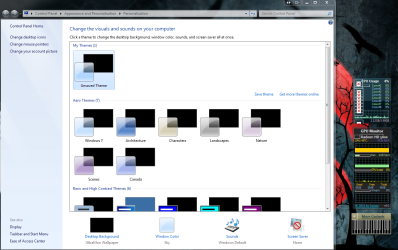
I just noticed there are missing images other places too. When I right-click on desktop and click Personalize. Well I included a screenshot so you guys can see what I mean. How do I get these images back. Remember I got this problem when I did a System Restore.. so I'm not sure if another System Restore will help. Any ideas?

Thanks
 

Attachments

  • missing images.png
    missing images.png
    438.5 KB · Views: 32

My Computer

OS
Windows 7 Ultimate x64
CPU
i7 950
Graphics Card(s)
XFX 5830
Just tried that Scan thing. It didn't complete. It says "Windows Resource Protection could not perform the requested opertation" Please help me :(
 

My Computer

OS
Windows 7 Ultimate x64
CPU
i7 950
Graphics Card(s)
XFX 5830

My Computer

Computer type
PC/Desktop
Computer Manufacturer/Model Number
Dell XPS 420
OS
Windows 10, Home Clean Install
CPU
Intel Core2 processsor Q8200(2.33Ghz 1333FSB) Quad Core Tech
Motherboard
Dell
Memory
6 gb
Graphics Card(s)
ATI Radeon 256MB HD3650
Sound Card
Intergrated 7.1 Channel Audio
Monitor(s) Displays
Dell SP2009W 20"
Hard Drives
640 GB Serial ATA Hard drive
Cooling
Fan
Keyboard
Dell USB Keyboard
Mouse
Dell Premium Optical USB
Internet Speed
DSL 2.85
www.malwarebytes.org is the link you need :)

It does sound like a repair install is what you need but thankfuly your personaly files can be saved.


OS
 

My Computer

Computer Manufacturer/Model Number
Compaq Desktop
OS
Windows 7 Ultimate x64
CPU
AMD Sempron Dual Core
Memory
3GB
Graphics Card(s)
NVIDIA GeForce 6150SE nForce 430
Screen Resolution
1024x768
Hard Drives
150GB Sata
Scan with malwarebytes, if negative its a repair install.
 

My Computer

Computer type
PC/Desktop
Computer Manufacturer/Model Number
Dell XPS 420
OS
Windows 10, Home Clean Install
CPU
Intel Core2 processsor Q8200(2.33Ghz 1333FSB) Quad Core Tech
Motherboard
Dell
Memory
6 gb
Graphics Card(s)
ATI Radeon 256MB HD3650
Sound Card
Intergrated 7.1 Channel Audio
Monitor(s) Displays
Dell SP2009W 20"
Hard Drives
640 GB Serial ATA Hard drive
Cooling
Fan
Keyboard
Dell USB Keyboard
Mouse
Dell Premium Optical USB
Internet Speed
DSL 2.85
Sorry, I didn't explain properly...:o

Run the scan with malwarebytes and if that doesn't yield any results then a repair install may be the only option.
 

My Computer

Computer Manufacturer/Model Number
Compaq Desktop
OS
Windows 7 Ultimate x64
CPU
AMD Sempron Dual Core
Memory
3GB
Graphics Card(s)
NVIDIA GeForce 6150SE nForce 430
Screen Resolution
1024x768
Hard Drives
150GB Sata
LOL, rich got there first.

Man you're fast :)
 

My Computer

Computer Manufacturer/Model Number
Compaq Desktop
OS
Windows 7 Ultimate x64
CPU
AMD Sempron Dual Core
Memory
3GB
Graphics Card(s)
NVIDIA GeForce 6150SE nForce 430
Screen Resolution
1024x768
Hard Drives
150GB Sata
Back
Top