Windows has an issue with the Windows PATH variable

ruppgeoff

New member
Local time
10:47 AM
Messages
4
I've been trying to install an application on my Windows 7 64-bit system and continue to encounter the same error every time I try to install the application. I have tried to contact the support the application, but was re-routed to this forum for help as it was stated as being a Windows issue.

I have also attached specific information about my system as well.

My path is the following: %SystemRoot%\system32;%SystemRoot%;%SystemRoot%\System32\Wbem;%SYSTEMROOT%\System32\WindowsPowerShell\v1.0\

Tried changing to:
C:\Windows\system32;C:\Windows;C:\Windows\System32\Wbem;C:\Windows\System32\WindowsPowerShell\v1.0\;C:\Program Files (x86)\NVIDIA Corporation\PhysX\Common

Didn't really matter. Even went as far as registry.

HKEY_LOCAL_MACHINE\SYSTEM\ControlSet001\Control\Session Manager\Environment
and
HKEY_LOCAL_MACHINE\SYSTEM\ControlSet002\Control\Session Manager\Environment

%SystemRoot%\system32;%SystemRoot%;%SystemRoot%\System32\Wbem;%SYSTEMROOT%\System32\WindowsPowerShell\v1.0\

nothing seems to matter. So was wondering if anyone had any pointers to what I might be able to do to resolve this issue.
 

Attachments

  • desktop-hardware.jpg
    desktop-hardware.jpg
    76.4 KB · Views: 23
  • path-error.jpg
    path-error.jpg
    10 KB · Views: 22

My Computer

Computer type
PC/Desktop
Computer Manufacturer/Model Number
Lenovo
OS
Windows 7 Home Premium 64-bit
CPU
Intel Core i5-2320
Memory
12GB, DDR3-1600/PC3-12800 DDR3 SDRAM
Graphics Card(s)
GeForce GT620
Hard Drives
Seagate, 1x2TB, 1x3TB
Antivirus
AVG
Browser
Chrome
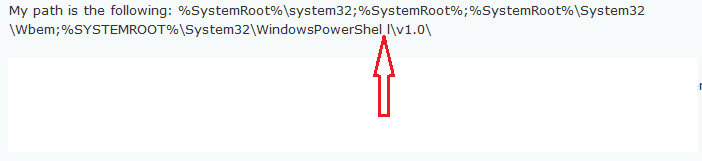
There seems to be a space where one should not be:

path.png

The default PATH is:
Code:
%SystemRoot%\system32;%SystemRoot%;%SystemRoot%\System32\Wbem;%SYSTEMROOT%\System32\WindowsPowerShell\v1.0\
 

My Computer

Computer type
Laptop
Computer Manufacturer/Model Number
Employer provided Dell Latitude
OS
W7 Pro SP1 64bit
CPU
i7
Memory
8GB
Graphics Card(s)
Intel HD Graphics
Hard Drives
crappy SSD
Antivirus
Employer mandated Symantec Endpoint Protection
Browser
Pale Moon 64bit, IE11 64bit & Chrome 64bit
What problem are you having?
What error messages are you receiving?
 

My Computer

Computer type
PC/Desktop
Computer Manufacturer/Model Number
HP
OS
Windows 7 Pro 64 bit
CPU
Xeon W3520
Memory
8 GB
Graphics Card(s)
Nvidia Geforce 210
What problem are you having?
What error messages are you receiving?

The OP states:
> ...continue to encounter the same error every time I try to install the application.

The error message from the app's installer is in the last screenshot attached to the OP.


I do wonder what app is throwing this error?
 

My Computer

Computer type
Laptop
Computer Manufacturer/Model Number
Employer provided Dell Latitude
OS
W7 Pro SP1 64bit
CPU
i7
Memory
8GB
Graphics Card(s)
Intel HD Graphics
Hard Drives
crappy SSD
Antivirus
Employer mandated Symantec Endpoint Protection
Browser
Pale Moon 64bit, IE11 64bit & Chrome 64bit
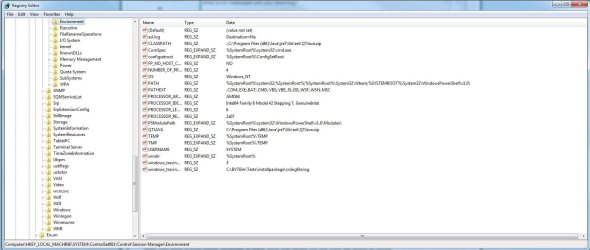
I am trying to install Andyroid on my Windows 7 system. BTW. There is no space between the ll's in powershell in my path statement. It is just the way the copy and paste played with it. I attached another view of my registry hive where my path would be found.

Any other ideas?
 

Attachments

  • Capture.JPG
    Capture.JPG
    120.1 KB · Views: 3
Last edited:

My Computer

Computer type
PC/Desktop
Computer Manufacturer/Model Number
Lenovo
OS
Windows 7 Home Premium 64-bit
CPU
Intel Core i5-2320
Memory
12GB, DDR3-1600/PC3-12800 DDR3 SDRAM
Graphics Card(s)
GeForce GT620
Hard Drives
Seagate, 1x2TB, 1x3TB
Antivirus
AVG
Browser
Chrome
Any new ideas

I tried the default path posted here and tried many other forms of a path, but the application continues to complain with the same error message.
 

My Computer

Computer type
PC/Desktop
Computer Manufacturer/Model Number
Lenovo
OS
Windows 7 Home Premium 64-bit
CPU
Intel Core i5-2320
Memory
12GB, DDR3-1600/PC3-12800 DDR3 SDRAM
Graphics Card(s)
GeForce GT620
Hard Drives
Seagate, 1x2TB, 1x3TB
Antivirus
AVG
Browser
Chrome
Use Process Monitor to gather data during the installation. Stop the data collection as soon as the error message comes up.

If you are not familiar wit Process Monitor, watch some videos. there are two videos in this post.
 

My Computer

Computer type
Laptop
Computer Manufacturer/Model Number
Employer provided Dell Latitude
OS
W7 Pro SP1 64bit
CPU
i7
Memory
8GB
Graphics Card(s)
Intel HD Graphics
Hard Drives
crappy SSD
Antivirus
Employer mandated Symantec Endpoint Protection
Browser
Pale Moon 64bit, IE11 64bit & Chrome 64bit
Process Monitor

Funny. Actually that was exactly what I did. I could not key on anything from that though. Was hoping I could identify a file or something that was getting written out that I could use as a log to see what is happening. A good deal of registry checks, but not much is visible or noticeable in the process monitor view. I was looking for only that setup.exe process, but nothing seems overly visible.

Oh well. Thanks for the thought.
 

My Computer

Computer type
PC/Desktop
Computer Manufacturer/Model Number
Lenovo
OS
Windows 7 Home Premium 64-bit
CPU
Intel Core i5-2320
Memory
12GB, DDR3-1600/PC3-12800 DDR3 SDRAM
Graphics Card(s)
GeForce GT620
Hard Drives
Seagate, 1x2TB, 1x3TB
Antivirus
AVG
Browser
Chrome
You can drag/drop the process finder (cross hairs) onto the error message to filter on the process that made the error. Maybe it was some process that setup.exe created during the installation.
 

My Computer

Computer type
Laptop
Computer Manufacturer/Model Number
Employer provided Dell Latitude
OS
W7 Pro SP1 64bit
CPU
i7
Memory
8GB
Graphics Card(s)
Intel HD Graphics
Hard Drives
crappy SSD
Antivirus
Employer mandated Symantec Endpoint Protection
Browser
Pale Moon 64bit, IE11 64bit & Chrome 64bit
Back
Top