Windows has detected your performance...

adcret7

New member
Local time
10:44 AM
Messages
8
Location
Boca Raton
So i recently updated and now this annoying message which i cleared up before i updated keeps appearing saying "Windows has detected your performance is slow try turning off aero" and all that giberish. Try as i might i cant seem to get it to stop. i Chose to hide icon and notifications from action center but it still appears. Is there anyway to stop this once and for all? Also i unchecked Windows troubleshooting in Maintenance messages in "Change action center settings".
 

My Computer

OS
Windows 7 64 bit
CPU
Intel core i5 2500 @ 3.3Ghz
Motherboard
MSI P67A-G45
Memory
8 Gigs DDR3 corsair
Graphics Card(s)
ATI Radeon 6950 HD 1 gig
Sound Card
onboard using a Razer Carcharias Headset
Monitor(s) Displays
ViewSonic VX2253mh-LED Black 22" Full HD HDMI LED Backlight
Screen Resolution
1920 x 1080
Hard Drives
1tb samsung HD 7200 RPM
PSU
Thermaltake Back widow 850 watt
Case
Xclio A380
Cooling
Stock on processor 2 250mm case fans and one 120mm fan
Keyboard
Razer Lycosa
Mouse
Razer Mamba
see if the steps below help you

Type "advance system settings" (without the quotes)in search box and select "view advance system settings".

On advance tab, click settings under performance.

In visual effect, select adjust for best performance and on the list, tick enable desktop composition, show thumbnails instead of icons, smooth edges of screen fonts and use visual styles on windows and buttons.

See if the problem persist after you change the settings.
 
Last edited by a moderator:

My Computer

Computer Manufacturer/Model Number
packard bell IXTREME M5722
OS
Operating System : Windows 7 Home Premium Edition 6.01.7600 SP1 (x64)
CPU
Processor : Intel Core 2 Quad Q8300 @ 2500 MHz
Motherboard
Mainboard : Packard Bell (Acer EG43M )
Memory
Physical Memory :8GB Corsair4x 2GB 800MHz C5 DDR2
Graphics Card(s)
Video Card : XFX 6700 AMD
Monitor(s) Displays
Maestro 234DL - BenQ V2220 - BenQ VW2420H
Screen Resolution
Current Display :1920x1080p pixels at 60 Hz in HD LED
Hard Drives
Hard Disks : WDC (1000 GB)
Drive C: (Hard Disk) : 428 GB available on 491 GB
Drive D: (Hard Disk) : 426 GB available on 492 GB
SAMSUNG spinpoint HD103SJ 1000.2 GB
(X 2) KINGSTON SSD NOW V 30GB
PSU
XFX ProSeries 550W PSU
Case
PACKARD BELL IXTREME
Cooling
System Blower Current: 150mA Air Flow16CFM ;Akasa 90mm rear
Keyboard
Gigabyte Aivia K8100
Mouse
TRUST-Wireless Laser Mouse - Carbon edition MI-7770C
Internet Speed
TP-LINK > TL-WN951N / AV500 Gigabit Powerline Adapters
Browser
chrome dev
Other Info
EXTRA COOLING>(FAN CONTROLLER) PC Bay Cooler 3 x 40mm fans; Akasa AK-HD-BL Blue hard drive cooler 2 x 40 mm fan 4500 rpm 29.7 dBA
Bios> American Megatrends Inc.
Version : P01-A1
Date : 08/31/2009
see if the steps below help you

Type "advance system settings" (without the quotes)in search box and select "view advance system settings".

On advance tab, click settings under performance.

In visual effect, select adjust for best performance and on the list, tick enable desktop composition, show thumbnails instead of icons, smooth edges of screen fonts and use visual styles on windows and buttons.

See if the problem persist after you change the settings.
Will this get rid of the aero theme? I happen to like that.
 

My Computer

OS
Windows 7 64 bit
CPU
Intel core i5 2500 @ 3.3Ghz
Motherboard
MSI P67A-G45
Memory
8 Gigs DDR3 corsair
Graphics Card(s)
ATI Radeon 6950 HD 1 gig
Sound Card
onboard using a Razer Carcharias Headset
Monitor(s) Displays
ViewSonic VX2253mh-LED Black 22" Full HD HDMI LED Backlight
Screen Resolution
1920 x 1080
Hard Drives
1tb samsung HD 7200 RPM
PSU
Thermaltake Back widow 850 watt
Case
Xclio A380
Cooling
Stock on processor 2 250mm case fans and one 120mm fan
Keyboard
Razer Lycosa
Mouse
Razer Mamba
Adcret7,
Yes you wil lose the aero.

there is another approach:
Rather than Adjust for best performance, select Custom
Uncheck a few items and see if yo lose any features you want, such as:
Enable aero peek, Use visual styles on windows and buttons


click on the APPLY button then OK button your way out.

Have you installed Win 7 SP1? Yes/No
 

My Computer

Computer Manufacturer/Model Number
Toshiba Satellite S875D-S7239 laptop
OS
MS Windows 7 Ultimate SP1 64-bit
CPU
AMD A10-4600M
Motherboard
AMD Pumori (Socket FT1)
Memory
6.00 GB Dual-Channel DDR3 @ 798MHz (11-11-12-28)
Graphics Card(s)
AMD Radeon HD 7660G
Sound Card
High Definition Audio Device
Monitor(s) Displays
Generic PnP Monitor (1600x900@60Hz)
Screen Resolution
1600x900@60Hz
Hard Drives
SSD 119GB Corsair CSSD-V128GB2 ATA Device
Keyboard
Standard PS/2 Keyboard
Mouse
HP Wireless Optical Mobile Mouse Model FHA-3410
Internet Speed
What the local pub, local coffee shop offers.
Other Info
Optical Drive:MATSHITA BD-CMB UJ160B ATA Device


Also have an Asus ha1002xp netbook with Win 7 Ultimate installed.
Adcret7,
Yes you wil lose the aero.

there is another approach:
Rather than Adjust for best performance, select Custom
Uncheck a few items and see if yo lose any features you want, such as:
Enable aero peek, Use visual styles on windows and buttons


click on the APPLY button then OK button your way out.

Have you installed Win 7 SP1? Yes/No
Yes i have SP1
 

My Computer

OS
Windows 7 64 bit
CPU
Intel core i5 2500 @ 3.3Ghz
Motherboard
MSI P67A-G45
Memory
8 Gigs DDR3 corsair
Graphics Card(s)
ATI Radeon 6950 HD 1 gig
Sound Card
onboard using a Razer Carcharias Headset
Monitor(s) Displays
ViewSonic VX2253mh-LED Black 22" Full HD HDMI LED Backlight
Screen Resolution
1920 x 1080
Hard Drives
1tb samsung HD 7200 RPM
PSU
Thermaltake Back widow 850 watt
Case
Xclio A380
Cooling
Stock on processor 2 250mm case fans and one 120mm fan
Keyboard
Razer Lycosa
Mouse
Razer Mamba
did you have a read through the link brink(admin) updated in my post? Visual Effects Settings - Change - Windows 7 Forums

If you want to help improve performance, then these are the most common ones to uncheck:
  • Animate windows when minimizing and maximizing
  • Animations in the taskbar and Start Menu
  • Enable transparent glass
  • Fade or slide menus into view
  • Fade or slide ToolTips into view
  • Fade out menu items after clicking
  • Show shadows under windows
  • Slide open combo boxes
 

My Computer

Computer Manufacturer/Model Number
packard bell IXTREME M5722
OS
Operating System : Windows 7 Home Premium Edition 6.01.7600 SP1 (x64)
CPU
Processor : Intel Core 2 Quad Q8300 @ 2500 MHz
Motherboard
Mainboard : Packard Bell (Acer EG43M )
Memory
Physical Memory :8GB Corsair4x 2GB 800MHz C5 DDR2
Graphics Card(s)
Video Card : XFX 6700 AMD
Monitor(s) Displays
Maestro 234DL - BenQ V2220 - BenQ VW2420H
Screen Resolution
Current Display :1920x1080p pixels at 60 Hz in HD LED
Hard Drives
Hard Disks : WDC (1000 GB)
Drive C: (Hard Disk) : 428 GB available on 491 GB
Drive D: (Hard Disk) : 426 GB available on 492 GB
SAMSUNG spinpoint HD103SJ 1000.2 GB
(X 2) KINGSTON SSD NOW V 30GB
PSU
XFX ProSeries 550W PSU
Case
PACKARD BELL IXTREME
Cooling
System Blower Current: 150mA Air Flow16CFM ;Akasa 90mm rear
Keyboard
Gigabyte Aivia K8100
Mouse
TRUST-Wireless Laser Mouse - Carbon edition MI-7770C
Internet Speed
TP-LINK > TL-WN951N / AV500 Gigabit Powerline Adapters
Browser
chrome dev
Other Info
EXTRA COOLING>(FAN CONTROLLER) PC Bay Cooler 3 x 40mm fans; Akasa AK-HD-BL Blue hard drive cooler 2 x 40 mm fan 4500 rpm 29.7 dBA
Bios> American Megatrends Inc.
Version : P01-A1
Date : 08/31/2009

My Computer

Computer Manufacturer/Model Number
packard bell IXTREME M5722
OS
Operating System : Windows 7 Home Premium Edition 6.01.7600 SP1 (x64)
CPU
Processor : Intel Core 2 Quad Q8300 @ 2500 MHz
Motherboard
Mainboard : Packard Bell (Acer EG43M )
Memory
Physical Memory :8GB Corsair4x 2GB 800MHz C5 DDR2
Graphics Card(s)
Video Card : XFX 6700 AMD
Monitor(s) Displays
Maestro 234DL - BenQ V2220 - BenQ VW2420H
Screen Resolution
Current Display :1920x1080p pixels at 60 Hz in HD LED
Hard Drives
Hard Disks : WDC (1000 GB)
Drive C: (Hard Disk) : 428 GB available on 491 GB
Drive D: (Hard Disk) : 426 GB available on 492 GB
SAMSUNG spinpoint HD103SJ 1000.2 GB
(X 2) KINGSTON SSD NOW V 30GB
PSU
XFX ProSeries 550W PSU
Case
PACKARD BELL IXTREME
Cooling
System Blower Current: 150mA Air Flow16CFM ;Akasa 90mm rear
Keyboard
Gigabyte Aivia K8100
Mouse
TRUST-Wireless Laser Mouse - Carbon edition MI-7770C
Internet Speed
TP-LINK > TL-WN951N / AV500 Gigabit Powerline Adapters
Browser
chrome dev
Other Info
EXTRA COOLING>(FAN CONTROLLER) PC Bay Cooler 3 x 40mm fans; Akasa AK-HD-BL Blue hard drive cooler 2 x 40 mm fan 4500 rpm 29.7 dBA
Bios> American Megatrends Inc.
Version : P01-A1
Date : 08/31/2009
I fixed it sort of. This happened long before and when you would hit "Keep display the same and never show this message" it would keep showing it. I guess they fixed it as i hit the X and not that assuming it wouldn't matter
 

My Computer

OS
Windows 7 64 bit
CPU
Intel core i5 2500 @ 3.3Ghz
Motherboard
MSI P67A-G45
Memory
8 Gigs DDR3 corsair
Graphics Card(s)
ATI Radeon 6950 HD 1 gig
Sound Card
onboard using a Razer Carcharias Headset
Monitor(s) Displays
ViewSonic VX2253mh-LED Black 22" Full HD HDMI LED Backlight
Screen Resolution
1920 x 1080
Hard Drives
1tb samsung HD 7200 RPM
PSU
Thermaltake Back widow 850 watt
Case
Xclio A380
Cooling
Stock on processor 2 250mm case fans and one 120mm fan
Keyboard
Razer Lycosa
Mouse
Razer Mamba

My Computer

Computer Manufacturer/Model Number
packard bell IXTREME M5722
OS
Operating System : Windows 7 Home Premium Edition 6.01.7600 SP1 (x64)
CPU
Processor : Intel Core 2 Quad Q8300 @ 2500 MHz
Motherboard
Mainboard : Packard Bell (Acer EG43M )
Memory
Physical Memory :8GB Corsair4x 2GB 800MHz C5 DDR2
Graphics Card(s)
Video Card : XFX 6700 AMD
Monitor(s) Displays
Maestro 234DL - BenQ V2220 - BenQ VW2420H
Screen Resolution
Current Display :1920x1080p pixels at 60 Hz in HD LED
Hard Drives
Hard Disks : WDC (1000 GB)
Drive C: (Hard Disk) : 428 GB available on 491 GB
Drive D: (Hard Disk) : 426 GB available on 492 GB
SAMSUNG spinpoint HD103SJ 1000.2 GB
(X 2) KINGSTON SSD NOW V 30GB
PSU
XFX ProSeries 550W PSU
Case
PACKARD BELL IXTREME
Cooling
System Blower Current: 150mA Air Flow16CFM ;Akasa 90mm rear
Keyboard
Gigabyte Aivia K8100
Mouse
TRUST-Wireless Laser Mouse - Carbon edition MI-7770C
Internet Speed
TP-LINK > TL-WN951N / AV500 Gigabit Powerline Adapters
Browser
chrome dev
Other Info
EXTRA COOLING>(FAN CONTROLLER) PC Bay Cooler 3 x 40mm fans; Akasa AK-HD-BL Blue hard drive cooler 2 x 40 mm fan 4500 rpm 29.7 dBA
Bios> American Megatrends Inc.
Version : P01-A1
Date : 08/31/2009
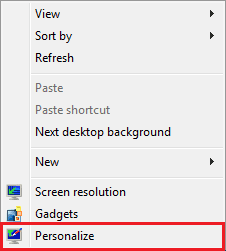
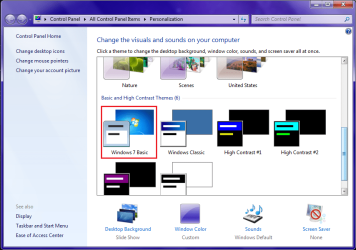
Use Windows 7 Basic theme to improve your performance. Here's some screenshot to help you understand.

Right-click empty desktop, click on Personalize.
a.png
Click on Windows 7 Basic theme. On Please wait, wait for a second and you'll no longer get full Aero experience.
b.png

For more information, visit this:
Change the theme to improve performance
 

My Computer

Computer Manufacturer/Model Number
Acer Aspire One 722 (AO722)
OS
Windows 7 Home Premium Service Pack 1 32-bit Build 7601
CPU
AMD C-50 Processor 1.0 Ghz
Memory
2 GB DDR3 RAM (1.73 usable in System Properties)
Graphics Card(s)
AMD Radeon HD 6200 series Graphics
Sound Card
High Definition Audio Device
Monitor(s) Displays
Generic PnP Monitor
Screen Resolution
1366 x 768 (recommended)
Hard Drives
320 GB HDD storage
298.09 GB in Disk Management (REAL)
Keyboard
Built-in on my laptop
Mouse
External mouse
Other Info
Installed Windows 7 Service Pack 1 by 9/9/2012
Jonathan,
He wants to keep the aero effect. With a basic theme, you lose aero.
karl
 

My Computer

Computer Manufacturer/Model Number
Toshiba Satellite S875D-S7239 laptop
OS
MS Windows 7 Ultimate SP1 64-bit
CPU
AMD A10-4600M
Motherboard
AMD Pumori (Socket FT1)
Memory
6.00 GB Dual-Channel DDR3 @ 798MHz (11-11-12-28)
Graphics Card(s)
AMD Radeon HD 7660G
Sound Card
High Definition Audio Device
Monitor(s) Displays
Generic PnP Monitor (1600x900@60Hz)
Screen Resolution
1600x900@60Hz
Hard Drives
SSD 119GB Corsair CSSD-V128GB2 ATA Device
Keyboard
Standard PS/2 Keyboard
Mouse
HP Wireless Optical Mobile Mouse Model FHA-3410
Internet Speed
What the local pub, local coffee shop offers.
Other Info
Optical Drive:MATSHITA BD-CMB UJ160B ATA Device


Also have an Asus ha1002xp netbook with Win 7 Ultimate installed.
Maybe this will do the job: Action Center > Troubleshooting > Change Settings > tick -Off- under Computer Maintenance. You will loose all messages, not only the graphic related ones, but then it's just a matter of running it with -On- now and then to check, if you feel it's needed.
 

My Computer

Computer type
Laptop
Computer Manufacturer/Model Number
Dell \ Lenovo\ HP \ Toshiba
OS
W7, W8.1
Antivirus
MSE, Malwarebytes
Browser
FF
You should not have that error message if you're running Win7 on adequate hardware. I would look at upgrading my video adapter since the rest of your posted hardware specs are plenty.

It can also depend upon a lean perfect install of Win7 running a Clean Boot (no startups except AV, gadgets, stickies) installed and maintained using the Best Practices in Clean Reinstall Windows 7.

I only have had to edit visual effects as mentioned in 4gb- RAM installs. The target items which hog resources but aren't noticeable when disabled are sliding, fading, dragging intact, selection rectangle.
 
Last edited:
  • Like
Reactions: Arc
I fixed it sort of. This happened long before and when you would hit "Keep display the same and never show this message" it would keep showing it. I guess they fixed it as i hit the X and not that assuming it wouldn't matter

Help me. Is the problem gone? Incidentally, I never had any aero problems on laptops with 4 GB of ram.
 

My Computer

Computer Manufacturer/Model Number
Toshiba Satellite S875D-S7239 laptop
OS
MS Windows 7 Ultimate SP1 64-bit
CPU
AMD A10-4600M
Motherboard
AMD Pumori (Socket FT1)
Memory
6.00 GB Dual-Channel DDR3 @ 798MHz (11-11-12-28)
Graphics Card(s)
AMD Radeon HD 7660G
Sound Card
High Definition Audio Device
Monitor(s) Displays
Generic PnP Monitor (1600x900@60Hz)
Screen Resolution
1600x900@60Hz
Hard Drives
SSD 119GB Corsair CSSD-V128GB2 ATA Device
Keyboard
Standard PS/2 Keyboard
Mouse
HP Wireless Optical Mobile Mouse Model FHA-3410
Internet Speed
What the local pub, local coffee shop offers.
Other Info
Optical Drive:MATSHITA BD-CMB UJ160B ATA Device


Also have an Asus ha1002xp netbook with Win 7 Ultimate installed.
It's apparently when Windows Desktop manager is regularly under heavy load that it generates the error OP is experiencing logged at the top of Advanced Tools page accessed by clicking your WEI score link at Computer>Properties.

I have only seen this error on installations with less than 4gb RAM. It will typically go away when Visual effects are edited of fading, sliding, draggin intact and selection rectangle which place extra demands on system resources.

Sometimes if it is accompanied by hanging or any other slowness it requires hardware upgrade of the weak component.
 
I disagree with the word evident. Let us wait for the OP.
 

My Computer

Computer Manufacturer/Model Number
Toshiba Satellite S875D-S7239 laptop
OS
MS Windows 7 Ultimate SP1 64-bit
CPU
AMD A10-4600M
Motherboard
AMD Pumori (Socket FT1)
Memory
6.00 GB Dual-Channel DDR3 @ 798MHz (11-11-12-28)
Graphics Card(s)
AMD Radeon HD 7660G
Sound Card
High Definition Audio Device
Monitor(s) Displays
Generic PnP Monitor (1600x900@60Hz)
Screen Resolution
1600x900@60Hz
Hard Drives
SSD 119GB Corsair CSSD-V128GB2 ATA Device
Keyboard
Standard PS/2 Keyboard
Mouse
HP Wireless Optical Mobile Mouse Model FHA-3410
Internet Speed
What the local pub, local coffee shop offers.
Other Info
Optical Drive:MATSHITA BD-CMB UJ160B ATA Device


Also have an Asus ha1002xp netbook with Win 7 Ultimate installed.
Are you referencing a post of mine, because I have not used that word that I can see?
 
Back
Top