
Middlespoon
New member
- Local time
- 4:29 AM
- Messages
- 2
So last night while browsing the interebz I noticed in the right bottom corner of my screen, that It said "Windows 7 Build 7601, is not Genuine." I have never received this before I have a retail version of Windows 7 Ultimate 64bit and I have already spoke to Microsoft and they determined my Key is legit(but were not much help from there) My machine is one that Ive built. Ive had this Key on hear for over a year. The first thing I did was go to Start>Computer>Properties> Where it should say Windows Activation code it is blank and does not have a "change" button. I went next to installed updates to remove the verification update and it says " No updates are installed on this computer." Ive tried the CMD promt "slmgr.vbs -ipk <type your product key here>" and it gave me Error 0xc004F016.
I really need some help on this one, If I have to reinstall my OS I will. I should have made an Image before now so that this wouldn't be a problem. Any help Would be nice I will Copy the data from MGADiag in after it runs. Thanks!!
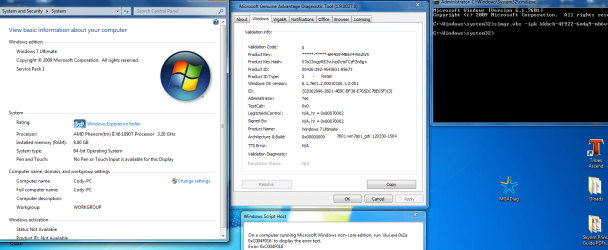
Hopefully this screen shot will help as well.
I really need some help on this one, If I have to reinstall my OS I will. I should have made an Image before now
so that this wouldn't be a problem. Any help Would be nice I will Copy the data from MGADiag in after it runs. Thanks!!
Code:
Diagnostic Report (1.9.0027.0):
-----------------------------------------
Windows Validation Data-->

Validation Code: 0
Cached Online Validation Code: 0x0
Windows Product Key: *****-*****-6M4G9-MB6V4-R62WX
Windows Product Key Hash: X7a33wgyRE3vUvpDctsTCzFZn8g=
Windows Product ID: 00426-292-4543831-85673
Windows Product ID Type: 5
Windows License Type: Retail
Windows OS version: 6.1.7601.2.00010100.1.0.001
ID: {C8362996-26D1-4EBC-BF38-E765DC7BE05F}(3)
Is Admin: Yes
TestCab: 0x0
LegitcheckControl ActiveX: N/A, hr = 0x80070002
Signed By: N/A, hr = 0x80070002
Product Name: Windows 7 Ultimate
Architecture: 0x00000009
Build lab: 7601.win7sp1_gdr.120330-1504
TTS Error:
Validation Diagnostic:
Resolution Status: N/A

Vista WgaER Data-->
ThreatID(s): N/A, hr = 0x80070002
Version: N/A, hr = 0x80070002

Windows XP Notifications Data-->
Cached Result: N/A, hr = 0x80070002
File Exists: No
Version: N/A, hr = 0x80070002
WgaTray.exe Signed By: N/A, hr = 0x80070002
WgaLogon.dll Signed By: N/A, hr = 0x80070002

OGA Notifications Data-->
Cached Result: N/A, hr = 0x80070002
Version: N/A, hr = 0x80070002
OGAExec.exe Signed By: N/A, hr = 0x80070002
OGAAddin.dll Signed By: N/A, hr = 0x80070002

OGA Data-->
Office Status: 109 N/A
OGA Version: N/A, 0x80070002
Signed By: N/A, hr = 0x80070002
Office Diagnostics: B4D0AA8B-604-645_025D1FF3-364-80041010_025D1FF3-229-80041010_025D1FF3-230-1_025D1FF3-517-80040154_025D1FF3-237-80040154_025D1FF3-238-2_025D1FF3-244-80070002_025D1FF3-258-3

Browser Data-->
Proxy settings: N/A
User Agent: Mozilla/4.0 (compatible; MSIE 8.0; Win32)
Default Browser: C:\Users\Cody\AppData\Local\Google\Chrome\Application\chrome.exe
Download signed ActiveX controls: Prompt
Download unsigned ActiveX controls: Disabled
Run ActiveX controls and plug-ins: Allowed
Initialize and script ActiveX controls not marked as safe: Disabled
Allow scripting of Internet Explorer Webbrowser control: Disabled
Active scripting: Allowed
Script ActiveX controls marked as safe for scripting: Allowed

File Scan Data-->
File Mismatch: C:\Windows\system32\wat\watadminsvc.exe[Hr = 0x80070003]
File Mismatch: C:\Windows\system32\wat\npwatweb.dll[Hr = 0x80070003]
File Mismatch: C:\Windows\system32\wat\watux.exe[Hr = 0x80070003]
File Mismatch: C:\Windows\system32\wat\watweb.dll[Hr = 0x80070003]

Other data-->
Office Details: <GenuineResults><MachineData><UGUID>{C8362996-26D1-4EBC-BF38-E765DC7BE05F}</UGUID><Version>1.9.0027.0</Version><OS>6.1.7601.2.00010100.1.0.001</OS><Architecture>x64</Architecture><PKey>*****-*****-*****-*****-R62WX</PKey><PID>00426-292-4543831-85673</PID><PIDType>5</PIDType><SID>S-1-5-21-2212560331-1675992407-1232260899</SID><SYSTEM><Manufacturer>System manufacturer</Manufacturer><Model>System Product Name</Model></SYSTEM><BIOS><Manufacturer>American Megatrends Inc.</Manufacturer><Version>2001 </Version><SMBIOSVersion major="2" minor="6"/><Date>20110308000000.000000+000</Date></BIOS><HWID>5D243A07018400F6</HWID><UserLCID>0409</UserLCID><SystemLCID>0409</SystemLCID><TimeZone>Eastern Standard Time(GMT-05:00)</TimeZone><iJoin>0</iJoin><SBID><stat>3</stat><msppid></msppid><name></name><model></model></SBID><OEM/><GANotification/></MachineData><Software><Office><Result>109</Result><Products/><Applications/></Office></Software></GenuineResults>

Spsys.log Content: 0x80070002

Licensing Data-->
On a computer running Microsoft Windows non-core edition, run 'slui.exe 0x2a 0xC004F012' to display the error text.
Error: 0xC004F012

Windows Activation Technologies-->
HrOffline: 0x00000000
HrOnline: 0x00000000
HealthStatus: 0x0000000000000000
Event Time Stamp: 3:21:2012 21:25
ActiveX: Not Registered - 0x80040154
Admin Service: Not Registered - 0x80040154
HealthStatus Bitmask Output:


HWID Data-->
HWID Hash Current: NAAAAAIABAABAAEAAAACAAAAAQABAAEAln0a4sQ5dxaebtajVPniX8ax7lmke/aALsMC0A==

OEM Activation 1.0 Data-->
N/A

OEM Activation 2.0 Data-->
BIOS valid for OA 2.0: yes, but no SLIC table
Windows marker version: N/A
OEMID and OEMTableID Consistent: N/A
BIOS Information:
ACPI Table Name    OEMID Value    OEMTableID Value
APIC            030811        APIC1143
FACP            030811        FACP1143
SRAT            AMD         FAM_F_10
HPET            030811        OEMHPET
MCFG            030811        OEMMCFG
OEMB            030811        OEMB1143
SSDT            A M I         POWERNOW


Diagnostic Report (1.9.0027.0):
-----------------------------------------
Windows Validation Data-->

Validation Code: 0
Cached Online Validation Code: 0x0
Windows Product Key: *****-*****-6M4G9-MB6V4-R62WX
Windows Product Key Hash: X7a33wgyRE3vUvpDctsTCzFZn8g=
Windows Product ID: 00426-292-4543831-85673
Windows Product ID Type: 5
Windows License Type: Retail
Windows OS version: 6.1.7601.2.00010100.1.0.001
ID: {C8362996-26D1-4EBC-BF38-E765DC7BE05F}(3)
Is Admin: Yes
TestCab: 0x0
LegitcheckControl ActiveX: N/A, hr = 0x80070002
Signed By: N/A, hr = 0x80070002
Product Name: Windows 7 Ultimate
Architecture: 0x00000009
Build lab: 7601.win7sp1_gdr.120330-1504
TTS Error:
Validation Diagnostic:
Resolution Status: N/A

Vista WgaER Data-->
ThreatID(s): N/A, hr = 0x80070002
Version: N/A, hr = 0x80070002

Windows XP Notifications Data-->
Cached Result: N/A, hr = 0x80070002
File Exists: No
Version: N/A, hr = 0x80070002
WgaTray.exe Signed By: N/A, hr = 0x80070002
WgaLogon.dll Signed By: N/A, hr = 0x80070002

OGA Notifications Data-->
Cached Result: N/A, hr = 0x80070002
Version: N/A, hr = 0x80070002
OGAExec.exe Signed By: N/A, hr = 0x80070002
OGAAddin.dll Signed By: N/A, hr = 0x80070002

OGA Data-->
Office Status: 109 N/A
OGA Version: N/A, 0x80070002
Signed By: N/A, hr = 0x80070002
Office Diagnostics: B4D0AA8B-604-645_025D1FF3-364-80041010_025D1FF3-229-80041010_025D1FF3-230-1_025D1FF3-517-80040154_025D1FF3-237-80040154_025D1FF3-238-2_025D1FF3-244-80070002_025D1FF3-258-3

Browser Data-->
Proxy settings: N/A
User Agent: Mozilla/4.0 (compatible; MSIE 8.0; Win32)
Default Browser: C:\Users\Cody\AppData\Local\Google\Chrome\Application\chrome.exe
Download signed ActiveX controls: Prompt
Download unsigned ActiveX controls: Disabled
Run ActiveX controls and plug-ins: Allowed
Initialize and script ActiveX controls not marked as safe: Disabled
Allow scripting of Internet Explorer Webbrowser control: Disabled
Active scripting: Allowed
Script ActiveX controls marked as safe for scripting: Allowed

File Scan Data-->
File Mismatch: C:\Windows\system32\wat\watadminsvc.exe[Hr = 0x80070003]
File Mismatch: C:\Windows\system32\wat\npwatweb.dll[Hr = 0x80070003]
File Mismatch: C:\Windows\system32\wat\watux.exe[Hr = 0x80070003]
File Mismatch: C:\Windows\system32\wat\watweb.dll[Hr = 0x80070003]

Other data-->
Office Details: <GenuineResults><MachineData><UGUID>{C8362996-26D1-4EBC-BF38-E765DC7BE05F}</UGUID><Version>1.9.0027.0</Version><OS>6.1.7601.2.00010100.1.0.001</OS><Architecture>x64</Architecture><PKey>*****-*****-*****-*****-R62WX</PKey><PID>00426-292-4543831-85673</PID><PIDType>5</PIDType><SID>S-1-5-21-2212560331-1675992407-1232260899</SID><SYSTEM><Manufacturer>System manufacturer</Manufacturer><Model>System Product Name</Model></SYSTEM><BIOS><Manufacturer>American Megatrends Inc.</Manufacturer><Version>2001 </Version><SMBIOSVersion major="2" minor="6"/><Date>20110308000000.000000+000</Date></BIOS><HWID>5D243A07018400F6</HWID><UserLCID>0409</UserLCID><SystemLCID>0409</SystemLCID><TimeZone>Eastern Standard Time(GMT-05:00)</TimeZone><iJoin>0</iJoin><SBID><stat>3</stat><msppid></msppid><name></name><model></model></SBID><OEM/><GANotification/></MachineData><Software><Office><Result>109</Result><Products/><Applications/></Office></Software></GenuineResults>

Spsys.log Content: 0x80070002

Licensing Data-->
On a computer running Microsoft Windows non-core edition, run 'slui.exe 0x2a 0xC004F012' to display the error text.
Error: 0xC004F012

Windows Activation Technologies-->
HrOffline: 0x00000000
HrOnline: 0x00000000
HealthStatus: 0x0000000000000000
Event Time Stamp: 3:21:2012 21:25
ActiveX: Not Registered - 0x80040154
Admin Service: Not Registered - 0x80040154
HealthStatus Bitmask Output:


HWID Data-->
HWID Hash Current: NAAAAAIABAABAAEAAAACAAAAAQABAAEAln0a4sQ5dxaebtajVPniX8ax7lmke/aALsMC0A==

OEM Activation 1.0 Data-->
N/A

OEM Activation 2.0 Data-->
BIOS valid for OA 2.0: yes, but no SLIC table
Windows marker version: N/A
OEMID and OEMTableID Consistent: N/A
BIOS Information:
ACPI Table Name    OEMID Value    OEMTableID Value
APIC            030811        APIC1143
FACP            030811        FACP1143
SRAT            AMD         FAM_F_10
HPET            030811        OEMHPET
MCFG            030811        OEMMCFG
OEMB            030811        OEMB1143
SSDT A M I POWERNOWAttachments
Last edited by a moderator:
My Computer
- OS
- Windows 7 Ultimate
- CPU
- AMD 1090 X6 3.2ghz
- Motherboard
- Asus AM3 Board
- Memory
- 8gbs Gskill DDR3 (1866)
- Graphics Card(s)
- GigabyteGTX 550
- Sound Card
- Built in
- Monitor(s) Displays
- 24in LG
- Screen Resolution
- 1680x 1920
- Hard Drives
- Seagate 1.5 Terabyte
Seagate 320gb
- PSU
- 650w BFG
- Case
- Antec
- Keyboard
- Razor Tarantula
- Mouse
- Razor DeathAdder
- Internet Speed
- Fiber optic 30mbs up and down

 )
)


