windows keep boosting up from portable drive

victrelis

New member
Local time
3:49 AM
Messages
6
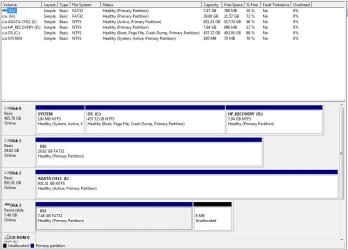
Hi, I have a pc running windows 7 pro 64 bit. I am wondering why everytime I turn it on with my portable drive plugged in, it would attempt to boost from that drive and give me an error. I have checked the boost order and did not see anything strange in the setting. This is a picture that I took (ADATA CH11 is the portable drive in question- there are other thumb drives plugged in too but they do not cause any problems).

5md2cngk3
http://postimg.org/image/5md2cngk3/

can someone take a look at this for me? Many thanks!

PS: inside that portable drive I copied the C drive of my old vista computer and put it in a folder- I do not think it causes the issue but just in case...
 

Attachments

  • 0214161702.jpg
    0214161702.jpg
    107 KB · Views: 1
Last edited by a moderator:

My Computer

OS
windows 7 64 bit

My Computer

Computer type
PC/Desktop
Computer Manufacturer/Model Number
Home made Desktop
OS
Windows 10 Pro. 64/ version 1709 Windows 7 Pro/64
CPU
Intel i7-6800K @ 4.3
Motherboard
ASUS X-99 Deluxe II
Memory
Corsair Platinum 16 gig @2400
Graphics Card(s)
EVGA GTX 1070 OC
Monitor(s) Displays
Asus 27" LED LCD/VE278Q
Screen Resolution
1920-1080 or 1280-720 HDMI
Hard Drives
INTEL SSD 730-240 Gb Sata 3.0/
PSU
EVGA Platium 1200W
Case
Phanteks Luxe Tempered Glass 8 fans/ one radiator
Cooling
XSPC/ Water Cooled CPU
Keyboard
Das 4 Professional
Mouse
Logitech M705/MX Anywhere 2-S
Internet Speed
100 mbits
Antivirus
Microsoft Security Essentials/ Malwarebytes Premium 3.0/ SAS
Browser
I.E. 11 default/Firefox/ ISP Time Warner Cable/Spectrum
Other Info
LG BluRay Burner/
Sound system-KLipsch-THX/
Icy Dock ssd Hot Swap bays.
thank you for your reply. here is the screenshot.

as far as the boot order, should I move legacy to be the first (though I still don't get how the system chooses the portable drive first)?
 

Attachments

  • disk management.jpg
    disk management.jpg
    84.5 KB · Views: 2

My Computer

OS
windows 7 64 bit
Right now you are booting from the Sandisk Cruzer.
 

My Computer

Computer Manufacturer/Model Number
HP, Dell, Gateway, Toshiba - 4 laptops and 2 desktops
OS
Vista, Windows7, Mint Mate, Zorin, Windows 8
CPU
from 1.6GHz Duo to i7
Monitor(s) Displays
2x HP w2207
Hard Drives
5x HDD, 7x SSD, 12x Externals
Keyboard
with trackball - no mices
Mouse
Trackball mice
Internet Speed
DSL 6000
What is CH-11 (I)?
What data is on CH-11 (I)?

The reason I ask is because it is flagged Active.
 

My Computer

Computer type
PC/Desktop
Computer Manufacturer/Model Number
Home made Desktop
OS
Windows 10 Pro. 64/ version 1709 Windows 7 Pro/64
CPU
Intel i7-6800K @ 4.3
Motherboard
ASUS X-99 Deluxe II
Memory
Corsair Platinum 16 gig @2400
Graphics Card(s)
EVGA GTX 1070 OC
Monitor(s) Displays
Asus 27" LED LCD/VE278Q
Screen Resolution
1920-1080 or 1280-720 HDMI
Hard Drives
INTEL SSD 730-240 Gb Sata 3.0/
PSU
EVGA Platium 1200W
Case
Phanteks Luxe Tempered Glass 8 fans/ one radiator
Cooling
XSPC/ Water Cooled CPU
Keyboard
Das 4 Professional
Mouse
Logitech M705/MX Anywhere 2-S
Internet Speed
100 mbits
Antivirus
Microsoft Security Essentials/ Malwarebytes Premium 3.0/ SAS
Browser
I.E. 11 default/Firefox/ ISP Time Warner Cable/Spectrum
Other Info
LG BluRay Burner/
Sound system-KLipsch-THX/
Icy Dock ssd Hot Swap bays.
Right now you are booting from the Sandisk Cruzer.

really? that is my thumb drive. But it boosts fine even with the thumb drive plugged in

What is CH-11 (I)?
What data is on CH-11 (I)?

The reason I ask is because it is flagged Active.

That's the portable drive that my pc is trying to boost from. I saved some acronis backup file in there. I also saved the c folder of my old windows vista pc in case i need anything from it. But I basically just copied those things into the portable drive. They are in their own folders and not hanging outside all over the root directory. I didn't do any special formatting to the portable drive either. It is just storage
 

My Computer

OS
windows 7 64 bit
Remove the Active flag from the "I" partition.
 

My Computer

Computer type
PC/Desktop
Computer Manufacturer/Model Number
Home made Desktop
OS
Windows 10 Pro. 64/ version 1709 Windows 7 Pro/64
CPU
Intel i7-6800K @ 4.3
Motherboard
ASUS X-99 Deluxe II
Memory
Corsair Platinum 16 gig @2400
Graphics Card(s)
EVGA GTX 1070 OC
Monitor(s) Displays
Asus 27" LED LCD/VE278Q
Screen Resolution
1920-1080 or 1280-720 HDMI
Hard Drives
INTEL SSD 730-240 Gb Sata 3.0/
PSU
EVGA Platium 1200W
Case
Phanteks Luxe Tempered Glass 8 fans/ one radiator
Cooling
XSPC/ Water Cooled CPU
Keyboard
Das 4 Professional
Mouse
Logitech M705/MX Anywhere 2-S
Internet Speed
100 mbits
Antivirus
Microsoft Security Essentials/ Malwarebytes Premium 3.0/ SAS
Browser
I.E. 11 default/Firefox/ ISP Time Warner Cable/Spectrum
Other Info
LG BluRay Burner/
Sound system-KLipsch-THX/
Icy Dock ssd Hot Swap bays.
thank you so much! that seems to solve the issue. this is how I do as as copy and paste from google How To: Mark Partition As Inactive Open up a command prompt and type DISKPART. Type LIST DISK. Type SELECT DISK n (where n is the number of the old Win98 drive) Type LIST PARTITION. Type SELECT PARTITION n (where n is the number of the active partition you wish to make inactive) Type INACTIVE. Type EXIT to exit DISKPART. Layback Bear, You have been very helpful. . I want to swap out my hard drive for ssd so I will probably make another post inquiring about clean installing windows 7. In the mean time thanks and repped!
 

My Computer

OS
windows 7 64 bit
Your very welcome. That is why we are here; to help and learn.
 

My Computer

Computer type
PC/Desktop
Computer Manufacturer/Model Number
Home made Desktop
OS
Windows 10 Pro. 64/ version 1709 Windows 7 Pro/64
CPU
Intel i7-6800K @ 4.3
Motherboard
ASUS X-99 Deluxe II
Memory
Corsair Platinum 16 gig @2400
Graphics Card(s)
EVGA GTX 1070 OC
Monitor(s) Displays
Asus 27" LED LCD/VE278Q
Screen Resolution
1920-1080 or 1280-720 HDMI
Hard Drives
INTEL SSD 730-240 Gb Sata 3.0/
PSU
EVGA Platium 1200W
Case
Phanteks Luxe Tempered Glass 8 fans/ one radiator
Cooling
XSPC/ Water Cooled CPU
Keyboard
Das 4 Professional
Mouse
Logitech M705/MX Anywhere 2-S
Internet Speed
100 mbits
Antivirus
Microsoft Security Essentials/ Malwarebytes Premium 3.0/ SAS
Browser
I.E. 11 default/Firefox/ ISP Time Warner Cable/Spectrum
Other Info
LG BluRay Burner/
Sound system-KLipsch-THX/
Icy Dock ssd Hot Swap bays.
Back
Top