

- Local time
- 9:41 AM
- Messages
- 111
OK. I had a different hypothesis here and about an hour later found I was incorrect. So I removed the whole post to give the correct answer.
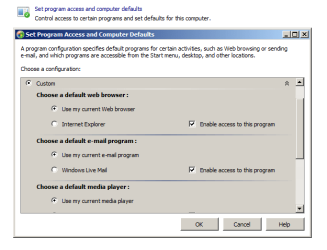
Setting Windows Live Mail to the "default email client" needs to be done through the Custom Settings. Been several days without my Reminders and I rely on them Big Time!
So if you're having the same problem in Windows 7, view this image and click all the items under Custom. Hopefully that will do the trick.
Setting Windows Live Mail to the "default email client" needs to be done through the Custom Settings. Been several days without my Reminders and I rely on them Big Time!
So if you're having the same problem in Windows 7, view this image and click all the items under Custom. Hopefully that will do the trick.
Attachments
Last edited:
My Computer
- Computer Manufacturer/Model Number
- My own Custom Build: Asus, Corsair, Transcend, AMD, PNY, Ultra
- OS
- W7 64 Bit
- CPU
- AMD Phenom x4 4000Mhz
- Memory
- 8 GB DDR-2
- Graphics Card(s)
- PNY-NVIDIA GeForce GTX 460 1GB GDDR5 PCI-e
- Monitor(s) Displays
- Dual: Flatron L1942T
- Hard Drives
- C: Drive (Agility 2 Solid State Drive 60 GB)
D: Drive (HDD Internal Western Digital 640 GB)
- PSU
- 650 Watt
- Cooling
- Corsair Hydro H6 Liquid Cooler
- Internet Speed
- 25 mbps down - 3 mbps up

