Windows Live Contacts

Cranberry

New member
Local time
12:19 PM
Messages
6
I can't find Windows Contacts when I click START>ALL PROGRAMS. Nor does an icon appear for Address Book in the lower left corner when I open Windows Live Mail, as I understand it should. The only way I can find to add a new contact is to press CTRL>SHIFT>C. There is nowhere in the menu bar showing Contacts or Address Book that I can click on either. All very frustrating. I have deleted Live Messaging from Windows Essentials. Might this be part of the problem??? Grateful for advice.
 

My Computer

Computer Manufacturer/Model Number
HP
OS
Windows 7 Home Premium X64
CPU
Intel Core i5 650 @ 3.2GHz 64 Bit
Memory
4 GB
Monitor(s) Displays
HP 2310
Hard Drives
1 TB
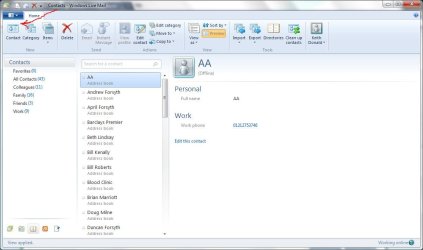
Contacts are a part of Windows Live Mail. See attachment.
Capture.jpg
 

My Computer

Computer type
Laptop
Computer Manufacturer/Model Number
Hewlett-Packard/G62-107SA Notebook
OS
Microsoft Windows 7 Home Premium 64-bit Service Pack 1
CPU
Intel(R) Core(TM) i3 CPU M 330 @ 2.13GHz
Motherboard
Hewlett-Packard 1425
Memory
8 GB DDR3
Graphics Card(s)
Intel(R) HD Graphics
Sound Card
Realtek High Definition Audio
Monitor(s) Displays
Builtin
Screen Resolution
1366 x 768 x 32 bits (4294967296 colors) @ 60 Hz
Hard Drives
250 GB SATA Hard Disk Drive 7200 rpm
2TB Seagate GoFlex USB 2 Drive
1TB Iomega Prestige USB 2 Drive
1.5TB Iomega Prestige USB 2 Drive (Samsung)
2TB WD MyBook Live NAS.
Mouse
Logitech Anywhere MX
Internet Speed
152 Mbs download 10 Mbs upload
Antivirus
Norton 360
Browser
Chrome
Yes I know that. But clicking on it only brings up the list of my contacts. There is nowhere I can find anything that enables me to add a new contact. And HELP files elsewhere state that Windows contacts should be shown as an entry when I open All Programs, but it's not. There is another screen-shot I have seen in HELP websites that shows addresses as a separate entry with an icon at the bottom left of the WLM page. I remain very confused I'm afraid.
 

My Computer

Computer Manufacturer/Model Number
HP
OS
Windows 7 Home Premium X64
CPU
Intel Core i5 650 @ 3.2GHz 64 Bit
Memory
4 GB
Monitor(s) Displays
HP 2310
Hard Drives
1 TB
I should have noticed that this was your first post. Welcome to Seven Forums.

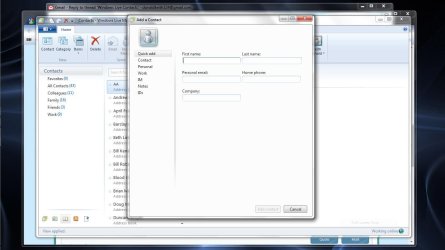
Press the contacts button to bring up your list of contacts. At the left of the ribbon is a button labelled Contact. If you press that you will open a dialog to add a contact.

Capture2.JPGCapture3.JPG

I Am not aware of any way that you can open this directly from the start menu. Perhaps you are thinking of Windows Contacts which is entirely separate and is not a part of Windows Live. I have never used that for this reason but if you have contacts in there there is an import button which will allow you to import them into Windows Live.

Hope this is of some help.
 

My Computer

Computer type
Laptop
Computer Manufacturer/Model Number
Hewlett-Packard/G62-107SA Notebook
OS
Microsoft Windows 7 Home Premium 64-bit Service Pack 1
CPU
Intel(R) Core(TM) i3 CPU M 330 @ 2.13GHz
Motherboard
Hewlett-Packard 1425
Memory
8 GB DDR3
Graphics Card(s)
Intel(R) HD Graphics
Sound Card
Realtek High Definition Audio
Monitor(s) Displays
Builtin
Screen Resolution
1366 x 768 x 32 bits (4294967296 colors) @ 60 Hz
Hard Drives
250 GB SATA Hard Disk Drive 7200 rpm
2TB Seagate GoFlex USB 2 Drive
1TB Iomega Prestige USB 2 Drive
1.5TB Iomega Prestige USB 2 Drive (Samsung)
2TB WD MyBook Live NAS.
Mouse
Logitech Anywhere MX
Internet Speed
152 Mbs download 10 Mbs upload
Antivirus
Norton 360
Browser
Chrome
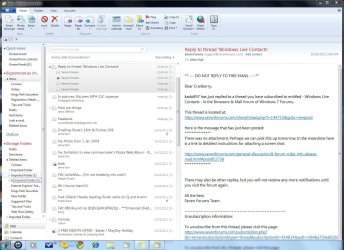
Thanks, KADO. The ribbon at the top of my WLM doesn't look the same as yours. I have taken a screenshot in Paint of my WLM screen, but I don't know how to paste it into a reply so you can see what I'm dealing with. I've selected the screen shot in Paint, pressed CTRL+C but CTRL+V won't paste it.

If I click on the HOME tab in WLM, the ribbon which opens below it show icons which reading from the left are "Email Message" "Photo "Email' "Items" then "Junk" "Delete" followed by a "RESPOND" box. Something seems not quite right.
 

My Computer

Computer Manufacturer/Model Number
HP
OS
Windows 7 Home Premium X64
CPU
Intel Core i5 650 @ 3.2GHz 64 Bit
Memory
4 GB
Monitor(s) Displays
HP 2310
Hard Drives
1 TB
If you press the Post Reply button to get the full facilities. On the top row is a button with a paper-clip on it. You can use that to upload images. Once you have uploaded the image close the dialog. To inset the image into the reply press the paperclip again and select the image from the drop down. You need to save your image as a jpg or png file before uploading I don't think a bmp file is allowed.
 

My Computer

Computer type
Laptop
Computer Manufacturer/Model Number
Hewlett-Packard/G62-107SA Notebook
OS
Microsoft Windows 7 Home Premium 64-bit Service Pack 1
CPU
Intel(R) Core(TM) i3 CPU M 330 @ 2.13GHz
Motherboard
Hewlett-Packard 1425
Memory
8 GB DDR3
Graphics Card(s)
Intel(R) HD Graphics
Sound Card
Realtek High Definition Audio
Monitor(s) Displays
Builtin
Screen Resolution
1366 x 768 x 32 bits (4294967296 colors) @ 60 Hz
Hard Drives
250 GB SATA Hard Disk Drive 7200 rpm
2TB Seagate GoFlex USB 2 Drive
1TB Iomega Prestige USB 2 Drive
1.5TB Iomega Prestige USB 2 Drive (Samsung)
2TB WD MyBook Live NAS.
Mouse
Logitech Anywhere MX
Internet Speed
152 Mbs download 10 Mbs upload
Antivirus
Norton 360
Browser
Chrome
Thanks again. I've done that. It is a .png file, by the way, so you should have it by now.

As it's after midnight here in Western Australia, I think I'll have to resume dealing with it tomorrow. Many thanks for your patience.

Hope the weather is warming up for you in Hertfordshire.
 

My Computer

Computer Manufacturer/Model Number
HP
OS
Windows 7 Home Premium X64
CPU
Intel Core i5 650 @ 3.2GHz 64 Bit
Memory
4 GB
Monitor(s) Displays
HP 2310
Hard Drives
1 TB

My Computer

Computer type
Laptop
Computer Manufacturer/Model Number
Hewlett-Packard/G62-107SA Notebook
OS
Microsoft Windows 7 Home Premium 64-bit Service Pack 1
CPU
Intel(R) Core(TM) i3 CPU M 330 @ 2.13GHz
Motherboard
Hewlett-Packard 1425
Memory
8 GB DDR3
Graphics Card(s)
Intel(R) HD Graphics
Sound Card
Realtek High Definition Audio
Monitor(s) Displays
Builtin
Screen Resolution
1366 x 768 x 32 bits (4294967296 colors) @ 60 Hz
Hard Drives
250 GB SATA Hard Disk Drive 7200 rpm
2TB Seagate GoFlex USB 2 Drive
1TB Iomega Prestige USB 2 Drive
1.5TB Iomega Prestige USB 2 Drive (Samsung)
2TB WD MyBook Live NAS.
Mouse
Logitech Anywhere MX
Internet Speed
152 Mbs download 10 Mbs upload
Antivirus
Norton 360
Browser
Chrome
Hello again. Well I've attached something! Hope it's the right thing!! I can try again if it's not. I think it's ok.

Capture.JPG
 

Attachments

  • Capture.JPG
    Capture.JPG
    178.7 KB · Views: 17

My Computer

Computer Manufacturer/Model Number
HP
OS
Windows 7 Home Premium X64
CPU
Intel Core i5 650 @ 3.2GHz 64 Bit
Memory
4 GB
Monitor(s) Displays
HP 2310
Hard Drives
1 TB
Hi Cranbery,

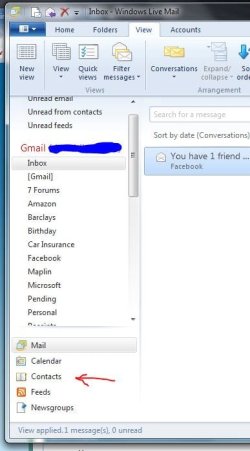
There is a small button near the bottom of the left hand pane labelled Contacts. Press that and you get into the contacts list screen, which was the first attachment in my post.
 

My Computer

Computer type
Laptop
Computer Manufacturer/Model Number
Hewlett-Packard/G62-107SA Notebook
OS
Microsoft Windows 7 Home Premium 64-bit Service Pack 1
CPU
Intel(R) Core(TM) i3 CPU M 330 @ 2.13GHz
Motherboard
Hewlett-Packard 1425
Memory
8 GB DDR3
Graphics Card(s)
Intel(R) HD Graphics
Sound Card
Realtek High Definition Audio
Monitor(s) Displays
Builtin
Screen Resolution
1366 x 768 x 32 bits (4294967296 colors) @ 60 Hz
Hard Drives
250 GB SATA Hard Disk Drive 7200 rpm
2TB Seagate GoFlex USB 2 Drive
1TB Iomega Prestige USB 2 Drive
1.5TB Iomega Prestige USB 2 Drive (Samsung)
2TB WD MyBook Live NAS.
Mouse
Logitech Anywhere MX
Internet Speed
152 Mbs download 10 Mbs upload
Antivirus
Norton 360
Browser
Chrome
Thanks Kado. Got it now :D. Don't know how I didn't see it before. Duh! I failed to notice the icon in the blue message bar. And now I know how to add a screen shot as well. Many thanks again.

Cranberry
 

My Computer

Computer Manufacturer/Model Number
HP
OS
Windows 7 Home Premium X64
CPU
Intel Core i5 650 @ 3.2GHz 64 Bit
Memory
4 GB
Monitor(s) Displays
HP 2310
Hard Drives
1 TB
You are welcome Cranberry.
 

My Computer

Computer type
Laptop
Computer Manufacturer/Model Number
Hewlett-Packard/G62-107SA Notebook
OS
Microsoft Windows 7 Home Premium 64-bit Service Pack 1
CPU
Intel(R) Core(TM) i3 CPU M 330 @ 2.13GHz
Motherboard
Hewlett-Packard 1425
Memory
8 GB DDR3
Graphics Card(s)
Intel(R) HD Graphics
Sound Card
Realtek High Definition Audio
Monitor(s) Displays
Builtin
Screen Resolution
1366 x 768 x 32 bits (4294967296 colors) @ 60 Hz
Hard Drives
250 GB SATA Hard Disk Drive 7200 rpm
2TB Seagate GoFlex USB 2 Drive
1TB Iomega Prestige USB 2 Drive
1.5TB Iomega Prestige USB 2 Drive (Samsung)
2TB WD MyBook Live NAS.
Mouse
Logitech Anywhere MX
Internet Speed
152 Mbs download 10 Mbs upload
Antivirus
Norton 360
Browser
Chrome
Back
Top