Windows Live Mail 2011 Privacy Issue

Windows7UserAsk

New member
Local time
2:26 PM
Messages
16
Hi does anyone know if Windows Live Mail 2011 stores all our emails in a Microsoft Server? Like is it web-based or is it just purely a desktop email client like Thunderbird?

I'm hearing all sorts of things about it like all our emails are being stored somewhere in a MS server as well as in our computer.

For example, if I use a gmail account with WLM 2011, when it loads all my emails from the gmail account into WLM 2011, does it also store a copy of those emails in an MS Server somewhere in the world, or is that mail only stored on my computer like thunderbird or outlook?

This is a serious issue as WLM 2011 looks good but I'm reluctant to use it if all my messages from my other emails (say yahoo, gmail, sympatico etc....) gets store in an MS server - this is a serious privacy issue, I'm hearing all sorts of things.

Here's a site that talks about WLM has gone "cloud-based":
Windows Live Mail versus Windows Mail « How-To Geek Forums

especially when it says:

"Windows Live Mail has taken your program 'into the cloud'. That means it is a webbased application.So the emails you've send, your concepts and your received mail are stored on a Microsoft server."

Also this skydrive issue, I hear WLM 2011 come bundled with skydrive and there's nothing you can do, that means all the photos you send gets stored in a skydrive server of MS. Does the emails also get stored in a server of MS.

This is really scary if that's the case. Perhaps you guys know the answer.
 

My Computer My Computer

At a glance

XP
OS
XP
Hi does anyone know if Windows Live Mail 2011 stores all our emails in a Microsoft Server? Like is it web-based or is it just purely a desktop email client like Thunderbird?

I'm hearing all sorts of things about it like all our emails are being stored somewhere in a MS server as well as in our computer.

For example, if I use a gmail account with WLM 2011, when it loads all my emails from the gmail account into WLM 2011, does it also store a copy of those emails in an MS Server somewhere in the world, or is that mail only stored on my computer like thunderbird or outlook?

I think the short answer is NO! But there is a caveat. If you do not link your WLM 2011 (the desktop client) to Windows Live Mail (Hotmail) there MS does not and cannot upload your emails to the cloud (on their servers). Thus, for example, if you use Gmail and use WLM 2011 (the email client) to access it, then Windows does not store it on their servers (depending on how you set up Gmail and WLM 2011), Google does.

Essentially, WLM 2011 stores your mails on your machine.

Does this help?
 

My Computer My Computer

At a glance

Win 7 Professional 64bit
OS
Win 7 Professional 64bit
So if I don't use a hotmail account in WLM 2011 (which means I have not signed up for a skydrive account) I can use gmail without storing my mails in MS servers so long as I do set it up in a certain way, but how do I set it up that way? Is there a specific way to set up a gmail/other accounts (other than hotmail) in WLM 2011 so that it only stores in my computer and not an MS server? How do you do that?
 

My Computer My Computer

At a glance

XP
OS
XP
So if I don't use a hotmail account in WLM 2011 (which means I have not signed up for a skydrive account) I can use gmail without storing my mails in MS servers so long as I do set it up in a certain way, but how do I set it up that way? Is there a specific way to set up a gmail/other accounts (other than hotmail) in WLM 2011 so that it only stores in my computer and not an MS server? How do you do that?

I don't think there is any "special" way to set up WLM 2011 with Gmail. It seems to work out the setting pretty much by itself. So, yes, if you don't link it to Live Mail, then your data will not be uploaded to any MS server.

I should also mention that even if you had a Windows Live Hotmail account in addition to your Gmail account, you can have both accessed by WLM 2011 but neither will access each other (unless you set them up to do so through their repsective web interfaces).

Does this help?

Cheers!

Edit: There are somethings you should be aware of. In WLM 2011, there is something called "Photo Album". It shows up in the Ribbon when you create a new email. Apparently, that has a connection to the web-based photo feature of Windows Live and is somehow linked/ synced by Live Mesh to Windows Skydrive. Personally, I don't use it. I always use the "attach file" method to send photos (which is very rare in my case).
 

My Computer My Computer

At a glance

Win 7 Professional 64bit
OS
Win 7 Professional 64bit
Here's a site that talks about WLM has gone "cloud-based":
Windows Live Mail versus Windows Mail « How-To Geek Forums

especially when it says:

"Windows Live Mail has taken your program 'into the cloud'. That means it is a webbased application.So the emails you've send, your concepts and your received mail are stored on a Microsoft server."

I just re-read the link you provided and I think the Windows Live Mail that they are referring to is the Hotmail stuff and not the client. This is seriously becoming a problem because WLM can mean (1) Windows Live Mail (Hotmail); (2) Windows Live Mail desktop client; (3) Windows Live Messenger.

I really wish MS would put some thought into how they designated their products.
 

My Computer My Computer

At a glance

Win 7 Professional 64bit
OS
Win 7 Professional 64bit
Yes thank you so much it does help a lot, just have one question i'm uncleared about, what do you mean by

"if you don't link it to live mail"

how can I be sure that I have not linked my mails to 'live mail'?
 

My Computer My Computer

At a glance

XP
OS
XP
So if I don't use a hotmail account in WLM 2011 (which means I have not signed up for a skydrive account) I can use gmail without storing my mails in MS servers so long as I do set it up in a certain way, but how do I set it up that way? Is there a specific way to set up a gmail/other accounts (other than hotmail) in WLM 2011 so that it only stores in my computer and not an MS server? How do you do that?
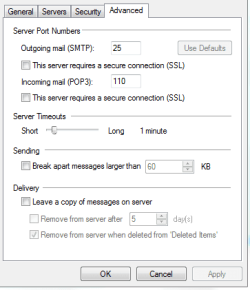
In WLM the easist way is to have your incoming mail as pop3. Then go to email accounts click on default account then click properties then click on the advanced tab in the window that opens and you should have this

Capture.PNG

Check or uncheck leave mail on server hope this helps.
 

My Computer My Computer

At a glance

Win7 Pro-64 Biti7-2600-3.4GHz8 GIG DDR3onboard
Computer Manufacturer/Model Number
Put together
OS
Win7 Pro-64 Bit
CPU
i7-2600-3.4GHz
Motherboard
ASRock Z68M
Memory
8 GIG DDR3
Graphics Card(s)
onboard
Sound Card
onboard
Hard Drives
Seagate 1TB 7200RPM
PSU
680 W
Case
black
Cooling
stock fans
Keyboard
Microsoft
Mouse
Microsoft optical
Yes thank you so much it does help a lot, just have one question i'm uncleared about, what do you mean by

"if you don't link it to live mail"

how can I be sure that I have not linked my mails to 'live mail'?

In WLM (the desktop client) you will see something called "sign in". It is the last button to the right under the Home tab. Simply don't sign in.
 

My Computer My Computer

At a glance

Win 7 Professional 64bit
OS
Win 7 Professional 64bit
Funny enough I don't have that option that says
uncheck leave mail on server hope:

i uploaded a picture
 

Attachments

  • GIG.png
    GIG.png
    12.5 KB · Views: 3

My Computer My Computer

At a glance

XP
OS
XP
I don't have that option either...I am using WLM 2011 (email client).
 

My Computer My Computer

At a glance

Win 7 Professional 64bit
OS
Win 7 Professional 64bit
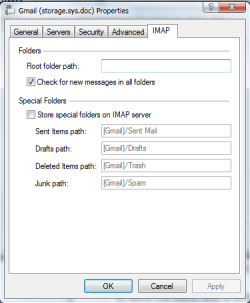
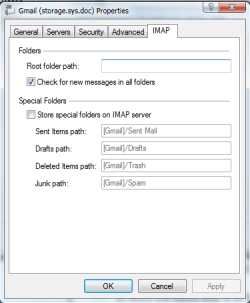
Any idea what "store special folders on imap folders" mean?
 

Attachments

  • GIG2.png
    GIG2.png
    11.9 KB · Views: 0

My Computer My Computer

At a glance

XP
OS
XP
moz-screenshot-3.png
Any idea what "store special folders on IMAP server" means?
 

Attachments

  • GIG2.png
    GIG2.png
    11.9 KB · Views: 0

My Computer My Computer

At a glance

XP
OS
XP
Funny enough I don't have that option that says
uncheck leave mail on server hope:

i uploaded a picture
Have you set up WLM as pop3 for incoming mail? What I posted was for a pop3 account
 

My Computer My Computer

At a glance

Win7 Pro-64 Biti7-2600-3.4GHz8 GIG DDR3onboard
Computer Manufacturer/Model Number
Put together
OS
Win7 Pro-64 Bit
CPU
i7-2600-3.4GHz
Motherboard
ASRock Z68M
Memory
8 GIG DDR3
Graphics Card(s)
onboard
Sound Card
onboard
Hard Drives
Seagate 1TB 7200RPM
PSU
680 W
Case
black
Cooling
stock fans
Keyboard
Microsoft
Mouse
Microsoft optical
How would you go about doing that, I just used the add email button, put in my email and password and then pressed next and it automatically stacked all the mails in my gmail account.
 

My Computer My Computer

At a glance

XP
OS
XP
what is the difference between pop3 and IMAP? Usually with thunderbird I use IMAP since I heard it was dynamic in the sense that it also updated my gmail account when I went online at gmail.com to access my emails.
 

My Computer My Computer

At a glance

XP
OS
XP
Funny enough I don't have that option that says
uncheck leave mail on server hope:

i uploaded a picture
Have you set up WLM as pop3 for incoming mail? What I posted was for a pop3 account

Ah...no...I went with the default IMAP config that WLM 2011 uses for Gmail. Downloading and synching all the mails was of course time-consumingly painful, but now whenever I work offline in WLM, I can read and work with my mails. I thought that would be a better option for me. Seems to be working out well. Sorry, I should have clarified this earlier. Thanks.

So, to the OP...there is one other consideration you have to keep in mind. If you use the POP3 option, you can pull off all your mails from the server (be it that of Gmail or that of Windows Live etc.). In the IMAP option, this is apparently also possible (unless I have misread the material on this), but the default action in IMAP is to download a copy of your mails from the server to your computer to allow for local and offline reading and working, but it also maintains the same mails on the server and both are synched when you get online. Under these conditions, yes, a copy of your mails will reside on the mail servers of Gmail or Windows Live etc.

If you want to use your email client and do not want to keep mails on the server, then I would think that the POP3 option would be best.
 

My Computer My Computer

At a glance

Win 7 Professional 64bit
OS
Win 7 Professional 64bit
Go to email accounts and click on add and follow prompts
 

My Computer My Computer

At a glance

Win7 Pro-64 Biti7-2600-3.4GHz8 GIG DDR3onboard
Computer Manufacturer/Model Number
Put together
OS
Win7 Pro-64 Bit
CPU
i7-2600-3.4GHz
Motherboard
ASRock Z68M
Memory
8 GIG DDR3
Graphics Card(s)
onboard
Sound Card
onboard
Hard Drives
Seagate 1TB 7200RPM
PSU
680 W
Case
black
Cooling
stock fans
Keyboard
Microsoft
Mouse
Microsoft optical
I don't mind if for my gmail account, the emails remain on the gmail server, but what I am worried about is if my emails in my gmail account, when I'm working win WLM 2011, that it might also get stored on an MS server.
 

My Computer My Computer

At a glance

XP
OS
XP
I don't mind if for my gmail account, the emails remain on the gmail server, but what I am worried about is if my emails in my gmail account, when I'm working win WLM 2011, that it might also get stored on an MS server.
I'm sorry I really don't understand what your trying to tell me
 

My Computer My Computer

At a glance

Win7 Pro-64 Biti7-2600-3.4GHz8 GIG DDR3onboard
Computer Manufacturer/Model Number
Put together
OS
Win7 Pro-64 Bit
CPU
i7-2600-3.4GHz
Motherboard
ASRock Z68M
Memory
8 GIG DDR3
Graphics Card(s)
onboard
Sound Card
onboard
Hard Drives
Seagate 1TB 7200RPM
PSU
680 W
Case
black
Cooling
stock fans
Keyboard
Microsoft
Mouse
Microsoft optical
I don't mind if for my gmail account, the emails remain on the gmail server, but what I am worried about is if my emails in my gmail account, when I'm working win WLM 2011, that it might also get stored on an MS server.

I am pretty sure that won't happen. You see, to do that you will have to link your Gmail and Hotmail accounts, which can be done through their respective web-interfaces. If you don't set up the relationship, that connection cant happen.

As I have understood it, in WLM (the desktop client) there is a Sign-In assistant which sets up your desktop client to receive/ send from Hotmail. Other Live services are also linked to your WLM client. But this is an opt in feature and does not happen by default (at least in my most recent experience). And, anyways, I don't think you can link those accounts from inside the WLM client unless you back up your emails from your Gmail account to your Live Mail (Hotmail) account.

I just hope I have not made matters worse for you!:(
 

My Computer My Computer

At a glance

Win 7 Professional 64bit
OS
Win 7 Professional 64bit
Back
Top