Hi guys. I hope I can make this clear to understand and not too confusing.
I've recently run Killdisk, reinstalled Windows 7 Pro x64 on my laptop, got it to where I wanted, including all MS updates and email, and have done an Acronis backup.
Before the format, I manually saved the email folder with all it's account and email content. Then reinstalled WLM on the fresh W7 install, went to 'Users/Me/AppData/Local/Microsoft/Windows Live Mail', deleted what was in there, and then pasted my saved email folder contents. Loaded WLM and hey presto, everything there, with all my emails. No problem with that.
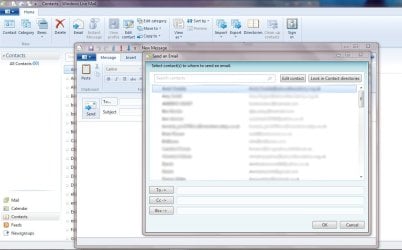
The next thing is putting my mail contacts back (also manually saved before the format) but I can't get them to show up. They normally reside as DBStore files in Windows Live Contacts folder, also in the same area as the email. 'Users/Me/AppData/Local/Microsoft/Windows Live Contacts'. So I put that folder there but nothing appears in my contacts when I load up WLM.
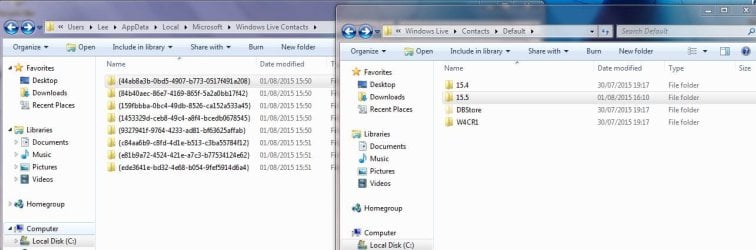
I removed the whole folder, and decided to do a test and add a new contact in WLM. I found out the new contact has appeared in a different place, 'Users/Me/AppData/Local/Microsoft/Windows Live/Contacts/Default' and then inside there, a folder saying 15.5, and inside that, a DBStore file. As another test, by removing the DBStore from 15.5, my contact disappeared in WLM but reappeared when I restored the DBStore file to the 15.5 folder.
By adding a new contact, I had expected windows to create a new Windows Live Contacts folder but it didn't. I tried putting all my saved contacts folder in the 15.5 folder, but they still don't appear. Any ideas where to put my contacts folders to get them showing up?
By the way, there were 8 folders that I saved, each with a DBStore file. One of them is 8MB, some are 6MB, and most are 4MB. I don't know if I need them all. Perhaps they're cumulative and only the 8MB has all my contacts?
Screenshot shows the two contact locations I mentioned.
I've recently run Killdisk, reinstalled Windows 7 Pro x64 on my laptop, got it to where I wanted, including all MS updates and email, and have done an Acronis backup.
Before the format, I manually saved the email folder with all it's account and email content. Then reinstalled WLM on the fresh W7 install, went to 'Users/Me/AppData/Local/Microsoft/Windows Live Mail', deleted what was in there, and then pasted my saved email folder contents. Loaded WLM and hey presto, everything there, with all my emails. No problem with that.
The next thing is putting my mail contacts back (also manually saved before the format) but I can't get them to show up. They normally reside as DBStore files in Windows Live Contacts folder, also in the same area as the email. 'Users/Me/AppData/Local/Microsoft/Windows Live Contacts'. So I put that folder there but nothing appears in my contacts when I load up WLM.
I removed the whole folder, and decided to do a test and add a new contact in WLM. I found out the new contact has appeared in a different place, 'Users/Me/AppData/Local/Microsoft/Windows Live/Contacts/Default' and then inside there, a folder saying 15.5, and inside that, a DBStore file. As another test, by removing the DBStore from 15.5, my contact disappeared in WLM but reappeared when I restored the DBStore file to the 15.5 folder.
By adding a new contact, I had expected windows to create a new Windows Live Contacts folder but it didn't. I tried putting all my saved contacts folder in the 15.5 folder, but they still don't appear. Any ideas where to put my contacts folders to get them showing up?
By the way, there were 8 folders that I saved, each with a DBStore file. One of them is 8MB, some are 6MB, and most are 4MB. I don't know if I need them all. Perhaps they're cumulative and only the 8MB has all my contacts?
Screenshot shows the two contact locations I mentioned.
Attachments
My Computer
- Computer type
- PC/Desktop
- OS
- Windows 7 HP x64 SP1
- CPU
- Phenom II x2 550BE @3.1Ghz
- Motherboard
- GA-MA770-UD3 rev 2.0
- Memory
- Patriot Viper 2x2GB DDR2 6400
- Graphics Card(s)
- Sapphire HD5850 Extreme 1GB
- Sound Card
- Onboard Realtek
- Monitor(s) Displays
- Samsung 23" S23A700D * 120Hz * 3D * 2ms response
- Screen Resolution
- 1920x1080
- Hard Drives
- SSD Samsung 830 128GB/Seagate 2TB (2 x single platter)/ WD 1TB Cav Black/ WD RE3 1TB /WD 320GB IDE/IBM 120GB IDE
- PSU
- XFX Pro 650w Core Edition
- Case
- Coolermaster CM690 Dominator
- Cooling
- TRUE Rev.C + Arctic Cooling MX-2 + various 12cm fans
- Keyboard
- Razer Lycosa
- Mouse
- Logitech MX518
- Internet Speed
- Fibre Optic 100MB Down * 6MB Up