Windows Live Mail Options settings not holding

Tink

New member
Member
Local time
4:28 PM
Messages
40
Location
So. California
Hi all,

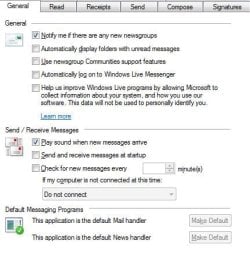
I have a new PC with Win7 x64 Home Premium, and am having a problem with the the option settings in Windows Live Mail, such as no auto download of emails, no notification of new emails, etc. that are not holding after being unchecked. The notifications are still coming and each time I open WLM the emails are automatically downloaded without me clicking the Send/receive button. I have a reason why I don't want my emails immediately downloaded when I open WLM and don't know why the settings are not holding from one time to the next.

Has anyone had a similar problem or perhaps know what I might also check to see why these settings are not holding?

Any suggestions or information would truly be appreciated.
 
Last edited:

My Computer My Computer

Computer Manufacturer/Model Number
Home built
OS
Windows 7 Ultimate 32 bit, Windows Vista Ultimate SP2 32 bit
CPU
3.00 gigahertz AMD Phenom II X4 945
Motherboard
Gigabyte: GA-790XTA-UDA4 9 GB
Memory
4 GB RAM
Graphics Card(s)
ATI Radeon Sapphire Radeon ATI
What type of accounts are having this problem (IMAP, POP3, or HTTP)?
 

My Computer My Computer

Computer type
PC/Desktop
Computer Manufacturer/Model Number
OQO 2+
OS
Windows 8 Pro w/MC 32-bit
CPU
Intel Atom 1.86 GHz
Motherboard
OQO 2+
Memory
2 GB
Graphics Card(s)
Intel GMA 500
Sound Card
IDT
Monitor(s) Displays
LCD
Screen Resolution
800 x 480 (portable) 1280 x 1024 (docked)
Hard Drives
64 GB SSD
PSU
9 Ah Battery (portable) or OQO Brick (docked)
Case
Shirt Pocket Sized
Cooling
Tiny Fan
Keyboard
Slide out (portable) DiNovo Edge (docked)
Mouse
Eraser head (portable) Logitech Bluetooth (docked)
Internet Speed
WWAN or 802.11G (portable) T1 (docked)
Browser
IE 10
Other Info
DVD-RW OQO Docking Station
Hi roncerr,

The problem happens with the POP account, I only have the one account at this time.

Thank you for your time and help.
 

My Computer My Computer

Computer Manufacturer/Model Number
Home built
OS
Windows 7 Ultimate 32 bit, Windows Vista Ultimate SP2 32 bit
CPU
3.00 gigahertz AMD Phenom II X4 945
Motherboard
Gigabyte: GA-790XTA-UDA4 9 GB
Memory
4 GB RAM
Graphics Card(s)
ATI Radeon Sapphire Radeon ATI
These are the options I have set in WLM 2009 (the version I'm using). I believe it works OK but I usually don't leave it open for a long time. It's possible that if you do, it may use some default download frequency other than never. If that happens you can try to change the "Check for new messages" box to "checked" and fill in the time as 480 minutes (the maximum it will allow).
 

Attachments

  • WLM Read.JPG
    WLM Read.JPG
    26.7 KB · Views: 3
  • WLM General.JPG
    WLM General.JPG
    37.7 KB · Views: 3

My Computer My Computer

Computer type
PC/Desktop
Computer Manufacturer/Model Number
OQO 2+
OS
Windows 8 Pro w/MC 32-bit
CPU
Intel Atom 1.86 GHz
Motherboard
OQO 2+
Memory
2 GB
Graphics Card(s)
Intel GMA 500
Sound Card
IDT
Monitor(s) Displays
LCD
Screen Resolution
800 x 480 (portable) 1280 x 1024 (docked)
Hard Drives
64 GB SSD
PSU
9 Ah Battery (portable) or OQO Brick (docked)
Case
Shirt Pocket Sized
Cooling
Tiny Fan
Keyboard
Slide out (portable) DiNovo Edge (docked)
Mouse
Eraser head (portable) Logitech Bluetooth (docked)
Internet Speed
WWAN or 802.11G (portable) T1 (docked)
Browser
IE 10
Other Info
DVD-RW OQO Docking Station
Hi roncerr, thank you for the attachments. I have a similar setting, although, I don't use sound, and rarely use ngs anymore since MS shut down their NNTP newsgroups. I have tool tip unchecked, and checked auto download for Preview Pane. I also have auto display folders with unread msgs. I don't have it auto check for mail as I prefer to download when I am ready. WLM is open most of the and closed over night. But, this is the first time I have had any problems with the WLM in this regard.

However, I have never used the Home Premium and have now done an Anytime Upgrade to the Win7 Ultimate. So will see if there is any change.

Thank you again for your time and help. I keep a check on it and see if there is any change and post back.
 

My Computer My Computer

Computer Manufacturer/Model Number
Home built
OS
Windows 7 Ultimate 32 bit, Windows Vista Ultimate SP2 32 bit
CPU
3.00 gigahertz AMD Phenom II X4 945
Motherboard
Gigabyte: GA-790XTA-UDA4 9 GB
Memory
4 GB RAM
Graphics Card(s)
ATI Radeon Sapphire Radeon ATI
Back
Top