Windows Live Mail & Windows Live Hotmail Plus

enigma1944

New member
Member
VIP
Local time
7:59 AM
Messages
220
Location
Pittsburgh Pa USA Dresden German
I use at times both the WLM & W Live Hotmail Plus.

If I use the Hotmail I can not place a foto in the body of a message however I can send
one as a attchment.

If I use the WLM I can add a text sig, a foto sig, or both if I use the layout format and
stored pics.

What puzzles me is if wish to set-up a permanent sig I can create the text but when I
attempt to add a foto and select the source the system opens but when I select pics
the file is empty.

My sequence to try to set up a sig is as follows:

Select NEW message, then I go to the tools, options, and signature

Thanks for any info
 

My Computer My Computer

Computer Manufacturer/Model Number
HP dv7-1247cl
OS
Windows 7 Home Premium x64
CPU
AMD TURION X2 DUAL CORE RM-72 ( 2 -CPU's ) 201 GHZ
Memory
3836 MB
Graphics Card(s)
ATI RADEON HD 3200
Sound Card
IDT HIGH DEFINITION AUDIO CODEC
Other Info
Pittsburgh, Pa
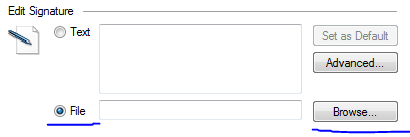
Under Signature, are you then clicking the File radio button, and then Browse, as shown below?

wlmsig.PNG

And then in the folder browser, what does the top part say in the lower-right corner of that window (mine is pictured):

wlmsig2.PNG
 

My Computer My Computer

Computer Manufacturer/Model Number
Alienware X51
OS
Windows 7 Home Premium x64
CPU
Intel Core i7-2600 @3.40GHz
Memory
8.00GB DDR3
Graphics Card(s)
NVIDIA GeForce GTX 555 w/1.0GB RAM
Monitor(s) Displays
BenQ XL2420TX
Screen Resolution
1920x1080@120Hz
Hard Drives
1TB
PSU
330-watt
Keyboard
Logitech Wireless Illuminated Keyboard K800
Mouse
Razer Orochi
Internet Speed
Campus Internet

My Computer My Computer

Computer Manufacturer/Model Number
HP dv7-1247cl
OS
Windows 7 Home Premium x64
CPU
AMD TURION X2 DUAL CORE RM-72 ( 2 -CPU's ) 201 GHZ
Memory
3836 MB
Graphics Card(s)
ATI RADEON HD 3200
Sound Card
IDT HIGH DEFINITION AUDIO CODEC
Other Info
Pittsburgh, Pa
Under Signature, are you then clicking the File radio button, and then Browse, as shown below?

View attachment 82410

And then in the folder browser, what does the top part say in the lower-right corner of that window (mine is pictured):

View attachment 82411

Mine says the same as your example

Then that is the reason why it's not working. That dialog doesn't allow you to add a picture file to your signature. That dialog is for the use of custom signatures saved in .txt or .html format.
 

My Computer My Computer

Computer Manufacturer/Model Number
Alienware X51
OS
Windows 7 Home Premium x64
CPU
Intel Core i7-2600 @3.40GHz
Memory
8.00GB DDR3
Graphics Card(s)
NVIDIA GeForce GTX 555 w/1.0GB RAM
Monitor(s) Displays
BenQ XL2420TX
Screen Resolution
1920x1080@120Hz
Hard Drives
1TB
PSU
330-watt
Keyboard
Logitech Wireless Illuminated Keyboard K800
Mouse
Razer Orochi
Internet Speed
Campus Internet
Under Signature, are you then clicking the File radio button, and then Browse, as shown below?

View attachment 82410

And then in the folder browser, what does the top part say in the lower-right corner of that window (mine is pictured):

View attachment 82411

Mine says the same as your example

Then that is the reason why it's not working. That dialog doesn't allow you to add a picture file to your signature. That dialog is for the use of custom signatures saved in .txt or .html format.

OK So my next question is can pics be placed in HTML format. I did this a long time ago and I think I had to place them in a url.
 

My Computer My Computer

Computer Manufacturer/Model Number
HP dv7-1247cl
OS
Windows 7 Home Premium x64
CPU
AMD TURION X2 DUAL CORE RM-72 ( 2 -CPU's ) 201 GHZ
Memory
3836 MB
Graphics Card(s)
ATI RADEON HD 3200
Sound Card
IDT HIGH DEFINITION AUDIO CODEC
Other Info
Pittsburgh, Pa
Mine says the same as your example

Then that is the reason why it's not working. That dialog doesn't allow you to add a picture file to your signature. That dialog is for the use of custom signatures saved in .txt or .html format.

OK So my next question is can pics be placed in HTML format. I did this a long time ago and I think I had to place them in a url.

Yes, that's how it works. You use a format like this:

Code:
<img src="http://your-picture-URL.com" />
 

My Computer My Computer

Computer Manufacturer/Model Number
Alienware X51
OS
Windows 7 Home Premium x64
CPU
Intel Core i7-2600 @3.40GHz
Memory
8.00GB DDR3
Graphics Card(s)
NVIDIA GeForce GTX 555 w/1.0GB RAM
Monitor(s) Displays
BenQ XL2420TX
Screen Resolution
1920x1080@120Hz
Hard Drives
1TB
PSU
330-watt
Keyboard
Logitech Wireless Illuminated Keyboard K800
Mouse
Razer Orochi
Internet Speed
Campus Internet
Then that is the reason why it's not working. That dialog doesn't allow you to add a picture file to your signature. That dialog is for the use of custom signatures saved in .txt or .html format.

OK So my next question is can pics be placed in HTML format. I did this a long time ago and I think I had to place them in a url.

Yes, that's how it works. You use a format like this:

Code:
<img src="http://your-picture-URL.com" />

OK I saw someplace recently that would create for pics but I don't remember where
it was. Are you familiar with it or anything similar
 

My Computer My Computer

Computer Manufacturer/Model Number
HP dv7-1247cl
OS
Windows 7 Home Premium x64
CPU
AMD TURION X2 DUAL CORE RM-72 ( 2 -CPU's ) 201 GHZ
Memory
3836 MB
Graphics Card(s)
ATI RADEON HD 3200
Sound Card
IDT HIGH DEFINITION AUDIO CODEC
Other Info
Pittsburgh, Pa
OK So my next question is can pics be placed in HTML format. I did this a long time ago and I think I had to place them in a url.

Yes, that's how it works. You use a format like this:

Code:
<img src="http://your-picture-URL.com" />

OK I saw someplace recently that would create for pics but I don't remember where
it was. Are you familiar with it or anything similar

I'm pretty sure most image hosting sites like Flickr, Photobucket, etc, give you this ability.
 

My Computer My Computer

Computer Manufacturer/Model Number
Alienware X51
OS
Windows 7 Home Premium x64
CPU
Intel Core i7-2600 @3.40GHz
Memory
8.00GB DDR3
Graphics Card(s)
NVIDIA GeForce GTX 555 w/1.0GB RAM
Monitor(s) Displays
BenQ XL2420TX
Screen Resolution
1920x1080@120Hz
Hard Drives
1TB
PSU
330-watt
Keyboard
Logitech Wireless Illuminated Keyboard K800
Mouse
Razer Orochi
Internet Speed
Campus Internet
Yes, that's how it works. You use a format like this:

Code:
<img src="http://your-picture-URL.com" />

OK I saw someplace recently that would create for pics but I don't remember where
it was. Are you familiar with it or anything similar

I'm pretty sure most image hosting sites like Flickr, Photobucket, etc, give you this ability.

OK Thanks for all your answers

I can take it from here
 

My Computer My Computer

Computer Manufacturer/Model Number
HP dv7-1247cl
OS
Windows 7 Home Premium x64
CPU
AMD TURION X2 DUAL CORE RM-72 ( 2 -CPU's ) 201 GHZ
Memory
3836 MB
Graphics Card(s)
ATI RADEON HD 3200
Sound Card
IDT HIGH DEFINITION AUDIO CODEC
Other Info
Pittsburgh, Pa
You're very welcome! ;)
 

My Computer My Computer

Computer Manufacturer/Model Number
Alienware X51
OS
Windows 7 Home Premium x64
CPU
Intel Core i7-2600 @3.40GHz
Memory
8.00GB DDR3
Graphics Card(s)
NVIDIA GeForce GTX 555 w/1.0GB RAM
Monitor(s) Displays
BenQ XL2420TX
Screen Resolution
1920x1080@120Hz
Hard Drives
1TB
PSU
330-watt
Keyboard
Logitech Wireless Illuminated Keyboard K800
Mouse
Razer Orochi
Internet Speed
Campus Internet
Back
Top