Windows Live Messenger doesn't work

DaChinPin

New member
Local time
3:36 AM
Messages
6
I've tried every trick I know to make it work. I've tried updating the router firmware, tried a few fixes that I found here on the forums that work for other people, and even tried updating the Live Messenger...No go...

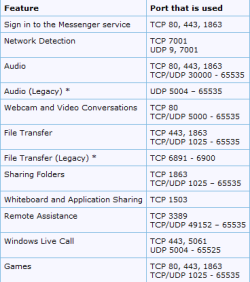
The problem is that my messenger gets online, but as soon as it does, it disconnects the entire network...I don't know if it's conflicting with the router...But if it is, can anyone tell me what ports I should open up for it to work?

Oh and I haven't tried to connect the PC directly into the router because my ISP is a pain in the neck to connect to different MAC adresses since you have to call them and register each time you switch.

Well anyways, can anyone give me a solution, maybe you've had a similar problem after you installed Windows 7?
 

My Computer

OS
Windows XP

My Computer

Computer type
PC/Desktop
Computer Manufacturer/Model Number
Dell XPS 420
OS
Windows 10, Home Clean Install
CPU
Intel Core2 processsor Q8200(2.33Ghz 1333FSB) Quad Core Tech
Motherboard
Dell
Memory
6 gb
Graphics Card(s)
ATI Radeon 256MB HD3650
Sound Card
Intergrated 7.1 Channel Audio
Monitor(s) Displays
Dell SP2009W 20"
Hard Drives
640 GB Serial ATA Hard drive
Cooling
Fan
Keyboard
Dell USB Keyboard
Mouse
Dell Premium Optical USB
Internet Speed
DSL 2.85
I think it's easier for you to guide me through where that device manager is because my Windows is in Portuguese since it's Brazil's version...But I'm sure that's not the problem since they're all the same, just different languages...Anyways you think you could tell me where it's located?
 

My Computer

OS
Windows XP
What happens if you disable your routers firewall?
 

My Computer

Computer Manufacturer/Model Number
Custom built machine
OS
W7 x64
CPU
Intel Q9300 2.5Ghz Quad LGA775 (Would like Q9650)
Motherboard
Gigabyte GA-EP45T-UD3R (F6 Bios)
Memory
4Gb OCZ Gold 1,333Mhz
Graphics Card(s)
Palit HD4850 O/C Sonic 512Mb DDR3, Dual DViD's
Sound Card
Azalia to twin Samson 50w Studio Monitors
Monitor(s) Displays
Twin Dell (E-IPS) U2311H 23.6" Screens
Screen Resolution
1920 x 1080 @ 60Hz
Hard Drives
Crucial M4 SSD, archives on twin Western Digital Caviar Black WD2002FAEX, 2TB, 7200rpm HDD's, Samsung Ritemaster CD/DVD Burner...
PSU
OCZ 600w
Case
Lian-Li PC8 acoustifoamed' aluminium tower
Cooling
Scythe 140mm Zipang
Keyboard
Cherry PS/2 custom model
Mouse
Lenovo USB laser "Thinkpad" Mouse
Internet Speed
ADSL2+ @14Mbps downstream & Cat6 Gigabit Ethernet
Antivirus
NOD32
Browser
Opera
Other Info
Silicon Dust HD Homerun Dual FTA (Ethernet) TV Tuners, Dray Tek Vigor 2850Vn router and 8x HP Gigabit Switch. Lian-Li CR26 Card Reader, Canon MF4430 iSensys laser printer/scanner.
I think it's easier for you to guide me through where that device manager is because my Windows is in Portuguese since it's Brazil's version...But I'm sure that's not the problem since they're all the same, just different languages...Anyways you think you could tell me where it's located?

Hope that I can. Go to control panel and you will see device manager. That is the only access that I know. You may want to go to a website that translates and put the term in and then search for that. Sorry that I can not be more help.
 

My Computer

Computer type
PC/Desktop
Computer Manufacturer/Model Number
Dell XPS 420
OS
Windows 10, Home Clean Install
CPU
Intel Core2 processsor Q8200(2.33Ghz 1333FSB) Quad Core Tech
Motherboard
Dell
Memory
6 gb
Graphics Card(s)
ATI Radeon 256MB HD3650
Sound Card
Intergrated 7.1 Channel Audio
Monitor(s) Displays
Dell SP2009W 20"
Hard Drives
640 GB Serial ATA Hard drive
Cooling
Fan
Keyboard
Dell USB Keyboard
Mouse
Dell Premium Optical USB
Internet Speed
DSL 2.85
Well...I'd rather not disable my router's firewall...But I'll try it to see if it's the culprit. Oh and I found the manager but it didn't show any updates except a few optional ones.
 

My Computer

OS
Windows XP

My Computer

Computer type
PC/Desktop
Computer Manufacturer/Model Number
Dell XPS 420
OS
Windows 10, Home Clean Install
CPU
Intel Core2 processsor Q8200(2.33Ghz 1333FSB) Quad Core Tech
Motherboard
Dell
Memory
6 gb
Graphics Card(s)
ATI Radeon 256MB HD3650
Sound Card
Intergrated 7.1 Channel Audio
Monitor(s) Displays
Dell SP2009W 20"
Hard Drives
640 GB Serial ATA Hard drive
Cooling
Fan
Keyboard
Dell USB Keyboard
Mouse
Dell Premium Optical USB
Internet Speed
DSL 2.85
I put the PC on DMZ, unfortunatelly it didn't work. I'm just hoping someone had the exact same problem I have.
 

My Computer

OS
Windows XP
Hi Welcome to SF,

DMZ is dangerous but is better to forward the Port numbers that would work in your case. Both Router as well as Windows Firewall in case you have any third party firewall add to that as well There is a beautifull Microsoft KB which describes about this

http://support.microsoft.com/kb/927847

Live Messenger.PNG

Hope this helps
 

My Computer

Computer Manufacturer/Model Number
Samsung NP550P5C-S02IN
OS
Windows 7 Ultimate - 64-bit | Windows 8 Pro - 64-bit
CPU
Intel® Core™ i7 Processor 3,610QM (2.30Hz, 6MB L3 Cach
Memory
8 GB
Graphics Card(s)
NVIDIA® GeForce® GT 650M 2GB Graphics, Optimus™ techno
Sound Card
SoundAlive™ JBL 3 Speakers (With sub-Woofer)
Monitor(s) Displays
39.62cm (15.6) SuperBright 300nit HD+ LED Display
Screen Resolution
1,600 x 900, Anti-Reflective
Hard Drives
1TB S-ATA II Hard Drive (5,400RPM)
Tried unblocking the ports. Needless to say, it didn'r work. I'm just wondering what has gone wrong. Maybe I should reinstall Windows 7.
 

My Computer

OS
Windows XP
Did you telnet these Port to make sure they all are open ??
 

My Computer

Computer Manufacturer/Model Number
Samsung NP550P5C-S02IN
OS
Windows 7 Ultimate - 64-bit | Windows 8 Pro - 64-bit
CPU
Intel® Core™ i7 Processor 3,610QM (2.30Hz, 6MB L3 Cach
Memory
8 GB
Graphics Card(s)
NVIDIA® GeForce® GT 650M 2GB Graphics, Optimus™ techno
Sound Card
SoundAlive™ JBL 3 Speakers (With sub-Woofer)
Monitor(s) Displays
39.62cm (15.6) SuperBright 300nit HD+ LED Display
Screen Resolution
1,600 x 900, Anti-Reflective
Hard Drives
1TB S-ATA II Hard Drive (5,400RPM)
There is a lot you can do before you reinstall. Try this In an administrator account
type cmd in search Once you have the cmd type sfc /scannow. Lets see what it says.
But dont reinstall until told to do so. Many steps left.
 

My Computer

Computer type
PC/Desktop
Computer Manufacturer/Model Number
Dell XPS 420
OS
Windows 10, Home Clean Install
CPU
Intel Core2 processsor Q8200(2.33Ghz 1333FSB) Quad Core Tech
Motherboard
Dell
Memory
6 gb
Graphics Card(s)
ATI Radeon 256MB HD3650
Sound Card
Intergrated 7.1 Channel Audio
Monitor(s) Displays
Dell SP2009W 20"
Hard Drives
640 GB Serial ATA Hard drive
Cooling
Fan
Keyboard
Dell USB Keyboard
Mouse
Dell Premium Optical USB
Internet Speed
DSL 2.85
I tried that too. Says there is nothing wrong with the system. What else could it be?
 

My Computer

OS
Windows XP
Back
Top