Windows Logo Screen Saver - Restore

How to Restore "Windows Logo Screen Saver" Back in Windows 7 and Windows 8

   Information
This tutorial will show you how to restore the Windows Logo screen saver back into Windows 7 and Windows 8.

You must be logged in as an administrator to be able to do the steps in this tutorial.


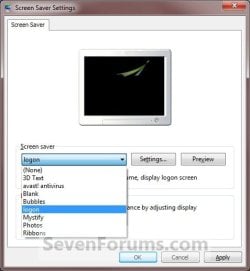
EXAMPLE: Windows Logo screen saver

Windows_Logo_example.jpg

EXAMPLE: Screen Saver Settings
NOTE: If restored, the Windows Logo screen saver will be added back to the Screen Saver Settings screen to be available to select as Logon.
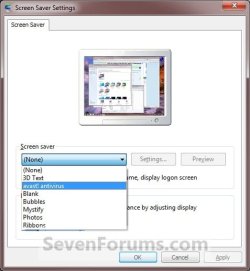
Settings.jpgWindows_Logo.jpg


Here's How:
1. Click/tap on the Download button below to download the file below.
Windows_Logo_Screensaver.zip

Download


2. Save the .zip file to the desktop.

3. Open the .zip file and extract (drag and drop) the logon.scr file to your desktop.

4. Right click or press and hold on the logon.scr file, and click/tap on Properties, General tab, and the Unblock button. (see screenshot below)
NOTE: If the unblock button is not there, then the logon.scr file is already set to be unblocked. Continue on to step 5.
Unblock.jpg
5. In Windows Explorer, navigate to C:\Windows\System32 and copy the logon.scr file here. (see screenshot below)
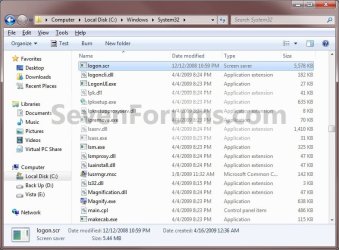
Windows_Logo_Explorer.jpg
6. Click/tap on Continue and Yes to approve copying the logon.scr file.

7. The Windows Logo (Logon) screen saver is now available to change your screen saver to. (see screenshot below)
Windows_Logo.jpg
8. When done, you can delete the downloaded logon.scr and .zip files on the desktop if you like.
That's it,
Shawn


Attachments

Last edited:
useless! i click the link it says i dun hav privileged to access the page! @$&%(^@$#!!!!
 

My Computer

OS
Windows 7 Ultimate X64
CPU
Intel Core i7
Motherboard
Gigabyte
Memory
8GB
Graphics Card(s)
2GB ATI Radeon
Monitor(s) Displays
Dell

My Computer

Computer type
PC/Desktop
Computer Manufacturer/Model Number
Self built custom
OS
64-bit Windows 11 Pro for Workstations
CPU
Intel i7-8700K OC'd to 5 GHz
Motherboard
ASUS ROG Maximus XI Formula Z390
Memory
64 GB (4x16GB) G.SKILL TridentZ RGB DDR4 3600 MHz
Graphics Card(s)
ASUS ROG-STRIX-GTX1080TI-O11G-GAMING
Sound Card
Integrated
Monitor(s) Displays
2 x Samsung Odyssey G7 27"
Screen Resolution
2560x1440
Hard Drives
1TB Samsung 990 PRO M.2,
4TB Samsung 990 PRO PRO M.2,
TerraMaster F8 SSD Plus NAS
PSU
Seasonic Prime Titanium 850W
Case
Thermaltake Core P3
Cooling
Corsair Hydro H115i
Keyboard
Logitech wireless K800
Mouse
Logitech MX Master 4
Internet Speed
2 Gb/s Download and 100 Mb/s Upload
Antivirus
Malwarebyte Anti-Malware Premium
Browser
Google Chrome
Other Info
Logitech Z625 speaker system,
Logitech BRIO 4K Pro webcam,
HP Color LaserJet Pro MFP M477fdn,
APC SMART-UPS RT 1000 XL - SURT1000XLI,
Galaxy S23 Plus phone
Just tried to restore this screensaver on W7 x64 SP1.
I'm just getting a blank screen :s

I have setup the permissions of the file exactly like they are set for the default .scr files, including setting the owner to 'NT SERVICE\TrustedInstaller'.

Is it because of the SP1 that they are not compatible anymore?
 

My Computer

OS
Microsoft Windows 7 (x64)
CPU
Intel Pentium 4 3.6Ghz (Prescott)
Motherboard
Gigabyte GA-8I955X Pro
Memory
2x1GB OCZ
Graphics Card(s)
Nvidia 7950GT
Sound Card
Realtek ALC882
Screen Resolution
1280*1024
Hard Drives
ST3250824AS
ST3500630NS
ST380815AS
PSU
Chieftec 500W
Case
Chieftec CX-04B-B-A
Cooling
Zalman 7700-CU
Keyboard
Logitech UltraX Cordless
Mouse
Logitech 1000MX
Hello Saiko, and welcome to Seven Forums.

Nope, it still works for me just fine. It starts off as a blank black screen at first, shows the Windows 7 logo a few seconds afterwards, then it starts showing what you see in the example screenshot in the tutorial.

Did you unblock the screen saver in step 4 before moving it to the system32 folder?

Does the screen saver play for you when you double click on it on your desktop?
 

My Computer

Computer type
PC/Desktop
Computer Manufacturer/Model Number
Self built custom
OS
64-bit Windows 11 Pro for Workstations
CPU
Intel i7-8700K OC'd to 5 GHz
Motherboard
ASUS ROG Maximus XI Formula Z390
Memory
64 GB (4x16GB) G.SKILL TridentZ RGB DDR4 3600 MHz
Graphics Card(s)
ASUS ROG-STRIX-GTX1080TI-O11G-GAMING
Sound Card
Integrated
Monitor(s) Displays
2 x Samsung Odyssey G7 27"
Screen Resolution
2560x1440
Hard Drives
1TB Samsung 990 PRO M.2,
4TB Samsung 990 PRO PRO M.2,
TerraMaster F8 SSD Plus NAS
PSU
Seasonic Prime Titanium 850W
Case
Thermaltake Core P3
Cooling
Corsair Hydro H115i
Keyboard
Logitech wireless K800
Mouse
Logitech MX Master 4
Internet Speed
2 Gb/s Download and 100 Mb/s Upload
Antivirus
Malwarebyte Anti-Malware Premium
Browser
Google Chrome
Other Info
Logitech Z625 speaker system,
Logitech BRIO 4K Pro webcam,
HP Color LaserJet Pro MFP M477fdn,
APC SMART-UPS RT 1000 XL - SURT1000XLI,
Galaxy S23 Plus phone
Is there a similar option for Windows 10 systems?

Brink,

I was wondering if there is an update similar to this but for Windows 10 systems? I really liked using your logon.scr under Windows 7 systems, but it appears that Microsoft does not have this option under Windows 10.

Is there a similar logon.scr for Windows 10 systems?

Thanks.
 

My Computer

Computer type
PC/Desktop
Computer Manufacturer/Model Number
Dell
OS
Windows 7 Pro x64
CPU
Intel Core i7
Memory
8GB
Graphics Card(s)
ATI Radeon
Monitor(s) Displays
Dell & Acer
Hard Drives
7200RPM 2TB drives - 2
Mouse
Good old IntelliMouse from Microsoft!
Browser
Firefox esr

My Computer

Computer type
PC/Desktop
Computer Manufacturer/Model Number
Self built custom
OS
64-bit Windows 11 Pro for Workstations
CPU
Intel i7-8700K OC'd to 5 GHz
Motherboard
ASUS ROG Maximus XI Formula Z390
Memory
64 GB (4x16GB) G.SKILL TridentZ RGB DDR4 3600 MHz
Graphics Card(s)
ASUS ROG-STRIX-GTX1080TI-O11G-GAMING
Sound Card
Integrated
Monitor(s) Displays
2 x Samsung Odyssey G7 27"
Screen Resolution
2560x1440
Hard Drives
1TB Samsung 990 PRO M.2,
4TB Samsung 990 PRO PRO M.2,
TerraMaster F8 SSD Plus NAS
PSU
Seasonic Prime Titanium 850W
Case
Thermaltake Core P3
Cooling
Corsair Hydro H115i
Keyboard
Logitech wireless K800
Mouse
Logitech MX Master 4
Internet Speed
2 Gb/s Download and 100 Mb/s Upload
Antivirus
Malwarebyte Anti-Malware Premium
Browser
Google Chrome
Other Info
Logitech Z625 speaker system,
Logitech BRIO 4K Pro webcam,
HP Color LaserJet Pro MFP M477fdn,
APC SMART-UPS RT 1000 XL - SURT1000XLI,
Galaxy S23 Plus phone
Updated Win 10 Logo for logon.scr?

Hello Brink,

Thanks for the reply! :D I was wondering if anyone created an updated logon.scr that contains the Windows 10 logo as the screensaver similar to this version that you had for Windows 7? Sorry, I should have been more clearer in my initial post.

Thanks!
 

My Computer

Computer type
PC/Desktop
Computer Manufacturer/Model Number
Dell
OS
Windows 7 Pro x64
CPU
Intel Core i7
Memory
8GB
Graphics Card(s)
ATI Radeon
Monitor(s) Displays
Dell & Acer
Hard Drives
7200RPM 2TB drives - 2
Mouse
Good old IntelliMouse from Microsoft!
Browser
Firefox esr
Not that I'm aware of.
 

My Computer

Computer type
PC/Desktop
Computer Manufacturer/Model Number
Self built custom
OS
64-bit Windows 11 Pro for Workstations
CPU
Intel i7-8700K OC'd to 5 GHz
Motherboard
ASUS ROG Maximus XI Formula Z390
Memory
64 GB (4x16GB) G.SKILL TridentZ RGB DDR4 3600 MHz
Graphics Card(s)
ASUS ROG-STRIX-GTX1080TI-O11G-GAMING
Sound Card
Integrated
Monitor(s) Displays
2 x Samsung Odyssey G7 27"
Screen Resolution
2560x1440
Hard Drives
1TB Samsung 990 PRO M.2,
4TB Samsung 990 PRO PRO M.2,
TerraMaster F8 SSD Plus NAS
PSU
Seasonic Prime Titanium 850W
Case
Thermaltake Core P3
Cooling
Corsair Hydro H115i
Keyboard
Logitech wireless K800
Mouse
Logitech MX Master 4
Internet Speed
2 Gb/s Download and 100 Mb/s Upload
Antivirus
Malwarebyte Anti-Malware Premium
Browser
Google Chrome
Other Info
Logitech Z625 speaker system,
Logitech BRIO 4K Pro webcam,
HP Color LaserJet Pro MFP M477fdn,
APC SMART-UPS RT 1000 XL - SURT1000XLI,
Galaxy S23 Plus phone
screensaver

Hi Brink,

I figured, but thought I would ask. Thanks again. Side-note, can you recommend a good screensaver creator so I can create something similar to the screensaver you provided for Windows 7 version? (I found one called Any Logo Screensaver creator but it is no longer sold)
 

My Computer

Computer type
PC/Desktop
Computer Manufacturer/Model Number
Dell
OS
Windows 7 Pro x64
CPU
Intel Core i7
Memory
8GB
Graphics Card(s)
ATI Radeon
Monitor(s) Displays
Dell & Acer
Hard Drives
7200RPM 2TB drives - 2
Mouse
Good old IntelliMouse from Microsoft!
Browser
Firefox esr

My Computer

Computer type
PC/Desktop
Computer Manufacturer/Model Number
Self built custom
OS
64-bit Windows 11 Pro for Workstations
CPU
Intel i7-8700K OC'd to 5 GHz
Motherboard
ASUS ROG Maximus XI Formula Z390
Memory
64 GB (4x16GB) G.SKILL TridentZ RGB DDR4 3600 MHz
Graphics Card(s)
ASUS ROG-STRIX-GTX1080TI-O11G-GAMING
Sound Card
Integrated
Monitor(s) Displays
2 x Samsung Odyssey G7 27"
Screen Resolution
2560x1440
Hard Drives
1TB Samsung 990 PRO M.2,
4TB Samsung 990 PRO PRO M.2,
TerraMaster F8 SSD Plus NAS
PSU
Seasonic Prime Titanium 850W
Case
Thermaltake Core P3
Cooling
Corsair Hydro H115i
Keyboard
Logitech wireless K800
Mouse
Logitech MX Master 4
Internet Speed
2 Gb/s Download and 100 Mb/s Upload
Antivirus
Malwarebyte Anti-Malware Premium
Browser
Google Chrome
Other Info
Logitech Z625 speaker system,
Logitech BRIO 4K Pro webcam,
HP Color LaserJet Pro MFP M477fdn,
APC SMART-UPS RT 1000 XL - SURT1000XLI,
Galaxy S23 Plus phone
Thanks

Thanks again Brink. You have been most helpful! :D
 

My Computer

Computer type
PC/Desktop
Computer Manufacturer/Model Number
Dell
OS
Windows 7 Pro x64
CPU
Intel Core i7
Memory
8GB
Graphics Card(s)
ATI Radeon
Monitor(s) Displays
Dell & Acer
Hard Drives
7200RPM 2TB drives - 2
Mouse
Good old IntelliMouse from Microsoft!
Browser
Firefox esr
You're most welcome. :)
 

My Computer

Computer type
PC/Desktop
Computer Manufacturer/Model Number
Self built custom
OS
64-bit Windows 11 Pro for Workstations
CPU
Intel i7-8700K OC'd to 5 GHz
Motherboard
ASUS ROG Maximus XI Formula Z390
Memory
64 GB (4x16GB) G.SKILL TridentZ RGB DDR4 3600 MHz
Graphics Card(s)
ASUS ROG-STRIX-GTX1080TI-O11G-GAMING
Sound Card
Integrated
Monitor(s) Displays
2 x Samsung Odyssey G7 27"
Screen Resolution
2560x1440
Hard Drives
1TB Samsung 990 PRO M.2,
4TB Samsung 990 PRO PRO M.2,
TerraMaster F8 SSD Plus NAS
PSU
Seasonic Prime Titanium 850W
Case
Thermaltake Core P3
Cooling
Corsair Hydro H115i
Keyboard
Logitech wireless K800
Mouse
Logitech MX Master 4
Internet Speed
2 Gb/s Download and 100 Mb/s Upload
Antivirus
Malwarebyte Anti-Malware Premium
Browser
Google Chrome
Other Info
Logitech Z625 speaker system,
Logitech BRIO 4K Pro webcam,
HP Color LaserJet Pro MFP M477fdn,
APC SMART-UPS RT 1000 XL - SURT1000XLI,
Galaxy S23 Plus phone
Back
Top