Windows logon ui...

had to restart.View attachment AdwCleaner[S0].txt
funny, it fix a totally different problem with my finger print scanner and chrome. A bit faster start up but I'm still sure something isn't right.
 

My Computer

OS
Windows 7 Ultimate x64
okay, sorry for the VERY Late reply, please download RougeKiller from my signature below, save it to your Desktop and post the report back here :)
 

My Computer

Computer type
PC/Desktop
OS
.
never mind, nothing new... detected.
 

My Computer

OS
Windows 7 Ultimate x64
please perform a clean boot, click the link in my signature for the tutorial
 

My Computer

Computer type
PC/Desktop
OS
.
clean boot doesn't help
 

My Computer

OS
Windows 7 Ultimate x64
have you followed all the directions? when did you try?
 

My Computer

Computer type
PC/Desktop
OS
.
Pardon? do you mean that's the first thing you tried?
 

My Computer

Computer type
PC/Desktop
OS
.
please, post a screenshot of your installed programs and your msconfig startup tab as asked for in post #8
 

My Computer

Computer type
PC/Desktop
OS
.
oh I didn't reply??? we'll I ran with diagnostic mode and normal mode, I usually disable everything but Microsoft and Intel and what I need. you have the installed programs from that txt earlier. also I did a system restore but no luck...
 

My Computer

OS
Windows 7 Ultimate x64
How far back did you go, make sure you dont have to do the steps over again, you said earlier that you thought there was still something, can explain why you think that? is your computer just slower than usual? Please explain your current problem further, or tell me if we may need to go over the steps again.
 

My Computer

Computer type
PC/Desktop
OS
.
Went back 4 months ago, when my pc was clean.
Yes, slower than it should be, internet light turns white before windows 7 logo disappears. Black loading screen for 1 minute, than sometimes waiting forever for "Welcome" to welcome me.

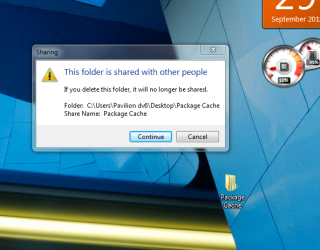
I have a confession... when there was a virus, in attempt to remove it I deleted some stuff from the program data folder. It worked a bit by corrupting the virus letting me remove it. how ever I also caused some damage by removing package cache. I had a backup of it but now it's just sitting on my desktop and reading off that instead of the actual folder. I know this because:
kk.PNG
 
Last edited:

My Computer

OS
Windows 7 Ultimate x64
that message does not mean it is being used by another process, it means that the computer is set to share the file with other accounts, or through a network you may have set up (IE: Homegroup), I recommend putting it back in program data.
 

My Computer

Computer type
PC/Desktop
OS
.
I did, that's just a copy. I'm running combo fix just in case and Windows 7 System Recovery Environment only shows the background. Not sure how to fix that.
 

My Computer

OS
Windows 7 Ultimate x64
do not use combofix! I am not trained to use it and neither are you, or else you probably would not be here. That tool can very easily turn your computer into a door stopper!
 

My Computer

Computer type
PC/Desktop
OS
.
please open command prompt as an administrator by pressing your start button and typing cmd, right click on cmd and click run as administrator. Then type in the following:
SFC /scannow
then press enter.
 

My Computer

Computer type
PC/Desktop
OS
.
I have already ran combo fix, it did nothing but rest the warnings on my programs. I have already ran sfc like 7 times. The only thing it ever fixes is the explorer drop box edit.
 

My Computer

OS
Windows 7 Ultimate x64
okay, well this is my suggestion:
Follow EVERY STEP while performing a clean boot; even with the services;
run MBAM, post the log
run MBAR, post the log
run TDSSKiller; delete anything it finds
run VIPRERescueScanner.
please provide any changes that occur.
 

My Computer

Computer type
PC/Desktop
OS
.
Back
Top