Windows Mail

How to Reinstate Windows Mail in Windows 7

   Warning
Microsoft no longer supports Windows Mail, aka WinMail. It's recommended you use another well known supported email client. This Tutorial is for Advanced users who importantly have the Technical Ability to make the changes, have backups of everything including your OS, and to be your own tech support for WinMail going forward. If you decide to complete this tutorial you accept the fact that you are using WinMail as-is. It might be necessary to uninstall other email clients to resolve any WinMail conflicts in some environments. Understand it's likely that new OS updates from Microsoft will break WinMail's operation, and to fix make it necessary to rerun the tutorial again to reinstate it. With those things in mind, this tutorial was written so that you can rerun it without affecting WinMail user data.
Please see this Errata (Bug List) post before you install, to be aware of the current information about known issues using WinMail within Windows 7, these issues are programmatic and in most cases cannot be resolved by this tutorial, and will never be fixed.

Having said all of that disclaimer, if you have the technical ability, and can put up with the annoying minor byproduct bugs, then like so many of us still enjoy using WinMail on Windows 7 ...ymmv!


   Tip
As of January, 2025, the instructions given here supersede all other instructions given in forthcoming older posts. Realize some of the posts that follow are over 16 years old, and many of the link pointers within have become mislinked over time, many of the files or information within them is outdated, incomplete, or superseded with more accurate information - and so be careful. However you can always be sure that the latest info from all research is incorporated into this tutorial post, and its downloads are the latest available. This post is continuously kept up-to-date, and so..
...Always refer to this Tutorial post for the very latest updated information

This is the 4th iteration of the Windows 7, WinMail tutorial.

The process of this tutorial Will Not work to reinstate WinMail on Windows 8/10 !
Windows 8/10 users please go Here


Start here
  1. Download tutorial package TutReWinMail.zip

    Download

  2. Extract the TutReWinMail.zip into your user Downloads folder
    • Note: Be sure once extracted this is the address of the ''TutReWinMail'' folder:
    • C:\Users\username\Downloads\TutReWinMail... ... (if it's not there please put it there)
  3. Navigate to your user Downloads\TutReWinMail folder to be sure the above is correct.
    • (..if you need more verbose install instructions to follow, download this WinMail Local Tutorial.zip)
    • Advanced Users can proceed below:
      (..log in for Full Access, being able to get support, remove ads, like, and even to post, etc..)
Advanced Users: ..use this easy excellent overview of the steps in the local tutorial:
  • Open an Administrator Command Prompt. (screenshot showing in Administrator mode)
  • copy/paste this line into the command prompt: cd %USERPROFILE%\Downloads\TutReWinMail\
  • Your command prompt must now be showing you are at That Same Folder Address ..which contains the tutorial files that the batch file in the next step executes programs and copies files specifically from that folder address - if it's not there the batch file will fail since it cannot find what it needs!
  • Next type in either winmail32 or win64mail <matching OS bit, to interactively process These Next Steps
  • If you've finished to the bottom as shown in last screenshot, restart your machine (sets registry)
  • Create a shortcut from WinMail.exe to your Desktop
  • Open WinMail - it may prompt you one (or both) of These Two Notices ..click yes, and okay.
  • They now should be already set, but you can manually check/set at any time These Default Settings
  • That's pretty much all there is to it, and from here you setup the rest of the Windows Mail client (aka: WinMail) as normal within its various tab menus for Accounts, Options, Layout, etc, etc, to suit your individual needs.
  • Lastly, but should be the First thing you do, is to Create A WinMail Backup (new version) ..Go to this next link and when you get there scroll down to the heading: Backup/Restore Procedures for further instructions.
   Information
See How to open an elevated Administrator Command Prompt
Important: The exact text provided by the tutorial must be entered into the Administrator Command Prompt.
Hint: to avoid typos, copy/paste the entire line containing the command into the Command Prompt window.
Also see: How to Enable Copy to Clipboard from the Windows 7 Command Prompt

Every effort has been made to make this a step-by-step process, however, it is beyond the scope of a single tutorial to provide information on every command or concept. Search the Main Tutorial Section if you need greater detail on a concept or command presented in this tutorial.


Good luck, and long live WinMail :thumbsup:


   Note
Made possible by members:
Mark (aka Mr GRiM) - provided the original tutorial
Poppa Bear - continued Mark's work within the 2nd version
endeavor - provided continuous feedback, changes, invaluable testing instrumental to tutorial operations
EKManitis - propose the batch code that made operations easier
Slartybart - updated, tested, and consolidated all of the above into the 3rd version
endeavor - reviewed, updated, tested, and incorporated all of the above into this 4th version
...and also a special thanks to All the other members who presented discovery for this project


Attachments

  • TutReWinMail.zip
    TutReWinMail.zip
    1.8 MB · Views: 4,994
  • Win74umsZip.zip
    Win74umsZip.zip
    404 bytes · Views: 106
  • WinMailEdit.zip
    WinMailEdit.zip
    404 bytes · Views: 6
  • msoe_32.zip
    msoe_32.zip
    404 bytes · Views: 1,052
  • msoe_64.zip
    msoe_64.zip
    404 bytes · Views: 1,531
  • ACP.jpg
    ACP.jpg
    11.5 KB · Views: 1,083
  • DefaultClickYes-OkayAssociation.jpg
    DefaultClickYes-OkayAssociation.jpg
    31.1 KB · Views: 899
  • ProcessingBatch.jpg
    ProcessingBatch.jpg
    109 KB · Views: 1,147
  • PasteCDCommand.jpg
    PasteCDCommand.jpg
    18.5 KB · Views: 696
  • WinMail_Local_Tutorial.zip
    WinMail_Local_Tutorial.zip
    6.1 KB · Views: 1,202
  • FolderOptionsSet.jpg
    FolderOptionsSet.jpg
    37.9 KB · Views: 695
  • WinMailAdvanceOptionsBlank.jpg
    WinMailAdvanceOptionsBlank.jpg
    138.1 KB · Views: 93
  • Win7x64AdvancedTab+FileVersions.jpg
    Win7x64AdvancedTab+FileVersions.jpg
    184.7 KB · Views: 112
  • AdvancedTabBefore&After_fixed.jpg
    AdvancedTabBefore&After_fixed.jpg
    79.1 KB · Views: 50
  • CheckManually.jpg
    CheckManually.jpg
    131.8 KB · Views: 136
  • Win10_SetDefault.jpg
    Win10_SetDefault.jpg
    31.8 KB · Views: 33
Last edited by a moderator:
In my case, I downloaded and extracted the new MSOE.DLL following the instructions and got it working again. But I am not able to take ownership of the old one. Not even with the little "take ownership" prog. that's posted on here. SO, I had to copy it with Ubuntu Linux. But it works! Ubuntu is your friend. Keep a bootable CD around for times like this!
 

My Computer

Computer Manufacturer/Model Number
Built it myself
OS
Windows 7 Home Premium X64
CPU
Intel Q6600 Quad-core
Motherboard
Gigabyte GA-P31-S3G
Memory
4 GB DDR2
Graphics Card(s)
Nvidia Geforce 7600 GS
Sound Card
Onboard
Monitor(s) Displays
Acer P244W
Screen Resolution
1920 X 1080
Hard Drives
Western Digital 500 GB
PSU
Enermax 650W
Case
Antec
Cooling
Coolermaster
Keyboard
Microsoft
Mouse
Logitech wireless
Internet Speed
6 MB
In the future, this situation will occur everytime Windows Mail is patched in Windows 7, as msoe.dll will be replaced each time. So in the future, anyone who is hacking Windows 7 by replacing msoe.dll from Vista, will continue to have to get the patched version of the Vista dll and replace it, as in this situation.

steve

MS-MVP
Outlook Express / Windows Mail
So, are we hornswoggled? Is there any way around that?
 

My Computer

OS
Win 7 Home Premium 64 bit Version 6.1 Build 7600
So, are we hornswoggled? Is there any way around that?
This update should be a one off. The potential security breach has been fixed. I'd be very surprised if it recurred, and since all of the other Windows Mail files are original Windows 7 files, any updates to them will not bork WinMail.

Cheers Pb
 

My Computer

Computer Manufacturer/Model Number
Self-assembled
OS
Win7 Ultimate 64bit Retail
CPU
Intel i7 960 quad core
Motherboard
Intel DX58SO2 Extreme
Memory
12 GB Kingston DDR 3 1300
Graphics Card(s)
PCI Express Gigabyte GTX 550 Ti
Sound Card
Gigabyte GTX 550 Ti Graphics/5 Sound card
Monitor(s) Displays
Samsung WS Syncmaster S23A350H
Screen Resolution
1920 x 1080
Hard Drives
OS on 128 GB Corsair SSD SATA 3 + Storage on 1 TB Western Digital Black SATA 2
Case
Cooler Master CM690 II Advanced Mid Tower
Cooling
CPU, top, front and rear extractor fans
Keyboard
Microsoft Intellitype Wireless Multimedia
Mouse
Microsoft Intellipoint2 Wireless
Internet Speed
100 MB/sec Theoretical max. Actual average 0.5MB/sec
Other Info
Back-up PC with Vista Ultimate OEM 32bit. Intel i5 2400 Quad Core CPU, DH67CL mobo, 8 GB Kingston DDR3 1300 RAM,
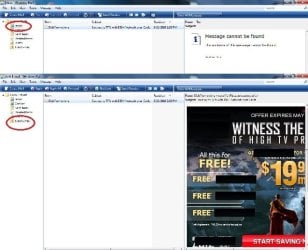
Ever since the security update "borked" the msoe.dll, I am having a strange problem where the same message is showing up in both my inbox and junk mail folder. The full content of the message is visible in the junk mail but the same message appears in the inbox with a message in the preview pane that "the content of this message cannot be found". My Junk E-mail option is set to "Safe List Only" and "Also trust e-mail from my Windows contacts". I have three Win7 PC's running Windows Mail and all have the same problem. Anybody else having this issue? Screenshot attached.
 

Attachments

  • WinMail..jpg
    WinMail..jpg
    46.3 KB · Views: 309

My Computer

OS
Win 7 Professional and Windows 8 Professional
Ever since the security update "borked" the msoe.dll, I am having a strange problem where the same message is showing up in both my inbox and junk mail folder. The full content of the message is visible in the junk mail but the same message appears in the inbox with a message in the preview pane that "the content of this message cannot be found". My Junk E-mail option is set to "Safe List Only" and "Also trust e-mail from my Windows contacts". I have three Win7 PC's running Windows Mail and all have the same problem. Anybody else having this issue? Screenshot attached.
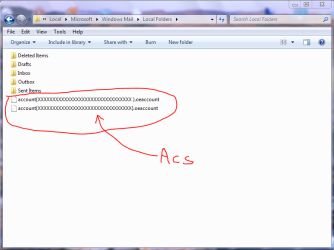
A. It might help to clean out your "Local Folders" folder in AppData.

1. Save all emails

2. Show hidden folders by opening any folder --> Task Bar --> Organize --> Layout --> Tick: Menu Bar
--> Task bar --> Tools --> Folder Options --> View --> Dot: Show hidden file, folders and drives --> OK.

3. Start orb --> User Name --> AppData --> Local --> Microsoft --> Windows Mail --> Local Folders

4. Delete all folders and files in the "Local Folders" folder, except the Accounts files. That is, delete Inbox, Sent Items, ete. The following is a pic of Local Folders. The alpha numeric code in the accounts shown has been replaced with crosses for security reasons.


Capture.PNG

Deleting these folders will not remove them from your WinMail file in Program Files. Next time WinMail is run again, a new set of folders will appear in Local Folders.​

B. Also read this post here.​

C. The other suggestion would be to make sure you have the lastest updates and Service Packs installed. As pointed out in a Microsoft article found here, this was an issue with Vitsta until the latest Service Packs were installed. There is a specific KB update listed in this MS article to deal with this problem.​

D. Finally, download, extract and run the attached program: View attachment Repair WinMail Database.zip. It is a small program WMUtil.exe which repairs the WinMail data base.​

Hope this helps. Cheers PB​
 
Last edited:

My Computer

Computer Manufacturer/Model Number
Self-assembled
OS
Win7 Ultimate 64bit Retail
CPU
Intel i7 960 quad core
Motherboard
Intel DX58SO2 Extreme
Memory
12 GB Kingston DDR 3 1300
Graphics Card(s)
PCI Express Gigabyte GTX 550 Ti
Sound Card
Gigabyte GTX 550 Ti Graphics/5 Sound card
Monitor(s) Displays
Samsung WS Syncmaster S23A350H
Screen Resolution
1920 x 1080
Hard Drives
OS on 128 GB Corsair SSD SATA 3 + Storage on 1 TB Western Digital Black SATA 2
Case
Cooler Master CM690 II Advanced Mid Tower
Cooling
CPU, top, front and rear extractor fans
Keyboard
Microsoft Intellitype Wireless Multimedia
Mouse
Microsoft Intellipoint2 Wireless
Internet Speed
100 MB/sec Theoretical max. Actual average 0.5MB/sec
Other Info
Back-up PC with Vista Ultimate OEM 32bit. Intel i5 2400 Quad Core CPU, DH67CL mobo, 8 GB Kingston DDR3 1300 RAM,
It might help to read this post here.​
Do you suppose a similar process can be used to fix or reset Windows Live Mail except that the Windows Live Mail folder would be used instead of the Windows Mail folder? (This is for those of us who are giving WLM a second chance.)
 

My Computer

Computer type
PC/Desktop
Computer Manufacturer/Model Number
OQO 2+
OS
Windows 8 Pro w/MC 32-bit
CPU
Intel Atom 1.86 GHz
Motherboard
OQO 2+
Memory
2 GB
Graphics Card(s)
Intel GMA 500
Sound Card
IDT
Monitor(s) Displays
LCD
Screen Resolution
800 x 480 (portable) 1280 x 1024 (docked)
Hard Drives
64 GB SSD
PSU
9 Ah Battery (portable) or OQO Brick (docked)
Case
Shirt Pocket Sized
Cooling
Tiny Fan
Keyboard
Slide out (portable) DiNovo Edge (docked)
Mouse
Eraser head (portable) Logitech Bluetooth (docked)
Internet Speed
WWAN or 802.11G (portable) T1 (docked)
Browser
IE 10
Other Info
DVD-RW OQO Docking Station
It might help to read this post here.​
Do you suppose a similar process can be used to fix or reset Windows Live Mail except that the Windows Live Mail folder would be used instead of the Windows Mail folder? (This is for those of us who are giving WLM a second chance.)
I'm sorry, but I don't fully understand your question when you say "fix or reset Win Live Mail". Win Live Mail can be downloaded from Microsoft and run at any time. It will auto correct any files needed in Windows Mail folder. I have run both Windows Mail and Windows Live Mail concurrently in 32 & 64bit installations.

Or are you referring to the import of email accounts, folders and emails from Vista to Local Folders in AppData? And whether this import process will work with Win Live Mail?
 

My Computer

Computer Manufacturer/Model Number
Self-assembled
OS
Win7 Ultimate 64bit Retail
CPU
Intel i7 960 quad core
Motherboard
Intel DX58SO2 Extreme
Memory
12 GB Kingston DDR 3 1300
Graphics Card(s)
PCI Express Gigabyte GTX 550 Ti
Sound Card
Gigabyte GTX 550 Ti Graphics/5 Sound card
Monitor(s) Displays
Samsung WS Syncmaster S23A350H
Screen Resolution
1920 x 1080
Hard Drives
OS on 128 GB Corsair SSD SATA 3 + Storage on 1 TB Western Digital Black SATA 2
Case
Cooler Master CM690 II Advanced Mid Tower
Cooling
CPU, top, front and rear extractor fans
Keyboard
Microsoft Intellitype Wireless Multimedia
Mouse
Microsoft Intellipoint2 Wireless
Internet Speed
100 MB/sec Theoretical max. Actual average 0.5MB/sec
Other Info
Back-up PC with Vista Ultimate OEM 32bit. Intel i5 2400 Quad Core CPU, DH67CL mobo, 8 GB Kingston DDR3 1300 RAM,
It might help to read this post here.​
Do you suppose a similar process can be used to fix or reset Windows Live Mail except that the Windows Live Mail folder would be used instead of the Windows Mail folder? (This is for those of us who are giving WLM a second chance.)
I'm sorry, but I don't fully understand your question when you say "fix or reset Win Live Mail".
Sorry, I confused the link you posted above with this one for Windows Mail:
Messages may be stuck in the Outbox when you use Windows Mail on a computer that is running Windows Vista
 

My Computer

Computer type
PC/Desktop
Computer Manufacturer/Model Number
OQO 2+
OS
Windows 8 Pro w/MC 32-bit
CPU
Intel Atom 1.86 GHz
Motherboard
OQO 2+
Memory
2 GB
Graphics Card(s)
Intel GMA 500
Sound Card
IDT
Monitor(s) Displays
LCD
Screen Resolution
800 x 480 (portable) 1280 x 1024 (docked)
Hard Drives
64 GB SSD
PSU
9 Ah Battery (portable) or OQO Brick (docked)
Case
Shirt Pocket Sized
Cooling
Tiny Fan
Keyboard
Slide out (portable) DiNovo Edge (docked)
Mouse
Eraser head (portable) Logitech Bluetooth (docked)
Internet Speed
WWAN or 802.11G (portable) T1 (docked)
Browser
IE 10
Other Info
DVD-RW OQO Docking Station
Do you suppose a similar process can be used to fix or reset Windows Live Mail except that the Windows Live Mail folder would be used instead of the Windows Mail folder? (This is for those of us who are giving WLM a second chance.)
I'm sorry, but I don't fully understand your question when you say "fix or reset Win Live Mail".
Sorry, I confused the link you posted above with this one for Windows Mail:
Messages may be stuck in the Outbox when you use Windows Mail on a computer that is running Windows Vista
A few months back I was advised by Microsoft that a new version of Win Live Mail would be coming out. To test this new version 2009 build 14.0.817.0416, I have just now downloaded and installed it by simply going to the download site for Windows Live. However, when I installed it I unticked everthing except Mail. It is loaded onto a 64bit version of Windows 7.

When I ran it for the first time, it auto imported all my contacts and settings, and the option to set it as default was offered. I ticked no for default, which supposedly left WinMail as default. In All Programs --> Default programs, both WinMail and WinLiveMail are listed.

I will continue to use it for a period of time to adjust to the different names and placement of various buttons etc.

Thanks for the heads up on the link to the MS Article on "stuck emails". I have referred mick823 in Post No 588 to this link.

Cheers PB
 
Last edited:

My Computer

Computer Manufacturer/Model Number
Self-assembled
OS
Win7 Ultimate 64bit Retail
CPU
Intel i7 960 quad core
Motherboard
Intel DX58SO2 Extreme
Memory
12 GB Kingston DDR 3 1300
Graphics Card(s)
PCI Express Gigabyte GTX 550 Ti
Sound Card
Gigabyte GTX 550 Ti Graphics/5 Sound card
Monitor(s) Displays
Samsung WS Syncmaster S23A350H
Screen Resolution
1920 x 1080
Hard Drives
OS on 128 GB Corsair SSD SATA 3 + Storage on 1 TB Western Digital Black SATA 2
Case
Cooler Master CM690 II Advanced Mid Tower
Cooling
CPU, top, front and rear extractor fans
Keyboard
Microsoft Intellitype Wireless Multimedia
Mouse
Microsoft Intellipoint2 Wireless
Internet Speed
100 MB/sec Theoretical max. Actual average 0.5MB/sec
Other Info
Back-up PC with Vista Ultimate OEM 32bit. Intel i5 2400 Quad Core CPU, DH67CL mobo, 8 GB Kingston DDR3 1300 RAM,
Poppa Bear,

I had located the WMUtil.exe prior to making the post. Running the WMUtil program did not correct the problem. Cleaning out the Local Folders in AppData seems to have worked so far. Thanks for the precise instructions.
 

My Computer

OS
Win 7 Professional and Windows 8 Professional
Poppa Bear,

I had located the WMUtil.exe prior to making the post. Running the WMUtil program did not correct the problem. Cleaning out the Local Folders in AppData seems to have worked so far. Thanks for the precise instructions.
Hey that's great mick823. Lets hope it stays that way. There may have been something in those folders that was carried over from Vista depending on how you transferred you emails. Post 374 outlines some of the problems which occur if the whole Windows Mail folder from AppData is imported over, instead of just Local Folders content.

Cheers PB
 

My Computer

Computer Manufacturer/Model Number
Self-assembled
OS
Win7 Ultimate 64bit Retail
CPU
Intel i7 960 quad core
Motherboard
Intel DX58SO2 Extreme
Memory
12 GB Kingston DDR 3 1300
Graphics Card(s)
PCI Express Gigabyte GTX 550 Ti
Sound Card
Gigabyte GTX 550 Ti Graphics/5 Sound card
Monitor(s) Displays
Samsung WS Syncmaster S23A350H
Screen Resolution
1920 x 1080
Hard Drives
OS on 128 GB Corsair SSD SATA 3 + Storage on 1 TB Western Digital Black SATA 2
Case
Cooler Master CM690 II Advanced Mid Tower
Cooling
CPU, top, front and rear extractor fans
Keyboard
Microsoft Intellitype Wireless Multimedia
Mouse
Microsoft Intellipoint2 Wireless
Internet Speed
100 MB/sec Theoretical max. Actual average 0.5MB/sec
Other Info
Back-up PC with Vista Ultimate OEM 32bit. Intel i5 2400 Quad Core CPU, DH67CL mobo, 8 GB Kingston DDR3 1300 RAM,
I need a seconardy email client and detest Live-gives MS an excuse to hit you with junkwarez. Follow your steps to the letter on 64x. Have a program file with the winmail.exe in the folder. Problem-I cant get it to run.
THe rub seems to fall below. No eml_auto_file regkey. Any thoughts???

HKCU - Classes eml_auto_file
 

My Computer

Computer Manufacturer/Model Number
Polecat
OS
Windows 7 Ultimate
CPU
Intel i-980 Extreme
Motherboard
Asus P6X58-Premeium
Memory
8 Gigs
Graphics Card(s)
Nvidia GTX 480-Fermi
Sound Card
Xonar
Monitor(s) Displays
2x Asus 24
Hard Drives
Intel 160 GiG SSDG
WDC-1 T
PSU
1200-Custom Antex
Case
Cooler Master Cosmos C
Cooling
Custom
I need a seconardy email client and detest Live-gives MS an excuse to hit you with junkwarez. Follow your steps to the letter on 64x. Have a program file with the winmail.exe in the folder. Problem-I cant get it to run.
THe rub seems to fall below. No eml_auto_file regkey. Any thoughts???

HKCU - Classes eml_auto_file
It's hard to know off-hand exactly what the problem is. Just to cover a few basics:

I. If HKCU - Classes eml_auto_file is not present in the registry then this footnote does not apply, and it would not be the reason why it won't work.

2. I assume that since writing this post you have re-booted your PC and it still doesn't work?

3. Do you have Windows Live Mail installed. If so I'd suggest uninstalling it via Control Panel --> Programs and features --> Uninstall programs. Also uninstall any associated Windows Live programs.

4. I assume you downloaded the correct 64bit msoe.dll file and made sure it went in the normal Program files, not the Program files(x86)?

5. Since running the tutorial have you downloaded the latest Microsoft updates? If you have, you will need to reinstal the msoe.dll file shown in Step 4 of the tutorial, because update KB 978542 modifies the msoe.dll file. Don't uninstall this update if you've got it, because it will just download again and bork the msoe.dll again. Just leave it there and simply replace the msoe.dll.

Hope this helps. Cheers PB
 

My Computer

Computer Manufacturer/Model Number
Self-assembled
OS
Win7 Ultimate 64bit Retail
CPU
Intel i7 960 quad core
Motherboard
Intel DX58SO2 Extreme
Memory
12 GB Kingston DDR 3 1300
Graphics Card(s)
PCI Express Gigabyte GTX 550 Ti
Sound Card
Gigabyte GTX 550 Ti Graphics/5 Sound card
Monitor(s) Displays
Samsung WS Syncmaster S23A350H
Screen Resolution
1920 x 1080
Hard Drives
OS on 128 GB Corsair SSD SATA 3 + Storage on 1 TB Western Digital Black SATA 2
Case
Cooler Master CM690 II Advanced Mid Tower
Cooling
CPU, top, front and rear extractor fans
Keyboard
Microsoft Intellitype Wireless Multimedia
Mouse
Microsoft Intellipoint2 Wireless
Internet Speed
100 MB/sec Theoretical max. Actual average 0.5MB/sec
Other Info
Back-up PC with Vista Ultimate OEM 32bit. Intel i5 2400 Quad Core CPU, DH67CL mobo, 8 GB Kingston DDR3 1300 RAM,
Hello Poppa Bear,
Can you please help me with this?. I have done all the steps related in the modified method (post 317) but, in the step 4, I can not find eml_auto_file in the Classes.
Thanks in advance.
jms

Hi again,

I have to say that even don´t having the eml_auto_file in the register, the method is working fine to me at the moment.

Are there any other KB, than 978542 in the Windows Update that can modify the msoe.dll?
Thanks,

jms
 
Last edited:

My Computer

OS
windows 7
Hello Poppa Bear,
Can you please help me with this?. I have done all the steps related in the modified method (post 317) but, in the step 4, I can not find eml_auto_file in the Classes.
Thanks in advance.
jms

Hi again,

I have to say that even don´t having the eml_auto_file in the register, the method is working fine to me at the moment.

Are there any other KB, than 978542 in the Windows Update that can modify the msoe.dll?
Thanks,

jms
Footnote 2 of the tutorial says: "Manually edit the following registry key if it is installed." If it's not installed you don't need to worry about it.

To the best of my knowledge KB978542 is the only update that affects the msoe.dll. It was brought in to counteract a potential security breach in the original msoe.dll. The msoe.dll downloaded from Step 4 of the tutorial is a Vista msoe.dll that has been modified by KB978542 in Vista, and hence secure against the potential breach.

Once the security breach is fixed, it would be unlikely, but not impossible for another breach to occur at some point in the future. However, since all the original files in the Windows Mail folder are the original Windows 7 files, the only one that should ever need changing is the msoe.dll. That was the whole point of the updated tutorial, as was developed by Greg S.

Cheers PB
 

My Computer

Computer Manufacturer/Model Number
Self-assembled
OS
Win7 Ultimate 64bit Retail
CPU
Intel i7 960 quad core
Motherboard
Intel DX58SO2 Extreme
Memory
12 GB Kingston DDR 3 1300
Graphics Card(s)
PCI Express Gigabyte GTX 550 Ti
Sound Card
Gigabyte GTX 550 Ti Graphics/5 Sound card
Monitor(s) Displays
Samsung WS Syncmaster S23A350H
Screen Resolution
1920 x 1080
Hard Drives
OS on 128 GB Corsair SSD SATA 3 + Storage on 1 TB Western Digital Black SATA 2
Case
Cooler Master CM690 II Advanced Mid Tower
Cooling
CPU, top, front and rear extractor fans
Keyboard
Microsoft Intellitype Wireless Multimedia
Mouse
Microsoft Intellipoint2 Wireless
Internet Speed
100 MB/sec Theoretical max. Actual average 0.5MB/sec
Other Info
Back-up PC with Vista Ultimate OEM 32bit. Intel i5 2400 Quad Core CPU, DH67CL mobo, 8 GB Kingston DDR3 1300 RAM,
Windows Live Mail as an alternative

Windows Live Mail as an alternative.

Without wishing to be a turncoat to the WinMail faithfuls, for those who may want to consider WinLiveMail as as alternative email client, the following information might help. I was asked by Microsoft to review WinLiveMail, and these are the comments I sent to them.

There may be other comments members may wish to add to this post.

Or the Microsoft representative, Jeff Putt can be contacted at: [email protected]

Or there is a feed-back option to Microsoft specifically for WinLiveMail via this link: here

WinLiveMail is computer based in the sense that it uses the Windows Mail files already in Windows 7. However, you still have to download some files from Windows Live on the net to make it work. The "Windows Live" folder is stored in 32bit Program Files(x86). When I downloaded it, I chose only the "Mail" option, and ignored all the other Live programs. It basically works the same as WinMail, but has new positions for some of the buttons, added features, and a somewhat different view of the main window. You can disable any interactive options and just use it basically as a stand alone program, which is what I've done. I am running it concurrently with Wndows Mail and can choose either as default email client via "Set Default Programs".
  • The "Send Receive" button has been replaced with a "Sync" button. When this is pressed, it shows the same window for incoming/outgoing mail as Windows Mail.
  • Every email account is shown individually in the left pane of the main window, with it's own set of folders for Inbox, Drafts, Sent Items, etc. So if you've got 3 or 4 email addresses you'll have 3 or 4 Accounts in the left panel, each with it's own folders.
  • It also has a "Quick View" set of folders at the top of the left panel which shows a summary of all emails. And you can customize the Quick View to show which emails you want to see, such as Junk, Drafts, etc.
  • Finally it has a set of "Storage Folders" in the left panel, under the Accounts. The folders include: Drafts, Sent Items, Deleted Items, Inbox, Junk Mail and Outbox.
  • It has 45 color options for text, as opposed to 15 in WinMail.
  • It has 70 Emoticons you can put into the text.
  • The Menu bar is not shown by default, which is typical of all Windows 7 folders. You need to click an icon in the top right of the task bar and tick "Show Menu Bar".
  • It has 3 buttons on the left above the main text: "Format'", "Photos" and "Layout". The photos button allows photos to be added. The Format & Layout buttons allow a photo to edited by rotating, changing size, adding a text box, auto correcting the image, changing the type of framing, etc.
  • Images are added using: Menu --> Insert --> Image --> Inline. There is no button in the taskbar to insert images as in WinMail.
  • In the left panel under the accounts, there are buttons which change the main window display to: Mail, Calendar, Contacts, Feeds and News Groups. As you click each one, the main window is changed, so you see the item mentioned; except for Contacts which are shown as a separate window.
  • The format buttons are in a drop down menu rather than individual buttons on the task bar, which is more inconvenient. The drop down menus include bulleting, numbering; formatting alignment such as Left, Right, Justify; as well as Indents & Insert a straight line.
  • When a contact in the Contacts folder is highlighted by hovering the mouse over it, it shows the option to send an email by single clicking this option.
  • Naturally, the SPAM/Phishing filter works, including updates, and is the same basic lay-out as WinMail.
  • When setting up accounts, once the user name, password, and display name is entered it auto fills the POP3 & SMTP protocol; and provides links to set up IMAP for Gmail, etc.
  • Junk/SPAM email options are found under taskbar Tools --> Safety Options
  • It boots up a lot quicker than WinMail and there is no splash screen to disable.
The main objection is the enforced display of all accounts, which makes the left panel very bulky if you have a lot of accounts. Mostly though, it's just a case of getting used to the new format, and postions of command buttons. I've been testing it for two weeks now, and overall it's quite good, and the extra features helpful. Drop down menus are a pain after individual buttons in the task bar, but it does tidy up the task bar.

The main adavantage I guess is having a fully operational application, which won't be borked by updates.

Hope this may help those who for whatever reason can't get Windows Mail to work.

Cheers PB
 
Last edited:

My Computer

Computer Manufacturer/Model Number
Self-assembled
OS
Win7 Ultimate 64bit Retail
CPU
Intel i7 960 quad core
Motherboard
Intel DX58SO2 Extreme
Memory
12 GB Kingston DDR 3 1300
Graphics Card(s)
PCI Express Gigabyte GTX 550 Ti
Sound Card
Gigabyte GTX 550 Ti Graphics/5 Sound card
Monitor(s) Displays
Samsung WS Syncmaster S23A350H
Screen Resolution
1920 x 1080
Hard Drives
OS on 128 GB Corsair SSD SATA 3 + Storage on 1 TB Western Digital Black SATA 2
Case
Cooler Master CM690 II Advanced Mid Tower
Cooling
CPU, top, front and rear extractor fans
Keyboard
Microsoft Intellitype Wireless Multimedia
Mouse
Microsoft Intellipoint2 Wireless
Internet Speed
100 MB/sec Theoretical max. Actual average 0.5MB/sec
Other Info
Back-up PC with Vista Ultimate OEM 32bit. Intel i5 2400 Quad Core CPU, DH67CL mobo, 8 GB Kingston DDR3 1300 RAM,
Anyone having a new problem is the last few days? My Mom's folders seem to be wiped out and she is getting strange error messages, etc.

bob
 

My Computer

OS
windows 7 64bit
Anyone having a new problem is the last few days? My Mom's folders seem to be wiped out and she is getting strange error messages, etc.

bob
It might help to clean out your "Local Folders" folder in AppData as per Part A of the following post found here.

If your mom has downloaded the Microsoft update KB978542 the msoe.dll file in Windows Mail folder will need to be replaced with the new modified mose.dll file from the download link in Step 4 of the tutorial on page one.

If that doesn't fix it, the only other suggestion would be to re-run the tutorial from the top.

Hope this helps. Cheers PB
 

My Computer

Computer Manufacturer/Model Number
Self-assembled
OS
Win7 Ultimate 64bit Retail
CPU
Intel i7 960 quad core
Motherboard
Intel DX58SO2 Extreme
Memory
12 GB Kingston DDR 3 1300
Graphics Card(s)
PCI Express Gigabyte GTX 550 Ti
Sound Card
Gigabyte GTX 550 Ti Graphics/5 Sound card
Monitor(s) Displays
Samsung WS Syncmaster S23A350H
Screen Resolution
1920 x 1080
Hard Drives
OS on 128 GB Corsair SSD SATA 3 + Storage on 1 TB Western Digital Black SATA 2
Case
Cooler Master CM690 II Advanced Mid Tower
Cooling
CPU, top, front and rear extractor fans
Keyboard
Microsoft Intellitype Wireless Multimedia
Mouse
Microsoft Intellipoint2 Wireless
Internet Speed
100 MB/sec Theoretical max. Actual average 0.5MB/sec
Other Info
Back-up PC with Vista Ultimate OEM 32bit. Intel i5 2400 Quad Core CPU, DH67CL mobo, 8 GB Kingston DDR3 1300 RAM,
Thanks, we did do the KB978542 fix a while back..... This just happened yesterday after she said yes to some kind of update yesterday!


bob

Anyone having a new problem is the last few days? My Mom's folders seem to be wiped out and she is getting strange error messages, etc.

bob
It might help to clean out your "Local Folders" folder in AppData as per Part A of the following post found here.

If your mom has downloaded the Microsoft update KB978542 the msoe.dll file in Windows Mail folder will need to be replaced with the new modified mose.dll file from the download link in Step 4 of the tutorial on page one.

If that doesn't fix it, the only other suggestion would be to re-run the tutorial from the top.

Hope this helps. Cheers PB
 

My Computer

OS
windows 7 64bit
Thanks, we did do the KB978542 fix a while back..... This just happened yesterday after she said yes to some kind of update yesterday!


bob

Anyone having a new problem is the last few days? My Mom's folders seem to be wiped out and she is getting strange error messages, etc.

bob
It might help to clean out your "Local Folders" folder in AppData as per Part A of the following post found here.

If your mom has downloaded the Microsoft update KB978542 the msoe.dll file in Windows Mail folder will need to be replaced with the new modified mose.dll file from the download link in Step 4 of the tutorial on page one.

If that doesn't fix it, the only other suggestion would be to re-run the tutorial from the top.

Hope this helps. Cheers PB

Go to your Windows Update history and let us know which updates she installed yesterday.
 

My Computer

Computer Manufacturer/Model Number
Averatec 6130HS-20
OS
Windows 7 Professional 32-bit (6.1, Build 7600)
CPU
Intel(R) Pentium(R) 4 3.00 GHz HT
Memory
2.0 GB
Graphics Card(s)
ATI Mobility Radeon 9600 64MB
Sound Card
Realtek AC'97 Audio
Screen Resolution
1280 x 800
Hard Drives
Seagate 96023A 60GB 7200RPM -
Seagate FreeAgentDesktop 250GB
Cooling
20 Inch Box Fan
Mouse
Targus PAWM10 Wireless Optical Laptop Mouse
Back
Top