Windows Mail

How to Reinstate Windows Mail in Windows 7

   Warning
Microsoft no longer supports Windows Mail, aka WinMail. It's recommended you use another well known supported email client. This Tutorial is for Advanced users who importantly have the Technical Ability to make the changes, have backups of everything including your OS, and to be your own tech support for WinMail going forward. If you decide to complete this tutorial you accept the fact that you are using WinMail as-is. It might be necessary to uninstall other email clients to resolve any WinMail conflicts in some environments. Understand it's likely that new OS updates from Microsoft will break WinMail's operation, and to fix make it necessary to rerun the tutorial again to reinstate it. With those things in mind, this tutorial was written so that you can rerun it without affecting WinMail user data.
Please see this Errata (Bug List) post before you install, to be aware of the current information about known issues using WinMail within Windows 7, these issues are programmatic and in most cases cannot be resolved by this tutorial, and will never be fixed.

Having said all of that disclaimer, if you have the technical ability, and can put up with the annoying minor byproduct bugs, then like so many of us still enjoy using WinMail on Windows 7 ...ymmv!


   Tip
As of January, 2025, the instructions given here supersede all other instructions given in forthcoming older posts. Realize some of the posts that follow are over 16 years old, and many of the link pointers within have become mislinked over time, many of the files or information within them is outdated, incomplete, or superseded with more accurate information - and so be careful. However you can always be sure that the latest info from all research is incorporated into this tutorial post, and its downloads are the latest available. This post is continuously kept up-to-date, and so..
...Always refer to this Tutorial post for the very latest updated information

This is the 4th iteration of the Windows 7, WinMail tutorial.

The process of this tutorial Will Not work to reinstate WinMail on Windows 8/10 !
Windows 8/10 users please go Here


Start here
  1. Download tutorial package TutReWinMail.zip

    Download

  2. Extract the TutReWinMail.zip into your user Downloads folder
    • Note: Be sure once extracted this is the address of the ''TutReWinMail'' folder:
    • C:\Users\username\Downloads\TutReWinMail... ... (if it's not there please put it there)
  3. Navigate to your user Downloads\TutReWinMail folder to be sure the above is correct.
    • (..if you need more verbose install instructions to follow, download this WinMail Local Tutorial.zip)
    • Advanced Users can proceed below:
      (..log in for Full Access, being able to get support, remove ads, like, and even to post, etc..)
Advanced Users: ..use this easy excellent overview of the steps in the local tutorial:
  • Open an Administrator Command Prompt. (screenshot showing in Administrator mode)
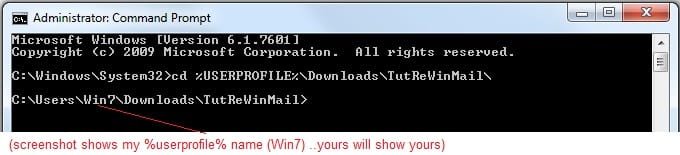
  • copy/paste this line into the command prompt: cd %USERPROFILE%\Downloads\TutReWinMail\
  • Your command prompt must now be showing you are at That Same Folder Address ..which contains the tutorial files that the batch file in the next step executes programs and copies files specifically from that folder address - if it's not there the batch file will fail since it cannot find what it needs!
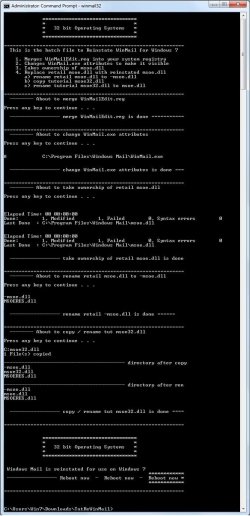
  • Next type in either winmail32 or win64mail <matching OS bit, to interactively process These Next Steps
  • If you've finished to the bottom as shown in last screenshot, restart your machine (sets registry)
  • Create a shortcut from WinMail.exe to your Desktop
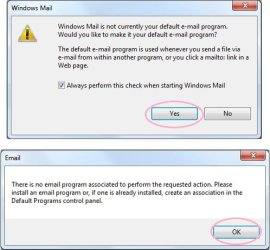
  • Open WinMail - it may prompt you one (or both) of These Two Notices ..click yes, and okay.
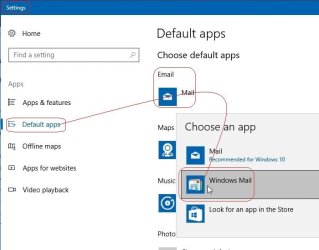
  • They now should be already set, but you can manually check/set at any time These Default Settings
  • That's pretty much all there is to it, and from here you setup the rest of the Windows Mail client (aka: WinMail) as normal within its various tab menus for Accounts, Options, Layout, etc, etc, to suit your individual needs.
  • Lastly, but should be the First thing you do, is to Create A WinMail Backup (new version) ..Go to this next link and when you get there scroll down to the heading: Backup/Restore Procedures for further instructions.
   Information
See How to open an elevated Administrator Command Prompt
Important: The exact text provided by the tutorial must be entered into the Administrator Command Prompt.
Hint: to avoid typos, copy/paste the entire line containing the command into the Command Prompt window.
Also see: How to Enable Copy to Clipboard from the Windows 7 Command Prompt

Every effort has been made to make this a step-by-step process, however, it is beyond the scope of a single tutorial to provide information on every command or concept. Search the Main Tutorial Section if you need greater detail on a concept or command presented in this tutorial.


Good luck, and long live WinMail :thumbsup:


   Note
Made possible by members:
Mark (aka Mr GRiM) - provided the original tutorial
Poppa Bear - continued Mark's work within the 2nd version
endeavor - provided continuous feedback, changes, invaluable testing instrumental to tutorial operations
EKManitis - propose the batch code that made operations easier
Slartybart - updated, tested, and consolidated all of the above into the 3rd version
endeavor - reviewed, updated, tested, and incorporated all of the above into this 4th version
...and also a special thanks to All the other members who presented discovery for this project


Attachments

  • TutReWinMail.zip
    TutReWinMail.zip
    1.8 MB · Views: 4,994
  • msoe_64.zip
    msoe_64.zip
    404 bytes · Views: 1,531
  • WinMailEdit.zip
    WinMailEdit.zip
    404 bytes · Views: 6
  • Win74umsZip.zip
    Win74umsZip.zip
    404 bytes · Views: 106
  • msoe_32.zip
    msoe_32.zip
    404 bytes · Views: 1,052
  • ACP.jpg
    ACP.jpg
    19.6 KB · Views: 1,083
  • DefaultClickYes-OkayAssociation.jpg
    DefaultClickYes-OkayAssociation.jpg
    52.8 KB · Views: 899
  • ProcessingBatch.jpg
    ProcessingBatch.jpg
    194.2 KB · Views: 1,147
  • PasteCDCommand.jpg
    PasteCDCommand.jpg
    33.1 KB · Views: 696
  • WinMail_Local_Tutorial.zip
    WinMail_Local_Tutorial.zip
    6.1 KB · Views: 1,202
  • FolderOptionsSet.jpg
    FolderOptionsSet.jpg
    61.5 KB · Views: 695
  • WinMailAdvanceOptionsBlank.jpg
    WinMailAdvanceOptionsBlank.jpg
    276.4 KB · Views: 93
  • Win7x64AdvancedTab+FileVersions.jpg
    Win7x64AdvancedTab+FileVersions.jpg
    298.9 KB · Views: 112
  • AdvancedTabBefore&After_fixed.jpg
    AdvancedTabBefore&After_fixed.jpg
    106.9 KB · Views: 50
  • CheckManually.jpg
    CheckManually.jpg
    209.5 KB · Views: 136
  • Win10_SetDefault.jpg
    Win10_SetDefault.jpg
    66.2 KB · Views: 33
Last edited by a moderator:
Good God Almighty, which one of these seven hundred outbound connections should actually have an outbound connection. As you may have guessed, I've installed it but am not happy to say the least. I've been trying for one hour to receive mail and couldn't. I deleted the Windows Live Mail rule from my Firewall and allowed it to create a new rule which I think may have solved that. Back to my original question, Is Windows Live Mail the only one that needs net access?

Here's what wanted and got as best I remember, network access during installation
1) Windows Installer
2) Windows Live Installer
3) Choice Guard command line interface
4) Can't remember, I killed it right off the bat
5) Windows Live Communications Platform
6) Windows Live Mail

Which one's above need to keep their Firewall rules and which, if any can be deleted?
Can't help. Fraid you've totally lost me. Are they rules for connections your firewall allows? I just installed WLM and it worked. Am using Zone Alarm freebie firewall.

Yes, I was alerted to everyone listed above which I allowed except for the one mentioned. I assume that if I do not sign in to Windows Live, I wouldn't need any
 

My Computer

Computer Manufacturer/Model Number
Averatec 6130HS-20
OS
Windows 7 Professional 32-bit (6.1, Build 7600)
CPU
Intel(R) Pentium(R) 4 3.00 GHz HT
Memory
2.0 GB
Graphics Card(s)
ATI Mobility Radeon 9600 64MB
Sound Card
Realtek AC'97 Audio
Screen Resolution
1280 x 800
Hard Drives
Seagate 96023A 60GB 7200RPM -
Seagate FreeAgentDesktop 250GB
Cooling
20 Inch Box Fan
Mouse
Targus PAWM10 Wireless Optical Laptop Mouse
Which do you recomend, signing in/not signing it? When WLM is setup successfully, can WinMail's mail storage/folders(email folders) be deleted? I took a snapshot prior to installing WLM. I will rollback and start again when I get this going correctly?
I have mine permanently on "Stop signing in". That way it never prompts you to sign in at start-up.

However, if you want to sign in at any point simply click the "Sign in" button at the right side of the top Ribbon with all the icons. The sign in window appears, and you fill in your email addy and password. To then sign out so it doesn't prompt you at next start up simple click the same "Sign in" button and it displays a drop down menu, form which you choose: Sign out of Windows Live Mail.

In the previous version of WLM when you chose the "Stop signing in" button, it gave a warning that synchronization of offline/online contacts lists would be switched off. However, in this new version it doesn't mention that anymore.

Previously there were three sets of contacts.

With "Sign-in" active under Connections tab in Settings:

1. "Remember me and sign me in automatically" ticked from sign in prompt. It uses Web based contacts.

2. "Remember me and sign me in automatically" un-ticked from sign in prompt. It uses an off line list of contacts stored on hard drive, and synced to online web contacts.

With "Stop signing-in" active under Connections tab in Settings:

3. It uses a third set of contacts from your hard drive which are not synced to the web contacts. In other words it acts like a normal email client, not a web based email client.

Hope that makes sense.

Re Storage folders being deleted, if you go to the View tab in the main window of WLM, toward the right side of the Ribbon, there is a button named "Storage Folders". Click it and Storage Folders disappear from the left panel. Accounts can be minimized so as not to show sub-folders by clicking the small triangular shaped button to the left side of the name. Right click the name Quick Folders and you can set options to use it as a Master folder, similar to Local Folders in WinMail.

Re:
Yes, I was alerted to everyone listed above which I allowed except for the one mentioned. I assume that if I do not sign in to Windows Live, I wouldn't need any
I just went into Zone Alarm and deleted all WinLiveMail permissions period, and WLM is working perfectly with no requests for permissions which validates what you have said.

Cheers PB.
 

My Computer

Computer Manufacturer/Model Number
Self-assembled
OS
Win7 Ultimate 64bit Retail
CPU
Intel i7 960 quad core
Motherboard
Intel DX58SO2 Extreme
Memory
12 GB Kingston DDR 3 1300
Graphics Card(s)
PCI Express Gigabyte GTX 550 Ti
Sound Card
Gigabyte GTX 550 Ti Graphics/5 Sound card
Monitor(s) Displays
Samsung WS Syncmaster S23A350H
Screen Resolution
1920 x 1080
Hard Drives
OS on 128 GB Corsair SSD SATA 3 + Storage on 1 TB Western Digital Black SATA 2
Case
Cooler Master CM690 II Advanced Mid Tower
Cooling
CPU, top, front and rear extractor fans
Keyboard
Microsoft Intellitype Wireless Multimedia
Mouse
Microsoft Intellipoint2 Wireless
Internet Speed
100 MB/sec Theoretical max. Actual average 0.5MB/sec
Other Info
Back-up PC with Vista Ultimate OEM 32bit. Intel i5 2400 Quad Core CPU, DH67CL mobo, 8 GB Kingston DDR3 1300 RAM,
I'm in the old version of WLM. I can't seem to sign out. I used my gmail account for my profile, maybe that was a mistake. I've opened up WLM at least 50 times with not sign out in sight.
 

My Computer

Computer Manufacturer/Model Number
Averatec 6130HS-20
OS
Windows 7 Professional 32-bit (6.1, Build 7600)
CPU
Intel(R) Pentium(R) 4 3.00 GHz HT
Memory
2.0 GB
Graphics Card(s)
ATI Mobility Radeon 9600 64MB
Sound Card
Realtek AC'97 Audio
Screen Resolution
1280 x 800
Hard Drives
Seagate 96023A 60GB 7200RPM -
Seagate FreeAgentDesktop 250GB
Cooling
20 Inch Box Fan
Mouse
Targus PAWM10 Wireless Optical Laptop Mouse
"Stop signing in" active:

3. On opening WinLiveMail you are never signed in and WLM acts like a normal email client, which means it can't store emails on Windows Live web site because it's not signed in.

Cheers PB
I believe that is correct and makes sense when talking about "contacts". You have two lists: signed-in contacts and not-signed-in contacts. Only one shows up when pushing the contacts icon. But emails are slightly different. Whether you sign in or not, emails you receive are initially stored on your ISP server (whether your ISP is Live.com or MyISP.net). If you set up WLM for POP3 access to those accounts, it will download your emails and store them locally regardless of your signed-in status on WLM. That's because the logging in is handled by the individual WLM account setups. The emails stored at your ISP are never "moved" to the Windows Live web site whether signed in or not.
 

My Computer

Computer type
PC/Desktop
Computer Manufacturer/Model Number
OQO 2+
OS
Windows 8 Pro w/MC 32-bit
CPU
Intel Atom 1.86 GHz
Motherboard
OQO 2+
Memory
2 GB
Graphics Card(s)
Intel GMA 500
Sound Card
IDT
Monitor(s) Displays
LCD
Screen Resolution
800 x 480 (portable) 1280 x 1024 (docked)
Hard Drives
64 GB SSD
PSU
9 Ah Battery (portable) or OQO Brick (docked)
Case
Shirt Pocket Sized
Cooling
Tiny Fan
Keyboard
Slide out (portable) DiNovo Edge (docked)
Mouse
Eraser head (portable) Logitech Bluetooth (docked)
Internet Speed
WWAN or 802.11G (portable) T1 (docked)
Browser
IE 10
Other Info
DVD-RW OQO Docking Station
I'm in the old version of WLM. I can't seem to sign out. I used my gmail account for my profile, maybe that was a mistake. I've opened up WLM at least 50 times with not sign out in sight.
Unfortunately I have uninstalled old version of WLM so can't check it directly.

Maybe you could try turning off your modem, then going to:

WLM --> Menu Bar (click small icon at right of top task bar to show Menu bar) --> Tools --> Options --> Connections Tab --> Sub-heading: Connecting to Windows Live services --> Click:Stop signing in.

Then log off, and back on, and re-start your modem. That should leave you signed out.

Better still, maybe delete that version and get Wave 4 using the download engine in my post a few up.

It sounds like you may have ticked the box to keep your auto signed in. Even if you chose Sign in under Connections tab, it should still bring up the prompt box to know if you want to make it permanent. The trick is to get that promprt box up, so you can untick it.
 

My Computer

Computer Manufacturer/Model Number
Self-assembled
OS
Win7 Ultimate 64bit Retail
CPU
Intel i7 960 quad core
Motherboard
Intel DX58SO2 Extreme
Memory
12 GB Kingston DDR 3 1300
Graphics Card(s)
PCI Express Gigabyte GTX 550 Ti
Sound Card
Gigabyte GTX 550 Ti Graphics/5 Sound card
Monitor(s) Displays
Samsung WS Syncmaster S23A350H
Screen Resolution
1920 x 1080
Hard Drives
OS on 128 GB Corsair SSD SATA 3 + Storage on 1 TB Western Digital Black SATA 2
Case
Cooler Master CM690 II Advanced Mid Tower
Cooling
CPU, top, front and rear extractor fans
Keyboard
Microsoft Intellitype Wireless Multimedia
Mouse
Microsoft Intellipoint2 Wireless
Internet Speed
100 MB/sec Theoretical max. Actual average 0.5MB/sec
Other Info
Back-up PC with Vista Ultimate OEM 32bit. Intel i5 2400 Quad Core CPU, DH67CL mobo, 8 GB Kingston DDR3 1300 RAM,
I believe that is correct and makes sense when talking about "contacts". You have two lists: signed-in contacts and not-signed-in contacts. Only one shows up when pushing the contacts icon. But emails are slightly different. Whether you sign in or not, emails you receive are initially stored on your ISP server (whether your ISP is Live.com or MyISP.net). If you set up WLM for POP3 access to those accounts, it will download your emails and store them locally regardless of your signed-in status on WLM. That's because the logging in is handled by the individual WLM account setups. The emails stored at your ISP are never "moved" to the Windows Live web site whether signed in or not.
Thanks for that input roncerr. What you say makes absolute sense and I thought it was probably the case but I wasn't certain. Good to have that confirmation.

Have you tried Wave 4 Beta yet?

Cheers PB
 

My Computer

Computer Manufacturer/Model Number
Self-assembled
OS
Win7 Ultimate 64bit Retail
CPU
Intel i7 960 quad core
Motherboard
Intel DX58SO2 Extreme
Memory
12 GB Kingston DDR 3 1300
Graphics Card(s)
PCI Express Gigabyte GTX 550 Ti
Sound Card
Gigabyte GTX 550 Ti Graphics/5 Sound card
Monitor(s) Displays
Samsung WS Syncmaster S23A350H
Screen Resolution
1920 x 1080
Hard Drives
OS on 128 GB Corsair SSD SATA 3 + Storage on 1 TB Western Digital Black SATA 2
Case
Cooler Master CM690 II Advanced Mid Tower
Cooling
CPU, top, front and rear extractor fans
Keyboard
Microsoft Intellitype Wireless Multimedia
Mouse
Microsoft Intellipoint2 Wireless
Internet Speed
100 MB/sec Theoretical max. Actual average 0.5MB/sec
Other Info
Back-up PC with Vista Ultimate OEM 32bit. Intel i5 2400 Quad Core CPU, DH67CL mobo, 8 GB Kingston DDR3 1300 RAM,
Have you tried Wave 4 Beta yet?
Not yet, but thanks for providing the special link that allows us to select what to download. Since I've subscribed to the "Browsers and Mail" Forum, I get emails of updated questions. Some of the questions have to do with the Beta of WLM. The answer is often "What did you expect...this is Beta software?!" Also, when I googled "Windows Live Essentials Beta" I found very negative reviews, with the defenders reminding the negative reviewer that it is only beta software and we should expect it to be buggy. Of course, the current WLM even though "bug free" has been bugging us a lot since it's even more annoying to discover that MS did this on purpose. Your observation of the changes to WLM may be just what we need to switch from "intended bugs" to "non-intended bugs".
 
Last edited:

My Computer

Computer type
PC/Desktop
Computer Manufacturer/Model Number
OQO 2+
OS
Windows 8 Pro w/MC 32-bit
CPU
Intel Atom 1.86 GHz
Motherboard
OQO 2+
Memory
2 GB
Graphics Card(s)
Intel GMA 500
Sound Card
IDT
Monitor(s) Displays
LCD
Screen Resolution
800 x 480 (portable) 1280 x 1024 (docked)
Hard Drives
64 GB SSD
PSU
9 Ah Battery (portable) or OQO Brick (docked)
Case
Shirt Pocket Sized
Cooling
Tiny Fan
Keyboard
Slide out (portable) DiNovo Edge (docked)
Mouse
Eraser head (portable) Logitech Bluetooth (docked)
Internet Speed
WWAN or 802.11G (portable) T1 (docked)
Browser
IE 10
Other Info
DVD-RW OQO Docking Station
Is there any way to lose the Quick Views in the top left pane of WLM? I have the Unread Mail check box selected and grayed out. One thing I noticed about not signing in is that you don't get the special marked days on the calendar. It's gonna take a little getting used to, but all in all it's fairly decent.
 

My Computer

Computer Manufacturer/Model Number
Averatec 6130HS-20
OS
Windows 7 Professional 32-bit (6.1, Build 7600)
CPU
Intel(R) Pentium(R) 4 3.00 GHz HT
Memory
2.0 GB
Graphics Card(s)
ATI Mobility Radeon 9600 64MB
Sound Card
Realtek AC'97 Audio
Screen Resolution
1280 x 800
Hard Drives
Seagate 96023A 60GB 7200RPM -
Seagate FreeAgentDesktop 250GB
Cooling
20 Inch Box Fan
Mouse
Targus PAWM10 Wireless Optical Laptop Mouse
Is there any way to lose the Quick Views in the top left pane of WLM? I have the Unread Mail check box selected and grayed out. One thing I noticed about not signing in is that you don't get the special marked days on the calendar. It's gonna take a little getting used to, but all in all it's fairly decent.
Not to my knowledge. In the previous version before Wave 4 Beta, I tried to combine all accounts into one folder similar to Local Folders in AppData > WinMail - see post here. This is an excerpt from that post:
As an experiment to see if it is possible to combine all accounts into one master account, starting with zero accounts, I created a new folder in Windows Live Mail, (sub folder of AppData), and named it Local Folders. I then copied and pasted two account files from Windows Mail Local Folders into the Local Folders folder, in Windows Live Mail.

When Windows Live Mail was opened, these still showed up as two separate accounts in the left panel.

Upon re-opening the Local Folders folder, it was empty. Two new account folders had been created in Windows Live Mail, named Bern and Poppa, with a complete set of Inbox, Outbox folders, etc, in each account folder. And the individual account files had been moved out of the newly created Local Folders into the corresponding individual account folders it had created. Also mail sent to either account went to the correct folder.

So obviously it's programmed to auto revert to multiple account folders.
I don't use Calendar in WLM so it doesn't worry me personally, but it's a bit disconcerting if you have to sign in to Windows Live to make it work. I'll bring that to the attention of M$ when I send my next email. My contact in M$ Australia is [email protected] if you guys feel like adding some fuel to the fire.

Update: When you have "Sign in" switched on in Connection tab in Settings, and cancel it by clicking "Stop signing in", it gives this warning: If you stop signing in, you'll stop synchronizing contacts and calendar events.

Cheers PB
 
Last edited:

My Computer

Computer Manufacturer/Model Number
Self-assembled
OS
Win7 Ultimate 64bit Retail
CPU
Intel i7 960 quad core
Motherboard
Intel DX58SO2 Extreme
Memory
12 GB Kingston DDR 3 1300
Graphics Card(s)
PCI Express Gigabyte GTX 550 Ti
Sound Card
Gigabyte GTX 550 Ti Graphics/5 Sound card
Monitor(s) Displays
Samsung WS Syncmaster S23A350H
Screen Resolution
1920 x 1080
Hard Drives
OS on 128 GB Corsair SSD SATA 3 + Storage on 1 TB Western Digital Black SATA 2
Case
Cooler Master CM690 II Advanced Mid Tower
Cooling
CPU, top, front and rear extractor fans
Keyboard
Microsoft Intellitype Wireless Multimedia
Mouse
Microsoft Intellipoint2 Wireless
Internet Speed
100 MB/sec Theoretical max. Actual average 0.5MB/sec
Other Info
Back-up PC with Vista Ultimate OEM 32bit. Intel i5 2400 Quad Core CPU, DH67CL mobo, 8 GB Kingston DDR3 1300 RAM,
Poppa Bear,

I installed the WLM Beta (Wave 4) and it solves a few of the dislikes I had with the previous version. Like you, I am annoyed by the multiple accounts listing in the left side panel and would prefer a single master account. I have 4 email accounts and the left panel is just too cluttered with multiple folders to suit my taste.

I am still trying to figure out how/where WLM stores the contact information. Some experimenting shows contact information in at least 3 locations on the hard drive.
\Users\YourUserName\Contacts is the contact list from the Windows Mail Program. (Not WLM)
\Program Files\Windows Live\Contacts has a series of .dll files and no visible "contact" information.
\Users\YourUserName\AppData\Local\Microsoft\Windows Live Contacts contains 3 folders with names such as {e38afe96-0218-476c-9ec8-df7623a011af} which are all empty.

Experimenting by adding a test contact while in Windows Mail, closing the program and opening Windows Live Mail to find that the test contact is not there tells me that the contact information is being stored somewhere other than the Users\YourUserName\Contacts folder that is used by Windows Mail. The question is where? Any ideas?
 
Last edited:

My Computer

OS
Win 7 Professional and Windows 8 Professional
Poppa Bear,

I installed the WLM Beta (Wave 4) and it solves a few of the dislikes I had with the previous version. Like you, I am annoyed by the multiple accounts listing in the left side panel and would prefer a single master account. I have 4 email accounts and the left panel is just too cluttered with multiple folders to suit my taste.

I am still trying to figure out how/where WLM stores the contact information. Some experimenting shows contact information in at least 3 locations on the hard drive.
\Users\YourUserName\Contacts is the contact list from the Windows Mail Program. (Not WLM)
\Program Files\Windows Live\Contacts has a series of .dll files and no visible "contact" information.
\Users\YourUserName\AppData\Local\Microsoft\Windows Live Contacts contains 3 folders with names such as {e38afe96-0218-476c-9ec8-df7623a011af} which are all empty.

Experimenting by adding a test contact while in Windows Mail, closing the program and opening Windows Live Mail to find that the test contact is not there tells me that the contact information is being stored somewhere other than the Users\YourUserName\Contacts folder that is used by Windows Mail. The question is where? Any ideas?
The following information is applicable to Windows Live Mail Wave 4 Beta.

There are three main contacts folders found in the following pathways.

Item 1 contains .contact type files. Individual contacts are visible and can be added/deleted/edited. These contacts are not used by Windows Live Mail except to be imported into WLM contact folders.

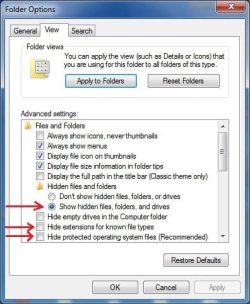
Items 2, 3 & 4 contain .edb type files. Individual contacts are not visible, and can only be added/deleted/edited through Contacts button in main window of Windows Live Mail. It is necessary to make hidden files visible and also untick the 3 options under show hidden files to be able to see all these folders.
1. Start Orb --> User Name --> Contacts --> billsmith.contact

2. Start Orb --> User Name --> AppData --> Local --> Microsoft --> Windows Live --> Contacts -->

a) Default Account --> DBStore --> contacts.edb

b) Default --> DBStore --> contacts.edb

3. Start Orb --> User Name --> AppData --> Local --> Microsoft --> Windows Live Contacts --> {alpha numeric string} --> DBStore -->

a) Backup --> New --> contacts.edb

b) contacts.edb

The following is a summary of the effect of singularly deleting each one of the contacts.edb files with either "Sign in" or "Stop signing in" switched on, found at:

Open: WinLiveMail --> Top Left tab WLM main window --> Options --> Mail --> Connections tab --> Sign in or Stop signing in.

For the sake of simplicity, the results will be listed as 2a, 2b, 3a & 3b.

A) Stop signing in: Switched on. This stops synchronizing of web based contacts and hard drive contacts, which happens in both scenarios 1 & 2 in part (B).

2a Contacts visible. No effect.
2b Contacts gone. New, empty contact.edb file created.
3a Contacts visible. No effect.
3b Contacts visible. No effect.

B) Sign in: Switched on. "Remember to sign me in" box unticked at start up prompt.

Scenario 1. Do not sign in to Windows Live on start up of WinLiveMail by cancelling prompt.

2a Contacts gone. New, empty contact.edb file created.
2b Contacts visible. No effect.
3a Contacts visible. No effect.
3b Contacts visible. No effect.


Scenario 2. Sing in to Windows Live on start up of WinLiveMail using prompt sign in.

2a Contacts gone. New, empty contact.edb file created.
2b Contacts visible. No effect.
3a Contacts visible. No effect.
3b Contacts visible. No effect.

Interpretation of results:

A) Stop signing in switched on so you are never signed in to Windows Live.

The contacts are stored in DBStore folder found at:

Start Orb --> User Name --> AppData --> Local --> Microsoft --> Windows Live --> Contacts --> Default --> DBStore --> contacts.edb


B) Sign in: Switched on. "Remember to sign me in" box unticked at start up prompt.

Scenarios 1 & 2. Whether signed in to Windows Live or not, at prompt on start up of WinLiveMail.

The contacts are stored in DBStore folder found at:

Start Orb --> User Name --> AppData --> Local --> Microsoft --> Windows Live --> Contacts --> Default Account --> DBStore --> contacts.edb


* When you have "Stop signing in" switched on, you're never signed in to Windows Live Mail: The contacts used are stored on the hard drive in DBStore under:

Start Orb --> User Name --> AppData --> Local --> Microsoft --> Windows Live --> Contacts --> Default --> DBStore --> contacts.edb

* When you have "Sign in" switched on in Connections tab, whether you actually sign in or not: The contacts used are stored on the hard drive in DBStore under:

Start Orb --> User Name --> AppData --> Local --> Microsoft --> Windows Live --> Contacts --> Default Account --> DBStore --> contacts.edb

Notice they're both in Windows Live, not Windows Live Contacts. You'll have to draw your own conclusions.

Cheers PB
 
Last edited:

My Computer

Computer Manufacturer/Model Number
Self-assembled
OS
Win7 Ultimate 64bit Retail
CPU
Intel i7 960 quad core
Motherboard
Intel DX58SO2 Extreme
Memory
12 GB Kingston DDR 3 1300
Graphics Card(s)
PCI Express Gigabyte GTX 550 Ti
Sound Card
Gigabyte GTX 550 Ti Graphics/5 Sound card
Monitor(s) Displays
Samsung WS Syncmaster S23A350H
Screen Resolution
1920 x 1080
Hard Drives
OS on 128 GB Corsair SSD SATA 3 + Storage on 1 TB Western Digital Black SATA 2
Case
Cooler Master CM690 II Advanced Mid Tower
Cooling
CPU, top, front and rear extractor fans
Keyboard
Microsoft Intellitype Wireless Multimedia
Mouse
Microsoft Intellipoint2 Wireless
Internet Speed
100 MB/sec Theoretical max. Actual average 0.5MB/sec
Other Info
Back-up PC with Vista Ultimate OEM 32bit. Intel i5 2400 Quad Core CPU, DH67CL mobo, 8 GB Kingston DDR3 1300 RAM,
Is there any way to lose the Quick Views in the top left pane of WLM? I have the Unread Mail check box selected and grayed out..

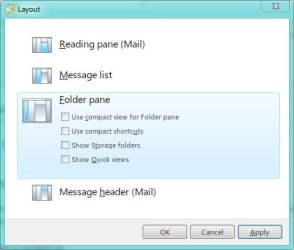
Yes greg there is a way,lol. Menus toolbarbutton > Layout > Folder Pane. Uncheck the Show Quick Views

Untitled.jpg

Question: why would anyone want to show the Storage Folders? Isn't the Windows Mail tree above it the same thing?
 

My Computer

Computer Manufacturer/Model Number
Averatec 6130HS-20
OS
Windows 7 Professional 32-bit (6.1, Build 7600)
CPU
Intel(R) Pentium(R) 4 3.00 GHz HT
Memory
2.0 GB
Graphics Card(s)
ATI Mobility Radeon 9600 64MB
Sound Card
Realtek AC'97 Audio
Screen Resolution
1280 x 800
Hard Drives
Seagate 96023A 60GB 7200RPM -
Seagate FreeAgentDesktop 250GB
Cooling
20 Inch Box Fan
Mouse
Targus PAWM10 Wireless Optical Laptop Mouse

My Computer

Computer Manufacturer/Model Number
Custom Built
OS
Windows 7 Ultimate 32 Bit, Windows Developer Preview, Linux Mint 9 Gnome 32 Bit
CPU
Intel Pentium Dual CPU E2180@2GHz
Motherboard
Elitegroup 671T-M3
Graphics Card(s)
NVIDIA GeForce 7200 GS
Monitor(s) Displays
AOC TFT1560 15" LCD Monitor
Screen Resolution
1024x768
Keyboard
Logitech USB Keyboard
Well, there is this video on Youtube where reinstating Windows Mail on Windows 7 seems to be easier than this method.

YouTube - How to Reinstate Windows Mail on Windows 7 by Britec

That video shows essentially the initial tutorial we are in now. Sure one can get WinMail to open up easy enough by doing those few steps but there's more to it than just opening it. Some glitches arose after using the easier than this method which were addressed by this method
 

My Computer

Computer Manufacturer/Model Number
Averatec 6130HS-20
OS
Windows 7 Professional 32-bit (6.1, Build 7600)
CPU
Intel(R) Pentium(R) 4 3.00 GHz HT
Memory
2.0 GB
Graphics Card(s)
ATI Mobility Radeon 9600 64MB
Sound Card
Realtek AC'97 Audio
Screen Resolution
1280 x 800
Hard Drives
Seagate 96023A 60GB 7200RPM -
Seagate FreeAgentDesktop 250GB
Cooling
20 Inch Box Fan
Mouse
Targus PAWM10 Wireless Optical Laptop Mouse
Is there any way to lose the Quick Views in the top left pane of WLM? I have the Unread Mail check box selected and grayed out..

Yes greg there is a way,lol. Menus toolbarbutton > Layout > Folder Pane. Uncheck the Show Quick Views

Question: why would anyone want to show the Storage Folders? Isn't the Windows Mail tree above it the same thing?
Hey Greg, sorry I gave you a bum steer in an earlier post on losing the Quick Views folder in left panel. I thought you meant delete it entirely from the program.

Yeah, why would you want Storage Folders!!! I peronally leave the Quick Views and configure it to use it as a master folder, a bit like Local Folders in WinMail, so I don't have to open each individual account.

BTW WLM Wave 4 doesn't have a Menu view. Most of the command buttons are shown in the "Ribbon"... see post here. Item 4 is a pic of the View tab which has buttons towards the right top for layout options.
 
Last edited:

My Computer

Computer Manufacturer/Model Number
Self-assembled
OS
Win7 Ultimate 64bit Retail
CPU
Intel i7 960 quad core
Motherboard
Intel DX58SO2 Extreme
Memory
12 GB Kingston DDR 3 1300
Graphics Card(s)
PCI Express Gigabyte GTX 550 Ti
Sound Card
Gigabyte GTX 550 Ti Graphics/5 Sound card
Monitor(s) Displays
Samsung WS Syncmaster S23A350H
Screen Resolution
1920 x 1080
Hard Drives
OS on 128 GB Corsair SSD SATA 3 + Storage on 1 TB Western Digital Black SATA 2
Case
Cooler Master CM690 II Advanced Mid Tower
Cooling
CPU, top, front and rear extractor fans
Keyboard
Microsoft Intellitype Wireless Multimedia
Mouse
Microsoft Intellipoint2 Wireless
Internet Speed
100 MB/sec Theoretical max. Actual average 0.5MB/sec
Other Info
Back-up PC with Vista Ultimate OEM 32bit. Intel i5 2400 Quad Core CPU, DH67CL mobo, 8 GB Kingston DDR3 1300 RAM,
Question: why would anyone want to show the Storage Folders? Isn't the Windows Mail tree above it the same thing?
In my WLM setup I have a mixture of IMAP and POP3 accounts. If you're using a POP3 account you're right the storage folders aren't used since each POP3 account has its own set of folders. But the IMAP accounts do not have their own sets of folders; they all share the one set of Storage Folders.

Also, I imagine some may want to save some of their email long term and delete the unwanted ones eventually. The email to be saved could be sorted in various storage folders and all the other folders in all the POP3 accounts periodically deleted.
 

My Computer

Computer type
PC/Desktop
Computer Manufacturer/Model Number
OQO 2+
OS
Windows 8 Pro w/MC 32-bit
CPU
Intel Atom 1.86 GHz
Motherboard
OQO 2+
Memory
2 GB
Graphics Card(s)
Intel GMA 500
Sound Card
IDT
Monitor(s) Displays
LCD
Screen Resolution
800 x 480 (portable) 1280 x 1024 (docked)
Hard Drives
64 GB SSD
PSU
9 Ah Battery (portable) or OQO Brick (docked)
Case
Shirt Pocket Sized
Cooling
Tiny Fan
Keyboard
Slide out (portable) DiNovo Edge (docked)
Mouse
Eraser head (portable) Logitech Bluetooth (docked)
Internet Speed
WWAN or 802.11G (portable) T1 (docked)
Browser
IE 10
Other Info
DVD-RW OQO Docking Station
Pls help : I have big problem when using Windows Mail - that is not usually happend but it is not first time :cry:

After received and read a mail, I could not read again right after moved it to specific folder? I do not understand why right after I moved it into the folder it shows a message as : "the contents of this message cannot be found" - the sender and receiver also disappeared, the mail's size (including attached files) are not changed but could not see/open/read...while other mails still can see and read with no problem?!

I am using Windows 7 Home version 64bite - Dell adamo.

Pls help to fix it! Mntks
 

My Computer

OS
windows 7
Pls help : I have big problem when using Windows Mail - that is not usually happend but it is not first time :cry:

After received and read a mail, I could not read again right after moved it to specific folder? I do not understand why right after I moved it into the folder it shows a message as : "the contents of this message cannot be found" - the sender and receiver also disappeared, the mail's size (including attached files) are not changed but could not see/open/read...while other mails still can see and read with no problem?!

I am using Windows 7 Home version 64bite - Dell adamo.

Pls help to fix it! Mntks
I have not experienced this problem using WinMail app, but strangely enough am experiencing that same problem with some emails, but not all, I receive in Windows Live Mail Wave 4 Beta.

It seems to happen more frequently when I drag/drop the email from In-box to desktop. I have since started moving them to desktop by opening the email and choosing Save as File, and choosing Desktop as destination.

Other than that I have no idea why this is happening, but will bring it to the attention of Microsoft related to WinLiveMail Wave 4 Beta.

Sorry can't be more helpful. Cheers PB
 

My Computer

Computer Manufacturer/Model Number
Self-assembled
OS
Win7 Ultimate 64bit Retail
CPU
Intel i7 960 quad core
Motherboard
Intel DX58SO2 Extreme
Memory
12 GB Kingston DDR 3 1300
Graphics Card(s)
PCI Express Gigabyte GTX 550 Ti
Sound Card
Gigabyte GTX 550 Ti Graphics/5 Sound card
Monitor(s) Displays
Samsung WS Syncmaster S23A350H
Screen Resolution
1920 x 1080
Hard Drives
OS on 128 GB Corsair SSD SATA 3 + Storage on 1 TB Western Digital Black SATA 2
Case
Cooler Master CM690 II Advanced Mid Tower
Cooling
CPU, top, front and rear extractor fans
Keyboard
Microsoft Intellitype Wireless Multimedia
Mouse
Microsoft Intellipoint2 Wireless
Internet Speed
100 MB/sec Theoretical max. Actual average 0.5MB/sec
Other Info
Back-up PC with Vista Ultimate OEM 32bit. Intel i5 2400 Quad Core CPU, DH67CL mobo, 8 GB Kingston DDR3 1300 RAM,
Windows Live Mail issues.

Windows Live Mail issues.

For any future issues raised related to Windows Live Mail Wave 4 Beta, I will be discussing them in the thread entitled: Windows Live Mail Beta found here.

Cheers PB
 

My Computer

Computer Manufacturer/Model Number
Self-assembled
OS
Win7 Ultimate 64bit Retail
CPU
Intel i7 960 quad core
Motherboard
Intel DX58SO2 Extreme
Memory
12 GB Kingston DDR 3 1300
Graphics Card(s)
PCI Express Gigabyte GTX 550 Ti
Sound Card
Gigabyte GTX 550 Ti Graphics/5 Sound card
Monitor(s) Displays
Samsung WS Syncmaster S23A350H
Screen Resolution
1920 x 1080
Hard Drives
OS on 128 GB Corsair SSD SATA 3 + Storage on 1 TB Western Digital Black SATA 2
Case
Cooler Master CM690 II Advanced Mid Tower
Cooling
CPU, top, front and rear extractor fans
Keyboard
Microsoft Intellitype Wireless Multimedia
Mouse
Microsoft Intellipoint2 Wireless
Internet Speed
100 MB/sec Theoretical max. Actual average 0.5MB/sec
Other Info
Back-up PC with Vista Ultimate OEM 32bit. Intel i5 2400 Quad Core CPU, DH67CL mobo, 8 GB Kingston DDR3 1300 RAM,
Pls help : I have big problem when using Windows Mail
This is the "Browsers and Mail" Forum but this thread primarily discusses a Tutorial about how to install the Windows Mail program from Vista on Windows 7 (which is unsupported by Microsoft). You could start a new thread or search the forum for your setup:
1) Windows Live Mail (part of Windows Live Essentials download)
2) Windows Live Mail Beta (newer version of Live Essentials if your brave enough to use beta software)
3) Windows Live Hotmail (web based email)

In any case, dragging email between folders within the program or to an external folder can be quirky. Try right clicking instead and choose the option you want. In your post include information about what email program let you drag like you want and the one that does not.
 

My Computer

Computer type
PC/Desktop
Computer Manufacturer/Model Number
OQO 2+
OS
Windows 8 Pro w/MC 32-bit
CPU
Intel Atom 1.86 GHz
Motherboard
OQO 2+
Memory
2 GB
Graphics Card(s)
Intel GMA 500
Sound Card
IDT
Monitor(s) Displays
LCD
Screen Resolution
800 x 480 (portable) 1280 x 1024 (docked)
Hard Drives
64 GB SSD
PSU
9 Ah Battery (portable) or OQO Brick (docked)
Case
Shirt Pocket Sized
Cooling
Tiny Fan
Keyboard
Slide out (portable) DiNovo Edge (docked)
Mouse
Eraser head (portable) Logitech Bluetooth (docked)
Internet Speed
WWAN or 802.11G (portable) T1 (docked)
Browser
IE 10
Other Info
DVD-RW OQO Docking Station
Back
Top