Windows Mail

How to Reinstate Windows Mail in Windows 7

   Warning
Microsoft no longer supports Windows Mail, aka WinMail. It's recommended you use another well known supported email client. This Tutorial is for Advanced users who importantly have the Technical Ability to make the changes, have backups of everything including your OS, and to be your own tech support for WinMail going forward. If you decide to complete this tutorial you accept the fact that you are using WinMail as-is. It might be necessary to uninstall other email clients to resolve any WinMail conflicts in some environments. Understand it's likely that new OS updates from Microsoft will break WinMail's operation, and to fix make it necessary to rerun the tutorial again to reinstate it. With those things in mind, this tutorial was written so that you can rerun it without affecting WinMail user data.
Please see this Errata (Bug List) post before you install, to be aware of the current information about known issues using WinMail within Windows 7, these issues are programmatic and in most cases cannot be resolved by this tutorial, and will never be fixed.

Having said all of that disclaimer, if you have the technical ability, and can put up with the annoying minor byproduct bugs, then like so many of us still enjoy using WinMail on Windows 7 ...ymmv!


   Tip
As of January, 2025, the instructions given here supersede all other instructions given in forthcoming older posts. Realize some of the posts that follow are over 16 years old, and many of the link pointers within have become mislinked over time, many of the files or information within them is outdated, incomplete, or superseded with more accurate information - and so be careful. However you can always be sure that the latest info from all research is incorporated into this tutorial post, and its downloads are the latest available. This post is continuously kept up-to-date, and so..
...Always refer to this Tutorial post for the very latest updated information

This is the 4th iteration of the Windows 7, WinMail tutorial.

The process of this tutorial Will Not work to reinstate WinMail on Windows 8/10 !
Windows 8/10 users please go Here


Start here
  1. Download tutorial package TutReWinMail.zip

    Download

  2. Extract the TutReWinMail.zip into your user Downloads folder
    • Note: Be sure once extracted this is the address of the ''TutReWinMail'' folder:
    • C:\Users\username\Downloads\TutReWinMail... ... (if it's not there please put it there)
  3. Navigate to your user Downloads\TutReWinMail folder to be sure the above is correct.
    • (..if you need more verbose install instructions to follow, download this WinMail Local Tutorial.zip)
    • Advanced Users can proceed below:
      (..log in for Full Access, being able to get support, remove ads, like, and even to post, etc..)
Advanced Users: ..use this easy excellent overview of the steps in the local tutorial:
  • Open an Administrator Command Prompt. (screenshot showing in Administrator mode)
  • copy/paste this line into the command prompt: cd %USERPROFILE%\Downloads\TutReWinMail\
  • Your command prompt must now be showing you are at That Same Folder Address ..which contains the tutorial files that the batch file in the next step executes programs and copies files specifically from that folder address - if it's not there the batch file will fail since it cannot find what it needs!
  • Next type in either winmail32 or win64mail <matching OS bit, to interactively process These Next Steps
  • If you've finished to the bottom as shown in last screenshot, restart your machine (sets registry)
  • Create a shortcut from WinMail.exe to your Desktop
  • Open WinMail - it may prompt you one (or both) of These Two Notices ..click yes, and okay.
  • They now should be already set, but you can manually check/set at any time These Default Settings
  • That's pretty much all there is to it, and from here you setup the rest of the Windows Mail client (aka: WinMail) as normal within its various tab menus for Accounts, Options, Layout, etc, etc, to suit your individual needs.
  • Lastly, but should be the First thing you do, is to Create A WinMail Backup (new version) ..Go to this next link and when you get there scroll down to the heading: Backup/Restore Procedures for further instructions.
   Information
See How to open an elevated Administrator Command Prompt
Important: The exact text provided by the tutorial must be entered into the Administrator Command Prompt.
Hint: to avoid typos, copy/paste the entire line containing the command into the Command Prompt window.
Also see: How to Enable Copy to Clipboard from the Windows 7 Command Prompt

Every effort has been made to make this a step-by-step process, however, it is beyond the scope of a single tutorial to provide information on every command or concept. Search the Main Tutorial Section if you need greater detail on a concept or command presented in this tutorial.


Good luck, and long live WinMail :thumbsup:


   Note
Made possible by members:
Mark (aka Mr GRiM) - provided the original tutorial
Poppa Bear - continued Mark's work within the 2nd version
endeavor - provided continuous feedback, changes, invaluable testing instrumental to tutorial operations
EKManitis - propose the batch code that made operations easier
Slartybart - updated, tested, and consolidated all of the above into the 3rd version
endeavor - reviewed, updated, tested, and incorporated all of the above into this 4th version
...and also a special thanks to All the other members who presented discovery for this project


Attachments

  • TutReWinMail.zip
    TutReWinMail.zip
    1.8 MB · Views: 4,994
  • WinMailEdit.zip
    WinMailEdit.zip
    404 bytes · Views: 6
  • Win74umsZip.zip
    Win74umsZip.zip
    404 bytes · Views: 106
  • msoe_64.zip
    msoe_64.zip
    404 bytes · Views: 1,531
  • msoe_32.zip
    msoe_32.zip
    404 bytes · Views: 1,052
  • ACP.jpg
    ACP.jpg
    11.5 KB · Views: 1,083
  • DefaultClickYes-OkayAssociation.jpg
    DefaultClickYes-OkayAssociation.jpg
    31.1 KB · Views: 899
  • ProcessingBatch.jpg
    ProcessingBatch.jpg
    109 KB · Views: 1,147
  • PasteCDCommand.jpg
    PasteCDCommand.jpg
    18.5 KB · Views: 696
  • WinMail_Local_Tutorial.zip
    WinMail_Local_Tutorial.zip
    6.1 KB · Views: 1,202
  • FolderOptionsSet.jpg
    FolderOptionsSet.jpg
    37.9 KB · Views: 695
  • WinMailAdvanceOptionsBlank.jpg
    WinMailAdvanceOptionsBlank.jpg
    138.1 KB · Views: 93
  • Win7x64AdvancedTab+FileVersions.jpg
    Win7x64AdvancedTab+FileVersions.jpg
    184.7 KB · Views: 112
  • AdvancedTabBefore&After_fixed.jpg
    AdvancedTabBefore&After_fixed.jpg
    79.1 KB · Views: 50
  • CheckManually.jpg
    CheckManually.jpg
    131.8 KB · Views: 136
  • Win10_SetDefault.jpg
    Win10_SetDefault.jpg
    31.8 KB · Views: 33
Last edited by a moderator:
hi i tried that and when i click the windows mail icon it starts and looks like it is going to do something then it just stops any ideas what might be wrong at all let me know thanks
 

My Computer

Computer Manufacturer/Model Number
dell laptop
OS
windows 7
Memory
4 gig
Monitor(s) Displays
laptop display
Hard Drives
internal 160 3 external
Internet Speed
broadband
Sounds like you didn't take ownership of files which I believe is one of the 1st steps in that tute. It's been a long time since I did it and the tute has been changed drastically since I did mine.
Hopefully someone else has some ideas. Might be an idea to also post in EightForums.
 

My Computer

Computer type
PC/Desktop
Computer Manufacturer/Model Number
Alienware® ALX X58
OS
Win 7 Ult SP1/Win 10 Pro (all x64)
CPU
Intel® Core™ i7-975 Extreme O/C to 4.02 GHz, 8MB Cache
Motherboard
Asus® P6T Deluxe V2 X58 LGA1366
Memory
24GB Corsair Vengeance DDR3 SDRAM at 1600MHz - 6 x 4096MB
Graphics Card(s)
1792 MB NVIDIA® GeForce® GTX 295 Dual Core
Sound Card
Onboard Soundmax® High-Definition 7.1 Performance Audio
Monitor(s) Displays
Samsung XL2370 LED backlit 23" W/S 2ms response time
Screen Resolution
1920 X 1080
Hard Drives
2 x 500gb SATA II
1 x 1TB SATA II
1 external eSATA LaCie 3TB
(Non-RAID)
PSU
Alienware® 1200 Watt Multi-GPU
Case
Alienware® P2 ALX Chassis with AlienIce™ 3.0 Video Cooling
Cooling
Alienware® High-Perf. Liquid Cooling + Acoustic Dampening
Keyboard
Microsoft® Wireless Entertainment 8000 + Logitech® G15 Wired
Mouse
Microsoft® Wireless Laser 8000 + Logitech® G9 Wired
Internet Speed
1Gb/s
Antivirus
McAfee LiveSafe
Browser
Firefox - latest
Other Info
Using non-RAID on purpose as I find RAID to be too temperamental.
Now set to AHCI
how does one get windows mail to work on windows 8 can someone kindly provide me with some help or details thanks any help would be greatly appreciated thanks

Yes it is definitely possible, I and many others have done it and have it installed and working, but since this thread you are posting in is a Win7 WinMail thread, and the process to reinstate it on Win8 is Different ! ...and so to keep it on topic here you should go over to the EightForums WinMail thread Here


...
 
Last edited:

My Computer

Computer type
PC/Desktop
Computer Manufacturer/Model Number
..all towers built from scratch
OS
Vista/Win7/8/10/11 (x86/x64)
CPU
i7
I must say I had to revert back to Windows Live Mail now that I had to do a fresh install of Windows 7. I really miss Windows Mail, but I found it simply too much work get it back. I wish someone could've created a batch file that would do this automatically.
 

My Computer

Computer type
PC/Desktop
Computer Manufacturer/Model Number
Asus P6X58D-E, Lenovo
OS
Windows 7, Windows 10 Pro
CPU
Intel Core i7 930
Motherboard
Asus X58 P6X58D-E
Memory
G.SKILL F3-12800CL9T-6GBNQ 6GB DDR3 3X2GB DDR3-1600 CL 9-9-9
Graphics Card(s)
ATI Radeon HD 5700
Hard Drives
Seagate Barracuda 1TB x2 SATA3 6GB/S 7200RPM 64MB
WD 1TB SATA3
PSU
Coolermaster Silent Pro 700W Modular Power Supply
I must say I had to revert back to Windows Live Mail now that I had to do a fresh install of Windows 7. I really miss Windows Mail, but I found it simply too much work get it back. I wish someone could've created a batch file that would do this automatically.
I think the batch file is included in the process described here: http://www.sevenforums.com/tutorials/5481-windows-mail.html . From the previous post it sounds like there is an extra complication for Windows 8. Personally, I am currently using WLM 2009 which works pretty well in Windows 7, although nothing beats OutlookExpress for XP or Windows Mail for Vista.
 

My Computer

Computer type
PC/Desktop
Computer Manufacturer/Model Number
OQO 2+
OS
Windows 8 Pro w/MC 32-bit
CPU
Intel Atom 1.86 GHz
Motherboard
OQO 2+
Memory
2 GB
Graphics Card(s)
Intel GMA 500
Sound Card
IDT
Monitor(s) Displays
LCD
Screen Resolution
800 x 480 (portable) 1280 x 1024 (docked)
Hard Drives
64 GB SSD
PSU
9 Ah Battery (portable) or OQO Brick (docked)
Case
Shirt Pocket Sized
Cooling
Tiny Fan
Keyboard
Slide out (portable) DiNovo Edge (docked)
Mouse
Eraser head (portable) Logitech Bluetooth (docked)
Internet Speed
WWAN or 802.11G (portable) T1 (docked)
Browser
IE 10
Other Info
DVD-RW OQO Docking Station
Sorry, nevermind
 
Last edited:

My Computer

Computer Manufacturer/Model Number
Toshiba Satellite S875-S7240
OS
Microsoft Windows 7 Home Premium 64-bit 7601 Multiprocessor Free Service Pack 1
CPU
Intel(R) Core(TM) i5-2450M CPU @ 2.50GHz
Motherboard
Type2 - Board Vendor Name1 Type2 - Board Product Name1
Memory
6.00 GB
Graphics Card(s)
Intel(R) HD Graphics 3000
Sound Card
(1) Intel(R) Display Audio (2) Realtek High Definition Aud
Screen Resolution
1600 x 900 x 32 bits (4294967296 colors) @ 60 Hz
Hard Drives
TOSHIBA MQ01ABD075
There really should be a new thread for WLM problems as it has nothing to do with the original purpose of this thread.
 

My Computer

Computer type
PC/Desktop
Computer Manufacturer/Model Number
Alienware® ALX X58
OS
Win 7 Ult SP1/Win 10 Pro (all x64)
CPU
Intel® Core™ i7-975 Extreme O/C to 4.02 GHz, 8MB Cache
Motherboard
Asus® P6T Deluxe V2 X58 LGA1366
Memory
24GB Corsair Vengeance DDR3 SDRAM at 1600MHz - 6 x 4096MB
Graphics Card(s)
1792 MB NVIDIA® GeForce® GTX 295 Dual Core
Sound Card
Onboard Soundmax® High-Definition 7.1 Performance Audio
Monitor(s) Displays
Samsung XL2370 LED backlit 23" W/S 2ms response time
Screen Resolution
1920 X 1080
Hard Drives
2 x 500gb SATA II
1 x 1TB SATA II
1 external eSATA LaCie 3TB
(Non-RAID)
PSU
Alienware® 1200 Watt Multi-GPU
Case
Alienware® P2 ALX Chassis with AlienIce™ 3.0 Video Cooling
Cooling
Alienware® High-Perf. Liquid Cooling + Acoustic Dampening
Keyboard
Microsoft® Wireless Entertainment 8000 + Logitech® G15 Wired
Mouse
Microsoft® Wireless Laser 8000 + Logitech® G9 Wired
Internet Speed
1Gb/s
Antivirus
McAfee LiveSafe
Browser
Firefox - latest
Other Info
Using non-RAID on purpose as I find RAID to be too temperamental.
Now set to AHCI
I must say I had to revert back to Windows Live Mail now that I had to do a fresh install of Windows 7. I really miss Windows Mail, but I found it simply too much work get it back. I wish someone could've created a batch file that would do this automatically.
I think the batch file is included in the process described here: http://www.sevenforums.com/tutorials/5481-windows-mail.html . From the previous post it sounds like there is an extra complication for Windows 8. Personally, I am currently using WLM 2009 which works pretty well in Windows 7, although nothing beats OutlookExpress for XP or Windows Mail for Vista.
Totally agree. OE was the cat's meow in my opinion. I used it from the beginning back at least from the early 90's. I took the challenge one day to try to get the next best thing, Windows Mail after about 7 months or so of installing Windows 7. Iirc, I did use the batch file which will automate most of the process but not all so I won't be bothered.

Windows 8 is a non issue at this point. I won't be upgrading my PC from the i7 930 for another year or two. There are new chipsets coming out mid to early this year. Still, why Microsoft did what they did astonishes me, but not as much as Google. That's one company I will never understand where their stupidity comes from.

Happy 2013 everybody!
 

My Computer

Computer type
PC/Desktop
Computer Manufacturer/Model Number
Asus P6X58D-E, Lenovo
OS
Windows 7, Windows 10 Pro
CPU
Intel Core i7 930
Motherboard
Asus X58 P6X58D-E
Memory
G.SKILL F3-12800CL9T-6GBNQ 6GB DDR3 3X2GB DDR3-1600 CL 9-9-9
Graphics Card(s)
ATI Radeon HD 5700
Hard Drives
Seagate Barracuda 1TB x2 SATA3 6GB/S 7200RPM 64MB
WD 1TB SATA3
PSU
Coolermaster Silent Pro 700W Modular Power Supply
undoing changes from Windows Mail tutorial

About a year ago, I followed the tutorial here to get Windows Mail on Win7 and have been using it since. Now I am ready to learn Outlook 2010 (mostly because it seems to have a better way to work with contacts--I got an iPhone and merged contacts and have 3-5 entries for each person--see my other post).

I went back to the tutorial page and it has been significantly changed, so I can not figure out what I might need to undo now. I found a folder that I must have made when doing the tutorial called "MS Mail temp hide" and in it are 4 subfolders: Backup, Local Folders, Microsoft Communities, Stationery and then some files with .jrs .pat .log .chk and some other extensions.

Should I move this folder back somewhere else? I want to export my Window Mail emails and folders into Outlook 2010 and have it all set up the same way. I have an archive of old emails that I need to access from time to time, I have them sorted into folders (both incoming and sent).

I tried the "export" to Microsoft Exchange in Windows Mail, following a web page the people here had linked to and it didn't work. I got an error that said "The export could not be performed. An error occurred while initializing MAPI" and I wonder if this temp hide folder move was the cause of this error.

thanks
 

My Computer

OS
windows 7 home premium 64
vassar89: I'm not sure that you have to undo anything.

You might consdier opening a new thread relating to outlook 2010, this is the WM tutorial and as such doesn't include outlook. You''l probably get more help specific to Outlook and migrating

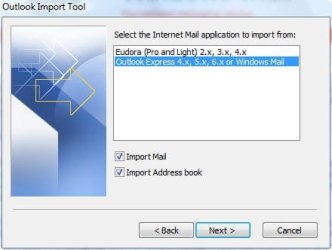
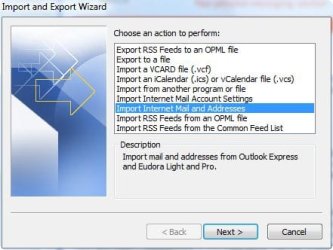
Here's what I woul try - launch Outlook and import Windows Mail messages (and contacts)
.
 

Attachments

  • b.jpg
    b.jpg
    17.7 KB · Views: 252
  • a.jpg
    a.jpg
    26.2 KB · Views: 259

My Computer

Computer type
Laptop
Computer Manufacturer/Model Number
HP Pavilion dv6-6c10us
OS
x64 (6.3.9600) Win8.1 Pro & soon dual boot x64 (6.1.7601) Win7_SP1 HomePrem
CPU
AMD A6-3420M APU with Radeon(tm) HD Graphics
Motherboard
Hewlett-Packard 1805
Memory
6.00 GB
Graphics Card(s)
AMD Radeon(TM) HD 6520G
Sound Card
(1) AMD High Definition Audio Device (2) IDT High Definiti
Monitor(s) Displays
HP W2072a 20" LCD (1600 x 900) @ 60 Hz
Screen Resolution
1366 x 768 x 32 bits (4294967296 colors) @ 60 Hz
Hard Drives
ST640LM0 00 HM641JI SATA Disk Device
Keyboard
Logitech k520 wireless KB
Mouse
Logitech m320 wireless mouse (bundled with KB)
Internet Speed
15/5 | 54 MB Wireless 'n'
Antivirus
Realtime: Defender or Avast | On-demand: Malwarebytes, ESET
Browser
IE 11 on Win8, IE 10 on win 7
Other Info
Media: [Gimp, Audacity, VLC] || Comm: [WEmail 2012, Skype] || Productivity: [OpenOffice,| Textpad] || Utils: [Sysinternals, cCleaner, Speccy, Defraggler]
@ Sammy
I always enjoyed OE in the very early days too. WM is basically the same thing with a few improvements and I like it even better. It's so blessed easy to install on 7 and only takes a few minutes, and with the new procedure it's pretty much fully automated.
As mentioned previously it's almost as quick and almost as easy to place it on 8 too for even the slightly experienced+ user, but here I agree and I prefer to use the 7 OS better at this point in time.

@vassar89
Yes the current Tutorial face and outward form has changed, although it's for the better in a few important ways. The procedure looks different than it was originally yes, but is even easier now and importantly its abilities are more encompassing. Anyway I also have Outlook installed on 7 since it came with the Office suite, but I don't even use Outlook since I prefer WM so much better 'for the way I use it'; however it's true for instance at the office where Outlook is the norm then yes Outllook serves best in that varied connective environment. Anyway, when you install Outlook and start it, it prompts you to import, etc, I don't know why you are trying to export 'out of WM' to Office where the procedure would be done the opposite via Outlook itself. Since this is specifically a WM on 7 thread though then you would be better served to post in the Outlook forum thread; having said as far as WM goes with what you've activated previously on 7 there is nothing extra you need to do with your current WM installation on 7 at all as Outlook should find what it needs just fine the way it is. good kuck
 

My Computer

Computer type
PC/Desktop
Computer Manufacturer/Model Number
..all towers built from scratch
OS
Vista/Win7/8/10/11 (x86/x64)
CPU
i7
Thanks to the two who responded so quickly. I had been hoping to re-read the tutorial and find out why I had the folder wtih "temp hide" and see if I should move it back to somewhere unhidden. Since the tutorial has changed so much, clearly I can't do that. Just was hoping I hadn't messed something up with outlook last year when I did this. Just in case anyone else searches, I am not using the Outlook import feature because I have read it marks every email as received that day. I found an import add on and am using that, it says it will preserve all the folders, emails, and attachments from .eml.
thanks again for the quick responses. I have posted other questions in the email forums but haven't gotten any responses since.
 

My Computer

OS
windows 7 home premium 64
vassar82: I don't recall any mention of a folder "temp hide" when I rewrote the tutorial, but I didn't read all 1230 comments in the original. My focus was taking the key parts and consolidating/automating them.

At any rate, the folder sounds as though it is your original MS Mail folder from a Vista machine (based on the content description). Moving or renaming it would have no effect on solving the MAPI issue and it might even mess you up more.

I wish I had thought about this before, but since you said you only need to occasionally reference the eMail in WM, then you could leave it in WM and look at it using WM. Probably a moot point now though.

I did a little research and found that the MAPI issue was never addressed in the original tut, so as Microsoft has moved well past WM, I don't think much effort will be put into solving it now.

I also saw that Outlook import "reset" the rcv'd dates - what is not clear is if this is still true today on OL 2010 / 2013. The posts/comments I read were quite old. Unfortunately I don't have OL 2010 or 2013 to test. It seems as though the "alarm" about receive dates only pertains to sent items. So I think using OL import is the way to go (or use the add-on when you provide a reference). The receive date on sent items will be incorrect, but all other data should be retained. At least that's how I read the research - only a real world test can answer that.

Could you post what add-on you found, either here or in your other threads?

And for anyone else following, I found this on the MS answer pages (it seems to be a two part solution, so read both pages if you follow the link)
hyperform said:
I had this problem. When you set sort by sent date in view all mails are displayed correct time. You must right click on arrange by in a folder and select view settings. You can find sent option by clicking sort button.
-- another user commented that didn't work for them until they did the following
tlong said:
July 23, 2011: Yeah. Doesn't work. When I switch to sent messages, the order goes by time but seems to have no regard for date. Messages from yesterday are next to messages from 2005

July 24, 2011: Turns out the problem is with conversation view. If you sort by sent date and want this to work, you have to turn off the "show as conversations" box on the view ribbon.
Probably the best explanation comes from itknowledgeexchange (even though it applies to OL 2003):
wiki said:
Answer Wiki:
We have seen users experience problems with the imported data in Outlook (OL) after completing the process of transferring e-mail message data from Outlook Express (OE) into Outlook.

The problems are most often seen as <b>incorrect, missing or misinterpreted dates on e-mail messages.</b>

Please also refer to the following Microsoft Knowledge Base and Assistance article on transferring data between OE and OL.
<a href="How to upgrade from Outlook Express to Outlook"> * OE to OL2002 or OL2003: Knowledge Base</a>;
--> broken link: office.microsoft.com/en-us/assistance/HA010943871033.aspx">Assistance
http://office.microsoft.com/en-us/o...m-outlook-express-to-outlook-HA001094387.aspx

During the import to OL, the problem arises on e-mail messages that did not originally pass through an SMTP server.

This is normally those messages that are placed directly into the 'Sent Items' folder.

The 'received date' on these messages gets set during the import procedure to the date that the transfer to OL takes place, instead of the 'received date' they originally had.

This sometimes shows up as many imported messages with the current date in Outlook with the same messages that appear with a date of 'Today' in NEO.

The export from Outlook Express: The export process from OE avoids the date problem that results from the import to OL, as described above, but the export causes the loss of all SMTP header information.

This is most commonly observed as a loss of the 'reply to' e-mail addresses associated with the affected messages. Steps to rectify the problem if it occurs:
  1. Try running a rule in Outlook Express to put all emails that are 'from you' into the Sent Items folder. This collects all the e-mails that will be affected by the missing date issue, having not gone through a server, into one folder.
  2. Then import into Outlook. This brings in all the emails properly, with the exception of the ones in the Sent Items folder, which will all have bad 'received' dates.
  3. Next, delete the Sent Items folder in Outlook.
  4. Go back to Outlook Express and Export just the Sent Items folder to Outlook. Now you have the right dates on the Sent Items, but they have lost their SMTP header information. In most cases this is not a critical problem, since you would not normally be replying to your messages that reside in your Sent Items folder.
  5. Finally, let Neo build it's catalog and all of the dates should appear correctly.
To our knowledge, from the discussion forums for Outlook, there seems to be a lack of understanding about what is going on here and that there's no clear realization of the mechanisms behind the errors.

The fact that Sent Items don't go through an SMTP server means that their 'received dates' are generated internally by Outlook Express, rather than coming from an SMTP header.

This results in the date problems once the messages arrive in Outlook for some users of NEO.

It appears as though Outlook internally uses a different date from the message when this problem is encountered but NEO only accesses the received date through the Microsoft Automation interface.

If you continually run into problems there are third party products that help with this but I have not tried any of them so I would not feel comfortable recommending one! good luck!
Since the MAPI error occurs on the WM hack, the export workaround above will not help. I did not research NEO so can't comment on that.

also see: http://support.microsoft.com/kb/291602
 

My Computer

Computer type
Laptop
Computer Manufacturer/Model Number
HP Pavilion dv6-6c10us
OS
x64 (6.3.9600) Win8.1 Pro & soon dual boot x64 (6.1.7601) Win7_SP1 HomePrem
CPU
AMD A6-3420M APU with Radeon(tm) HD Graphics
Motherboard
Hewlett-Packard 1805
Memory
6.00 GB
Graphics Card(s)
AMD Radeon(TM) HD 6520G
Sound Card
(1) AMD High Definition Audio Device (2) IDT High Definiti
Monitor(s) Displays
HP W2072a 20" LCD (1600 x 900) @ 60 Hz
Screen Resolution
1366 x 768 x 32 bits (4294967296 colors) @ 60 Hz
Hard Drives
ST640LM0 00 HM641JI SATA Disk Device
Keyboard
Logitech k520 wireless KB
Mouse
Logitech m320 wireless mouse (bundled with KB)
Internet Speed
15/5 | 54 MB Wireless 'n'
Antivirus
Realtime: Defender or Avast | On-demand: Malwarebytes, ESET
Browser
IE 11 on Win8, IE 10 on win 7
Other Info
Media: [Gimp, Audacity, VLC] || Comm: [WEmail 2012, Skype] || Productivity: [OpenOffice,| Textpad] || Utils: [Sysinternals, cCleaner, Speccy, Defraggler]
Thank you - I am not great with computers, but the instructions are so easy that I had Windows Mail within 5 minutes. Just to note that after downloading the instruction file, as requested, the rest of the instructions assume that it has downloaded to your "Downloads" file - mine went to the IE files, so I simply moved the whole file to the downloads file, and it worked great.

Many thanks
 

My Computer

OS
Windows 7 Home Premium 64 bit
Could you post what add-on you found, either here or in your other threads?

Thanks so much for all the advice. I have to say that I didn't really understand it all. In case anyone else is interested. I used the export command in WM to export all my emails with the "windows live mail" option (since the microsoft exchange option resulted in the MAPI error. In answer to your question, I used free software I downloaded from outlookfreeware.com a site I think I first found here (or it could have been from a google search). I had to download their runtime program and then a specific one for importing .eml files. It was advertised to preserve all emails, folders, and folder organization while importing into outlook. It appeared as an add on and made its own tab in outlook. It seems to have transferred the emails in their folders but didn't quite succeed in keeping the folders in their hierarchies--so I had to move some folders around and inside each other. I then removed the software. I hope that it didn't leave anything yucky on my computer. I also did the think to correct/reinstall microsoft stuff that I read about here, so WM has "disappeared" again.

I hope it is okay to post this here. I was really happy to have WM on my win7 for the last year and probably would not have switched to outlook if I hadn't gotten a smart phone and needed feature of outlook.
 

My Computer

OS
windows 7 home premium 64
Sorry endeavor, I gotta disagree big time with you on WLM. Suddenly, I came across this error which never occured with OE: http://www.sevenforums.com/browsers...pected-error-unable-delete-some-messages.html

@ Sammy
I always enjoyed OE in the very early days too. WM is basically the same thing with a few improvements and I like it even better. It's so blessed easy to install on 7 and only takes a few minutes, and with the new procedure it's pretty much fully automated.
As mentioned previously it's almost as quick and almost as easy to place it on 8 too for even the slightly experienced+ user, but here I agree and I prefer to use the 7 OS better at this point in time.
 

My Computer

Computer type
PC/Desktop
Computer Manufacturer/Model Number
Asus P6X58D-E, Lenovo
OS
Windows 7, Windows 10 Pro
CPU
Intel Core i7 930
Motherboard
Asus X58 P6X58D-E
Memory
G.SKILL F3-12800CL9T-6GBNQ 6GB DDR3 3X2GB DDR3-1600 CL 9-9-9
Graphics Card(s)
ATI Radeon HD 5700
Hard Drives
Seagate Barracuda 1TB x2 SATA3 6GB/S 7200RPM 64MB
WD 1TB SATA3
PSU
Coolermaster Silent Pro 700W Modular Power Supply
Looks like I can't import my WLM 2012 messages into Outlook 2013. Gotta love how MS products don't talk to each other.

So, I am just wondering. Is it possible that the WM installation onto Windows 7 will be able to convert the WLM 2012 messages into .dbx format? And regardless, is it maybe better to wait for MailApp instead of waiting to go through all that hassle in installing WM?
 

My Computer

Computer type
PC/Desktop
Computer Manufacturer/Model Number
Asus P6X58D-E, Lenovo
OS
Windows 7, Windows 10 Pro
CPU
Intel Core i7 930
Motherboard
Asus X58 P6X58D-E
Memory
G.SKILL F3-12800CL9T-6GBNQ 6GB DDR3 3X2GB DDR3-1600 CL 9-9-9
Graphics Card(s)
ATI Radeon HD 5700
Hard Drives
Seagate Barracuda 1TB x2 SATA3 6GB/S 7200RPM 64MB
WD 1TB SATA3
PSU
Coolermaster Silent Pro 700W Modular Power Supply
Looks like I can't import my WLM 2012 messages into Outlook 2013. Gotta love how MS products don't talk to each other.

So, I am just wondering. Is it possible that the WM installation onto Windows 7 will be able to convert the WLM 2012 messages into .dbx format? And regardless, is it maybe better to wait for MailApp instead of waiting to go through all that hassle in installing WM?
The .dbx format was last used in OE (never in WM or WLM) although the newer programs can import form the older format. Also, MS doesn't make it easy to "downgrade". So you can't generally export from a newer free program to an older one or from a paid program like Outlook to a free one. But you're first sentence doesn't sound correct since MS wants people to "upgrade" to Outlook from any of the free programs. Perhaps you need to export WLM messages into "Exchange" format and then use Outlook to import from that exported file.
 

My Computer

Computer type
PC/Desktop
Computer Manufacturer/Model Number
OQO 2+
OS
Windows 8 Pro w/MC 32-bit
CPU
Intel Atom 1.86 GHz
Motherboard
OQO 2+
Memory
2 GB
Graphics Card(s)
Intel GMA 500
Sound Card
IDT
Monitor(s) Displays
LCD
Screen Resolution
800 x 480 (portable) 1280 x 1024 (docked)
Hard Drives
64 GB SSD
PSU
9 Ah Battery (portable) or OQO Brick (docked)
Case
Shirt Pocket Sized
Cooling
Tiny Fan
Keyboard
Slide out (portable) DiNovo Edge (docked)
Mouse
Eraser head (portable) Logitech Bluetooth (docked)
Internet Speed
WWAN or 802.11G (portable) T1 (docked)
Browser
IE 10
Other Info
DVD-RW OQO Docking Station
Can someone help me get the Windows Calendar files?? I want to install them in Windows 7 to work with Windows Mail and need both the 32 bit and 64 bit files, if they are different. As you know the links don't work any more and I do not have access to any Vista machines or discs to copy them. I'd sure appreciate some help.
Thanks so much.
Ron K.
 
Last edited by a moderator:

My Computer

OS
Windows 7
Can someone help me get the Windows Calendar files?? I want to install them in Windows 7 to work with Windows Mail and need both the 32 bit and 64 bit files, if they are different. As you know the links don't work any more and I do not have access to any Vista machines or discs to copy them. I'd sure appreciate some help.
Thanks so much.
Ron K.

I just emailed you.
 
Last edited by a moderator:

My Computer

Computer type
PC/Desktop
Computer Manufacturer/Model Number
Alienware® ALX X58
OS
Win 7 Ult SP1/Win 10 Pro (all x64)
CPU
Intel® Core™ i7-975 Extreme O/C to 4.02 GHz, 8MB Cache
Motherboard
Asus® P6T Deluxe V2 X58 LGA1366
Memory
24GB Corsair Vengeance DDR3 SDRAM at 1600MHz - 6 x 4096MB
Graphics Card(s)
1792 MB NVIDIA® GeForce® GTX 295 Dual Core
Sound Card
Onboard Soundmax® High-Definition 7.1 Performance Audio
Monitor(s) Displays
Samsung XL2370 LED backlit 23" W/S 2ms response time
Screen Resolution
1920 X 1080
Hard Drives
2 x 500gb SATA II
1 x 1TB SATA II
1 external eSATA LaCie 3TB
(Non-RAID)
PSU
Alienware® 1200 Watt Multi-GPU
Case
Alienware® P2 ALX Chassis with AlienIce™ 3.0 Video Cooling
Cooling
Alienware® High-Perf. Liquid Cooling + Acoustic Dampening
Keyboard
Microsoft® Wireless Entertainment 8000 + Logitech® G15 Wired
Mouse
Microsoft® Wireless Laser 8000 + Logitech® G9 Wired
Internet Speed
1Gb/s
Antivirus
McAfee LiveSafe
Browser
Firefox - latest
Other Info
Using non-RAID on purpose as I find RAID to be too temperamental.
Now set to AHCI
Back
Top