
Windows Mail

How to Reinstate Windows Mail in Windows 7

   Warning
Microsoft no longer supports Windows Mail, aka WinMail. It's recommended you use another well known supported email client. This Tutorial is for Advanced users who importantly have the Technical Ability to make the changes, have backups of everything including your OS, and to be your own tech support for WinMail going forward. If you decide to complete this tutorial you accept the fact that you are using WinMail as-is. It might be necessary to uninstall other email clients to resolve any WinMail conflicts in some environments. Understand it's likely that new OS updates from Microsoft will break WinMail's operation, and to fix make it necessary to rerun the tutorial again to reinstate it. With those things in mind, this tutorial was written so that you can rerun it without affecting WinMail user data.
Please see this Errata (Bug List) post before you install, to be aware of the current information about known issues using WinMail within Windows 7, these issues are programmatic and in most cases cannot be resolved by this tutorial, and will never be fixed.

Having said all of that disclaimer, if you have the technical ability, and can put up with the annoying minor byproduct bugs, then like so many of us still enjoy using WinMail on Windows 7 ...ymmv!


   Tip
As of January, 2025, the instructions given here supersede all other instructions given in forthcoming older posts. Realize some of the posts that follow are over 16 years old, and many of the link pointers within have become mislinked over time, many of the files or information within them is outdated, incomplete, or superseded with more accurate information - and so be careful. However you can always be sure that the latest info from all research is incorporated into this tutorial post, and its downloads are the latest available. This post is continuously kept up-to-date, and so..
...Always refer to this Tutorial post for the very latest updated information

This is the 4th iteration of the Windows 7, WinMail tutorial.

The process of this tutorial Will Not work to reinstate WinMail on Windows 8/10 !
Windows 8/10 users please go Here


Start here
  1. Download tutorial package TutReWinMail.zip

    Download

  2. Extract the TutReWinMail.zip into your user Downloads folder
    • Note: Be sure once extracted this is the address of the ''TutReWinMail'' folder:
    • C:\Users\username\Downloads\TutReWinMail... ... (if it's not there please put it there)
  3. Navigate to your user Downloads\TutReWinMail folder to be sure the above is correct.
    • (..if you need more verbose install instructions to follow, download this WinMail Local Tutorial.zip)
    • Advanced Users can proceed below:
      (..log in for Full Access, being able to get support, remove ads, like, and even to post, etc..)
Advanced Users: ..use this easy excellent overview of the steps in the local tutorial:
  • Open an Administrator Command Prompt. (screenshot showing in Administrator mode)
  • copy/paste this line into the command prompt: cd %USERPROFILE%\Downloads\TutReWinMail\
  • Your command prompt must now be showing you are at That Same Folder Address ..which contains the tutorial files that the batch file in the next step executes programs and copies files specifically from that folder address - if it's not there the batch file will fail since it cannot find what it needs!
  • Next type in either winmail32 or win64mail <matching OS bit, to interactively process These Next Steps
  • If you've finished to the bottom as shown in last screenshot, restart your machine (sets registry)
  • Create a shortcut from WinMail.exe to your Desktop
  • Open WinMail - it may prompt you one (or both) of These Two Notices ..click yes, and okay.
  • They now should be already set, but you can manually check/set at any time These Default Settings
  • That's pretty much all there is to it, and from here you setup the rest of the Windows Mail client (aka: WinMail) as normal within its various tab menus for Accounts, Options, Layout, etc, etc, to suit your individual needs.
  • Lastly, but should be the First thing you do, is to Create A WinMail Backup (new version) ..Go to this next link and when you get there scroll down to the heading: Backup/Restore Procedures for further instructions.
   Information
See How to open an elevated Administrator Command Prompt
Important: The exact text provided by the tutorial must be entered into the Administrator Command Prompt.
Hint: to avoid typos, copy/paste the entire line containing the command into the Command Prompt window.
Also see: How to Enable Copy to Clipboard from the Windows 7 Command Prompt

Every effort has been made to make this a step-by-step process, however, it is beyond the scope of a single tutorial to provide information on every command or concept. Search the Main Tutorial Section if you need greater detail on a concept or command presented in this tutorial.


Good luck, and long live WinMail :thumbsup:


   Note
Made possible by members:
Mark (aka Mr GRiM) - provided the original tutorial
Poppa Bear - continued Mark's work within the 2nd version
endeavor - provided continuous feedback, changes, invaluable testing instrumental to tutorial operations
EKManitis - propose the batch code that made operations easier
Slartybart - updated, tested, and consolidated all of the above into the 3rd version
endeavor - reviewed, updated, tested, and incorporated all of the above into this 4th version
...and also a special thanks to All the other members who presented discovery for this project


Attachments

  • TutReWinMail.zip
    TutReWinMail.zip
    1.8 MB · Views: 4,994
  • WinMailEdit.zip
    WinMailEdit.zip
    404 bytes · Views: 6
  • Win74umsZip.zip
    Win74umsZip.zip
    404 bytes · Views: 106
  • msoe_64.zip
    msoe_64.zip
    404 bytes · Views: 1,531
  • msoe_32.zip
    msoe_32.zip
    404 bytes · Views: 1,052
  • ACP.jpg
    ACP.jpg
    11.5 KB · Views: 1,083
  • DefaultClickYes-OkayAssociation.jpg
    DefaultClickYes-OkayAssociation.jpg
    31.1 KB · Views: 899
  • ProcessingBatch.jpg
    ProcessingBatch.jpg
    109 KB · Views: 1,147
  • PasteCDCommand.jpg
    PasteCDCommand.jpg
    18.5 KB · Views: 696
  • WinMail_Local_Tutorial.zip
    WinMail_Local_Tutorial.zip
    6.1 KB · Views: 1,202
  • FolderOptionsSet.jpg
    FolderOptionsSet.jpg
    37.9 KB · Views: 695
  • WinMailAdvanceOptionsBlank.jpg
    WinMailAdvanceOptionsBlank.jpg
    138.1 KB · Views: 93
  • Win7x64AdvancedTab+FileVersions.jpg
    Win7x64AdvancedTab+FileVersions.jpg
    184.7 KB · Views: 112
  • AdvancedTabBefore&After_fixed.jpg
    AdvancedTabBefore&After_fixed.jpg
    79.1 KB · Views: 50
  • CheckManually.jpg
    CheckManually.jpg
    131.8 KB · Views: 136
  • Win10_SetDefault.jpg
    Win10_SetDefault.jpg
    31.8 KB · Views: 33
Last edited by a moderator:

My Computer

Computer type
PC/Desktop
Computer Manufacturer/Model Number
Alienware® ALX X58
OS
Win 7 Ult SP1/Win 10 Pro (all x64)
CPU
Intel® Core™ i7-975 Extreme O/C to 4.02 GHz, 8MB Cache
Motherboard
Asus® P6T Deluxe V2 X58 LGA1366
Memory
24GB Corsair Vengeance DDR3 SDRAM at 1600MHz - 6 x 4096MB
Graphics Card(s)
1792 MB NVIDIA® GeForce® GTX 295 Dual Core
Sound Card
Onboard Soundmax® High-Definition 7.1 Performance Audio
Monitor(s) Displays
Samsung XL2370 LED backlit 23" W/S 2ms response time
Screen Resolution
1920 X 1080
Hard Drives
2 x 500gb SATA II
1 x 1TB SATA II
1 external eSATA LaCie 3TB
(Non-RAID)
PSU
Alienware® 1200 Watt Multi-GPU
Case
Alienware® P2 ALX Chassis with AlienIce™ 3.0 Video Cooling
Cooling
Alienware® High-Perf. Liquid Cooling + Acoustic Dampening
Keyboard
Microsoft® Wireless Entertainment 8000 + Logitech® G15 Wired
Mouse
Microsoft® Wireless Laser 8000 + Logitech® G9 Wired
Internet Speed
1Gb/s
Antivirus
McAfee LiveSafe
Browser
Firefox - latest
Other Info
Using non-RAID on purpose as I find RAID to be too temperamental.
Now set to AHCI
Sorry endeavor, I gotta disagree big time with you on WLM. Suddenly, I came across this error which never occured with OE: http://www.sevenforums.com/browsers-mail/273453-windows-live-mail-unexpected-error-unable-delete-some-messages.html

@ Sammy
I always enjoyed OE in the very early days too. WM is basically the same thing with a few improvements and I like it even better. It's so blessed easy to install on 7 and only takes a few minutes, and with the new procedure it's pretty much fully automated.
As mentioned previously it's almost as quick and almost as easy to place it on 8 too for even the slightly experienced+ user, but here I agree and I prefer to use the 7 OS better at this point in time.


I've been away and didn't these posts Sammy, but to clarify yourself if you look again I clearly stated and was only talking about WM = Windows Mail !
...I was never talking about WLM = Windows Live Mail, which is a whole different animal of which the core of this entire thread and tutorial is not even about.
 

My Computer

Computer type
PC/Desktop
Computer Manufacturer/Model Number
..all towers built from scratch
OS
Vista/Win7/8/10/11 (x86/x64)
CPU
i7
Mail and Calendar in 7 and 8

I followed this tute to a T and got Mail and Calendar both working in Windows 7. I know some have done the same with Windows 8, which I tried to do but could not get Mail to launch in 8. I hunted all around the net and found that 8 was lacking a dll file- msidcrl30.dll. The following is what I found that makes it work in 8.
"You can install and run Windows Mail for Windows Vista on Windows 8, just like you can on Windows 7. But to get Windows mail working in Windows 8, you must have the dll file Msidcrl30.dll in order for Windows Mail to work on Windows 8. Msidcrl30.dll is included in both Windows Vista and Windows 7 but it is not included in Windows 8. So first you have to install the dll file on Windows 8 in order to get Windows Mail working.
To do this you need to go to either your Windows Vista or Windows 7 computer. Then go to your Windows/system 32 folder on C drive. In the Windows/system 32 folder look for a dll file called Msidcrl30.dll. Then copy and paste the dll file into your My Documents or My Downloads folder. And then make a new folder. Copy and paste the dll file into the new folder you have just made. Then right click with your mouse and select ‘send to zip folder’. This creates a zip installer file.
Once you have done this you must copy the Msidcrl30.dll file onto your Windows 8 computer. And then unzip the file, open the folder, and paste the dll file in Windows/system32 on Windows 8." After I did this WIndows Mail launched right off the bat.
However I cannot get Calendar to work in 8. I followed the tute for Calendar, right to a T. Alll went well up to where I was to select the Reminders file. That part seemed to work okay, but when I tried to select the configuration OS at the bottom, I got an error message saying "the specified account name is not valid." I tried it for all of the options, but none worked. I have no idea what the error message is talking about, nor where to even find the name of the mystery accout so I can remedy it.
Any ideas, anyone? I'd love to get Calendar working with Mail, but am up a tree so far.
Forgive me if I have posted this in the wrong place. One of you suggested here so here I am. :huh:
I appreciate this forum a bunch!
Ron K.
 

My Computer

OS
Windows 7
Thanks for cluing us all in on the need to create a copy of the Windows 7 Msidcrl30.dll file in the corresponding place in Windows 8 (c:/Windows/System32). I had to do a similar trick with one of the battery related files in order to fix a "battery not detected" issue in Windows 8. In that case the file (cmbatt.sys) did exist in Windows 8 but had to be replaced with the Windows 7 version. In that case it was necessary to take ownership of the file and change its security permissions in order to delete the bad Windows 8 version and replace it with the good Windows 7 version. But we need to be aware that when changing files around in the Windows/System folder, the change may be undone whenever the system detects an "unsanctioned" change. In the case of the battery file, if I do a system file check via the command prompt (sfc /scannow), the Windows 8 file version will replace the Windows 7 version and the original problem will return. This was the main reason most of us don't use Windows Mail on 7 or 8; you never know when it will revert back to not working and then you have to go back an make the changes all over again.
 

My Computer

Computer type
PC/Desktop
Computer Manufacturer/Model Number
OQO 2+
OS
Windows 8 Pro w/MC 32-bit
CPU
Intel Atom 1.86 GHz
Motherboard
OQO 2+
Memory
2 GB
Graphics Card(s)
Intel GMA 500
Sound Card
IDT
Monitor(s) Displays
LCD
Screen Resolution
800 x 480 (portable) 1280 x 1024 (docked)
Hard Drives
64 GB SSD
PSU
9 Ah Battery (portable) or OQO Brick (docked)
Case
Shirt Pocket Sized
Cooling
Tiny Fan
Keyboard
Slide out (portable) DiNovo Edge (docked)
Mouse
Eraser head (portable) Logitech Bluetooth (docked)
Internet Speed
WWAN or 802.11G (portable) T1 (docked)
Browser
IE 10
Other Info
DVD-RW OQO Docking Station
R Kelly: Yes, thank you for posting the info re: the dll file msidcrl30 (sure this is Win7 and you're post is Win8 related, but no one seems to want to take ownership of the tutorial on Win8 - for good reason - it's basically an orphaned product)

Regarding the invalid account issue, I'll take a guess that there are registry changes required to make the connection between calendar and WM. My Vista machine bit the dust a few months ago, so I don't have a reference to use for investigation (even I won't take ownership of WM on Win8).

I searched for non-MS alternatives. Seems as thogh Mozilla Thunderbird w/ Lightning add-on for Cal takes top honors. The only other decent option was Outlook and that is said with caveats - not useful on Win8 RT.

If you're looking for just calendering, Rainlendar, is well regarded, although I'm not familiar with it. I you couple that with Live Essentials mail - you might have a workable messaging platform.

Note that I'm not using Win8. I haven't used calendering since Outlook 98 and use Live Essentials Mail client.

If you find the "missing link" that ties WM and Cal on Win8, please do post what you find.
 

My Computer

Computer type
Laptop
Computer Manufacturer/Model Number
HP Pavilion dv6-6c10us
OS
x64 (6.3.9600) Win8.1 Pro & soon dual boot x64 (6.1.7601) Win7_SP1 HomePrem
CPU
AMD A6-3420M APU with Radeon(tm) HD Graphics
Motherboard
Hewlett-Packard 1805
Memory
6.00 GB
Graphics Card(s)
AMD Radeon(TM) HD 6520G
Sound Card
(1) AMD High Definition Audio Device (2) IDT High Definiti
Monitor(s) Displays
HP W2072a 20" LCD (1600 x 900) @ 60 Hz
Screen Resolution
1366 x 768 x 32 bits (4294967296 colors) @ 60 Hz
Hard Drives
ST640LM0 00 HM641JI SATA Disk Device
Keyboard
Logitech k520 wireless KB
Mouse
Logitech m320 wireless mouse (bundled with KB)
Internet Speed
15/5 | 54 MB Wireless 'n'
Antivirus
Realtime: Defender or Avast | On-demand: Malwarebytes, ESET
Browser
IE 11 on Win8, IE 10 on win 7
Other Info
Media: [Gimp, Audacity, VLC] || Comm: [WEmail 2012, Skype] || Productivity: [OpenOffice,| Textpad] || Utils: [Sysinternals, cCleaner, Speccy, Defraggler]
Yes, it is a "risk" to use Windows Mail like we do, but it sure is fun, too. YEA for us! :p That's a good thing to know about the battery file. If I ever do run across the link between WM and CAL in 8 I'll be glad to post it.
Thanks all,
Ron
 

My Computer

OS
Windows 7
New Windows Mail download

I want to thank you for the new way to get Windows Mail back.
It is so easy compared to the other way. I tried about 10 times
to get it the other way before I finally got it. Then after about a
week, Windows updates sent a file that made me lose it. Very
frustrating. I have now turned off Windows updates to stop the
problem.
 

My Computer

Computer Manufacturer/Model Number
Alienware
OS
Windows 7 Ultimate
CPU
Intel Duo core 2.66Mz
Motherboard
EVGA
Memory
4 GB
Graphics Card(s)
Nvidia GeForce
Sound Card
SoundBlaster
Monitor(s) Displays
Sony E540 21" CRT
Hard Drives
Seagate 500GB SATA
PSU
Alienware 750 Watt
Case
Alienware
Cooling
4 Fans, Heatsink
You're welcome.

I do not recommend turning off Windows Update, though. The the current tut should prevent the issue through a registry key mod.

Besides, I don't think MS is doing any maint on WM - they might have sent some files through WU back then, but I'm fairly sure that the people who built the original caught that. I'd be interested to know if there is something else that you experienced using the modified tutorial.
I want to thank you for the new way to get Windows Mail back.
It is so easy compared to the other way. I tried about 10 times to get it the other way before I finally got it. Then after about a week, Windows updates sent a file that made me lose it. Very frustrating.

I have now turned off Windows updates to stop the problem.
 

My Computer

Computer type
Laptop
Computer Manufacturer/Model Number
HP Pavilion dv6-6c10us
OS
x64 (6.3.9600) Win8.1 Pro & soon dual boot x64 (6.1.7601) Win7_SP1 HomePrem
CPU
AMD A6-3420M APU with Radeon(tm) HD Graphics
Motherboard
Hewlett-Packard 1805
Memory
6.00 GB
Graphics Card(s)
AMD Radeon(TM) HD 6520G
Sound Card
(1) AMD High Definition Audio Device (2) IDT High Definiti
Monitor(s) Displays
HP W2072a 20" LCD (1600 x 900) @ 60 Hz
Screen Resolution
1366 x 768 x 32 bits (4294967296 colors) @ 60 Hz
Hard Drives
ST640LM0 00 HM641JI SATA Disk Device
Keyboard
Logitech k520 wireless KB
Mouse
Logitech m320 wireless mouse (bundled with KB)
Internet Speed
15/5 | 54 MB Wireless 'n'
Antivirus
Realtime: Defender or Avast | On-demand: Malwarebytes, ESET
Browser
IE 11 on Win8, IE 10 on win 7
Other Info
Media: [Gimp, Audacity, VLC] || Comm: [WEmail 2012, Skype] || Productivity: [OpenOffice,| Textpad] || Utils: [Sysinternals, cCleaner, Speccy, Defraggler]
...The the current tut should prevent the issue through a registry key mod...Besides, I don't think MS is doing any maint on WM.
The recent comments were prompted by these posts:
1) http://www.sevenforums.com/tutorials/5481-windows-mail-135.html#post2278326
2) http://www.sevenforums.com/tutorials/5481-windows-mail-135.html#post2278716

1) Has the missing dll issue for Windows 8 been corrected or mentioned in the tutorial?
2) Does WM in Windows 7 or 8 still work after doing a system file check (sfc /scannow)? (I'm not sure how a registry key mod can affect the sfc test.)
 

My Computer

Computer type
PC/Desktop
Computer Manufacturer/Model Number
OQO 2+
OS
Windows 8 Pro w/MC 32-bit
CPU
Intel Atom 1.86 GHz
Motherboard
OQO 2+
Memory
2 GB
Graphics Card(s)
Intel GMA 500
Sound Card
IDT
Monitor(s) Displays
LCD
Screen Resolution
800 x 480 (portable) 1280 x 1024 (docked)
Hard Drives
64 GB SSD
PSU
9 Ah Battery (portable) or OQO Brick (docked)
Case
Shirt Pocket Sized
Cooling
Tiny Fan
Keyboard
Slide out (portable) DiNovo Edge (docked)
Mouse
Eraser head (portable) Logitech Bluetooth (docked)
Internet Speed
WWAN or 802.11G (portable) T1 (docked)
Browser
IE 10
Other Info
DVD-RW OQO Docking Station
1) Have you run the tutorial Ron?
2) Did SFC break WM on Win7?

I spent a good deal of time writing and testing the tut. Endeavor tested it. About 5 other people have tested it and no one has reported issues. On the contrary, the two most recent posts stated the tut worked!

With regards to Win8 - it doesn't apply to this tutorial. RKelly needed somplece to write about his Win8 / WM experience and that's great, it will help others.

If you have issues that need to be addressed specific to Win7 and this tutorial, I've always said I will update the tut. It is not within the scope of this tut or this forum to answer all questions about all platforms (i.e. Win8) or about all related aplets (i.e. Calendar).

If you tried the tut or took the time to look at the files in the download, the questions you ask would be moot.
 
Last edited:

My Computer

Computer type
Laptop
Computer Manufacturer/Model Number
HP Pavilion dv6-6c10us
OS
x64 (6.3.9600) Win8.1 Pro & soon dual boot x64 (6.1.7601) Win7_SP1 HomePrem
CPU
AMD A6-3420M APU with Radeon(tm) HD Graphics
Motherboard
Hewlett-Packard 1805
Memory
6.00 GB
Graphics Card(s)
AMD Radeon(TM) HD 6520G
Sound Card
(1) AMD High Definition Audio Device (2) IDT High Definiti
Monitor(s) Displays
HP W2072a 20" LCD (1600 x 900) @ 60 Hz
Screen Resolution
1366 x 768 x 32 bits (4294967296 colors) @ 60 Hz
Hard Drives
ST640LM0 00 HM641JI SATA Disk Device
Keyboard
Logitech k520 wireless KB
Mouse
Logitech m320 wireless mouse (bundled with KB)
Internet Speed
15/5 | 54 MB Wireless 'n'
Antivirus
Realtime: Defender or Avast | On-demand: Malwarebytes, ESET
Browser
IE 11 on Win8, IE 10 on win 7
Other Info
Media: [Gimp, Audacity, VLC] || Comm: [WEmail 2012, Skype] || Productivity: [OpenOffice,| Textpad] || Utils: [Sysinternals, cCleaner, Speccy, Defraggler]
You might want to post this on the Calendar tutorial. Someone over there might have a better idea of the internals.
..... After I did this WIndows Mail launched right off the bat.

However I cannot get Calendar to work in 8. I followed the tute for Calendar, right to a T. Alll went well up to where I was to select the Reminders file. That part seemed to work okay, but when I tried to select the configuration OS at the bottom, I got an error message saying "the specified account name is not valid."

I tried it for all of the options, but none worked. I have no idea what the error message is talking about, nor where to even find the name of the mystery accout so I can remedy it.

Ron K.
 

My Computer

Computer type
Laptop
Computer Manufacturer/Model Number
HP Pavilion dv6-6c10us
OS
x64 (6.3.9600) Win8.1 Pro & soon dual boot x64 (6.1.7601) Win7_SP1 HomePrem
CPU
AMD A6-3420M APU with Radeon(tm) HD Graphics
Motherboard
Hewlett-Packard 1805
Memory
6.00 GB
Graphics Card(s)
AMD Radeon(TM) HD 6520G
Sound Card
(1) AMD High Definition Audio Device (2) IDT High Definiti
Monitor(s) Displays
HP W2072a 20" LCD (1600 x 900) @ 60 Hz
Screen Resolution
1366 x 768 x 32 bits (4294967296 colors) @ 60 Hz
Hard Drives
ST640LM0 00 HM641JI SATA Disk Device
Keyboard
Logitech k520 wireless KB
Mouse
Logitech m320 wireless mouse (bundled with KB)
Internet Speed
15/5 | 54 MB Wireless 'n'
Antivirus
Realtime: Defender or Avast | On-demand: Malwarebytes, ESET
Browser
IE 11 on Win8, IE 10 on win 7
Other Info
Media: [Gimp, Audacity, VLC] || Comm: [WEmail 2012, Skype] || Productivity: [OpenOffice,| Textpad] || Utils: [Sysinternals, cCleaner, Speccy, Defraggler]
SlartyBart- the tut worked great. I didn't have any problems at all with it. I was just trying to do the same thing with 8 to see how it would work. That's when I ran across the info about the missing dll file. So far I haven't been able to get Calendar to work in 8, but that's really no big deal. It all works fine in 7 and that's the main thing.
RK
 

My Computer

OS
Windows 7
RKelly: Thanks again, it helps everyone understand. Have you tried asking a question in the Calendar tutorial? You might get better feedback there.
SlartyBart- the tut worked great. I didn't have any problems at all with it. I was just trying to do the same thing with 8 to see how it would work. That's when I ran across the info about the missing dll file. So far I haven't been able to get Calendar to work in 8, but that's really no big deal. It all works fine in 7 and that's the main thing.
RK
 

My Computer

Computer type
Laptop
Computer Manufacturer/Model Number
HP Pavilion dv6-6c10us
OS
x64 (6.3.9600) Win8.1 Pro & soon dual boot x64 (6.1.7601) Win7_SP1 HomePrem
CPU
AMD A6-3420M APU with Radeon(tm) HD Graphics
Motherboard
Hewlett-Packard 1805
Memory
6.00 GB
Graphics Card(s)
AMD Radeon(TM) HD 6520G
Sound Card
(1) AMD High Definition Audio Device (2) IDT High Definiti
Monitor(s) Displays
HP W2072a 20" LCD (1600 x 900) @ 60 Hz
Screen Resolution
1366 x 768 x 32 bits (4294967296 colors) @ 60 Hz
Hard Drives
ST640LM0 00 HM641JI SATA Disk Device
Keyboard
Logitech k520 wireless KB
Mouse
Logitech m320 wireless mouse (bundled with KB)
Internet Speed
15/5 | 54 MB Wireless 'n'
Antivirus
Realtime: Defender or Avast | On-demand: Malwarebytes, ESET
Browser
IE 11 on Win8, IE 10 on win 7
Other Info
Media: [Gimp, Audacity, VLC] || Comm: [WEmail 2012, Skype] || Productivity: [OpenOffice,| Textpad] || Utils: [Sysinternals, cCleaner, Speccy, Defraggler]
[...] I know some have done the same with Windows 8, which I tried to do but could not get Mail to launch in 8. I hunted all around the net and found that 8 was lacking a dll file- msidcrl30.dll. The following is what I found that makes it work in 8. [...]

Many of us have it installed on Win8 already.
All the information that you posted was covered last year on post 1262
and before that on post 1181 with the links where to go to get the information to do it.

..or just go directly to the WinMail on Win8 thread at the EightForums Here


...
 
Last edited:

My Computer

Computer type
PC/Desktop
Computer Manufacturer/Model Number
..all towers built from scratch
OS
Vista/Win7/8/10/11 (x86/x64)
CPU
i7
I have not run through the entire thread so possibly what I am saying could have been mentioned previously.
Although I had no problem installing WM on W7Pro(64bit) with the tut as of 2012-05-19 (page I saved *.mht and *.pdf at the time), thanks to SlartyBart, it did not resolve the "time stamp" issue I have with *.eml files on W7, in that their "modified date" is changed when using the W7 search or browsing a Folder (DIR) with Windows Explorer (WE) to "current date". I had just hoped that by installing WM changes would be made to the registry that would prevent this annoying feature of W7 from happening. It is not very conducive to data integrity in the OS and after searching for solutions during which I found some very lame :cry: reasons on one of the MS-Answer Forums, why the OS is behaving this way. Has this issue been raised in this thread?

I am still using OE6 on a WXP-Pro-SP3 VMware machine on my W7Pro(64bit) box for my e-Mails side-stepping W7-Updates from removing the WM, bypassing the lack of W7 drivers for our office printer and have also stopped saving e-Mails to Hard drive (HDD) in the *.eml format. The latter dose not resolve the date issue on the W7Box for existing files, some of which are +10years old. The date issue of course dose not happen if I search or browse from within the WXP-VM-Box on the same HDD!
Of course I use a work around in the form of a "live" backup but it is time consuming and laborious when syncing as the *.eml files that have had their dates changed, due to a search or browsing, will show up as newer versions of the same file.

The eventual migration from OE to OL (Outlook) and Schedule to OL is a dark cloud :sick: on the horizon that I still have to face in order to come in line with the rest of the office and my smartphone (iPhone).
I know that this is not directly pertaining to installing WM on W7 but at least you have feedback that the tut is great and works fine and the issue relates to WM (OE) on W7.
Looking forward to some constructive input.
 
Last edited:

My Computer

Computer Manufacturer/Model Number
Hewlett-Packard ProBook 4520s LapTop (Notebook)
OS
Win7Pro(HP)(x64)
CPU
Intel(R) Core(TM) i5 CPU M 460 @ 2534Mhz, 2Core(s), 4Logic
Motherboard
HP 1413 KBC Ver. 57.31; BIOS: HP 68AZZ Ver. F.0B 09/16/2010
Memory
3888MB
Graphics Card(s)
Intel(R) HD Graphics [Display adapter]
Sound Card
IDT High Definition Audio
Monitor(s) Displays
Generic PnP Monitor (15.7"vis,)
Hard Drives
319.96GB C:120GB D:(Data)180GB
ST9320423AS [Hard drive] (320.07 GB) -- drive 0, s/n 5VH6NG5Z, rev 0006HPM1, SMART Status: Healthy
Case
Enclosure Type: Notebook
Renamo3: I apprciate your feedback and sympathisize with you on the eMail variations (shortcomings). You're using OE in an XP Virtual Machine on Win7 an you have WM reinstated on Win7.

I'm not sure that I understand the rest of the issue, though. There are a lot of concerns expressed and I'm want to be certain anything suggested fits your needs.

OE stores the eMail in .dbx fles, extracting (exporting/saving as eml) creates a new file, hence a new date. I'll need your help testing this as two of my machines bit the dust over the past year. My memory is good, but limited.

Does using Win7 search with eMail filters help as a workaround?
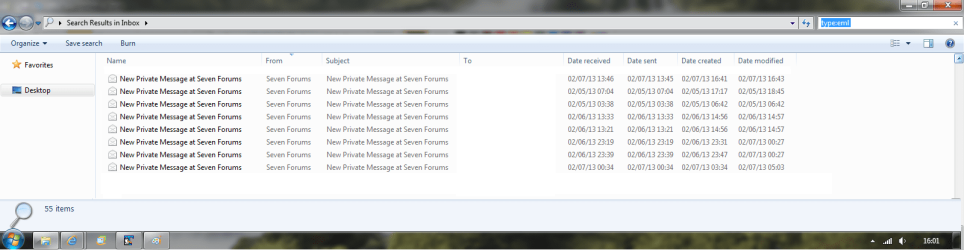
In the search box enter:
type:eml

then arrange the resulting window to include the following column headings
date sent
date received
date created
date modified
To
From
Subject

This is a sticky wicket, there are a number of factors affecting the issue - the OS and eMail client(s)

Before I suggest anything, I'll need to reasrch; and sine my older machines bit the dust, I'll need your help
This will take some time and I'm not sure there is a good answer, but if you're will, so am I
Let's start with: What import / export options exist in both OE and WM.
If we can go from OE .dbx format to .eml format and preserve the internal dates - great.

The file creation/modification dates cannot be altered unless you use a third party utility (on Unix it's touch). I used one utility a very long time ago (Win98 perhaps), so more research is needed. I really don't like using third party solutions unless there is no native Windows feature and.... and it is absolutely necessary. The user assumes all risks of mucking with file timestamps.

Your intermediate goal is to migrate from OE to WM reinstated on Win7, and then eventually to Outlook - correct? I'd like to suggest going from OE to OL without WM in between. There are a few bumps from OE to WM and a few more from WM to OL.

Some references you might want to review:
Import messages into Windows Mail from Outlook Express (don't worry about it saying Vista... Vista or Win7 is more correct, but MS didn't include WM in Win7, so they didn't change it)

Import your messages or account from Outlook Express to Outlook - Outlook - Office.com
 

Attachments

  • search_eml.png
    search_eml.png
    52.2 KB · Views: 162

My Computer

Computer type
Laptop
Computer Manufacturer/Model Number
HP Pavilion dv6-6c10us
OS
x64 (6.3.9600) Win8.1 Pro & soon dual boot x64 (6.1.7601) Win7_SP1 HomePrem
CPU
AMD A6-3420M APU with Radeon(tm) HD Graphics
Motherboard
Hewlett-Packard 1805
Memory
6.00 GB
Graphics Card(s)
AMD Radeon(TM) HD 6520G
Sound Card
(1) AMD High Definition Audio Device (2) IDT High Definiti
Monitor(s) Displays
HP W2072a 20" LCD (1600 x 900) @ 60 Hz
Screen Resolution
1366 x 768 x 32 bits (4294967296 colors) @ 60 Hz
Hard Drives
ST640LM0 00 HM641JI SATA Disk Device
Keyboard
Logitech k520 wireless KB
Mouse
Logitech m320 wireless mouse (bundled with KB)
Internet Speed
15/5 | 54 MB Wireless 'n'
Antivirus
Realtime: Defender or Avast | On-demand: Malwarebytes, ESET
Browser
IE 11 on Win8, IE 10 on win 7
Other Info
Media: [Gimp, Audacity, VLC] || Comm: [WEmail 2012, Skype] || Productivity: [OpenOffice,| Textpad] || Utils: [Sysinternals, cCleaner, Speccy, Defraggler]
Slartybart: Confirmative to your first statement
"using OE6 in a WXP VM(VMware) on W7 and WM reinstated on W7".

I am not speaking of saving an e-Mail to disk from OE6 *.dbx (database) in *.eml format now as that will obviously use the date the file is saved to HDD as "modified date". Windows 7 changes the "modified date" of already existing *.eml files to the "current date" when using the search, browsing a folder or hovering over the file with the mouse.
Say you have a file mark.eml with a modified date 2001-10-26 on your HDD and you execute any of the functions mentioned above the W7 OS will change the "modified date" to 2013-02-10.

The W7 search with e-Mail filters, "type:eml" compound the issue, especially if you do the search from root e.g. D:\ as it will change all *.eml files "modified date" to the current date on that drive. Do not try this on files for which you need to maintain the date integrity, if you do not have a back up on a machine with an older OS (pre Vista).

The date issue is a very sticky one and has been around since WVista was put on the market. Microsoft is very much aware of it and has probably hoped that it would go away with users using new mail-clients and in line with their general thinking on upgrading and end of life policies. Of course the other thing is how many users really keep e-Mail files for years and how many check the date integrity of their files on HDD.

Nevertheless I am more than happy to help and expound this issue. I too will need some time to review my notes on the issue as it is a while since I last worked on it.

I have not come across a problem to go: "from OE .dbx format to .eml format and preserve the internal dates",
even with very old *.dbx files that I have used as backups, removed from OE6 Folder and Index and then opened them up again in OE6 at a much later stage by creating a *.dbx folder in OE6 with the same name as my backup, then copying an arbitrary mail to the new folder, closing OE6, overwriting the *.dbx with my backup and reopening OE6 to access e-Mails in the backup *.dbx. This method also works for WE and keeps the "live data" in the program down to a reasonable size especially if saving the "Deleted Items" *.dbx from time to time.

I also "really don't like using third party solutions unless there is no native Windows feature" or "Hack".
The issue at hand is that W7 as OS is "mucking with file timestamps"

No I have no intentions of "migrate from OE to WM reinstated on Windows 7". As stated I only installed WM in the hope of resolving the "timestamps" issue on the W7 box. I will use the OL on the WXP-WM to migrate from OE6 to OL03k and then use the *.pst file to migrate to the W7 box, just as you suggested. This will only happen once I have figured out how to migrate my extensive *.wab Address Book to OL-Contacts without loosing the *.wab internal folder structure and found a resolution to the office printer driver on W7.

Back to the issue at hand: *.eml FileType arbitrary "timestamp" modification in Windows 7
I have found my notes, which are in a *.doc file with embedded local and INet links impossible to extract all to this post so I have uploaded it as an attachment. Take your time going through it and have fun.
References to machines mentioned in the file are:
"SERVER" = W2kSVR, ASUS P2B-DS, 1MB-RAM, 72GB-SCSI-HDDs (WinMirrors) C:\=OS and D:\=Data
"DUNE1" = W7Pro(64bit)-SP1, HP-ProBook-4520s, 4MB-RAM, 300GB-HDD C:\=OS and D:\=Data
"JUPITER" = VMware-Workstation(7.1.1 build-282343) WXP-Pro-SP3, 2MB-RAM, 40GB-VHDD C:\=OS (no Data Drive)
 

Attachments

My Computer

Computer Manufacturer/Model Number
Hewlett-Packard ProBook 4520s LapTop (Notebook)
OS
Win7Pro(HP)(x64)
CPU
Intel(R) Core(TM) i5 CPU M 460 @ 2534Mhz, 2Core(s), 4Logic
Motherboard
HP 1413 KBC Ver. 57.31; BIOS: HP 68AZZ Ver. F.0B 09/16/2010
Memory
3888MB
Graphics Card(s)
Intel(R) HD Graphics [Display adapter]
Sound Card
IDT High Definition Audio
Monitor(s) Displays
Generic PnP Monitor (15.7"vis,)
Hard Drives
319.96GB C:120GB D:(Data)180GB
ST9320423AS [Hard drive] (320.07 GB) -- drive 0, s/n 5VH6NG5Z, rev 0006HPM1, SMART Status: Healthy
Case
Enclosure Type: Notebook
@Renamo: Great information, thanks.

To keep the focus of this tutorial on reinstating WM on Win7 and the issue your machine has is OE / Win7, please open a new thread in Browsers & Mail - Windows 7 Support Forums. You'll get more people looking at a solution. Post a link to the new thread here and I'll follow it.

In the meantime, I'll read the doc you attached.

I'll double check this, but I don't believe that I've ever seen Windows changing the dates of exisitng files unless something does actually affect the date. Each machine is different so who knows?
..... Windows 7 changes the "modified date" of already existing *.eml files to the "current date" when using the search, browsing a folder or hovering over the file with the mouse.
Say you have a file mark.eml with a modified date 2001-10-26 on your HDD and you execute any of the functions mentioned above the W7 OS will change the "modified date" to 2013-02-10.
I know I've never seen Windows search change dates - that's very odd that it happens on your machine. It would be helpful to see a screen shot of the issue you describe. Show both examples, I guess one from OE (correct date) and one from Windows search using the coulmns I suggested (dates differ).

If you take a look at the attached search in post# 1361, you'll see all of the dates are different (mostly). These are existing .eml files on my machine.

There definitely is a change to the way dates are presented in Win7 (not sure about Vista) - I believe the generic Date field is used to simplify date presentation (sent / received / created /modified).

Please make a backup to avoid the issue you describe
..... The W7 search with e-Mail filters, "type:eml" compound the issue, especially if you do the search from root e.g. D:\ as it will change all *.eml files "modified date" to the current date on that drive. Do not try this on files for which you need to maintain the date integrity, if you do not have a back up on a machine with an older OS (pre Vista).
Ok, I'm confused... I must not understand the issue - I thought this was the issue. Open a new thread, I'll read your doc.
..... I have not come across a problem to go: "from OE .dbx format to .eml format and preserve the internal dates", even with very old *.dbx files ...
..... This method also works for WE and keeps the "live data" in the program down to a reasonable size especially if saving the "Deleted Items" *.dbx from time to time.
..... The issue at hand is that W7 as OS is "mucking with file timestamps"

No I have no intentions of "migrate from OE to WM reinstated on Windows 7". As stated I only installed WM in the hope of resolving the "timestamps" issue on the W7 box. I will use the OL on the WXP-WM to migrate from OE6 to OL03k and then use the *.pst file to migrate to the W7 box, just as you suggested.
OE and OL store contacts differently, you won't be able to preserve the "wab" format. You can always keep the wab on file, it's just that OL won't actually use it. You'll need to import the contacts to OL. Again, this will take some testing, but I think you'll still be able to open the WAB, just not in OL.

I'm not certain, but I seem to recall that some contacts fields (group/category) just can't get migrated to OL. Same is true for WE. It is a pain, but a one time manual "reorg" solves that.
..... migrate my extensive *.wab Address Book to OL-Contacts without loosing the *.wab internal folder structure and found a resolution to the office printer driver on W7.
 

My Computer

Computer type
Laptop
Computer Manufacturer/Model Number
HP Pavilion dv6-6c10us
OS
x64 (6.3.9600) Win8.1 Pro & soon dual boot x64 (6.1.7601) Win7_SP1 HomePrem
CPU
AMD A6-3420M APU with Radeon(tm) HD Graphics
Motherboard
Hewlett-Packard 1805
Memory
6.00 GB
Graphics Card(s)
AMD Radeon(TM) HD 6520G
Sound Card
(1) AMD High Definition Audio Device (2) IDT High Definiti
Monitor(s) Displays
HP W2072a 20" LCD (1600 x 900) @ 60 Hz
Screen Resolution
1366 x 768 x 32 bits (4294967296 colors) @ 60 Hz
Hard Drives
ST640LM0 00 HM641JI SATA Disk Device
Keyboard
Logitech k520 wireless KB
Mouse
Logitech m320 wireless mouse (bundled with KB)
Internet Speed
15/5 | 54 MB Wireless 'n'
Antivirus
Realtime: Defender or Avast | On-demand: Malwarebytes, ESET
Browser
IE 11 on Win8, IE 10 on win 7
Other Info
Media: [Gimp, Audacity, VLC] || Comm: [WEmail 2012, Skype] || Productivity: [OpenOffice,| Textpad] || Utils: [Sysinternals, cCleaner, Speccy, Defraggler]
@Slartybart: Sorry I confused you. After you have read my file and followed some of the links in the file a lot will make more sense. I am certainly not the only one that has experienced the *.eml FileType arbitrary "timestamp" modification in Windows 7 issue and Microsoft has confirmed that it happens and given a reason for it too.

You can always keep the wab on file, it's just that OL won't actually use it. You'll need to import the contacts to OL. Again, this will take some testing, but I think you'll still be able to open the WAB,

A warning on opening a *wab file in Windows 7. The entire content is captured by Windows 7 "Contacts". Can become a real mess.
 

My Computer

Computer Manufacturer/Model Number
Hewlett-Packard ProBook 4520s LapTop (Notebook)
OS
Win7Pro(HP)(x64)
CPU
Intel(R) Core(TM) i5 CPU M 460 @ 2534Mhz, 2Core(s), 4Logic
Motherboard
HP 1413 KBC Ver. 57.31; BIOS: HP 68AZZ Ver. F.0B 09/16/2010
Memory
3888MB
Graphics Card(s)
Intel(R) HD Graphics [Display adapter]
Sound Card
IDT High Definition Audio
Monitor(s) Displays
Generic PnP Monitor (15.7"vis,)
Hard Drives
319.96GB C:120GB D:(Data)180GB
ST9320423AS [Hard drive] (320.07 GB) -- drive 0, s/n 5VH6NG5Z, rev 0006HPM1, SMART Status: Healthy
Case
Enclosure Type: Notebook
@Renamo: Yeah, that's quite a book. After reading it, I don't think I'm qualified to help as I think itlies in the Server-Client arena.
EDIT: A quick look in Technet took me here. This is only a reference, not a suggested solution. It certainly sounds similar to the issue you're describing. The HOTfix is quite old, another reason I ask you be be absolutely clear on the versions.
DO NOT apply the hotifx in the link.

At this point, I simply guessing.
Please open a new thread as I previously asked and I'll request help from other members.

Please make sure that all of the versions and names of Servers and clients match. I read the doc and saw
DUNE1 Win7Pro(x64) and JUGASVR W08R2SVR
but when I went back to your post 1362, I saw
"SERVER" = W2kSVR
"DUNE1" = W7Pro(64bit)-SP1
I'm asking so that no one suggests updating software that you already update Win7 to Win7-SP1. I think you recorded the process you tried very well.

When you open a new thread, please indicate the registry changes you've made to which OS. I'll check for a new thread as this is not within the scope of this tutorial.

Thanks.
 
Last edited:

My Computer

Computer type
Laptop
Computer Manufacturer/Model Number
HP Pavilion dv6-6c10us
OS
x64 (6.3.9600) Win8.1 Pro & soon dual boot x64 (6.1.7601) Win7_SP1 HomePrem
CPU
AMD A6-3420M APU with Radeon(tm) HD Graphics
Motherboard
Hewlett-Packard 1805
Memory
6.00 GB
Graphics Card(s)
AMD Radeon(TM) HD 6520G
Sound Card
(1) AMD High Definition Audio Device (2) IDT High Definiti
Monitor(s) Displays
HP W2072a 20" LCD (1600 x 900) @ 60 Hz
Screen Resolution
1366 x 768 x 32 bits (4294967296 colors) @ 60 Hz
Hard Drives
ST640LM0 00 HM641JI SATA Disk Device
Keyboard
Logitech k520 wireless KB
Mouse
Logitech m320 wireless mouse (bundled with KB)
Internet Speed
15/5 | 54 MB Wireless 'n'
Antivirus
Realtime: Defender or Avast | On-demand: Malwarebytes, ESET
Browser
IE 11 on Win8, IE 10 on win 7
Other Info
Media: [Gimp, Audacity, VLC] || Comm: [WEmail 2012, Skype] || Productivity: [OpenOffice,| Textpad] || Utils: [Sysinternals, cCleaner, Speccy, Defraggler]
Back
Top








