Windows Mail

How to Reinstate Windows Mail in Windows 7

   Warning
Microsoft no longer supports Windows Mail, aka WinMail. It's recommended you use another well known supported email client. This Tutorial is for Advanced users who importantly have the Technical Ability to make the changes, have backups of everything including your OS, and to be your own tech support for WinMail going forward. If you decide to complete this tutorial you accept the fact that you are using WinMail as-is. It might be necessary to uninstall other email clients to resolve any WinMail conflicts in some environments. Understand it's likely that new OS updates from Microsoft will break WinMail's operation, and to fix make it necessary to rerun the tutorial again to reinstate it. With those things in mind, this tutorial was written so that you can rerun it without affecting WinMail user data.
Please see this Errata (Bug List) post before you install, to be aware of the current information about known issues using WinMail within Windows 7, these issues are programmatic and in most cases cannot be resolved by this tutorial, and will never be fixed.

Having said all of that disclaimer, if you have the technical ability, and can put up with the annoying minor byproduct bugs, then like so many of us still enjoy using WinMail on Windows 7 ...ymmv!


   Tip
As of January, 2025, the instructions given here supersede all other instructions given in forthcoming older posts. Realize some of the posts that follow are over 16 years old, and many of the link pointers within have become mislinked over time, many of the files or information within them is outdated, incomplete, or superseded with more accurate information - and so be careful. However you can always be sure that the latest info from all research is incorporated into this tutorial post, and its downloads are the latest available. This post is continuously kept up-to-date, and so..
...Always refer to this Tutorial post for the very latest updated information

This is the 4th iteration of the Windows 7, WinMail tutorial.

The process of this tutorial Will Not work to reinstate WinMail on Windows 8/10 !
Windows 8/10 users please go Here


Start here
  1. Download tutorial package TutReWinMail.zip

    Download

  2. Extract the TutReWinMail.zip into your user Downloads folder
    • Note: Be sure once extracted this is the address of the ''TutReWinMail'' folder:
    • C:\Users\username\Downloads\TutReWinMail... ... (if it's not there please put it there)
  3. Navigate to your user Downloads\TutReWinMail folder to be sure the above is correct.
    • (..if you need more verbose install instructions to follow, download this WinMail Local Tutorial.zip)
    • Advanced Users can proceed below:
      (..log in for Full Access, being able to get support, remove ads, like, and even to post, etc..)
Advanced Users: ..use this easy excellent overview of the steps in the local tutorial:
  • Open an Administrator Command Prompt. (screenshot showing in Administrator mode)
  • copy/paste this line into the command prompt: cd %USERPROFILE%\Downloads\TutReWinMail\
  • Your command prompt must now be showing you are at That Same Folder Address ..which contains the tutorial files that the batch file in the next step executes programs and copies files specifically from that folder address - if it's not there the batch file will fail since it cannot find what it needs!
  • Next type in either winmail32 or win64mail <matching OS bit, to interactively process These Next Steps
  • If you've finished to the bottom as shown in last screenshot, restart your machine (sets registry)
  • Create a shortcut from WinMail.exe to your Desktop
  • Open WinMail - it may prompt you one (or both) of These Two Notices ..click yes, and okay.
  • They now should be already set, but you can manually check/set at any time These Default Settings
  • That's pretty much all there is to it, and from here you setup the rest of the Windows Mail client (aka: WinMail) as normal within its various tab menus for Accounts, Options, Layout, etc, etc, to suit your individual needs.
  • Lastly, but should be the First thing you do, is to Create A WinMail Backup (new version) ..Go to this next link and when you get there scroll down to the heading: Backup/Restore Procedures for further instructions.
   Information
See How to open an elevated Administrator Command Prompt
Important: The exact text provided by the tutorial must be entered into the Administrator Command Prompt.
Hint: to avoid typos, copy/paste the entire line containing the command into the Command Prompt window.
Also see: How to Enable Copy to Clipboard from the Windows 7 Command Prompt

Every effort has been made to make this a step-by-step process, however, it is beyond the scope of a single tutorial to provide information on every command or concept. Search the Main Tutorial Section if you need greater detail on a concept or command presented in this tutorial.


Good luck, and long live WinMail :thumbsup:


   Note
Made possible by members:
Mark (aka Mr GRiM) - provided the original tutorial
Poppa Bear - continued Mark's work within the 2nd version
endeavor - provided continuous feedback, changes, invaluable testing instrumental to tutorial operations
EKManitis - propose the batch code that made operations easier
Slartybart - updated, tested, and consolidated all of the above into the 3rd version
endeavor - reviewed, updated, tested, and incorporated all of the above into this 4th version
...and also a special thanks to All the other members who presented discovery for this project


Attachments

  • TutReWinMail.zip
    TutReWinMail.zip
    1.8 MB · Views: 4,994
  • msoe_64.zip
    msoe_64.zip
    404 bytes · Views: 1,531
  • WinMailEdit.zip
    WinMailEdit.zip
    404 bytes · Views: 6
  • Win74umsZip.zip
    Win74umsZip.zip
    404 bytes · Views: 106
  • msoe_32.zip
    msoe_32.zip
    404 bytes · Views: 1,052
  • ACP.jpg
    ACP.jpg
    11.5 KB · Views: 1,083
  • DefaultClickYes-OkayAssociation.jpg
    DefaultClickYes-OkayAssociation.jpg
    31.1 KB · Views: 899
  • ProcessingBatch.jpg
    ProcessingBatch.jpg
    109 KB · Views: 1,147
  • PasteCDCommand.jpg
    PasteCDCommand.jpg
    18.5 KB · Views: 696
  • WinMail_Local_Tutorial.zip
    WinMail_Local_Tutorial.zip
    6.1 KB · Views: 1,202
  • FolderOptionsSet.jpg
    FolderOptionsSet.jpg
    37.9 KB · Views: 695
  • WinMailAdvanceOptionsBlank.jpg
    WinMailAdvanceOptionsBlank.jpg
    138.1 KB · Views: 93
  • Win7x64AdvancedTab+FileVersions.jpg
    Win7x64AdvancedTab+FileVersions.jpg
    184.7 KB · Views: 112
  • AdvancedTabBefore&After_fixed.jpg
    AdvancedTabBefore&After_fixed.jpg
    79.1 KB · Views: 50
  • CheckManually.jpg
    CheckManually.jpg
    131.8 KB · Views: 136
  • Win10_SetDefault.jpg
    Win10_SetDefault.jpg
    31.8 KB · Views: 33
Last edited by a moderator:
Hi LeelaG, and thanks!

No Leela I'm sorry, but the spam filter and junk mail folder workings will never be resolved.

There are a few other things that will never be resolved either, and most likely as time goes on that list 'may' grow, and so enjoy what we have while you can :geek:

The fact that WM works at all on Windows 7, and Windows 8, is a blessing, and so appreciate it!

Long Live Windows Mail, aka, Outlook Express!
 
Last edited:

My Computer

Computer type
PC/Desktop
Computer Manufacturer/Model Number
..all towers built from scratch
OS
Vista/Win7/8/10/11 (x86/x64)
CPU
i7
Thanks for quick reply - at least now I know I can quit trying.... it was starting to make me crazy :confused:
Yes, I am THRILLED to have the rest of WinMail alive & well on Win7!! :D
 

My Computer

Computer type
PC/Desktop
OS
Win7 64 bit, Win Vista Ultimate 32 bit, Win XP Pro
Leela, just an fyi, the only limited way to use it is to try what Ex-Brit spoke about a few years ago.
His post is Here
But besides that, I've always recommended to just turn it off.
I've never used the junk e-mail feature in any way whatsoever though.
Many have tried different ways over the years, but have never fully succeeded.
 

My Computer

Computer type
PC/Desktop
Computer Manufacturer/Model Number
..all towers built from scratch
OS
Vista/Win7/8/10/11 (x86/x64)
CPU
i7
Lots of interesting info at that link 'Endeavor' - Thank You!

For now, from within Win Mail, I've gone to Tools --> Junk Email Options, and set it at Safe List Only, then on the Safe Senders Tab, I checked both *Trust Email from my Contacts & *Add people I Email to my Safe List.

This seems to work pretty well, then as any emails come in that go into Junk that shouldn't, I right click --> Junk Email Options --> Add Sender to Safe Senders List. Initially a lot of good emails went to Junk, but it improves over time. :)
 

My Computer

Computer type
PC/Desktop
OS
Win7 64 bit, Win Vista Ultimate 32 bit, Win XP Pro
The computer technician replaced a screen and motherboard on my six month old computer. He could not get windows 7 running so ordered me a new c hard drive incase data was lost, he then replaced the C drive and reinstalled windows. I swaped over the C drives because someone said all the old data would still be there. It appears to contain the same data as the new C drive.
There is back up data on the second E hard drive. I have reinstalled windows mail but I am desperate to retrieve all my old emails could any suggest if they might be accessable from the E drive or the old C drive somewhere or indeed anywhere in my computer? Thank You
 

My Computer

OS
windows 7 64 bit
The computer technician replaced a screen and motherboard on my six month old computer. He could not get windows 7 running so ordered me a new c hard drive incase data was lost, he then replaced the C drive and reinstalled windows. I swaped over the C drives because someone said all the old data would still be there. It appears to contain the same data as the new C drive.
There is back up data on the second E hard drive. I have reinstalled windows mail but I am desperate to retrieve all my old emails could any suggest if they might be accessable from the E drive or the old C drive somewhere or indeed anywhere in my computer? Thank You

If you have access to your old C:\ (I think you said E:\) partition then yes you can, but there's variables and I'm not sure how industrious you are and the variables you face. If I was there with my hands on your keyboard and previous working partition I could lift them out in a few minutes.

First though I suggest you copy your previous WM store folder to a US stick or something similar, and even make a copy of that, this way no matter what you do you'll be sure to have the original mail store to draw from.

The particular folder on that old drive that contains all your mail is... and so copy the whole folder of:
(just substitute "C:\" to what letter of partition it's on depending on how you're looking at it)

C:\Users\Win7\AppData\Local\Microsoft\Windows Mail

On my computers because they are all working clones of each other I dictate that all my different
"account{xxxxxxxx-xxxx-xxxx-xxxx-xxxxxxxxxxxx}.oeaccount"
#'s within that folder are the same so that I can just copy that entire Windows Mail folder above from one computer to the next and all my folder structures and mail are available identical to each other instantly, But, because yours is a re-install then surly all those accounts #'s will be different and so you cannot do it the same way... sorry, there are still ways but it's appropriate for me to keep you and your data store safe if your not a maverick, and so..
I guess here that's where for you, go to the top tab of
File> Import> Messages...
...and toggle in pointing it to your previous store folder on your USB stick, or your original location. This may be the safest way for you to do. You could pick up you other listings this way too.

Everything you do be sure you have a backup plan though, if you use a backup imaging program is Excellent; if you don't then use the built in Restore Point. All backup plans are your best friend.
 

My Computer

Computer type
PC/Desktop
Computer Manufacturer/Model Number
..all towers built from scratch
OS
Vista/Win7/8/10/11 (x86/x64)
CPU
i7
As you can gather i'm easily confused. I searched the E drive and new C drive but cannot find the folder. I don't understand why the old C drive hard disk is the same as the new one I assume due to the reinstall of windows.

I have a windows image backup from the 7/4/2013 can I use this to reinstall all the programs and files. I have saved all the files from that backup to an external hardrive but I cannot find any emails.

And would I have to delete the new windows 7 install on the current C drive partition before I did this, I now have a windows CD (the technician provided) I didn't have before if that would help me.

Sorry if i'm in the wrong thread or asking dumb questions or your answer should be obvious to me.

Thanks
 

My Computer

OS
windows 7 64 bit
As you can gather i'm easily confused. I searched the E drive and new C drive but cannot find the folder. I don't understand why the old C drive hard disk is the same as the new one I assume due to the reinstall of windows.

I have a windows image backup from the 7/4/2013 can I use this to reinstall all the programs and files. I have saved all the files from that backup to an external hardrive but I cannot find any emails.

And would I have to delete the new windows 7 install on the current C drive partition before I did this, I now have a windows CD (the technician provided) I didn't have before if that would help me.

Sorry if i'm in the wrong thread or asking dumb questions or your answer should be obvious to me.

Thanks

Dear Janmor,
If I had my hands on your keyboard then it would be a matter of a few minutes to figure it out, but by your questions back to me, tells me that I'm not sure you should be doing any of this by yourself, and I don't want to be responsible if you wreck havoc with your OS again by mistake.
My reply I thought was plain and I apologize if you don't understand my meanings to help you.

My new response and advice to your questions are, no, and so do not proceed.
I want to help and for you to succeed, but perhaps someone else can help you with more time and patience.
These procedures are easy enough, but are for average+ to more advanced users only.
 

My Computer

Computer type
PC/Desktop
Computer Manufacturer/Model Number
..all towers built from scratch
OS
Vista/Win7/8/10/11 (x86/x64)
CPU
i7
I found the email folder eventually via the backup and restore search for folders and saved it to external drive. I went into the boot menu and tried to change settings to start from cd last night (so I could have all my software and programs reinstalled) that was a disaster. Computer crashed big time.

Anyway tried again today eventually F12 let me start via the windows cd in repair mode, then went to the image back-up of 7/4/2013 and amazingly all the software ect back in the computer. More good luck than good management obviously.

In my defence I am blond, but thank you kindly for all your help and I will check the system image settings for the future.

Thanks again.
 

My Computer

OS
windows 7 64 bit
I found the email folder eventually via the backup and restore search for folders and saved it to external drive. I went into the boot menu and tried to change settings to start from cd last night (so I could have all my software and programs reinstalled) that was a disaster. Computer crashed big time.

Anyway tried again today eventually F12 let me start via the windows cd in repair mode, then went to the image back-up of 7/4/2013 and amazingly all the software ect back in the computer. More good luck than good management obviously.

In my defence I am blond, but thank you kindly for all your help and I will check the system image settings for the future.

Thanks again.

Dear Janmor,
I did say No to what you were asking in your previous post - but I see you did it anyway!
My concern was, that since your Dell technician reinstalled the OS and so the decision was to start brand new fresh, but then you wanted to erase what he did and go back to what you had before which really he should of did in the first place instead of reinstalling the OS...but then again there is something to be said for reinstalling and starting from scratch 'if' your current and/or recent backup software/system environment was too corrupted over too many instances to recover from - all of which were unknowns..to me anyway.

Anyway in the end, I have to give you props for being fearless even though I'm not sure how much you understood what you were doing, or risking. I personally did not want you to break your system again of which you did anyway! I would of not forgave myself ...but somehow miraculously your recovered from it yourself. In some ways it seems you understand more than you give yourself credit for.

Well honestly I am very glad you have your system back to the way you want and I assume you have all your emails?

If you were to have kept your new OS installation that your Dell tech did, then to get your emails back you would of simply used your import function as I outlined previously pointing its function too that backup folder that I gave you, and it would of imported your emails automatically. Having said that though, if you have a known good partition image backup from a previous date, then by all means that trumps everything.

All the best, sincerely...!
 

My Computer

Computer type
PC/Desktop
Computer Manufacturer/Model Number
..all towers built from scratch
OS
Vista/Win7/8/10/11 (x86/x64)
CPU
i7
windows mail

I followed the instructions...but when I went into the registry I found no eml auto file under classes, just eml. all else failed, my machine locks up and have to reset after doing other instructions
 

My Computer

Computer type
PC/Desktop
OS
Windows 7 Home Premium 64bit.
CPU
i5
Motherboard
asus
Memory
8g
Hard Drives
500g
Antivirus
avast
Browser
ie fox
once again.....it simply didn't work...what's up?
 

My Computer

Computer type
PC/Desktop
OS
Windows 7 Home Premium 64bit.
CPU
i5
Motherboard
asus
Memory
8g
Hard Drives
500g
Antivirus
avast
Browser
ie fox
once again.....it simply didn't work...what's up?
You need to take a breath and describe starting from when things were working fine and what you did (more detail than "follow instructions"). Also, what do you mean by "lock up" starting with booting up from a powered off state?
 

My Computer

Computer type
PC/Desktop
Computer Manufacturer/Model Number
OQO 2+
OS
Windows 8 Pro w/MC 32-bit
CPU
Intel Atom 1.86 GHz
Motherboard
OQO 2+
Memory
2 GB
Graphics Card(s)
Intel GMA 500
Sound Card
IDT
Monitor(s) Displays
LCD
Screen Resolution
800 x 480 (portable) 1280 x 1024 (docked)
Hard Drives
64 GB SSD
PSU
9 Ah Battery (portable) or OQO Brick (docked)
Case
Shirt Pocket Sized
Cooling
Tiny Fan
Keyboard
Slide out (portable) DiNovo Edge (docked)
Mouse
Eraser head (portable) Logitech Bluetooth (docked)
Internet Speed
WWAN or 802.11G (portable) T1 (docked)
Browser
IE 10
Other Info
DVD-RW OQO Docking Station
Windows 7 doesn't have a "reset" to click. Maybe you mean "restart". Try shutdown, remove power, restore power, and let it boot up. What happens then?
 

My Computer

Computer type
PC/Desktop
Computer Manufacturer/Model Number
OQO 2+
OS
Windows 8 Pro w/MC 32-bit
CPU
Intel Atom 1.86 GHz
Motherboard
OQO 2+
Memory
2 GB
Graphics Card(s)
Intel GMA 500
Sound Card
IDT
Monitor(s) Displays
LCD
Screen Resolution
800 x 480 (portable) 1280 x 1024 (docked)
Hard Drives
64 GB SSD
PSU
9 Ah Battery (portable) or OQO Brick (docked)
Case
Shirt Pocket Sized
Cooling
Tiny Fan
Keyboard
Slide out (portable) DiNovo Edge (docked)
Mouse
Eraser head (portable) Logitech Bluetooth (docked)
Internet Speed
WWAN or 802.11G (portable) T1 (docked)
Browser
IE 10
Other Info
DVD-RW OQO Docking Station
that's the reset button on the computer, nothing else works at that point
 

My Computer

Computer type
PC/Desktop
OS
Windows 7 Home Premium 64bit.
CPU
i5
Motherboard
asus
Memory
8g
Hard Drives
500g
Antivirus
avast
Browser
ie fox
this is the one that just failed
http://www.sevenforums.com/tutorials/5481-windows-mail.html
what always happens is I will get a permanent hourglass after clicking the shortcut. after I reset it goes back to normal
As you know, the tutorial is not supported by Microsoft and it's hard to trouble shoot a "lock up" problem that happens when you click on a shortcut to Windows Mail. That should not happen if there was nothing wrong with your hardware and software to begin with. I'd delete the shortcut and go back to using a supported version of mail. See if your system works fine that way, as supported by Microsoft and the manufacturer.

You should have a plan for what to do if your hard drive goes bad and your system won't boot. That includes regular backups of your important data and some sort of install media that should have come with the PC. Should you ever have a need or desire to do that, the next step will be a lengthy process of doing all the important Windows Updates and perhaps Windows Security Essentials (instead of Avast). If you dislike the supported Windows Live Mail, you can always try the Tutorial before installing a supported mail program at that time.
 

My Computer

Computer type
PC/Desktop
Computer Manufacturer/Model Number
OQO 2+
OS
Windows 8 Pro w/MC 32-bit
CPU
Intel Atom 1.86 GHz
Motherboard
OQO 2+
Memory
2 GB
Graphics Card(s)
Intel GMA 500
Sound Card
IDT
Monitor(s) Displays
LCD
Screen Resolution
800 x 480 (portable) 1280 x 1024 (docked)
Hard Drives
64 GB SSD
PSU
9 Ah Battery (portable) or OQO Brick (docked)
Case
Shirt Pocket Sized
Cooling
Tiny Fan
Keyboard
Slide out (portable) DiNovo Edge (docked)
Mouse
Eraser head (portable) Logitech Bluetooth (docked)
Internet Speed
WWAN or 802.11G (portable) T1 (docked)
Browser
IE 10
Other Info
DVD-RW OQO Docking Station
I followed the instructions...but when I went into the registry I found no eml auto file under classes, just eml. all else failed, my machine locks up and have to reset after doing other instructions

No where in the instructions does it ask you to go into the registry and verify what you're asking, which doesn't make sense anyway.
Rest assured that all necessary registration information needed for the process is taken care of automatically.

once again.....it simply didn't work...what's up?
What's up?
Create a proper effort and respect into your post and you may get a better response.
Your first post is incomplete and undecipherable,
Your second post is impatiently disrespectful really.
Roncerr asking you to take a breath is quite polite, I'll try and be that patient.

this is the one that just failed
http://www.sevenforums.com/tutorials/5481-windows-mail.html

what always happens is I will get a permanent hourglass after clicking the shortcut. after I reset it goes back to normal

The procedure if followed exactly is foolproof for the average+ user.

If you specifically follow the directions given on the "ReWinMail_tutorial.html" that you get when unzipping the Win74umsZip.zip into it's proper location in the Downloads folder, and then reading/following that ReWinMail_tutorial.html process exactly starting from # 2. and executing the steps from within that Downloads folder to reinstate WM - is foolproof 'if' you follow the directions properly, and takes no more than five minutes.

The fact that it's hanging on you is exactly because you haven't done the process correctly and so WM cannot start in its uncompleted stage and so hangs, but when you follow the "ReWinMail_tutorial.html" directions exactly, all necessary changes are applied, and it Will Work, every time.
 

My Computer

Computer type
PC/Desktop
Computer Manufacturer/Model Number
..all towers built from scratch
OS
Vista/Win7/8/10/11 (x86/x64)
CPU
i7
Thanks endeavor, sorry it took me sooo long to reply. (see post #1378 at page 138)

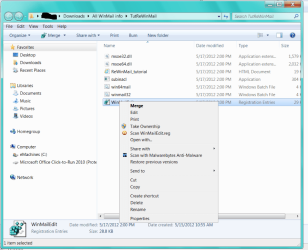
Are you saying that 'Merge' will stop my loss of WM should I ever run SFC or that's a way to get it back? As for your other method, something about "reg code" , I'm completely lost there.

If I do the Merge, do I just click on that word? Sorry, don't recall ever doing it before :o.
 

Attachments

  • Do I just click on Merge to prevent SFC from messing up WM.PNG
    Do I just click on Merge to prevent SFC from messing up WM.PNG
    62.9 KB · Views: 180

My Computer

Computer type
PC/Desktop
Computer Manufacturer/Model Number
emachines
OS
Microsoft Windows 7 Home Premium 64-bit 7601 Multiprocessor Free Service Pack 1
CPU
AMD Athlon(tm) II X2 220 Processor
Motherboard
eMachines EL1358G
Memory
3.00 GB
Graphics Card(s)
NVIDIA GeForce 6150SE nForce 430
Sound Card
Realtek High Definition Audio
Screen Resolution
1280 x 1024 x 32 bits (4294967296 colors) @ 60 Hz
Hard Drives
(1) WDC WD10 EADX-22TDHB0 SCSI Disk Device (2) Generic- Multi-Card USB Device
Keyboard
came with PC
Mouse
came with PC
Antivirus
Avast
Browser
IE 9
Other Info
don't know how to get info for the other 5 areas
Thanks endeavor, sorry it took me sooo long to reply. (see post #1378 at page 138)

Are you saying that 'Merge' will stop my loss of WM should I ever run SFC or that's a way to get it back? As for your other method, something about "reg code" , I'm completely lost there.

If I do the Merge, do I just click on that word? Sorry, don't recall ever doing it before :o.

Hi Grits,

Yes.
The answers and reasonings are still all the same as I have told you in that Previous Post.

In your case since you've previously run the tutorial already then you can just merge that reg to set those two simple registry entries back - but they were there! ..and so something you did removed them is all, and there are No MS Updates ''beyond SP1'' as of yet that will remove them so I'm not sure what you did. fwiw, when your first installed the tutorial though that WinMailEdit.reg was merged automatically.

In that post I gave you three choices to add those two registry entries back which prevents SFC from breaking WinMail, and your screenshot is showing me you have chosen the 'second' way to fix - if that's the easiest for you; and so as your screenshot shows you right clicking on the WinMailEdit.reg, and so just click Merge yes, that's it, as long as your security settings allow the simple task of merging the reg file.


...
 
Last edited:

My Computer

Computer type
PC/Desktop
Computer Manufacturer/Model Number
..all towers built from scratch
OS
Vista/Win7/8/10/11 (x86/x64)
CPU
i7
Back
Top