Windows Mail

How to Reinstate Windows Mail in Windows 7

   Warning
Microsoft no longer supports Windows Mail, aka WinMail. It's recommended you use another well known supported email client. This Tutorial is for Advanced users who importantly have the Technical Ability to make the changes, have backups of everything including your OS, and to be your own tech support for WinMail going forward. If you decide to complete this tutorial you accept the fact that you are using WinMail as-is. It might be necessary to uninstall other email clients to resolve any WinMail conflicts in some environments. Understand it's likely that new OS updates from Microsoft will break WinMail's operation, and to fix make it necessary to rerun the tutorial again to reinstate it. With those things in mind, this tutorial was written so that you can rerun it without affecting WinMail user data.
Please see this Errata (Bug List) post before you install, to be aware of the current information about known issues using WinMail within Windows 7, these issues are programmatic and in most cases cannot be resolved by this tutorial, and will never be fixed.

Having said all of that disclaimer, if you have the technical ability, and can put up with the annoying minor byproduct bugs, then like so many of us still enjoy using WinMail on Windows 7 ...ymmv!


   Tip
As of January, 2025, the instructions given here supersede all other instructions given in forthcoming older posts. Realize some of the posts that follow are over 16 years old, and many of the link pointers within have become mislinked over time, many of the files or information within them is outdated, incomplete, or superseded with more accurate information - and so be careful. However you can always be sure that the latest info from all research is incorporated into this tutorial post, and its downloads are the latest available. This post is continuously kept up-to-date, and so..
...Always refer to this Tutorial post for the very latest updated information

This is the 4th iteration of the Windows 7, WinMail tutorial.

The process of this tutorial Will Not work to reinstate WinMail on Windows 8/10 !
Windows 8/10 users please go Here


Start here
  1. Download tutorial package TutReWinMail.zip

    Download

  2. Extract the TutReWinMail.zip into your user Downloads folder
    • Note: Be sure once extracted this is the address of the ''TutReWinMail'' folder:
    • C:\Users\username\Downloads\TutReWinMail... ... (if it's not there please put it there)
  3. Navigate to your user Downloads\TutReWinMail folder to be sure the above is correct.
    • (..if you need more verbose install instructions to follow, download this WinMail Local Tutorial.zip)
    • Advanced Users can proceed below:
      (..log in for Full Access, being able to get support, remove ads, like, and even to post, etc..)
Advanced Users: ..use this easy excellent overview of the steps in the local tutorial:
  • Open an Administrator Command Prompt. (screenshot showing in Administrator mode)
  • copy/paste this line into the command prompt: cd %USERPROFILE%\Downloads\TutReWinMail\
  • Your command prompt must now be showing you are at That Same Folder Address ..which contains the tutorial files that the batch file in the next step executes programs and copies files specifically from that folder address - if it's not there the batch file will fail since it cannot find what it needs!
  • Next type in either winmail32 or win64mail <matching OS bit, to interactively process These Next Steps
  • If you've finished to the bottom as shown in last screenshot, restart your machine (sets registry)
  • Create a shortcut from WinMail.exe to your Desktop
  • Open WinMail - it may prompt you one (or both) of These Two Notices ..click yes, and okay.
  • They now should be already set, but you can manually check/set at any time These Default Settings
  • That's pretty much all there is to it, and from here you setup the rest of the Windows Mail client (aka: WinMail) as normal within its various tab menus for Accounts, Options, Layout, etc, etc, to suit your individual needs.
  • Lastly, but should be the First thing you do, is to Create A WinMail Backup (new version) ..Go to this next link and when you get there scroll down to the heading: Backup/Restore Procedures for further instructions.
   Information
See How to open an elevated Administrator Command Prompt
Important: The exact text provided by the tutorial must be entered into the Administrator Command Prompt.
Hint: to avoid typos, copy/paste the entire line containing the command into the Command Prompt window.
Also see: How to Enable Copy to Clipboard from the Windows 7 Command Prompt

Every effort has been made to make this a step-by-step process, however, it is beyond the scope of a single tutorial to provide information on every command or concept. Search the Main Tutorial Section if you need greater detail on a concept or command presented in this tutorial.


Good luck, and long live WinMail :thumbsup:


   Note
Made possible by members:
Mark (aka Mr GRiM) - provided the original tutorial
Poppa Bear - continued Mark's work within the 2nd version
endeavor - provided continuous feedback, changes, invaluable testing instrumental to tutorial operations
EKManitis - propose the batch code that made operations easier
Slartybart - updated, tested, and consolidated all of the above into the 3rd version
endeavor - reviewed, updated, tested, and incorporated all of the above into this 4th version
...and also a special thanks to All the other members who presented discovery for this project


Attachments

  • TutReWinMail.zip
    TutReWinMail.zip
    1.8 MB · Views: 4,994
  • Win74umsZip.zip
    Win74umsZip.zip
    404 bytes · Views: 106
  • msoe_32.zip
    msoe_32.zip
    404 bytes · Views: 1,052
  • msoe_64.zip
    msoe_64.zip
    404 bytes · Views: 1,531
  • WinMailEdit.zip
    WinMailEdit.zip
    404 bytes · Views: 6
  • ACP.jpg
    ACP.jpg
    11.5 KB · Views: 1,083
  • DefaultClickYes-OkayAssociation.jpg
    DefaultClickYes-OkayAssociation.jpg
    31.1 KB · Views: 899
  • ProcessingBatch.jpg
    ProcessingBatch.jpg
    109 KB · Views: 1,147
  • PasteCDCommand.jpg
    PasteCDCommand.jpg
    18.5 KB · Views: 696
  • WinMail_Local_Tutorial.zip
    WinMail_Local_Tutorial.zip
    6.1 KB · Views: 1,202
  • FolderOptionsSet.jpg
    FolderOptionsSet.jpg
    37.9 KB · Views: 695
  • WinMailAdvanceOptionsBlank.jpg
    WinMailAdvanceOptionsBlank.jpg
    138.1 KB · Views: 93
  • Win7x64AdvancedTab+FileVersions.jpg
    Win7x64AdvancedTab+FileVersions.jpg
    184.7 KB · Views: 112
  • AdvancedTabBefore&After_fixed.jpg
    AdvancedTabBefore&After_fixed.jpg
    79.1 KB · Views: 50
  • CheckManually.jpg
    CheckManually.jpg
    131.8 KB · Views: 136
  • Win10_SetDefault.jpg
    Win10_SetDefault.jpg
    31.8 KB · Views: 33
Last edited by a moderator:
Trust me on this. Ports for mail servers are fairly standard. Some add an additional port to circumvent know issues, usually associated with AV programs.

These are the settings Comcast require:
Incoming server: mail.comcast.net
Requires a secure connection (SSL)
Port: 995 (ticking SSL automatically changes the port to 995... but please verify it)

Outgoing server: smtp.comcast.net
Requires a secure connection (SSL)
Requires authentication
Port: 465 (must be changed manually)
The port 587 page you linked an alternative port to circumvent known issues. To be honest with you, I'm disappointed in Comcast. I could not find the information in one place so I had to cobble together the information from a few pages.

Understand that the configurations I provided above are industry standard and they are documented on Comcast. I just can't send you to a Comcast page that shows WinMail and Comcast mail servers. Things have changed and Comcast has not kept up with those changes - shame on them.

Most mail servers use secure connections (so does Comcast) and the ports that service those connections differ from non-SSL ports. You can see this by ticking and unticking SSL

Incoming port
SSL -> 995
STD -> 110

Outgoing port
SSL -> 465 or 587 (there is more than one, that's why you have to enter the port number manually)
STD - > 25

Just make sure that when you're done ticking/unticking that the ports are set correctly.

The error msg you posted says incoming 110 (SSL) which is just wrong! Why it ever works is a guess that the server tries and tries until it finds one that works. It shouldn't do that, it should always reject the connection.

If you still get the error after reconfiguring Winmail (at least one of the four accounts with the issue) then check your AV pgm - is it scanning mail? Try temporarily disabling that feature and test. AV mail scanning is not necessary. If any bug got on your system, then it will also pass the outbound test in a mail scan (same application scans files as mail). I always disable or uninstall AV mail scanning.

A while back, Avast tagged outgoing eMail it scanned with a promotional banner Scanned with Avast. I'm not sure if Avast still does that, but no application should ever use my eMail to promote itself.

Anyway.... that's more than enough to chew on.

Bill
.
 

My Computer

Computer type
Laptop
Computer Manufacturer/Model Number
HP Pavilion dv6-6c10us
OS
x64 (6.3.9600) Win8.1 Pro & soon dual boot x64 (6.1.7601) Win7_SP1 HomePrem
CPU
AMD A6-3420M APU with Radeon(tm) HD Graphics
Motherboard
Hewlett-Packard 1805
Memory
6.00 GB
Graphics Card(s)
AMD Radeon(TM) HD 6520G
Sound Card
(1) AMD High Definition Audio Device (2) IDT High Definiti
Monitor(s) Displays
HP W2072a 20" LCD (1600 x 900) @ 60 Hz
Screen Resolution
1366 x 768 x 32 bits (4294967296 colors) @ 60 Hz
Hard Drives
ST640LM0 00 HM641JI SATA Disk Device
Keyboard
Logitech k520 wireless KB
Mouse
Logitech m320 wireless mouse (bundled with KB)
Internet Speed
15/5 | 54 MB Wireless 'n'
Antivirus
Realtime: Defender or Avast | On-demand: Malwarebytes, ESET
Browser
IE 11 on Win8, IE 10 on win 7
Other Info
Media: [Gimp, Audacity, VLC] || Comm: [WEmail 2012, Skype] || Productivity: [OpenOffice,| Textpad] || Utils: [Sysinternals, cCleaner, Speccy, Defraggler]
Bill,
I used the settings that you suggested.
Same thing... After sleep it chokes on first account and others work fine. I Send/Receive again and all 4 work fine.

In the window that opens when checking for mail says "Securing", after about 30 seconds I get the error message and other 3 accounts work fine.


Your server has unexpectedly terminated the connection. Possible causes for this include server problems, network problems, or a long period of inactivity. Account: 'AlohaNow', Server: 'mail.comcast.net', Protocol: POP3, Port: 995, Secure(SSL): Yes, Error Number: 0x800CCC0F
 

My Computer

Computer type
PC/Desktop
Computer Manufacturer/Model Number
Hp p6608f
OS
Windows 7 Home Premium 64
CPU
Intel(R) Core(TM) i3 CPU
Memory
8.00 GB
Graphics Card(s)
ATI Radeon HD 4600 Series
Sound Card
(1) ATI High Definition Audio Device (2) Realtek High Defi
Monitor(s) Displays
one Asus VW266H one Samsung T260HD
Screen Resolution
1920 x 1200
Hard Drives
ST3750528AS
Other Info
BIOS Date: 04/09/10 10:04:52 Ver: 5.28
Hi Endeavor; Actually I got the SFC thing taken care of quite some time ago.
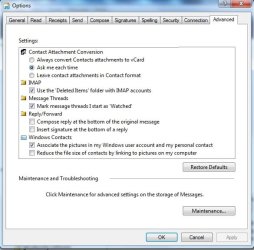
If you click on Tools/Options/Advanced tab, that's where the "Settings" box is. There is nothing listed there. On the one I set up for my widow friend, it has several options listed there.
I haven't had a chance to copy the dll files from hers yet, to see if one of those might be the reason for the blank "Settings" box.
I've attached the screen shot of the box so you can see what I am talking about. Or at least I hope I did. :)
YEA for guys like you who are so helpful so much of the time.

Okay I see what you're saying now.
Not that it's it, but are you sure you ran the latest Tutorial on Page 1? ...do it again, not that it's it or will solve the problem directly, but I just need to know you did it! ..humor me and do it again k, it's not just about SFC.

Anyway that screens information is contained in the msoeres.dll.mui driven by the MSOERES.dll & registry, however we do not change those files or registry in any way with what we do, those are stock with Win7 and so you should be fine there if you have not changed out any other files besides the one that the Tutorial does which is only the msoe.dll. fwiw, your files version numbers and dates should look like these screenshots that we were talking about in another thread Here
The msoeres.dll.mui is inside the en-US folder there. If you haven't touched those files from stock then they should be fine though.

Let me think about it for a bit...
I'm sure you clicked that "Restore Defaults" button on your screenshot there many times already and it did nothing right?

That settings screen is suppose to look like this screenshot:
 

Attachments

  • Settings.jpg
    Settings.jpg
    44.4 KB · Views: 560

My Computer

Computer type
PC/Desktop
Computer Manufacturer/Model Number
..all towers built from scratch
OS
Vista/Win7/8/10/11 (x86/x64)
CPU
i7
@DonZ: Do me a favor and post screen shots of the account information, just the server and advanced tabs, plus the settings on "My server requires authentication"

Yep, I'd like to see all 7 accounts or is it 4 accounts. I might have added the 4 + 3 to get 7.

Sorry about this, but you'll have to edit each General tab screenshot to remove for eMail username - you never want to post that information on a public forum. Might as well preview all screenshots just in case there's personal information there. You can use paint to select and delete or just color over the info.

You'll need to identify them somehow - easiest is to post them in an order of your preference.
Just so that I can reference a screen shot set and you know which account it is, in case I see something.

Or we could do this one account at a time - that might be easier. The thing is all accounts have to be verified.

While I'm asking you to do stuff, could you fill in your system specs? I should have asked, what AV pgm do you have on your system and does it scan eMail?

See: http://www.sevenforums.com/tutorials/180324-system-info-see-your-system-specs.html
  • In the System Manufacturer/Model Number field, manually type Desktop or Laptop adding it to the information already in the field.
  • Specify Custom Build as the manufacturer if it is not an OEM machine.
  • The tool does not fill in this information but it is very important if someone has to research drivers or hardware for your machine.
Log on to Sevenforums (SF) and let the tool fill in you System specs on your SF profile.

Full instructions are in the tutorial. It's a simple process and it makes that information readily available on your posts. You don't have to retype the information in any thread.

Click here to view your system specs on SevenForums.

Click on My System Specs in the lower left of any post by any member to see what is presented about their machine.

Thanks
 

My Computer

Computer type
Laptop
Computer Manufacturer/Model Number
HP Pavilion dv6-6c10us
OS
x64 (6.3.9600) Win8.1 Pro & soon dual boot x64 (6.1.7601) Win7_SP1 HomePrem
CPU
AMD A6-3420M APU with Radeon(tm) HD Graphics
Motherboard
Hewlett-Packard 1805
Memory
6.00 GB
Graphics Card(s)
AMD Radeon(TM) HD 6520G
Sound Card
(1) AMD High Definition Audio Device (2) IDT High Definiti
Monitor(s) Displays
HP W2072a 20" LCD (1600 x 900) @ 60 Hz
Screen Resolution
1366 x 768 x 32 bits (4294967296 colors) @ 60 Hz
Hard Drives
ST640LM0 00 HM641JI SATA Disk Device
Keyboard
Logitech k520 wireless KB
Mouse
Logitech m320 wireless mouse (bundled with KB)
Internet Speed
15/5 | 54 MB Wireless 'n'
Antivirus
Realtime: Defender or Avast | On-demand: Malwarebytes, ESET
Browser
IE 11 on Win8, IE 10 on win 7
Other Info
Media: [Gimp, Audacity, VLC] || Comm: [WEmail 2012, Skype] || Productivity: [OpenOffice,| Textpad] || Utils: [Sysinternals, cCleaner, Speccy, Defraggler]
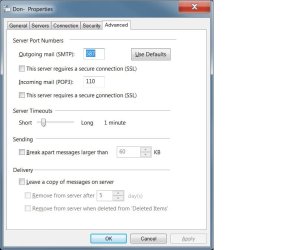
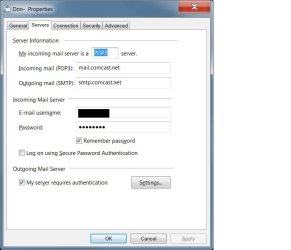
Here are two accounts. Both have different settings. No matter which settings are used, if it's the first email account it will fail coming out of sleep.
The remaining 3 accounts have identical settings as the Don- account, all Comcast..

I have free Avast, and just disabled outgoing mail.

Bill, the problem is not a big deal at all, and very simple to deal with, and hardly worth the effort.

Don
 

Attachments

  • advanced 2.jpg
    advanced 2.jpg
    42.7 KB · Views: 236
  • serv 2.jpg
    serv 2.jpg
    39.9 KB · Views: 250
Last edited:

My Computer

Computer type
PC/Desktop
Computer Manufacturer/Model Number
Hp p6608f
OS
Windows 7 Home Premium 64
CPU
Intel(R) Core(TM) i3 CPU
Memory
8.00 GB
Graphics Card(s)
ATI Radeon HD 4600 Series
Sound Card
(1) ATI High Definition Audio Device (2) Realtek High Defi
Monitor(s) Displays
one Asus VW266H one Samsung T260HD
Screen Resolution
1920 x 1200
Hard Drives
ST3750528AS
Other Info
BIOS Date: 04/09/10 10:04:52 Ver: 5.28
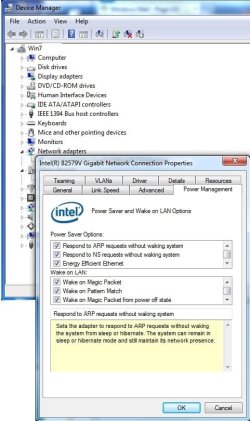
I suppose it's not out of the question that your Network drivers are having a yawn when your system comes out of sleep and it takes a moment for them to initialize. You can look at those settings via Device Manager and under Network Adapters.. for instance below here's a screenshot of mine, but again I don't use sleep so mine are set however they were default. You could even try updating them if available, for the heck of it. Always backup first.
I still recommend WinMail turned off, when sleeping:sleep:
 

Attachments

  • DM-NA.jpg
    DM-NA.jpg
    59.6 KB · Views: 226

My Computer

Computer type
PC/Desktop
Computer Manufacturer/Model Number
..all towers built from scratch
OS
Vista/Win7/8/10/11 (x86/x64)
CPU
i7
@DonZ: Ok, if you're happy the way it works, I certainly won't force the issue.

Other issues might crop up in the future because of the settings and I was just trying to ward them off before they occur.

I strongly recommend changing all accounts to the values recommended by Comcast (post 1552) and leaving Avast Mail scan off (or uninstall the mail shield). The choice is yours of course.

Bill
.
 
Last edited:

My Computer

Computer type
Laptop
Computer Manufacturer/Model Number
HP Pavilion dv6-6c10us
OS
x64 (6.3.9600) Win8.1 Pro & soon dual boot x64 (6.1.7601) Win7_SP1 HomePrem
CPU
AMD A6-3420M APU with Radeon(tm) HD Graphics
Motherboard
Hewlett-Packard 1805
Memory
6.00 GB
Graphics Card(s)
AMD Radeon(TM) HD 6520G
Sound Card
(1) AMD High Definition Audio Device (2) IDT High Definiti
Monitor(s) Displays
HP W2072a 20" LCD (1600 x 900) @ 60 Hz
Screen Resolution
1366 x 768 x 32 bits (4294967296 colors) @ 60 Hz
Hard Drives
ST640LM0 00 HM641JI SATA Disk Device
Keyboard
Logitech k520 wireless KB
Mouse
Logitech m320 wireless mouse (bundled with KB)
Internet Speed
15/5 | 54 MB Wireless 'n'
Antivirus
Realtime: Defender or Avast | On-demand: Malwarebytes, ESET
Browser
IE 11 on Win8, IE 10 on win 7
Other Info
Media: [Gimp, Audacity, VLC] || Comm: [WEmail 2012, Skype] || Productivity: [OpenOffice,| Textpad] || Utils: [Sysinternals, cCleaner, Speccy, Defraggler]
.....
Anyway that screens information is contained in the msoeres.dll.mui driven by the MSOERES.dll & registry, however we do not change those files or registry in any way with what we do, those are stock with Win7 and so you should be fine there if you have not changed out any other files besides the one that the Tutorial does which is only the msoe.dll. fwiw, your files version numbers and dates should look like these screenshots that we were talking about in another thread Here
The msoeres.dll.mui is inside the en-US folder there. If you haven't touched those files from stock then they should be fine though.
.....
@endeavor: What do you think about renaming the Windows Mail folder to WinMail_oldTut and creating a new Windows Mail folder. Then run SFC to repair the std files, then run the 1st page tutorial.

If you would be kind enough to test that scenario, and it works, it might be the fastest way to resolve the Advanced Settings issue for RKelly.

The question is: Will SFC restore all, or enough, of the Windows Mail folder for it to work?


@RKelly: Please wait for endeavor to reply.

Please post a directory listing of your Windows Mail folder(s)

Command prompt
dir "Program Files\Windows Mail" /s /a
dir "Program Files (x86)\Windows Mail" /s /a

Also, please fill in your system specs - I'm not sure if you're running a 64 or 32 OS.
See: How to Automatically Fill Out your System Specs on Seven Forums
  • In the System Manufacturer/Model Number field, manually type Desktop or Laptop adding it to the information already in the field.
  • Specify Custom Build as the manufacturer if it is not an OEM machine.
  • The tool does not fill in this information but it is very important if someone has to research drivers or hardware for your machine.
Log on to Sevenforums (SF) and let the tool fill in you System specs on your SF profile.

Full instructions are in the tutorial. It's a simple process and it makes that information readily available on your posts. You don't have to retype the information in any thread.

Click here to view your system specs on SevenForums.

Click on My System Specs in the lower left of any post by any member to see what is presented about their machine.

Thanks
 

My Computer

Computer type
Laptop
Computer Manufacturer/Model Number
HP Pavilion dv6-6c10us
OS
x64 (6.3.9600) Win8.1 Pro & soon dual boot x64 (6.1.7601) Win7_SP1 HomePrem
CPU
AMD A6-3420M APU with Radeon(tm) HD Graphics
Motherboard
Hewlett-Packard 1805
Memory
6.00 GB
Graphics Card(s)
AMD Radeon(TM) HD 6520G
Sound Card
(1) AMD High Definition Audio Device (2) IDT High Definiti
Monitor(s) Displays
HP W2072a 20" LCD (1600 x 900) @ 60 Hz
Screen Resolution
1366 x 768 x 32 bits (4294967296 colors) @ 60 Hz
Hard Drives
ST640LM0 00 HM641JI SATA Disk Device
Keyboard
Logitech k520 wireless KB
Mouse
Logitech m320 wireless mouse (bundled with KB)
Internet Speed
15/5 | 54 MB Wireless 'n'
Antivirus
Realtime: Defender or Avast | On-demand: Malwarebytes, ESET
Browser
IE 11 on Win8, IE 10 on win 7
Other Info
Media: [Gimp, Audacity, VLC] || Comm: [WEmail 2012, Skype] || Productivity: [OpenOffice,| Textpad] || Utils: [Sysinternals, cCleaner, Speccy, Defraggler]
@endeavor: What do you think about renaming the Windows Mail folder to WinMail_oldTut and creating a new Windows Mail folder. Then run SFC to repair the std files, then run the 1st page tutorial.

If you would be kind enough to test that scenario, and it works, it might be the fastest way to resolve the Advanced Settings issue for RKelly.

The question is: Will SFC restore all, or enough, of the Windows Mail folder for it to work?

Thanks

Yes okay, I fired up the Test Bench setup and deleted the Windows Mail folder, and ran SFC, however it replaced the folder and most of the files except 2, which it left out the mose.dll and msoeres.dll, but of course after I ran the tut it inserted the msoe.dll but not the msoeres.dll and so we are not going to get it that way although it was a good idea, but he can just make sure he has the right files visually as I had pointed him to in my post (Also keep in mind in the Tutorial the WinMailEdit.reg, which I already had run right along, has the registry entry that fixed SFC stopping it from replacing msoe.dll Forward in the first place, but no matter since here running the latest tutorial placed the right one there when ran)

Anyway, last I knew for sure from RJKelly's post Here tells me he Has Not run the Latest Tutorial, if he did it would not of swapped Forward the msoe.dll, and it did, so he must of used something else or did it manually which concerns me of the process used, and so as of that date anyway he has not, even though the month before in his other post he told you that he did. As I had asked RJKelly yesterday if he would please run the current Tutorial process on page 1 Before we can go further please, and for sure post the answers to my and your questions too. I'd like to see what files he actually has in there. By the way he has 64 bit since the other day you see he asked why he had the two WinMail folders(x86) and regular.

That screen he's missing is not a big deal at all, even though it may have something to do with his Main Gripe which is from a different option screen that he has checkmarked so that WimMail Empties the Deleted folder on Exit - and that's not working for him, But 'Yes' he can manually right click the Deleted Folder and empty it just fine....my point is realize this is a very minor problem and so may not warrant loads of work...

night
 

My Computer

Computer type
PC/Desktop
Computer Manufacturer/Model Number
..all towers built from scratch
OS
Vista/Win7/8/10/11 (x86/x64)
CPU
i7
Thanks endeavor,

Yes, it was a good idea, too bad it didn't fully repair the folder, so it is not an option.

So the ball is back in RKelly's court. I agree with you, there isn't much anyone can do without hard data on the issue, so we'll have to wait until the directory listing is posted by RKelly.

If the data shows that the files in the directories are not what are expected, then the Reinstate WinMail tutorial should be run and the output from the run should be posted, just as Donz did in post#1509.

Bill
.
 

My Computer

Computer type
Laptop
Computer Manufacturer/Model Number
HP Pavilion dv6-6c10us
OS
x64 (6.3.9600) Win8.1 Pro & soon dual boot x64 (6.1.7601) Win7_SP1 HomePrem
CPU
AMD A6-3420M APU with Radeon(tm) HD Graphics
Motherboard
Hewlett-Packard 1805
Memory
6.00 GB
Graphics Card(s)
AMD Radeon(TM) HD 6520G
Sound Card
(1) AMD High Definition Audio Device (2) IDT High Definiti
Monitor(s) Displays
HP W2072a 20" LCD (1600 x 900) @ 60 Hz
Screen Resolution
1366 x 768 x 32 bits (4294967296 colors) @ 60 Hz
Hard Drives
ST640LM0 00 HM641JI SATA Disk Device
Keyboard
Logitech k520 wireless KB
Mouse
Logitech m320 wireless mouse (bundled with KB)
Internet Speed
15/5 | 54 MB Wireless 'n'
Antivirus
Realtime: Defender or Avast | On-demand: Malwarebytes, ESET
Browser
IE 11 on Win8, IE 10 on win 7
Other Info
Media: [Gimp, Audacity, VLC] || Comm: [WEmail 2012, Skype] || Productivity: [OpenOffice,| Textpad] || Utils: [Sysinternals, cCleaner, Speccy, Defraggler]
Endeavor et al; I'm running a 64 bit system- It's an Intel core 2.13GHz CPU w/ 8GBs RAM- HP machine. I'll post the info when I can. We're getting ready for a trip south to try to help one of our kids, so I'm up to my neck here, trying to get the all the lawn mowed, pets taken care of... you know, the usual stuff. I believe all the files are there in the WinMail folder, but I'll check into it more when I can. Thanks so much. You folks amaze me. I probably amuse you. Is that a fair trade? :)
 

My Computer

OS
Windows 7
@RKelly: Fair trade! Post the info when you catch a breather. Either endeavor or I will do the analysis when we can see the data. Safe journeys south.

Bill
.
 

My Computer

Computer type
Laptop
Computer Manufacturer/Model Number
HP Pavilion dv6-6c10us
OS
x64 (6.3.9600) Win8.1 Pro & soon dual boot x64 (6.1.7601) Win7_SP1 HomePrem
CPU
AMD A6-3420M APU with Radeon(tm) HD Graphics
Motherboard
Hewlett-Packard 1805
Memory
6.00 GB
Graphics Card(s)
AMD Radeon(TM) HD 6520G
Sound Card
(1) AMD High Definition Audio Device (2) IDT High Definiti
Monitor(s) Displays
HP W2072a 20" LCD (1600 x 900) @ 60 Hz
Screen Resolution
1366 x 768 x 32 bits (4294967296 colors) @ 60 Hz
Hard Drives
ST640LM0 00 HM641JI SATA Disk Device
Keyboard
Logitech k520 wireless KB
Mouse
Logitech m320 wireless mouse (bundled with KB)
Internet Speed
15/5 | 54 MB Wireless 'n'
Antivirus
Realtime: Defender or Avast | On-demand: Malwarebytes, ESET
Browser
IE 11 on Win8, IE 10 on win 7
Other Info
Media: [Gimp, Audacity, VLC] || Comm: [WEmail 2012, Skype] || Productivity: [OpenOffice,| Textpad] || Utils: [Sysinternals, cCleaner, Speccy, Defraggler]
I did want to say that I found that the WM files in the machine that worked right were 2009/2010 files. Mine are 2013. Maybe I can look into it more while down yonder in the hot and muggy south. :)
 

My Computer

OS
Windows 7
@Rkelly: Don't sweat it until you return - you have other things to care after.

When you post the actual file list, we'll be in a better position to advise. Until then, we're just guessing on this side of your monitor. After comparing the WinMail files to a known list - we can stop guessing.

Hey, I just looked up and noticed your locale - my older brother attended Lycoming.

Bill
.
 
Last edited:

My Computer

Computer type
Laptop
Computer Manufacturer/Model Number
HP Pavilion dv6-6c10us
OS
x64 (6.3.9600) Win8.1 Pro & soon dual boot x64 (6.1.7601) Win7_SP1 HomePrem
CPU
AMD A6-3420M APU with Radeon(tm) HD Graphics
Motherboard
Hewlett-Packard 1805
Memory
6.00 GB
Graphics Card(s)
AMD Radeon(TM) HD 6520G
Sound Card
(1) AMD High Definition Audio Device (2) IDT High Definiti
Monitor(s) Displays
HP W2072a 20" LCD (1600 x 900) @ 60 Hz
Screen Resolution
1366 x 768 x 32 bits (4294967296 colors) @ 60 Hz
Hard Drives
ST640LM0 00 HM641JI SATA Disk Device
Keyboard
Logitech k520 wireless KB
Mouse
Logitech m320 wireless mouse (bundled with KB)
Internet Speed
15/5 | 54 MB Wireless 'n'
Antivirus
Realtime: Defender or Avast | On-demand: Malwarebytes, ESET
Browser
IE 11 on Win8, IE 10 on win 7
Other Info
Media: [Gimp, Audacity, VLC] || Comm: [WEmail 2012, Skype] || Productivity: [OpenOffice,| Textpad] || Utils: [Sysinternals, cCleaner, Speccy, Defraggler]
I just discovered something odd? I have my WM set to stay on server until I click 'Receive' but a bit ago I clicked on 'Refresh' & it started bringing in mail from both my accts, is it supposed to do that? Guess this must be the 1st time I've ever clicked Refresh button but sure wasn't expecting mail to come in. :eek: :huh:
 

My Computer

Computer type
PC/Desktop
Computer Manufacturer/Model Number
emachines
OS
Microsoft Windows 7 Home Premium 64-bit 7601 Multiprocessor Free Service Pack 1
CPU
AMD Athlon(tm) II X2 220 Processor
Motherboard
eMachines EL1358G
Memory
3.00 GB
Graphics Card(s)
NVIDIA GeForce 6150SE nForce 430
Sound Card
Realtek High Definition Audio
Screen Resolution
1280 x 1024 x 32 bits (4294967296 colors) @ 60 Hz
Hard Drives
(1) WDC WD10 EADX-22TDHB0 SCSI Disk Device (2) Generic- Multi-Card USB Device
Keyboard
came with PC
Mouse
came with PC
Antivirus
Avast
Browser
IE 9
Other Info
don't know how to get info for the other 5 areas
Refresh will make it poll for mail, so not a good idea to use that unless that's what you want. It's not quite the same as a browser page refresh. ;-)
 

My Computer

Computer type
PC/Desktop
Computer Manufacturer/Model Number
Alienware® ALX X58
OS
Win 7 Ult SP1/Win 10 Pro (all x64)
CPU
Intel® Core™ i7-975 Extreme O/C to 4.02 GHz, 8MB Cache
Motherboard
Asus® P6T Deluxe V2 X58 LGA1366
Memory
24GB Corsair Vengeance DDR3 SDRAM at 1600MHz - 6 x 4096MB
Graphics Card(s)
1792 MB NVIDIA® GeForce® GTX 295 Dual Core
Sound Card
Onboard Soundmax® High-Definition 7.1 Performance Audio
Monitor(s) Displays
Samsung XL2370 LED backlit 23" W/S 2ms response time
Screen Resolution
1920 X 1080
Hard Drives
2 x 500gb SATA II
1 x 1TB SATA II
1 external eSATA LaCie 3TB
(Non-RAID)
PSU
Alienware® 1200 Watt Multi-GPU
Case
Alienware® P2 ALX Chassis with AlienIce™ 3.0 Video Cooling
Cooling
Alienware® High-Perf. Liquid Cooling + Acoustic Dampening
Keyboard
Microsoft® Wireless Entertainment 8000 + Logitech® G15 Wired
Mouse
Microsoft® Wireless Laser 8000 + Logitech® G9 Wired
Internet Speed
1Gb/s
Antivirus
McAfee LiveSafe
Browser
Firefox - latest
Other Info
Using non-RAID on purpose as I find RAID to be too temperamental.
Now set to AHCI
Thanx Peter, yup I won't be pressing that button again, I did assume it was like browser refresh.
 

My Computer

Computer type
PC/Desktop
Computer Manufacturer/Model Number
emachines
OS
Microsoft Windows 7 Home Premium 64-bit 7601 Multiprocessor Free Service Pack 1
CPU
AMD Athlon(tm) II X2 220 Processor
Motherboard
eMachines EL1358G
Memory
3.00 GB
Graphics Card(s)
NVIDIA GeForce 6150SE nForce 430
Sound Card
Realtek High Definition Audio
Screen Resolution
1280 x 1024 x 32 bits (4294967296 colors) @ 60 Hz
Hard Drives
(1) WDC WD10 EADX-22TDHB0 SCSI Disk Device (2) Generic- Multi-Card USB Device
Keyboard
came with PC
Mouse
came with PC
Antivirus
Avast
Browser
IE 9
Other Info
don't know how to get info for the other 5 areas
LOL. All the best.
 

My Computer

Computer type
PC/Desktop
Computer Manufacturer/Model Number
Alienware® ALX X58
OS
Win 7 Ult SP1/Win 10 Pro (all x64)
CPU
Intel® Core™ i7-975 Extreme O/C to 4.02 GHz, 8MB Cache
Motherboard
Asus® P6T Deluxe V2 X58 LGA1366
Memory
24GB Corsair Vengeance DDR3 SDRAM at 1600MHz - 6 x 4096MB
Graphics Card(s)
1792 MB NVIDIA® GeForce® GTX 295 Dual Core
Sound Card
Onboard Soundmax® High-Definition 7.1 Performance Audio
Monitor(s) Displays
Samsung XL2370 LED backlit 23" W/S 2ms response time
Screen Resolution
1920 X 1080
Hard Drives
2 x 500gb SATA II
1 x 1TB SATA II
1 external eSATA LaCie 3TB
(Non-RAID)
PSU
Alienware® 1200 Watt Multi-GPU
Case
Alienware® P2 ALX Chassis with AlienIce™ 3.0 Video Cooling
Cooling
Alienware® High-Perf. Liquid Cooling + Acoustic Dampening
Keyboard
Microsoft® Wireless Entertainment 8000 + Logitech® G15 Wired
Mouse
Microsoft® Wireless Laser 8000 + Logitech® G9 Wired
Internet Speed
1Gb/s
Antivirus
McAfee LiveSafe
Browser
Firefox - latest
Other Info
Using non-RAID on purpose as I find RAID to be too temperamental.
Now set to AHCI
Back
Top