Windows Mail

How to Reinstate Windows Mail in Windows 7

   Warning
Microsoft no longer supports Windows Mail, aka WinMail. It's recommended you use another well known supported email client. This Tutorial is for Advanced users who importantly have the Technical Ability to make the changes, have backups of everything including your OS, and to be your own tech support for WinMail going forward. If you decide to complete this tutorial you accept the fact that you are using WinMail as-is. It might be necessary to uninstall other email clients to resolve any WinMail conflicts in some environments. Understand it's likely that new OS updates from Microsoft will break WinMail's operation, and to fix make it necessary to rerun the tutorial again to reinstate it. With those things in mind, this tutorial was written so that you can rerun it without affecting WinMail user data.
Please see this Errata (Bug List) post before you install, to be aware of the current information about known issues using WinMail within Windows 7, these issues are programmatic and in most cases cannot be resolved by this tutorial, and will never be fixed.

Having said all of that disclaimer, if you have the technical ability, and can put up with the annoying minor byproduct bugs, then like so many of us still enjoy using WinMail on Windows 7 ...ymmv!


   Tip
As of January, 2025, the instructions given here supersede all other instructions given in forthcoming older posts. Realize some of the posts that follow are over 16 years old, and many of the link pointers within have become mislinked over time, many of the files or information within them is outdated, incomplete, or superseded with more accurate information - and so be careful. However you can always be sure that the latest info from all research is incorporated into this tutorial post, and its downloads are the latest available. This post is continuously kept up-to-date, and so..
...Always refer to this Tutorial post for the very latest updated information

This is the 4th iteration of the Windows 7, WinMail tutorial.

The process of this tutorial Will Not work to reinstate WinMail on Windows 8/10 !
Windows 8/10 users please go Here


Start here
  1. Download tutorial package TutReWinMail.zip

    Download

  2. Extract the TutReWinMail.zip into your user Downloads folder
    • Note: Be sure once extracted this is the address of the ''TutReWinMail'' folder:
    • C:\Users\username\Downloads\TutReWinMail... ... (if it's not there please put it there)
  3. Navigate to your user Downloads\TutReWinMail folder to be sure the above is correct.
    • (..if you need more verbose install instructions to follow, download this WinMail Local Tutorial.zip)
    • Advanced Users can proceed below:
      (..log in for Full Access, being able to get support, remove ads, like, and even to post, etc..)
Advanced Users: ..use this easy excellent overview of the steps in the local tutorial:
  • Open an Administrator Command Prompt. (screenshot showing in Administrator mode)
  • copy/paste this line into the command prompt: cd %USERPROFILE%\Downloads\TutReWinMail\
  • Your command prompt must now be showing you are at That Same Folder Address ..which contains the tutorial files that the batch file in the next step executes programs and copies files specifically from that folder address - if it's not there the batch file will fail since it cannot find what it needs!
  • Next type in either winmail32 or win64mail <matching OS bit, to interactively process These Next Steps
  • If you've finished to the bottom as shown in last screenshot, restart your machine (sets registry)
  • Create a shortcut from WinMail.exe to your Desktop
  • Open WinMail - it may prompt you one (or both) of These Two Notices ..click yes, and okay.
  • They now should be already set, but you can manually check/set at any time These Default Settings
  • That's pretty much all there is to it, and from here you setup the rest of the Windows Mail client (aka: WinMail) as normal within its various tab menus for Accounts, Options, Layout, etc, etc, to suit your individual needs.
  • Lastly, but should be the First thing you do, is to Create A WinMail Backup (new version) ..Go to this next link and when you get there scroll down to the heading: Backup/Restore Procedures for further instructions.
   Information
See How to open an elevated Administrator Command Prompt
Important: The exact text provided by the tutorial must be entered into the Administrator Command Prompt.
Hint: to avoid typos, copy/paste the entire line containing the command into the Command Prompt window.
Also see: How to Enable Copy to Clipboard from the Windows 7 Command Prompt

Every effort has been made to make this a step-by-step process, however, it is beyond the scope of a single tutorial to provide information on every command or concept. Search the Main Tutorial Section if you need greater detail on a concept or command presented in this tutorial.


Good luck, and long live WinMail :thumbsup:


   Note
Made possible by members:
Mark (aka Mr GRiM) - provided the original tutorial
Poppa Bear - continued Mark's work within the 2nd version
endeavor - provided continuous feedback, changes, invaluable testing instrumental to tutorial operations
EKManitis - propose the batch code that made operations easier
Slartybart - updated, tested, and consolidated all of the above into the 3rd version
endeavor - reviewed, updated, tested, and incorporated all of the above into this 4th version
...and also a special thanks to All the other members who presented discovery for this project


Attachments

  • TutReWinMail.zip
    TutReWinMail.zip
    1.8 MB · Views: 4,994
  • msoe_64.zip
    msoe_64.zip
    404 bytes · Views: 1,531
  • WinMailEdit.zip
    WinMailEdit.zip
    404 bytes · Views: 6
  • Win74umsZip.zip
    Win74umsZip.zip
    404 bytes · Views: 106
  • msoe_32.zip
    msoe_32.zip
    404 bytes · Views: 1,052
  • ACP.jpg
    ACP.jpg
    11.5 KB · Views: 1,083
  • DefaultClickYes-OkayAssociation.jpg
    DefaultClickYes-OkayAssociation.jpg
    31.1 KB · Views: 899
  • ProcessingBatch.jpg
    ProcessingBatch.jpg
    109 KB · Views: 1,147
  • PasteCDCommand.jpg
    PasteCDCommand.jpg
    18.5 KB · Views: 696
  • WinMail_Local_Tutorial.zip
    WinMail_Local_Tutorial.zip
    6.1 KB · Views: 1,202
  • FolderOptionsSet.jpg
    FolderOptionsSet.jpg
    37.9 KB · Views: 695
  • WinMailAdvanceOptionsBlank.jpg
    WinMailAdvanceOptionsBlank.jpg
    138.1 KB · Views: 93
  • Win7x64AdvancedTab+FileVersions.jpg
    Win7x64AdvancedTab+FileVersions.jpg
    184.7 KB · Views: 112
  • AdvancedTabBefore&After_fixed.jpg
    AdvancedTabBefore&After_fixed.jpg
    79.1 KB · Views: 50
  • CheckManually.jpg
    CheckManually.jpg
    131.8 KB · Views: 136
  • Win10_SetDefault.jpg
    Win10_SetDefault.jpg
    31.8 KB · Views: 33
Last edited by a moderator:
the ghost in Win-Mail

Bill, Endeavor, I apologize for not getting that file info back to you. It scares me every time I forget something because of the awful case of Alzheimer's my mother had. I have 3 brothers and a sister. All of us shudder every time we can't remember someone's name. Actually, I would think a large majority of folks can't remember names, where they put their glasses or their car keys, and never do end up with Alzheimer's/Dementia. Still that thought lingers. You folks here give me space cuz you know I'm older. I didn't say how old this time, but I think I did before. :)
Anyway, I don't know how to find previous posts. I suppose you use the post number somehow when you have it such as you've given in your replies. That amazes me that you can keep track. Since I don't know how to find those posts, would you help me out by letting me know what file information you need?
I appreciate the time and effort you boys and girls put into all this. BTW, the fresh install of Win 7 is out. I'm into 8.1 now. I read that MS is going to give a free joy ride into Windows 9 for those who are using Win 8.1. I'll go that route with this machine if that's true. My wife has one with Win 7 on it that I fixed up for her, and I have a desktop with XP/Win7 dual boot on it. And yet an older Dell laptop with Win MCE on it that I want to set up with Win 7 dual boot. When I get time, that is.
Don't retire, folks. You hardly have time for anything then. ;)
 

My Computer

OS
Windows 7
I enjoyed your post very much RKelly, it made me smile and laugh (yes everyone forgets names...car keys? I can't find my car!)

I'd be glad to help you find a post, I'm not sure if you're asking me or endeavor about information.

You move pretty fast for an 'old' guy. Already moved to win8.1 (me too, I like it) and planning on moving to Win9. Do you have a reference for the 'free joy ride'? I'd like to try Win9 too, even if it's a short joy ride (beta testing).

I'm not sure the old Dell will run Win7 very well.
See: Windows 7 system requirements - Windows Help

Gee, I'm semi-retired (can't let go of some of the day-to-day, but it's more like every 3rd day-to-every 3rd day)
I was hoping to retire fully someday when the kids take over or kick me out. ;)

Regards,

Bill
.
 

My Computer

Computer type
Laptop
Computer Manufacturer/Model Number
HP Pavilion dv6-6c10us
OS
x64 (6.3.9600) Win8.1 Pro & soon dual boot x64 (6.1.7601) Win7_SP1 HomePrem
CPU
AMD A6-3420M APU with Radeon(tm) HD Graphics
Motherboard
Hewlett-Packard 1805
Memory
6.00 GB
Graphics Card(s)
AMD Radeon(TM) HD 6520G
Sound Card
(1) AMD High Definition Audio Device (2) IDT High Definiti
Monitor(s) Displays
HP W2072a 20" LCD (1600 x 900) @ 60 Hz
Screen Resolution
1366 x 768 x 32 bits (4294967296 colors) @ 60 Hz
Hard Drives
ST640LM0 00 HM641JI SATA Disk Device
Keyboard
Logitech k520 wireless KB
Mouse
Logitech m320 wireless mouse (bundled with KB)
Internet Speed
15/5 | 54 MB Wireless 'n'
Antivirus
Realtime: Defender or Avast | On-demand: Malwarebytes, ESET
Browser
IE 11 on Win8, IE 10 on win 7
Other Info
Media: [Gimp, Audacity, VLC] || Comm: [WEmail 2012, Skype] || Productivity: [OpenOffice,| Textpad] || Utils: [Sysinternals, cCleaner, Speccy, Defraggler]
RKelly,

I forget things all the time too, no worries. My mom had that diagnosis too when she was here, rip.
Anyway, to find your posts I mentioned is easy, just look at the top right of every post there is a number and and they go in numerical order, and simply note the numbers I mentioned and go back a few pages to that post, and read where you started and read the posts onwards to refresh your memory.

Basically you need to verify the version number of the files in your WinMail Programs folder, since you mentioned before you were moving them around or something as you played with OE transferring files or something a year or so ago, and you may have the incorrect program files in place and/or maybe even in the wrong folder x86... anyway you were going to get the files from your lady friends 7 computer and swap them with yours since her options screen were fine and her delete worked fine too.

Also please run the tutorial !
I'm not convinced you ever did going by our previous conversations where you activated your original Win7 by doing it piece meal with a few different ways.

Take good care
 

My Computer

Computer type
PC/Desktop
Computer Manufacturer/Model Number
..all towers built from scratch
OS
Vista/Win7/8/10/11 (x86/x64)
CPU
i7
the ghost in Win-Mail

Now folks, don't you know doing things piece meal is so much fun??? I did re-run the tutorial and everything stayed the same. I haven't done anything with the files yet. I'm retired. Remember? That means I don't have enough time to get things done. heh heh. I do have the copy of my lady friend's files, but haven't done anything with them. As far as Win-Mail not emptying the Deleted Items folder upon exit, I'm just coping with it and do it manually.
Regarding the bit on Windows 9 being offered to Win 8.1 users free, I get a couple of different news letters. It may have been in one from PC World. We'll just have to wait and see about that one. If I hear any more I'll post it here- if I can remember. :cool:
Now about that little matter of forgetting, I have decided it doesn't pay to learn because the more you learn, the more you know, and the more you know, the more you forget. The more you forget, the less you know. On the other hand, if you don't learn a lot, the less you know. The less you know, the less you forget. The less you forget, the more you know! YEA for knowing more!!! ;)
I've been doing these computers ever since the old Commodore 64s and some of those things came out. I had the Coleco which was a lot better than the 64 because you could get 3rd party stuff for it. I had 2 cassette type drives for it! Later on they even had a hard drive available for it, but by then I had scoffed up a factory built 286. That was the last factory built desktop I ever had. Since then I've built my own. You know- piece meal stuff. :) I've had a zillion laptops all torn to bits fixing them, etc. Even had the old CBs where you had to change crystals to get a different channel. Fun days.
 

My Computer

OS
Windows 7
Hi All,

It would be nice if we had a "Like" available on our posts as they do on Facebook. :)

Great post above by RKelly

I remember my son as a teenager being in our basement with his Commodore 64 and yelling to us upstairs to not pick up the phone because he was downloading on CompuServe.
Of coarse we would forget and pick it up...

I started out of need. TWA required up to get computers to view our schedules etc..

Mine was a ...386 SX with a $400 dollar 40 mb hard drive. Yes, mb.

Dos was a real education. Writing simple batch files was the most fun. Could you imagine it today.


Don
 

My Computer

Computer type
PC/Desktop
Computer Manufacturer/Model Number
Hp p6608f
OS
Windows 7 Home Premium 64
CPU
Intel(R) Core(TM) i3 CPU
Memory
8.00 GB
Graphics Card(s)
ATI Radeon HD 4600 Series
Sound Card
(1) ATI High Definition Audio Device (2) Realtek High Defi
Monitor(s) Displays
one Asus VW266H one Samsung T260HD
Screen Resolution
1920 x 1200
Hard Drives
ST3750528AS
Other Info
BIOS Date: 04/09/10 10:04:52 Ver: 5.28
... It would be nice if we had a "Like" available on our posts as they do on Facebook. :)

Great post above by RKelly

Nooooooooooooooooooooooooooooo, not FB!
:roflmao:

Just having a little fun with you Don, Eightforums does have the like feature :(

You can always add to RKelly's reputation if you want to show your appreciation to him.
Click on the middle of three icons (the scale) in the upper right hand corner of his post
 

My Computer

Computer type
Laptop
Computer Manufacturer/Model Number
HP Pavilion dv6-6c10us
OS
x64 (6.3.9600) Win8.1 Pro & soon dual boot x64 (6.1.7601) Win7_SP1 HomePrem
CPU
AMD A6-3420M APU with Radeon(tm) HD Graphics
Motherboard
Hewlett-Packard 1805
Memory
6.00 GB
Graphics Card(s)
AMD Radeon(TM) HD 6520G
Sound Card
(1) AMD High Definition Audio Device (2) IDT High Definiti
Monitor(s) Displays
HP W2072a 20" LCD (1600 x 900) @ 60 Hz
Screen Resolution
1366 x 768 x 32 bits (4294967296 colors) @ 60 Hz
Hard Drives
ST640LM0 00 HM641JI SATA Disk Device
Keyboard
Logitech k520 wireless KB
Mouse
Logitech m320 wireless mouse (bundled with KB)
Internet Speed
15/5 | 54 MB Wireless 'n'
Antivirus
Realtime: Defender or Avast | On-demand: Malwarebytes, ESET
Browser
IE 11 on Win8, IE 10 on win 7
Other Info
Media: [Gimp, Audacity, VLC] || Comm: [WEmail 2012, Skype] || Productivity: [OpenOffice,| Textpad] || Utils: [Sysinternals, cCleaner, Speccy, Defraggler]
the ghost in Win-Mail

You folks are so kind and so gracious with your remarks. And helpful, too. If I wore a hat I would take it off to honor you, but I don't wear one unless it's freezing cold, so I'll just say thank you so much. I love people and try to be a blessing wherever I go. You have blessed me instead. Thank you. :)
I'll try to remember to post it here if I run across any more news on Win 9 being offered free to Win 8.1 users.
Ron.
 

My Computer

OS
Windows 7
Crazy New Problem With Spell Check in Windows Mail

I have a new problem with Windows Mail, Windows 7 SP1 but this time on my laptop a Lenovo X1 Carbon. When I spell check an email the program will grey out, windows will search for a solution, Windows Mail will then restart and my work is lost. Even if I anticipate this and "copy" the email prior to spell checking my copy will disappear from the clipboard and not be available to paste when I am back in Winmail. I'm thinking something this crazy could only happen to me but I better ask.

Has anyone else ever seen this? Could it be related to a windows update? Just to add a little more weirdness, I don’t think it does it every day.

Actually now that I think of it there is also a second problem. If I have an email that has been saved somewhere else on the computer, the desktop for example or on a memory stick, I cannot open it in Winmail. If I double click on it Windows Mail opens but there is no sign of that email. Same thing if I right click and choose open with. I can use "open with" however and open with Outlook. Maybe my entire Windows Mail is corrupted and I'm out of luck
 
Last edited:

My Computer

Computer type
PC/Desktop
Computer Manufacturer/Model Number
Blackbird 002 (rebuilt-upgraded)
OS
Win 7 Ultimate SP1 64 bit
CPU
Core i7 950 3.06 GHz
Motherboard
GigaByte
Memory
24 gigs Corsair XMS3
Graphics Card(s)
NVIDIA GeForce GTX 460
Monitor(s) Displays
2 X Dell flat screen E228 WFP
Screen Resolution
1680 x 1050
Hard Drives
Raptor RAID 0 array & 3 other internal and several external drives. Just added 1TB Samsung SSD
Case
Blackbird 002
Cooling
liquid
Keyboard
Logitech wireless
Mouse
Logitech wireless
Internet Speed
14.63 / 2.11 Mbps
Antivirus
Fsecure
Browser
Firefox
I'm also baffled. I found an interesting discussion about the clipboard here: Why can programs empty the clipboard when they start up? - The Old New Thing - Site Home - MSDN Blogs but it basically says that programs are permitted to wipe the clipboard when they start up, not that they will do this. Perhaps it's part of the crash recovery process, in your case.

Why do you have Outlook and Windows Mail on the same PC? Also, since Microsoft now uses the word "outlook" indiscriminately, I have no idea what program or perhaps, website, you are talking about, except that it is not the "Windows Mail" or "Windows Live Mail" clients. It's also unlikely to be "Outlook Express" since I have never heard of that running on Windows 7. All I can say for sure is that "Outlook" is somehow related to the process of sending or receiving emails, but where they reside, or whether, or how, they are saved to your PC is now a mystery, without a more descriptive explanation.
 

My Computer

Computer type
PC/Desktop
Computer Manufacturer/Model Number
OQO 2+
OS
Windows 8 Pro w/MC 32-bit
CPU
Intel Atom 1.86 GHz
Motherboard
OQO 2+
Memory
2 GB
Graphics Card(s)
Intel GMA 500
Sound Card
IDT
Monitor(s) Displays
LCD
Screen Resolution
800 x 480 (portable) 1280 x 1024 (docked)
Hard Drives
64 GB SSD
PSU
9 Ah Battery (portable) or OQO Brick (docked)
Case
Shirt Pocket Sized
Cooling
Tiny Fan
Keyboard
Slide out (portable) DiNovo Edge (docked)
Mouse
Eraser head (portable) Logitech Bluetooth (docked)
Internet Speed
WWAN or 802.11G (portable) T1 (docked)
Browser
IE 10
Other Info
DVD-RW OQO Docking Station
Morning roncerr,

Yes that is an interesting discussion. It wouldn't be so bad if the clipboard were emptied because you were closing a program deliberately and knew it was going to happen and that you did not need the contents anymore. But of course it's a different story when the program restarts itself and you have no control over it.
Sorry to not be more specific, I can open the Windows Mail emails in MS Outlook 2010, part of MS Office 2010. It's on my computer solely for the use of my work email. That is the only reason I have it and the only thing I use it for. I still use Lotus Organizer since my first laptop in 1993 although I have upgraded to every new version until it was discontinued by the new owners i.e. IBM.
So to be more specific, right clicking on a Windows Mail email that has been moved to the desktop or some other folder outside of the Windows Mail program and choosing "open with" Windows Mail will open the Windows Mail program but not the email. Choosing "open with" Outlook will open the email as it would look in Outlook but I just noticed that the Outlook program will not also be open. Only the email will.
 

My Computer

Computer type
PC/Desktop
Computer Manufacturer/Model Number
Blackbird 002 (rebuilt-upgraded)
OS
Win 7 Ultimate SP1 64 bit
CPU
Core i7 950 3.06 GHz
Motherboard
GigaByte
Memory
24 gigs Corsair XMS3
Graphics Card(s)
NVIDIA GeForce GTX 460
Monitor(s) Displays
2 X Dell flat screen E228 WFP
Screen Resolution
1680 x 1050
Hard Drives
Raptor RAID 0 array & 3 other internal and several external drives. Just added 1TB Samsung SSD
Case
Blackbird 002
Cooling
liquid
Keyboard
Logitech wireless
Mouse
Logitech wireless
Internet Speed
14.63 / 2.11 Mbps
Antivirus
Fsecure
Browser
Firefox
Apparently Outlook 2010 can open its own *.msg files as well as saved *.eml files, so it's working normally: "Note: Outlook 2010 holds native support for opening eml-files and also does this by default..." Opening eml-files with Outlook | MSOutlook.info . Generally the advice on this forum about problems with Windows Mail on 7, especially after a Windows Update, is to go through the tutorial again.
 

My Computer

Computer type
PC/Desktop
Computer Manufacturer/Model Number
OQO 2+
OS
Windows 8 Pro w/MC 32-bit
CPU
Intel Atom 1.86 GHz
Motherboard
OQO 2+
Memory
2 GB
Graphics Card(s)
Intel GMA 500
Sound Card
IDT
Monitor(s) Displays
LCD
Screen Resolution
800 x 480 (portable) 1280 x 1024 (docked)
Hard Drives
64 GB SSD
PSU
9 Ah Battery (portable) or OQO Brick (docked)
Case
Shirt Pocket Sized
Cooling
Tiny Fan
Keyboard
Slide out (portable) DiNovo Edge (docked)
Mouse
Eraser head (portable) Logitech Bluetooth (docked)
Internet Speed
WWAN or 802.11G (portable) T1 (docked)
Browser
IE 10
Other Info
DVD-RW OQO Docking Station
Hey kewl1,

I'm a big advocate of having backups at all times whether it's the built in System Restore, or preferably complete partition image backup, and so if you have those options you could easily revert backwards to a working time period.

Speaking of Office 2010 just a few weeks before your post I did a bench test install of a slipstreamed up to date Office 2010 SP2, testing only because I know at some point in order to use and/or keep up with the corporate environment I would have to move up from my preferred Office 2003 (that co-inhabits with WinMail just fine) to Office 2010 which would be my second choice. Anyway I could not see any problems when testing Office 2010 with Outlook while send & receiving a message with WinMail which I only sent one to make sure it was working, but I must admit I did not use SpellCheck on that particular test, or try to open separately saved .eml files on my drive like you did. I do not have that test setup saved for reference anymore though I'm sorry to say, however I plan to install Office 2010 permanent in the future.

One thing I can say kewl1 if you install Office 2010 and when you open Outlook and it asks you if you want Outlook to be the default email client (if you want to use WinMail) then you must say No as I Always did, otherwise it will take over WinMail operations and then some. I'm not sure if re-running the tutorial process will solve your problem to correct default associations. I don't think you are going to get out of this that easy. Since WinMail is not a natural resident of Windows 7 trying to reverse default program operations with it's default program function or individual associations may not solve the problem, I believe it's much more than that. In order to say for sure anyone would have to duplicate the exact experience and be able to reverse it. Next time I give Office 2010 a spin because of your post I will remember to test and outline that function with WinMail, creating a reverse installation procedure if warranted.
 
Last edited:

My Computer

Computer type
PC/Desktop
Computer Manufacturer/Model Number
..all towers built from scratch
OS
Vista/Win7/8/10/11 (x86/x64)
CPU
i7
For file associations use Control Panel>Default Programs>
use the fourth option to set a default program and the second option to set default associations for specific file types (msg and eml) if you want to check/change the default program for one of those types.

Redo the tutorial for the spell check (Win Mail crashing) problem.
 

My Computer

Computer type
PC/Desktop
Computer Manufacturer/Model Number
OQO 2+
OS
Windows 8 Pro w/MC 32-bit
CPU
Intel Atom 1.86 GHz
Motherboard
OQO 2+
Memory
2 GB
Graphics Card(s)
Intel GMA 500
Sound Card
IDT
Monitor(s) Displays
LCD
Screen Resolution
800 x 480 (portable) 1280 x 1024 (docked)
Hard Drives
64 GB SSD
PSU
9 Ah Battery (portable) or OQO Brick (docked)
Case
Shirt Pocket Sized
Cooling
Tiny Fan
Keyboard
Slide out (portable) DiNovo Edge (docked)
Mouse
Eraser head (portable) Logitech Bluetooth (docked)
Internet Speed
WWAN or 802.11G (portable) T1 (docked)
Browser
IE 10
Other Info
DVD-RW OQO Docking Station
Yonder Old Dell Laptop and Windows 7

Yo Slartybart Bill- Since we chatted here I've had a chance to try that old Dell laptop with Windows 7 and I am happy, happy, happy with it. It is a Dell E1505 and originally came with XP Media Center Edition. I got a bigger hard drive, partitioned it into 2 partitions, did a fresh install of XP MCE on one partition and Win 7 on the other. I had over 200 updates to do on the XP MCE partition. Wow! It boots to the desktop in Win 7 in just about 45 seconds and is done running in about a minute. Not too shabby, I'd say.
The Dell has an Intel Core Duo Processor T2500 at 2.0 GHz per core. It has a 7200 rpm SATA hard drive and 2 GBs of RAM- its maximum.
I tried several ways to make a clone of the original drive, a 60GB drive, to the new 500GB drive, but every time the clone, or restoring an image, cut the capacity of 500GBs down to the size of the original, 60GBs. I had the techies of Acronis going out of their minds trying to figure out how to clone or restore the image without that happening, but it just would not work. I tried Macrium, too, but it did the same thing. From what I was told, they said the HPA partition is what caused that to happen. I even tried working with just the C partition, but nothing would work. I always lost the full size of the drive. Thus the fresh install of XP MCE. When I did that, then Win 7 was able to be installed along with MCE.
I hope I don't get in trouble for posting this here, but I did it cuz the original statement about it possibly not working was posted here. Okay ya all?
THE END
 

My Computer

OS
Windows 7
Hey RK,

I don't know why the Acronis techs you spoke with didn't refer you to their own article on how to resolve that HPA issue here:
https://kb.acronis.com/content/1710

That HPA issue has been around a while with them as you can see looking at the search titles here:
https://forum.acronis.com/search/apachesolr_search/HPA?filters=type:forum

Also fwiw, another member solved it this way:
https://forum.acronis.com/forum/33121#comment-102489

At any rate doing a fresh install is a good thing too.
 

My Computer

Computer type
PC/Desktop
Computer Manufacturer/Model Number
..all towers built from scratch
OS
Vista/Win7/8/10/11 (x86/x64)
CPU
i7
Yo Slartybart Bill

- Since we chatted here I've had a chance to try that old Dell laptop with Windows 7 and I am happy, happy, happy with it. It is a Dell E1505 and originally came with XP Media Center Edition.

I got a bigger hard drive, partitioned it into 2 partitions, did a fresh install of XP MCE on one partition and Win 7 on the other. I had over 200 updates to do on the XP MCE partition. Wow! It boots to the desktop in Win 7 in just about 45 seconds and is done running in about a minute. Not too shabby, I'd say.

The Dell has an Intel Core Duo Processor T2500 at 2.0 GHz per core. It has a 7200 rpm SATA hard drive and 2 GBs of RAM- its maximum.

I tried several ways to make a clone of the original drive, a 60GB drive, to the new 500GB drive, but every time the clone, or restoring an image, cut the capacity of 500GBs down to the size of the original, 60GBs. I had the techies of Acronis going out of their minds trying to figure out how to clone or restore the image without that happening, but it just would not work. I tried Macrium, too, but it did the same thing. From what I was told, they said the HPA partition is what caused that to happen. I even tried working with just the C partition, but nothing would work. I always lost the full size of the drive. Thus the fresh install of XP MCE. When I did that, then Win 7 was able to be installed along with MCE.

I hope I don't get in trouble for posting this here, but I did it cuz the original statement about it possibly not working was posted here.

Okay ya all?

THE END

I was on holiday for August and came back to a full plate - I guess I'll never fully retire!

I had to refresh my memory about "our chat" and the only thing I recall was the memory (pun intended). Win7 likes more than 2 GB, but it does run as you obviously discovered.

I think the clean install you did was the better way to go anyway - the imaging software should have been able to slice and dice the data/partitions, but why bang your head against the wall too many times. Now I have to go lookup what an HPA partition is - lol.

Host (or Hidden) Protected Area: found a few pages that might help some else (I read a few paragraphs)
HPA Problems When Upgrading Hard Disk
Host protected area - Wikipedia, the free encyclopedia
Hidden Protected Area - ThinkWiki

Your post was on topic even if it strayed a bit - but we all learn from others.

Get in trouble for posting something that might help another member - never!

Bill
.
 

My Computer

Computer type
Laptop
Computer Manufacturer/Model Number
HP Pavilion dv6-6c10us
OS
x64 (6.3.9600) Win8.1 Pro & soon dual boot x64 (6.1.7601) Win7_SP1 HomePrem
CPU
AMD A6-3420M APU with Radeon(tm) HD Graphics
Motherboard
Hewlett-Packard 1805
Memory
6.00 GB
Graphics Card(s)
AMD Radeon(TM) HD 6520G
Sound Card
(1) AMD High Definition Audio Device (2) IDT High Definiti
Monitor(s) Displays
HP W2072a 20" LCD (1600 x 900) @ 60 Hz
Screen Resolution
1366 x 768 x 32 bits (4294967296 colors) @ 60 Hz
Hard Drives
ST640LM0 00 HM641JI SATA Disk Device
Keyboard
Logitech k520 wireless KB
Mouse
Logitech m320 wireless mouse (bundled with KB)
Internet Speed
15/5 | 54 MB Wireless 'n'
Antivirus
Realtime: Defender or Avast | On-demand: Malwarebytes, ESET
Browser
IE 11 on Win8, IE 10 on win 7
Other Info
Media: [Gimp, Audacity, VLC] || Comm: [WEmail 2012, Skype] || Productivity: [OpenOffice,| Textpad] || Utils: [Sysinternals, cCleaner, Speccy, Defraggler]
Just a tidbit to mention about our beloved WinMail program, I find it very interesting when installing and testing the new Windows 10 Technical Preview today, that the WinMail folder...just like it was in Windows 7 & Windows 8, is in Windows 10 too! ...and so of course I decided to install WinMail the same way as I did in Windows 8 into Windows 10 too, and sure enough it works! as you can see by my first opening of WinMail on Windows 10 my screenshot of it Here

No I'm not going to take up room in this thread talking about it here. You can read how to do it over at the EightForums WinMail thread Here ..if you want to. Naturally, just like on my Windows 8 where I use WinMail, and also for sure if I ever decide someday when Windows 10 becomes a final version, I will use WinMail on that too <vbg>

In the meantime I personally like and use Windows 7 better and more often than Windows 8 but I can see already that I will like Windows 10 better than 8... is just my humble opinion, and of course you all have your favorites too... all of which changes for us as time marches forward.

Long Live Windows Mail ! :p


...
 
Last edited:

My Computer

Computer type
PC/Desktop
Computer Manufacturer/Model Number
..all towers built from scratch
OS
Vista/Win7/8/10/11 (x86/x64)
CPU
i7
hi,

i'm not getting the correct cmd prompt, i'm always getting a user cmd prompt, like

C:\User\Name>

even after running cmd as admin

any ideas?

cheers
 

My Computer

Computer Manufacturer/Model Number
Mesh Q4
OS
Win 7 Pro 32bit
CPU
Intel Quad Core 6600
Motherboard
Asus P5N-E SLI
Memory
4 GB
Graphics Card(s)
nVidia 8800GT
Sound Card
Onboard
Hard Drives
1TB Samsung Spinpoint,
1TB WD Eco Green
Two things you can try
  • Create a new Admin account and see if you can launch and elevated command prompt from the profile.

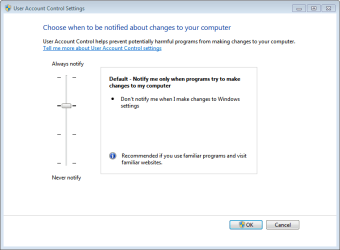
  • Make sure that UAC is the default level
    Capture.PNG
 

My Computer

Computer type
Laptop
Computer Manufacturer/Model Number
HP Pavilion dv6-6c10us
OS
x64 (6.3.9600) Win8.1 Pro & soon dual boot x64 (6.1.7601) Win7_SP1 HomePrem
CPU
AMD A6-3420M APU with Radeon(tm) HD Graphics
Motherboard
Hewlett-Packard 1805
Memory
6.00 GB
Graphics Card(s)
AMD Radeon(TM) HD 6520G
Sound Card
(1) AMD High Definition Audio Device (2) IDT High Definiti
Monitor(s) Displays
HP W2072a 20" LCD (1600 x 900) @ 60 Hz
Screen Resolution
1366 x 768 x 32 bits (4294967296 colors) @ 60 Hz
Hard Drives
ST640LM0 00 HM641JI SATA Disk Device
Keyboard
Logitech k520 wireless KB
Mouse
Logitech m320 wireless mouse (bundled with KB)
Internet Speed
15/5 | 54 MB Wireless 'n'
Antivirus
Realtime: Defender or Avast | On-demand: Malwarebytes, ESET
Browser
IE 11 on Win8, IE 10 on win 7
Other Info
Media: [Gimp, Audacity, VLC] || Comm: [WEmail 2012, Skype] || Productivity: [OpenOffice,| Textpad] || Utils: [Sysinternals, cCleaner, Speccy, Defraggler]
Two things you can try
  • Create a new Admin account and see if you can launch and elevated command prompt from the profile.

  • Make sure that UAC is the default level
    View attachment 335795
cheers,

i managed to get it going, first try, after a reboot, it didn't work, had to do it all again, but with the same C:\users\name>downloads.......
and it worked

i do have the UAC at the lowest, for installing all the programs, as i've just wiped xp off and installed win 7
 

My Computer

Computer Manufacturer/Model Number
Mesh Q4
OS
Win 7 Pro 32bit
CPU
Intel Quad Core 6600
Motherboard
Asus P5N-E SLI
Memory
4 GB
Graphics Card(s)
nVidia 8800GT
Sound Card
Onboard
Hard Drives
1TB Samsung Spinpoint,
1TB WD Eco Green
Back
Top